This is the full developer documentation for Xahau Docs
# Xahau Documentation
Welcome to the Xahau Documentation. This is your comprehensive guide to understanding and working with Xahau. This documentation is divided into three main categories: Features, Infrastructure, and Technical.
Each category is designed to provide you with detailed insights and instructions about different aspects of Xahau.
### Features
[Section titled “Features”](#features)
The Features section is where you’ll find information about the unique aspects of Xahau. One of the key areas covered in this section is Developer Tooling.
Our Developer Tooling page covers Hooks Tools and Client Libraries, simplifying the process of interacting with Hooks and the Xahau Network. This section is designed to help you understand the functionality and capabilities of Xahau, with practical examples to help illustrate these features in action.
### Protocol Reference
[Section titled “Protocol Reference”](#protocol-reference)
The Protocol Reference section of Xahau’s documentation provides an in-depth look at the platform’s unique aspects, including various transaction types like AccountDelete, CheckCancel, and Payment, each with its own specific use and characteristics.
It also covers the different ledger objects integral to the network’s operation, such as AccountRoot and Amendments. This comprehensive overview aims to enhance the understanding of Xahau’s functionalities and capabilities, ensuring users can fully leverage the network’s features.
### Infrastructure
[Section titled “Infrastructure”](#infrastructure)
Infrastructure is the core of the Xahau Network. Servers running the xahaud software enable users to do things like submit, verify, and query transactions. The documentation in this section provides instructions for installing, updating, configuring, and building xahaud. Concepts, such as attesting to the identity of a given server or running xahaud as a validator, are also discussed.
**We hope this documentation provides you with the information you need to understand, use, and contribute to the Xahau Network. Happy exploring!**
# Responsible Disclosure
> Our Responsible Disclosure Policy provides clear guidelines for submitting reports through our support portal, ensuring confidentiality.
### Responsible Disclosure Policy
[Section titled “Responsible Disclosure Policy”](#responsible-disclosure-policy)
At Xahau, we believe that the security of our systems is extremely important.
Despite our concern for the security of our systems during product development and maintenance, there’s always the possibility of someone finding something we need to improve/update/change/fix /…
We appreciate you notifying us if you have found a weak point in one of our systems as soon as possible so we can immediately take measures to protect our customers and their data.
### How to Report
[Section titled “How to Report”](#how-to-report)
If you believe you have found a security-related bug, please notify us as soon as possible by emailing a **high level description of your finding and contact information (so someone can reach out)** to .
If the issue is related to **xahaud**, please refer to its security policy:
### Rules
[Section titled “Rules”](#rules)
This responsible disclosure policy is not an open invitation to actively scan our network and applications for vulnerabilities. Our continuous monitoring will likely detect your scan, and these will be investigated.
#### We ask you to:
[Section titled “We ask you to:”](#we-ask-you-to)
* Not share information about the security issue with others until the problem is resolved, and to immediately delete any confidential data acquired
* Not further abuse the problem, for example, by downloading more data than is necessary to demonstrate the leak or to view, delete, or amend the data of third parties
* Provide detailed information in order for us to reproduce, validate, and resolve the problem as quickly as possible. Include your test data, timestamps, and URL(s) of the system(s) involved
* Leave your contact details (e-mail address and/or phone number) so that we may contact you about the progress of the solution. We do accept anonymous reports.
* Do not use attacks on physical security, social engineering, distributed denial of service, spam, or applications of third parties
### Responsible Disclosure procedure(s)
[Section titled “Responsible Disclosure procedure(s)”](#responsible-disclosure-procedures)
#### When you report a security issue, we will act according to the following:
[Section titled “When you report a security issue, we will act according to the following:”](#when-you-report-a-security-issue-we-will-act-according-to-the-following)
* You will receive a confirmation of receipt from us within 4 working days after the report is made
* You will receive a response with the assessment of the security issue and an expected date of resolution within 4 working days after the confirmation of receipt is sent
* We will take no legal steps against you in relation to the report if you have kept to the conditions as set out above
* We will handle your report confidentially, and we will not share your details with third parties without your permission unless that is necessary in order to fulfill a legal obligation
#### This responsible disclosure scheme is not intended for:
[Section titled “This responsible disclosure scheme is not intended for:”](#this-responsible-disclosure-scheme-is-not-intended-for)
* Complaints
* Website unavailable reports
* Phishing reports
* Fraud reports
For these complaints or reports, please post a **high level description of your issue and contact information (so someone can reach out) on Github:** [**https://github.com/Xahau/xahaud/issues**](https://github.com/Xahau/xahaud/issues)
### Bug bounty program
[Section titled “Bug bounty program”](#bug-bounty-program)
Xahau encourages the reporting of security issues or vulnerabilities. We may make an appropriate reward for confidential disclosure of any design or implementation issue that could be used to compromise the confidentiality or integrity of our users’ data that was not yet known to us. We decide whether the report is eligible and the amount of the reward.
### Exclusions
[Section titled “Exclusions”](#exclusions)
#### The following types of security problems are excluded
[Section titled “The following types of security problems are excluded”](#the-following-types-of-security-problems-are-excluded)
* (D)DOS attacks
* Error messages or error pages without sensitive data
* Tests & sample data as publicly available in our repositories on Github
* Common issues like browser header warnings or DNS configuration, identified by vulnerability scans
* Vulnerability scan reports for the software we publicly use
* Security issues related to outdated OS’s, browsers, or plugins
* Reports for security problems that we have been notified of before
Please note: Reports that lack any proof (such as screenshots or other data), detailed information, or details on how to reproduce any unexpected result will be investigated but will not be eligible for any reward.
This policy is based on the National Cyber Security Centre’s Responsible Disclosure Guidelines and an [example by Floor Terra](https://responsibledisclosure.nl/).
# Security Audits
The Hooks amendment, integral to XRPL’s smart contract infrastructure, has passed a detailed security audit by FYEO. The audit examined the Hooks framework implementation, including the Hook API, helper functions, and execution environment.
With no severe security issues detected and all minor issues resolved, this audit serves as a testament to our commitment to security and the robustness of Hooks.
By enabling smart transaction logic directly on XRPL’s Layer 1, Hooks bring increased flexibility to tailor applications to their unique needs, inspiring further innovation within the XRPL ecosystem.
Developers now have robust tools for creating and deploying custom logic, accessible on our testnet.
### **Assurance of Ongoing Security**
[Section titled “Assurance of Ongoing Security”](#assurance-of-ongoing-security)
The audit’s successful completion is not just a milestone but a cornerstone for the ongoing security and sustainability of the Hooks network.
With all identified vulnerabilities addressed, the Hooks amendment is set to drive innovation securely on Xahau.
Note
The full security audit can be found [**here**](https://xrpl-labs.com/static/misc/Security%20Assessment%20of%20the%20XRP%20Labs%20Hooks%20Amendment%20v1.0.pdf).
To a brighter, more innovative future with Xahau!
# Data APIs
The primary Data API is located at
# Amendments
Amendments represent new features or other changes to transaction processing.
The amendment system uses the consensus process to approve any changes that affect transaction processing on Xahau. Fully-functional, transaction process changes are introduced as amendments; validators then vote on these changes. If an amendment receives more than 80% support for five days, the amendment passes and the change applies permanently to all subsequent ledger versions. Disabling a passed amendment requires a new amendment to do so.
**Note:** Bug fixes that change transaction processes also require amendments.
### Amendment Process
[Section titled “Amendment Process”](#amendment-process)
The Contributing Code to Xahau topic walks through the workflow to develop an amendment from an idea to activation on Xahau.
After the code for an amendment is built into a software release, the process to enable it happens within the Xahau network, which checks the status of amendments every *flag* ledger (typically about 15 minutes apart).
Every 256th ledger is called a **flag** ledger. The flag ledger doesn’t have special contents, but the amendment process happens around it.
1. **Flag Ledger -1:** When `xahaud` validators send validation messages, they also submit their amendment votes.
2. **Flag Ledger:** Servers interpret the votes from trusted validators.
3. **Flag Ledger +1:** Servers insert an `EnableAmendment` pseudo-transaction and flag based on what they think happened:
* The `tfGotMajority` flag means the amendment has more than 80% support.
* The `tfLostMajority` flag means support for the amendment has decreased to 80% or less.
* No flag means the amendment is enabled.
**Note:** It’s possible for an amendment to lose 80% support on the same ledger it reaches the required five day period to be enabled. In these cases, an `EnableAmendment` pseudo-transactions is added for both scenarios, but the amendment is ultimately enabled.
4. **Flag Ledger +2:** Enabled amendments apply to transactions on this ledger onwards.
### Amendment Voting
[Section titled “Amendment Voting”](#amendment-voting)
Each version of `xahaud` is compiled with a list of known amendments and the code to implement those amendments. Operators of `xahaud` validators configure their servers to vote on each amendment and can change it at any time. If the operator doesn’t choose a vote, the server uses a default vote defined by the source code.
**Note:** The default vote can change between software releases. \[Updated in: rippled 1.8.1]\[]
Amendments must maintain five days of support from more than 80% of trusted validators to be enabled. If support drops below 80%, the amendment is temporarily rejected, and the two week period restarts. Amendments can gain and lose a majority any number of times before they become permanently enabled.
Amendments that have had their source code removed without being enabled are considered **Vetoed** by the network.
### Amendment Blocked Servers
[Section titled “Amendment Blocked Servers”](#amendment-blocked-servers)
Amendment blocking is a security feature to protect the accuracy of Xahau’s data. When an amendment is enabled, servers running earlier versions of `xahaud` without the amendment’s source code no longer understand the rules of the network. Rather than guess and misinterpret ledger data, these servers become **amendment blocked** and can’t:
* Determine the validity of a ledger.
* Submit or process transactions.
* Participate in the consensus process.
* Vote on future amendments.
The voting configuration of a `xahaud` server has no impact on it becoming amendment blocked. A `xahaud` server always follows the amendments enabled by the rest of the network, so blockages are based solely on having the code to understand rule changes. This means you can also become amendment blocked if you connect your server to a parallel network with different amendments enabled. For example, the Xahau Testnet typically has experimental amendments enabled. If you are using the latest production release, your server likely won’t have the code for those experimental amendments.
You can unblock amendment blocked servers by upgrading to the newest version of `xahaud`.
Starting with 2026.10.13-release+4119, an amendment blocked server **stops** instead of running in a degraded state:
* **Before activation:** once an amendment that the build does not support has reached majority, the server checks on every validated ledger. When activation is less than 5 minutes away (or the expected time has passed and it is only waiting for the flag ledger), the server shuts down.
* **After activation:** a server that is already past the activation (for example, an old build being started) also stops.
* **Receipt file:** on stopping, the server writes a `README_AMENDMENT_BLOCKED` file into its config directory. It contains the text `XAHAUD STOPPED: UPGRADE REQUIRED`, the stop time, the build version, the IDs of the unsupported amendments with their expected or actual activation time, and instructions to upgrade and restart. The file is removed automatically on the next start (and rewritten if the build is still unsupported). Standalone mode does not write or remove it.
Operators should monitor for this shutdown (for example, by alerting on the receipt file or on process exit) and upgrade before new amendments activate.
### Retiring Amendments
[Section titled “Retiring Amendments”](#retiring-amendments)
When amendments are enabled, the source code for pre-amendment behaviors remain in `xahaud`. While there are use-cases for keeping old code, such as reconstructing ledger outcomes for verification, tracking amendments and legacy code adds complexity over time.
The [XRP Ledger Standard 11d](https://github.com/XRPLF/XRPL-Standards/discussions/19) defines a process for retiring old amendments and associated pre-amendment code. After an amendment has been enabled on the Mainnet for two years, it can be retired. Retiring an amendment makes it part of the core protocol unconditionally; it’s no longer tracked or treated as an amendment, and all pre-amendment code is removed.
### Known Amendments
[Section titled “Known Amendments”](#known-amendments)
The following amendments have been implemented or are in the process of being enabled on Xahau:
#### Feature Amendments
[Section titled “Feature Amendments”](#feature-amendments)
##### RNG
[Section titled “RNG”](#rng)
Gives Hooks access to unpredictable, consensus-agreed random numbers. Validators on the UNLReport supply entropy through a commit-reveal scheme: each proposing validator places one [Entropy pseudo-transaction](/docs/protocol-reference/transactions/pseudo-transaction-types/entropy) in its initial consensus position, committing to a new secret and revealing the one it committed to previously. The revealed values are mixed into a per-ledger seed stored in the singleton [Random ledger object](/docs/protocol-reference/ledger-data/ledger-objects-types/random), so no single validator or Hook can predict or steer the result. Adds two Hook API functions: `dice(sides)`, which returns a uniformly distributed integer in `[0, sides)`, and `util_random(write_ptr, write_len)`, which writes 1–512 random bytes. A draw only succeeds if at least 80% of the UNLReport contributed to the ledger’s seed; otherwise it returns the new `TOO_LITTLE_ENTROPY` (-46) return code. Draws are never undone: if a transaction fails after its Hook drew random numbers, the RNG state still advances. The validated metadata of any transaction whose Hooks drew random numbers contains a `RandomData` field that allows the values to be audited. *(Introduced in 2026.10.13-release+4119)*
##### PWALoader
[Section titled “PWALoader”](#pwaloader)
Allows an account to publish a small HTML bootstrap page for a Progressive Web App (an “AppLoader”) on ledger, by sending an [AccountSet transaction](/docs/protocol-reference/transactions/transaction-types/accountset) with the new `AppLoader` field. The document is stored in an [AppLoader ledger object](/docs/protocol-reference/ledger-data/ledger-objects-types/app-loader) (at most one per account, up to 4096 bytes), costs the base fee plus 1 drop per byte, and takes no owner reserve. Sending an empty `AppLoader` removes it. Adds the `AppLoaderSequence` field to [AccountRoot](/docs/protocol-reference/ledger-data/ledger-objects-types/accountroot) objects. Node operators can optionally serve published documents over HTTP through a new `pwa` port type (not amendment-gated), and clients can check a served document with the new `pwa_validate` RPC method. *(Introduced in 2026.10.13-release+4119)*
##### OnChainManifests
[Section titled “OnChainManifests”](#onchainmanifests)
Allows validator manifests (which bind a validator’s master key to its current ephemeral signing key and record key rotations and revocations) to be published on ledger, in addition to peer gossip and validator lists. Introduces the [SetManifest transaction](/docs/protocol-reference/transactions/transaction-types/setmanifest), which carries no account signature (its authority comes from the manifest’s own signatures) and is paid for by the account derived from the master public key, and the [Manifest ledger object](/docs/protocol-reference/ledger-data/ledger-objects-types/manifest). Adds the `ManifestID` field to [AccountRoot](/docs/protocol-reference/ledger-data/ledger-objects-types/accountroot) objects, the `manifest` parameter to the `submit` RPC method, and the `KEYLET_MANIFEST` (37) keylet type to `util_keylet`. Publishing on ledger adds a distribution channel only; which validators a node trusts is still decided by its UNL configuration. *(Introduced in 2026.10.13-release+4119)*
##### EscrowDestinationCancel
[Section titled “EscrowDestinationCancel”](#escrowdestinationcancel)
Allows the **destination** of an escrow to cancel it with an [EscrowCancel transaction](/docs/protocol-reference/transactions/transaction-types/escrowcancel) at any time, returning the funds to the owner, regardless of `CancelAfter` (and also for escrows without a `CancelAfter`). Self-escrows (owner and destination are the same account) are excluded, so a timelock on your own funds stays binding. When the destination cancels, the escrow owner is only a weak transactional stakeholder, so the owner’s Hooks cannot roll back the cancel. *(Introduced in 2026.10.13-release+4119)*
##### HookOnV2\_1
[Section titled “HookOnV2\_1”](#hookonv2_1)
Replaces [HookOnV2](#hookonv2), which is no longer supported. Enables the `HookOnIncoming` and `HookOnOutgoing` fields in a [SetHook transaction](/docs/protocol-reference/transactions/transaction-types/sethook) with stricter validation: `HookOn` and `HookOnIncoming`/`HookOnOutgoing` are mutually exclusive in a Hook entry, `HookOnIncoming` and `HookOnOutgoing` must be supplied together, and their values must differ (if they would be equal, use `HookOn` instead). These rules are enforced on both install and update operations. Validators that voted for `HookOnV2` must vote for `HookOnV2_1` instead. *(Introduced in 2026.10.13-release+4119)*
##### XahauGenesis
[Section titled “XahauGenesis”](#xahaugenesis)
Enables the genesis account to mint XAH and distribute it via [GenesisMint transactions](/docs/protocol-reference/transactions/transaction-types/genesismint-emitted-txn).
##### MultiSign
[Section titled “MultiSign”](#multisign)
Enables multi-signature functionality, allowing accounts to require multiple signatures for transactions. This amendment introduces [SignerListSet transactions](/docs/protocol-reference/transactions/transaction-types/signerlistset) and [SignerList ledger objects](/docs/protocol-reference/ledger-data/ledger-objects-types/signers-list) to support multi-signing.
##### DepositAuth
[Section titled “DepositAuth”](#depositauth)
Enables deposit authorization functionality, allowing accounts to require preauthorization before receiving payments. This amendment introduces [DepositPreauth transactions](/docs/protocol-reference/transactions/transaction-types/depositpreauth) and [DepositPreauth ledger objects](/docs/protocol-reference/ledger-data/ledger-objects-types/deposit-pre-auth) to manage preauthorizations.
##### Hooks
[Section titled “Hooks”](#hooks)
Core amendment enabling Hook smart contract functionality on Xahau. *(Added by the [Hooks amendment](/docs/features/amendments/#hooks).)*
##### HooksUpdate1
[Section titled “HooksUpdate1”](#hooksupdate1)
Updates and improvements to the Hooks system.
##### HookAPISerializedType240
[Section titled “HookAPISerializedType240”](#hookapiserializedtype240)
Fixes incorrect parsing of `STPathSet` fields (used by `sfPaths` in Payment transactions) within all `sto_` Hook API functions ([sto\_subfield](/docs/hooks/functions/serialization/sto_subfield), [sto\_subarray](/docs/hooks/functions/serialization/sto_subarray), [sto\_emplace](/docs/hooks/functions/serialization/sto_emplace), [sto\_erase](/docs/hooks/functions/serialization/sto_erase), [sto\_validate](/docs/hooks/functions/serialization/sto_validate)). Before this amendment, PathSet fields were incorrectly treated as VL-encoded data, causing the internal parser (`get_stobject_length`) to misread the field boundary and corrupt the parsing of all subsequent fields in the object. PathSet fields are self-delimiting (using `0xFF` path-separator bytes and a `0x00` end-of-set byte) and are now parsed correctly. Also raises the maximum supported serialized type from `STI_VECTOR256` (19) to `STI_CURRENCY` (26), adding correct support for `STI_ISSUE` (24), `STI_XCHAIN_BRIDGE` (25), and `STI_CURRENCY` (26) within all `sto_` functions. *(Introduced in 2026.6.21-release+3350)*
##### NamedHooks
[Section titled “NamedHooks”](#namedhooks)
Adds an optional `HookName` field (4–16 bytes, UTF-8) to the Hook slot in a [SetHook transaction](/docs/protocol-reference/transactions/transaction-types/sethook). When a hook installation carries a `HookName`, that hook will **only execute** if the incoming transaction also includes a matching top-level `HookName` field. Transactions without `HookName`, or with a different value, silently skip the named hook. `HookName` is also added as an optional common field on all transaction types so that submitters can target specific named hooks. This enables multiple hooks to coexist on an account with different entry points activated by different callers. *(Introduced in 2026.6.21-release+3350)*
##### HooksUpdate2
[Section titled “HooksUpdate2”](#hooksupdate2)
Adds the `prepare()` Hook API function. `prepare(write_ptr, write_len, read_ptr, read_len)` accepts a partial serialized transaction containing only transaction-type-specific fields and automatically injects all fields required for emission: `Account`, `Sequence`, `SigningPubKey`, `Fee`, `FirstLedgerSequence`, `LastLedgerSequence`, and `EmitDetails`. The output can be passed directly to `emit()`, eliminating the need to manually construct these boilerplate fields in hook code. *(Introduced in 2026.6.21-release+3350)*
##### HookOnV2
[Section titled “HookOnV2”](#hookonv2)
Hooks may continue to specify `HookOn` with the existing behaviour, or optionally replace it with two separate fields: `HookOnIncoming` and `HookOnOutgoing`. Both use the same bitmask syntax as `HookOn` but differentiate between transactions originating from the Hook account (`HookOnOutgoing`) and transactions originating from another account (`HookOnIncoming`). *(Introduced in 2026.6.21-release+3350)*
**Superseded:** As of 2026.10.13-release+4119, `HookOnV2` is no longer supported and is replaced by [HookOnV2\_1](#hookonv2_1). Votes cast for `HookOnV2` are lost.
##### PriceOracle
[Section titled “PriceOracle”](#priceoracle)
A port of the XRPL PriceOracle (XLS-47d) standard. Enables on-chain price feeds by allowing accounts to publish asset price data as [Oracle ledger objects](/docs/protocol-reference/ledger-data/ledger-objects-types/oracle). Introduces two new transactions: [OracleSet](/docs/protocol-reference/transactions/transaction-types/oracleset) (create or update an Oracle) and [OracleDelete](/docs/protocol-reference/transactions/transaction-types/oracledelete) (remove an Oracle). Also adds the `get_aggregate_price` RPC method for querying aggregated prices across multiple oracles. Each Oracle object stores 1–10 asset/quote price pairs (1–5 pairs consume 1 owner reserve; 6–10 consume 2). The integer `AssetPrice`, together with `Scale`, encodes the price as `AssetPrice` × 10^(-`Scale`). *(Introduced in 2026.6.21-release+3350)*
##### IOURewardClaim
[Section titled “IOURewardClaim”](#iourewardclaim)
Expands the [ClaimReward](/docs/protocol-reference/transactions/transaction-types/claimreward) transaction type beyond genesis balance adjustments to other IOU currencies. Reward counters are held within the trustline (`LowReward`/`HighReward` objects on the [RippleState](/docs/protocol-reference/ledger-data/ledger-objects-types/ripple-state) object) and do not affect genesis balance adjustments. The transaction triggers any Hook installed on the account specified by the `Issuer` field, allowing that Hook to process and optionally pay out the reward. The reward-paying account does not need to be the issuer of the IOU currency. *(Introduced in 2026.6.21-release+3350)*
##### Remit
[Section titled “Remit”](#remit)
Implements [XLS-55](https://github.com/XRPLF/XRPL-Standards/discussions/156). A new simple but powerful what-you-see-is-what-you-get push payment transaction type. Enables [Remit transactions](/docs/protocol-reference/transactions/transaction-types/remit) that allow paying multiple currencies and URITokens in the same transaction to the same destination. The transaction automatically pays to create missing trustlines, automatically pays the reserves on transferred tokens, and automatically pays to create the destination account if it doesn’t exist. You can mint a receipt or bonus URIToken in-line within the transaction. Optionally inform a third party Hook about the transaction. No partial payments and no pathing.
##### ZeroB2M
[Section titled “ZeroB2M”](#zerob2m)
Disables the burn-to-mint path for XRP to XAH. Normal behaviour of the Import transaction remains, but burned XRP is not credited. B2M is still available for key synchronisation or to activate an account, but cannot be used to mint new assets.
##### Remarks
[Section titled “Remarks”](#remarks)
The Remarks amendment allows key-value pairs (similar to hook state) to be stored by object owners on those objects. This is akin to flipping over a document and hand-writing a note on it. Remarks can be anything and mean different things to different parties. Remarks can also be set to immutable. Remarks follow an object through changes of ownership and can be used to achieve novel use cases like dynamic NFTs and simplify some otherwise very complicated hook state operations. Enables [SetRemarks transactions](/docs/protocol-reference/transactions/transaction-types/setremarks).
##### Touch
[Section titled “Touch”](#touch)
This amendment ensures all accounts involved in a transaction (all transactional stakeholders) are forced to appear in its metadata by incrementing a “touch counter” even if nothing else on the account was changed. This is named for the unix file utility touch. This provides better audit consistency and ease of programming automated tools.
##### HookCanEmit
[Section titled “HookCanEmit”](#hookcanemit)
This amendment adds a new field to HookSet objects: `HookCanEmit` is syntactically identical to the `HookOn` field, except that it controls which transaction types the Hook is allowed to emit rather than which transaction types trigger the hook. Note that it uses the same active-low semantics as `HookOn` with `SetHook` being active high. However if the field is absent it’s taken to be that the Hook may emit any transaction including `SetHook`. Adds the `HookCanEmit` field to [HookDefinition](/docs/protocol-reference/ledger-data/ledger-objects-types/hook-definition) objects.
##### Clawback
[Section titled “Clawback”](#clawback)
Enables [Clawback transactions](/docs/protocol-reference/transactions/transaction-types/clawback) that allow issuers to revoke tokens that were previously issued by their account. This is a ported feature from the XRPL. *(Introduced in 2025.7.9-release+1951)*
##### DeepFreeze
[Section titled “DeepFreeze”](#deepfreeze)
Enables deep freeze functionality for trustlines and assets. This is a ported feature from the XRPL. *(Introduced in 2025.7.9-release+1951)*
##### IOUIssuerWeakTSH
[Section titled “IOUIssuerWeakTSH”](#iouissuerweaktsh)
Makes IOU issuers weak transactional stakeholders (TSH) in certain transaction types. Ensures that Currency Issuers have their hooks executed in third party transactions that touch or mention their currency, if they have opted into weak execution. See [Weak and Strong](/docs/hooks/concepts/weak-and-strong) for details. *(Introduced in 2025.7.9-release+1951)*
##### Cron
[Section titled “Cron”](#cron)
Enables scheduled Hook execution via [CronSet transactions](/docs/protocol-reference/transactions/transaction-types/cronset) and [Cron ledger objects](/docs/protocol-reference/ledger-data/ledger-objects-types/cron). This feature allows Hooks to schedule a series of future self-invocations (akin to a cronjob in Linux systems) which can assist Hook developers in writing complex governance structures, games and more. The maximum number of repeats is 256, however issuing a further `CronSet` transaction can extend this once the number of repeats crosses a desired minimum threshold. *(Introduced in 2025.10.27-release+2405)*
##### ExtendedHookState
[Section titled “ExtendedHookState”](#extendedhookstate)
Extends Hook state management capabilities, including the `HookStateScale` field for [AccountRoot](/docs/protocol-reference/ledger-data/ledger-objects-types/accountroot) objects to control when Hook state entries become stale. This feature expands the amount of data Hooks can store in their Hook State (key-value system for Hooks) to allow Hooks richer data storage when they need it. The scale (up to 16) affects both the maximum size of the value you may store in a single hook state, along with the number of reserve units that k-v pair consumes. A scale of 1 (default) means you pay 1 reserve for up-to 256 bytes stored per Hook State. A scale of 4 means you pay 4 reserve units for up-to 1024 bytes per Hook State. It’s important to note that you pay this rate (the scale rate) even if all of your Hook States contain only a single byte. It is possible to increase the scale after your Hook already has stored state, but not to decrease it. Decreasing the scale requires all HookState to be first deleted. *(Introduced in 2025.10.27-release+2405)*
#### Bug Fix Amendments
[Section titled “Bug Fix Amendments”](#bug-fix-amendments)
##### fixXahauV1
[Section titled “fixXahauV1”](#fixxahauv1)
Enforces a namespaces per account limit of 256. Various bug fixes with URIToken logic. Ensures that default (0) STAmounts are recorded in metadata. Ensures that OfferID can be used instead of OfferSequence when cancelling an offer. Fixes a bug where certain hooks cannot be deleted. Fixes a bug where the quorum required for a `ttIMPORT` is accidentally too high. Allows accounts to appear more than once in a GenesisMint transaction. Changes the Issuer of a URIToken from strong to weak TSH when a URIToken is being burned. Ensures TSHes on escrows created by emitted transactions are correctly triggered. Adds hook parameters size fee to all txns (1 drop per byte). *(Introduced in 2024.9.11-release+985)* **Retired** in 2026.10.13-release+4119: the pre-amendment code paths have been removed.
##### fixXahauV2
[Section titled “fixXahauV2”](#fixxahauv2)
Cleans up TSH logic and removes old redundant table. Adds informational flags to each member of `sfHookExecutions`, describing weak, strong etc. execution. Adds `sfEmitNonce` to each member of `sfHookEmissions`, so as to better disambiguate emitted txns. Additional sanity checks on emitted txns to ensure they are placed into the correct ledger. **Retired** in 2026.10.13-release+4119: the pre-amendment code paths have been removed.
##### fixXahauV3
[Section titled “fixXahauV3”](#fixxahauv3)
Further fixes for Xahau protocol implementation issues. This amendment ensures consistency and sensible outcomes for various edge cases. This amendment is set to default: *yes* voting. If validators wish to vote against this amendment they must manually change their vote to no. *(Introduced in 2025.2.6-release+1299)*
##### fixNSDelete
[Section titled “fixNSDelete”](#fixnsdelete)
Fixes the behaviour of Hook State namespace deletion to ensure ledger consistency. Introduces a new tes code: `tesPARTIAL`. `tesPARTIAL` is returned if the transaction was successful but should be resubmitted by the user under a new sequence number to complete amortized work until `tesSUCCESS` is returned.
##### fix240819
[Section titled “fix240819”](#fix240819)
Bug fix amendment from August 19, 2024.
##### fixPageCap
[Section titled “fixPageCap”](#fixpagecap)
Fixes issues related to page capacity limits.
##### fix240911
[Section titled “fix240911”](#fix240911)
Bug fix amendment from September 11, 2024. **Retired** in 2026.10.13-release+4119: the pre-amendment code paths have been removed.
##### fixFloatDivide
[Section titled “fixFloatDivide”](#fixfloatdivide)
Fixes issues with floating point division operations in Hooks. This amendment ensures proper handling of division by zero and edge cases in the `float_divide` function. Changes the behaviour of the `float_divide` hook API to correct a small error. This amendment is set to default: *yes* voting. See [float\_divide](/docs/hooks/functions/float/float_divide) for details. *(Introduced in 2024.11.18-release+1141)*
##### fixReduceImport
[Section titled “fixReduceImport”](#fixreduceimport)
Fixes issues related to Import transaction processing. This amendment ensures consistency and sensible outcomes for various edge cases. This amendment is set to default: *yes* voting. If validators wish to vote against this amendment they must manually change their vote to no. *(Introduced in 2025.2.6-release+1299)*
##### fix20250131
[Section titled “fix20250131”](#fix20250131)
Bug fix amendment from January 31, 2025. This amendment ensures consistency and sensible outcomes for various edge cases. This amendment is set to default: *yes* voting. If validators wish to vote against this amendment they must manually change their vote to no. *(Introduced in 2025.2.6-release+1299)*
##### fixRewardClaimFlags
[Section titled “fixRewardClaimFlags”](#fixrewardclaimflags)
Fixes issues with reward claim transaction flags.
##### fixProvisionalDoubleThreading
[Section titled “fixProvisionalDoubleThreading”](#fixprovisionaldoublethreading)
Fixes issues with provisional double threading in transaction processing. Ensures the correct PreviousTxnID and transaction metadata are maintained in double threading scenarios. *(Introduced in 2025.7.9-release+1951)*
##### fixInvalidTxFlags
[Section titled “fixInvalidTxFlags”](#fixinvalidtxflags)
Fixes a bug that currently allows invalid flags to be provided to some transactions. While these invalid flags currently do nothing, they should actually produce a malformed error. After this fix is applied, invalid flags will produce a malformed error as expected. *(Introduced in 2025.10.27-release+2405)*
##### fixCronStacking
[Section titled “fixCronStacking”](#fixcronstacking)
Fixes issues with Cron transaction stacking behavior.
### Amendment Status
[Section titled “Amendment Status”](#amendment-status)
For the most current status of amendments (enabled, voting, or vetoed), check the [xahaud repository](https://github.com/Xahau/xahaud) or query a running `xahaud` server using the `feature` command.
# Balance Adjustments
> How to claim a Balance Adjustment on Xahau
### Opt-in + Claim
[Section titled “Opt-in + Claim”](#opt-in--claim)
Opting into Balance Adjustments is the same transaction as claiming an adjustment. You must do this first to kick off the ability to claim later.
```json
{
"Account": "",
"TransactionType": "ClaimReward",
"Issuer": "rHb9CJAWyB4rj91VRWn96DkukG4bwdtyTh",
"NetworkID": 21337
}
```
### Opt-out
[Section titled “Opt-out”](#opt-out)
To opt-out of Balance Adjustments, omit the Issuer field and set Flags to 1. Doing this will delete your average balance statistics. These will not be restored. If you opt-in again, they will be reset to a starting position.
```json
{
"Account": "",
"TransactionType": "ClaimReward",
"NetworkID": 21337,
"Flags": 1
}
```
### Technical Details
[Section titled “Technical Details”](#technical-details)
Balance Adjustments are implemented as a combination of two pieces of code:
1. BalanceRewards Amendment (native code)
2. Genesis Account’s Reward Hook (hook code).
BalanceRewards collect average balance statistics about the accounts they are activated on. These statistics are then passed to a target Hook when the user wishes to claim.
All interactions with this amendment are via the ClaimReward transaction:
```json
{
"Account": "",
"TransactionType": "ClaimReward",
"Issuer": "rHb9CJAWyB4rj91VRWn96DkukG4bwdtyTh",
"NetworkID": 21337
}
```
When a ClaimReward transaction is successfully submitted with a **tesSUCCESS** error code, the account’s average balance statistics are reset. The only other thing the amendment does is invoke the Hooks on the specified Issuer’s account.
The *Issuer* field is the account responsible for fulfilling the claim. Depending on what’s installed on the Issuer account, several things can happen:
* If no Hook is installed on the Issuer’s account, then nothing is done, and the BalanceRewards statistics are simply reset.
* If a Hook is installed on the Issuer’s account and the Hook performs a rollback, then the transaction fails, and the statistics are *not* reset.
* If a Hook is installed on the Issuer’s account and the Hook performs accept, then the transaction succeeds, and the statistics are reset. In this case, the Hook should also emit a transaction back to the user’s account containing their reward.
In practice, on Xahau, the Issuer will probably always be the genesis account **rHb9CJAWyB4rj91VRWn96DkukG4bwdtyTh**.
Unless:
* Network Governance results in a different account being used for BalanceAdjustments.
* A non-Governance party runs its own BalanceRewards giveaway that the user wants to be involved with. Note that successful claims result in the average balance statistics being reset, so only one type of reward can be claimed per reset.
The average balance statistics exist as a collection of three new fields on the AccountRoot object. These are:
| Field | Type | Explanation |
| --------------------- | ------ | --------------------------------------------------------------------------------------------- |
| `sfRewardAccumulator` | UINT64 | The area under of the balance-time graph for your account since last ClaimReward transaction. |
| `sfRewardLgrFirst` | UINT32 | The ledger number of the last ClaimReward transaction. |
| `sfRewardLgrLast` | UINT32 | The ledger sequence number of the last transaction in or out of your account. |
| `sfRewardTime` | UINT32 | The ledger time the last reward was claimed. |
# Burn 2 Mint (B2M)
> Burn2Mint is a low-level inter-chain primitive and is intended for enterprise users to self-supply their own liquidity as needed for their own purposes.
Caution
Since the ZeroB2M amendment has been voted in at Xahau, Burn 2 Mint (B2M) is no longer available to mint new assets. B2M is still available, but just for **key synchonisation** or to activate an account based (for which the information & procedures below are still relevant)
* **Xahau Explorer:**
* **XahauWin:**
## Burn2Mint Technical Manual (Xahau Testnet)
[Section titled “Burn2Mint Technical Manual (Xahau Testnet)”](#burn2mint-technical-manual-xahau-testnet)
Caution
**This process is deliberately non-trivial and not designed for end users.** Mistakes result in a burn not being able to turn into a mint.
This is a warning that will appear on the production version of this document. You may disregard it because you are burning free testnet XRP in this instance.
Burn2Mint is a low-level inter-chain primitive intended for enterprise users to self-supply their liquidity as needed for their purposes. Running your own nodes and performing this operation yourself on your nodes means you and you alone bear responsibility for the outcome of the procedure.
The generation & collection of XPOPs fundamentally relies on collecting validation messages on the overlay network, which are ephemeral by nature. If your nodes are not reliably connected, or if your hardware, network connection, or operating system fails at the wrong point in time, then the XPOP for a Burn Transaction might not be generated or might not be generated correctly. This can lead to loss of funds as the Burn Transaction’s XPOP was not captured in time, and it’s possible the validation messages are lost forever, making a Mint Transaction impossible despite a successful Burn Transaction.
If you are not comfortable with taking these technical risks or do not understand what you are doing, or are not an enterprise user, then please source your liquidity via other friendly alternatives.
### Setup
[Section titled “Setup”](#setup)
To perform B2M, *two* XRPL protocol nodes should be operated by the user:
1. **Obtain xPOP from burn**
* xPOP Collector & Server (easier)
Run this (e.g., using Docker Compose; see repo Docs)\
[**https://github.com/Xahau/Validation-Ledger-Tx-Store-to-xPOP**](https://github.com/Xahau/Validation-Ledger-Tx-Store-to-xPOP)
* The service listens for XRPL validation messages, closed ledgers, and transactions.
* It stores this data in an organized file system.
* It is essential for generating xPOPs, as XRPL validation messages are ephemeral; without storing them, a transaction burn can’t be turned into a mint.
* **How it Works**:
* A watcher connects to multiple XRPL nodes and listens for specific data.
* The captured data is then saved, organized, and used to generate xPOPs
Simply fetch the xPOP now from:\
`http[s]://{your-host}:{your-port}/xpop/{tx-hash}`
You can easily fetch/create xPOPs from a node using the repo above using this NPM package:
[**https://www.npmjs.com/package/xpop**](https://www.npmjs.com/package/xpop)
* or: dedicated "Burning Node"
**Burn Node**, comprising:
* A modified Rippled instance (modified to record XPOPs)
* Universal linux binary here:
*
* Running a with a rippled.cfg that has:
* an **\[xpop\_dir]** stanza specifying an output directory for generated XPOPs.
* a **\[network\_id]** stanza specifying network\_id: 1
* (in production this would be network 0)
* a `validators.txt` containing:\\
```plaintext
[validator_list_sites]
https://vl.altnet.rippletest.net
[validator_list_keys]
ED264807102805220DA0F312E71FC2C69E1552C9C5790F6C25E3729DEB573D5860
```
2. **Mint**
* In this test scenario, you will connect directly to the Xahau. You do not need to run your own node. In the production scenario, you will need to run a Mint node, which is just a stock node for the target network. This is because public nodes will probably opt out of accepting Import transactions due to legal risk.
* Connect to **wss\://xahau-test.net**
* Or download download/run: [**https://github.com/Xahau/Xahau-Testnet-Docker**](https://github.com/Xahau/Xahau-Testnet-Docker)
## Sample (nodejs)
[Section titled “Sample (nodejs)”](#sample-nodejs)
This example creates a testnet account, burns 10 XRP & then imports this on Xahau Testnet, using the xPOP fetched using the tools mentioned above.
```js
import { derive, utils, signAndSubmit } from 'xrpl-accountlib'
import { TxData } from 'xrpl-txdata'
import { XrplClient } from 'xrpl-client'
import { xpop, setEndpoints as xpopEndpoints } from 'xpop'
import fetch from 'node-fetch'
// The above needs:
// npm install xrpl-accountlib xrpl-txdata xrpl-client xpop node-fetch
console.log('Obtaining XRPL Testnet account (faucet)')
const faucet = await (await fetch('https://faucet.altnet.rippletest.net/accounts', { method: 'POST' })).json()
console.log(' -->', faucet.account.address)
const account = derive.familySeed(faucet.account.secret)
xpopEndpoints((await (await fetch('https://xrpl.ws-stats.com/xpop/list?json=true')).json()).bestguess)
const nodes = {
testnet: [
new XrplClient('wss://s.altnet.rippletest.net:51233'),
new XrplClient('wss://testnet.xrpl-labs.com'),
],
xahau: [
new XrplClient('wss://xahau-test.net'),
]
}
console.log('Waiting for network connections to be ready')
await Promise.all(Object.keys(nodes).map(k => Promise.race(nodes[k].map(n => n.ready()))))
console.log('Waiting for faucet account funding & obtaining network values...')
await new Promise(resolve => setTimeout(resolve, 4000)) // Wait till ledger is closed
const [
testnetParams,
xahauParams,
] = await Promise.all([
Promise.race(nodes.testnet.map(n => utils.accountAndLedgerSequence(n, account))),
Promise.race(nodes.xahau.map(n => utils.accountAndLedgerSequence(n, account))),
])
const testnetTx = {
...testnetParams.txValues,
TransactionType: 'AccountSet',
Fee: String(10_000_000),
OperationLimit: xahauParams.txValues.NetworkID,
NetworkID: undefined, // Testnet has a NetworkID < 1024, so none should be provided
}
console.log('Submitting burn...', testnetTx)
const testnetSubmitted = await Promise.race(nodes.testnet.map(n => signAndSubmit(testnetTx, n, account)))
console.log('Submitted burn to testnet')
console.log(' -->', 'https://testnet.xrpl.org/transactions/' + testnetSubmitted.tx_id)
console.log('Obtaining burn tx data...')
const txdata = new TxData(nodes.testnet.map(n => n.getState().server.uri), {
AllowNoFullHistory: true,
EndpointTimeoutMs: 2_000,
OverallTimeoutMs: 10_000,
})
const appliedtx = await txdata.getOne(testnetSubmitted.tx_id)
console.log(' -->', 'Burn validated in ledger', appliedtx?.result?.ledger_index)
console.log('Waiting for closed ledger before fetching xPOP...')
await new Promise(resolve => setTimeout(resolve, 4000)) // Wait till ledger is closed
console.log('Fetching xPOP...')
const Blob = await xpop(testnetSubmitted.tx_id, appliedtx?.result?.ledger_index, 1)
console.log(' -->', 'xPOP fetched, hex strlen:', Blob.length)
const hooksTx = {
...xahauParams.txValues,
TransactionType: 'Import',
Fee: '0',
Blob,
}
console.log('Submitting for mint of xPOP...')
const b2mSubmitted = await Promise.race(nodes.xahau.map(n => signAndSubmit(hooksTx, n, account)))
console.log(' -->', 'B2M submitted! TX on Xahau Testnet:')
console.log(' -->', 'https://test.xahauexplorer.com/explorer/' + b2mSubmitted?.tx_id)
console.log(' -->', b2mSubmitted.response.engine_result, b2mSubmitted.response.engine_result_message)
// Closing connections
Object.keys(nodes).map(k => nodes[k].map(n => n.close()))
```
[Source](https://gist.github.com/WietseWind/cd8a7a8c88f218fe7b768f59a665685d)
## Technical Summary of B2M’s procedure
[Section titled “Technical Summary of B2M’s procedure”](#technical-summary-of-b2ms-procedure)
#### New Transaction Type: `Import`
[Section titled “New Transaction Type: Import”](#new-transaction-type-import)
Xahau Testnet (*network\_id=21338*) introduces a new transaction type called ***Import***, which accepts an XPOP from the Ripple testnet chain (*network\_id=1*) and provides for a “burn-to-mint” unidirectional value transfer and key / account synchronization.
### Burn Transaction
[Section titled “Burn Transaction”](#burn-transaction)
A ***Burn Transaction*** is a transaction that burns XRP on a source XRPL chain, which would be used as proof (XPOP) to mint on a destination XRPL chain.
The following are supported transaction types:
* AccountSet
* SetRegularKey
* SignerListSet.
Caution
Tickets ***are not accepted*** in **any** Burn Transactions and would lead to a Burn Transaction being invalid for minting. To protect against spam, transactions must be validated with a real, natural sequence number.
Note that other transaction types are not currently supported and cannot be used to mint on Xahau Testnet. (However, this may change).
All three transaction types can be used for minting. This means the ***Fee*** burned by the Burn Transaction is subsequently minted on Xahau Testnet after a successful `Import`.
If `SetRegularKey` or `SignerListSet` is used, then key synchronization occurs according to the standard rules of the transaction type. If `AccountSet` it is used, then no key synchronization occurs on the destination XRPL chain (Xahau Testnet).
A field called ***OperationLimit*** must be present on the Burn Transaction to be the destination chain’s Network ID. This field is to prevent replay attacks on other B2M-integrated chains.
The Burn Transaction may be used for Minting if it has either a **tesSUCCESS** transaction code or *any* of the **tec** transaction codes. Meaning *if* the fee was burnt, then the transaction can be used for minting. However, key synchronization *only* occurs when the Burn Transaction result was tesSUCCESS.
Example Burn Transaction:
```json
{
"TransactionType": "AccountSet",
"Fee": 10000000,
"OperationLimit": 21338
}
```
### XPOP Collection
[Section titled “XPOP Collection”](#xpop-collection)
Before submitting the Burn Transaction, ensure your Burn Node is synchronized with the testnet chain (Network ID: `1`).
After checking your Burn Node’s state, submit the signed Burn Transaction to the Burn Node.
The Burn Node watches closed ledgers for transactions containing the **OperationLimit** field and uses collected validation messages to generate an XPOP (Proof Of Burn). These are written to a file under the directory specified in **\[xpop\_dir]** stanza in the Burn Node’s `rippled.cfg`.
Wait for the ledger to close, then browse through the xpop\_dir for the Burn Transaction’s XPOP according to its TXID. The file contains a JSON document, which is the XPOP that you’ll be relaying to the destination XRPL chain (HooksV3).
Take the raw contents of this file and encode it as HEX. This will become the contents of the \**Blob* field in the `Import` transaction.
### Mint Transaction
[Section titled “Mint Transaction”](#mint-transaction)
Your binary codec will be missing the necessary fields to construct the `Import` (Mint) transaction. If you are using ripple-binary-codec, you can update its `definitions.json` file in the following way:
1. Change directory into `node_modules`
2. Run `find . | grep 'dist/enums/definitions.json'` to locate the relevant file to update
3. Connect to **wss\://hooks-testnet-v3.xrpl-labs.com**
4. Request: `{"command":"server_definitions"}`
5. Dump the contents of the `"result"` key into `definitions.json` from step 2.
The `Import` transaction type takes only one non-common field ***Blob.***. This must contain the HEX-encoded XPOP from the XPOP Collection phase.
* You can do this with `cat xpopjsonfile | xxd -p | tr -d '\n'`
The `Account` and `SigningPubKey` field (or Signers array) must match exactly between the Burn Transaction and the Mint Transaction. Users can only mint to the same account, which they burned from.
If the `Account` field specifies an account that does not yet exist on Xahau Testnet, and it will be created. In this case, use 0 for the `Sequence` field on the Mint Transaction. If the account already exists on Xahau Testnet, then use the next available Sequence number on the account on Xahau Testnet.
Example Import:
```json
{
"Account": "",
"TransactionType": "Import",
"Blob": "",
"Sequence": 0
}
```
IMPORTANT: **The Mint Transaction must be signed exactly the same way and by the same account as the Burn Transaction!**
Encode and sign the transaction appropriately, yielding a signed transaction blob (hex).
If you are not running your own Mint node:
* Connect to **wss\://xahau-testn.et**
* Submit the transaction to the node:
```json
{
"command": "submit",
"tx_blob": ""
}
```
Or, if you are running your own Mint node:
* Ensure the Mint Node is running and synchronised to Network ID 21338.
* Use the `submit` RPC call to submit the Mint Transaction.
* You can do this from command line using `./hooksv3d submit `
### Considerations
[Section titled “Considerations”](#considerations)
If the Account is to be created on Xahau Testnet but the keying for the account is unclear from the context of the Burn Transaction, then the Account is created in a blackholed mode. It can be subsequently rekeyed using either keying transaction type.
If the Burn Transaction is either a `SignerListSet` or a `SetRegularKey` transaction, then provided it had a tesSUCCESS transaction result on the source XRPL chain (testnet), that same keying operation is now applied to that same account on the destination XRPL chain (Xahau Testnet).
During testing, Accounts on Xahau Testnet *can* be deleted, however, on the production Hooks-enabled chain, they will not be able to be deleted.
Accounts on Xahau Testnet have an optional ***ImportSequence*** field in the AccountRoot. If **Import** has ever been used on that account on Xahau Testnet, this field is present and is populated with the most recently imported Burn Transaction’s Sequence number. This is to prevent replay attacks, but it also means that you should never submit your Burn2Mints out of sequence, otherwise the skipped transactions will never be accepted for Minting.
# Client Libraries
These client libraries simplify some of the common work of accessing and processing XAH Ledger data and present it in a form that matches the native conventions of their respective programming languages.
For other programming languages, you can access the XAH Ledger through the HTTP APIs.
| Language | Library Name | Get Started | Protocol | Source Code |
| ------------------------------- | ------------------------------------------------------------------ | -------------------------------------------------------------------------------------------------------------------------------------------------------------------- | --------- | ----------------------------------------------------- |
| **Python** | `xahau-py` | [Get Started](https://github.com/Xahau/xahau-py) | XAH / XRP | [Repo](https://github.com/Xahau/xahau-py) |
| **JavaScript** / **TypeScript** | `xahau.js` | [Get Started](https://github.com/Xahau/xahau.js) | XAH / XRP | [Repo](https://github.com/Xahau/xahau.js) |
| **JavaScript** / **TypeScript** | [`xrpl-accountlib`](https://www.npmjs.com/package/xrpl-accountlib) | [Get started](https://www.npmjs.com/package/xrpl-accountlib) [Sample](https://github.com/WietseWind/xrpl-accountlib/blob/master/samples/prefill-sign-and-submit.mjs) | XAH / XRP | [Repo](https://github.com/WietseWind/xrpl-accountlib) |
**Tip:** To add a client library not listed here, please suggest changes to this page!
# Curated Tooling
These tools simplify some of the common work of accessing and processing Hooks.
| Tool | Reference Link |
| --------------------- | ---------------------------------------------------------------- |
| **Hooks Builder** | [Builder Link](https://builder.xahau.network/develop) |
| **Hooks Toolkit** | [Toolkit Link](https://hooks-toolkit.com/) |
| **Xpop Toolkit** | [Toolkit Link](https://github.com/Transia-RnD/xpop-toolkit) |
| **Hooks Blog** | [Blog Link](https://dev.to/t/xrplhooks/top/infinity) |
| **XFL Tools** | [Tool Link](https://richardah.github.io/xfl-tools/) |
| **Binary Visualizer** | [Tool Link](https://richardah.github.io/xrpl-binary-visualizer/) |
| **Keylet Tools** | [Tool Link](https://richardah.github.io/xrpl-keylet-tools/) |
| **CTID Visualizer** | [Tool Link](https://transia-rnd.github.io/xrpl-ctid-visualizer/) |
| **C Hook Tx Builder** | [Tool Link](https://transia-rnd.github.io/xrpl-tt-visualizer/) |
# Developer Tricks
## Wildcard signing
[Section titled “Wildcard signing”](#wildcard-signing)
To easily test & replay, use `NetworkID` with value `65535` (config: `[network_id]`) to disable signature verification.
Added:
## Server Definitions
[Section titled “Server Definitions”](#server-definitions)
Server definitions can easily be fetched from public nodes. These definitions include binary codec information and other network-specific data needed for transaction serialization and deserialization.
### Mainnet
[Section titled “Mainnet”](#mainnet)
* [`https://xahau.network/server_definitions.json`](https://xahau.network/server_definitions.json)
### Testnet
[Section titled “Testnet”](#testnet)
* [`https://xahau-test.net/server_definitions.json`](https://xahau-test.net/server_definitions.json)
### JSHooks-Testnet
[Section titled “JSHooks-Testnet”](#jshooks-testnet)
* [`https://jshooks.xahau-test.net/server_definitions.json`](https://jshooks.xahau-test.net/server_definitions.json)
These server definitions are essential for:
* Binary codec operations
* Transaction serialization
* Field type definitions
* Network-specific constants
You can use these definitions in your applications to properly encode and decode transactions for the Xahau network.
# Faucet & Explorers
The Xahau Faucet & Explorers can be found here:
## Testnet
[Section titled “Testnet”](#testnet)
* **Faucet:** [**https://xahau-test.net**](https://xahau-test.net)
* To automate funding accounts on testnet, HTTP POST to:\
\
Empty body: new account (prefunded)\
JSON body with `destination` property: fund the mentioned `destination` account.
* **Explorers:**
* **Xahauexplorer:** [**https://test.xahauexplorer.com**](https://test.xahauexplorer.com)
* **InFTF:** [**https://explorer.xahau-test.net**](https://explorer.xahau-test.net)
* **XRPL.org:** [**https://xahau-testnet.xrpl.org**](https://xahau-testnet.xrpl.org)
* **XRPLWin:** [**https://xahau-testnet.xrplwin.com**](https://xahau-testnet.xrplwin.com/)
## Mainnet
[Section titled “Mainnet”](#mainnet)
* **Homepage:** [**https://xahau.network**](https://xahau.network/)
* **Explorers:**
* **Xahauexplorer:** [**https://xahauexplorer.com**](https://xahauexplorer.com/)
* **Xahscan:** [**https://xahscan.com/**](https://xahscan.com/)
* **InFTF:** [**https://explorer.xahau.network**](https://explorer.xahau.network/)
* **XRPL.org:** [**https://xahau.xrpl.org**](https://xahau.xrpl.org)
* **XahauWin:** [**https://xahauwin.com**](https://xahauwin.com/)
# Governance Game
> The Governance Game is an innovative governance mechanism within the Xahau ecosystem to ensure a community-centric approach towards decision-making.
### Overview
[Section titled “Overview”](#overview)
The Xahau Governance Game allows up to 400 stakeholders to democratically participate in the management of the Xahau network via the Governance Hook installed on the Genesis Account.
### Layer 1
[Section titled “Layer 1”](#layer-1)
The game consists of a “Layer 1” table at which there are 20 seats. A Xahau account (r-address) may fill each seat, or it may be empty. When a seat is filled, it is said that a member of the table sits there.
To play the game, the members of the table cast votes. The votes are for one of three types of topics:
* Seat topics
* Hook topics
* Reward topics.
Seat topics are S00 through S19 and represent a vote for who (if anyone) currently sits in that seat. A vote of 80% is sufficient to make a change. The voting process is continuous, with the final vote that crosses the threshold actioning the change.
Hook topics are H0 through H9 and represent which Hooks, including the Governance Hook itself, are installed on the table’s account. These topics require 100% of the members seated at that table to agree before a change can be made. This allows the Governance Game to be updated and for more Genesis account features to be added over time.
Reward topics are RR and RD, which stand for Reward-Rate and Reward-Delay, respectively. These topics also require 100% of the members at the table to agree in order to make a change. These parameters affect the BalanceAdjustments system: how much each active user on the network can claim and how often.
### Layer 2
[Section titled “Layer 2”](#layer-2)
The members who fill seats on the Layer 1 table are Xahau accounts (r-addresses). The governance game is designed to be structurally recursive, such that one of these accounts may itself be a table consisting of another 20 seats. This is called a Layer 2 table, and the seats are Layer 2 seats.
Within a Layer 2 table, the same seat voting and hook voting topics exist, with the same voting rules as the Layer 1 table. This allows a table to govern its own membership and the hooks that run there.
In addition to these topics, a Layer 2 table may also, by a 51% vote, raise a vote to the Layer 1 table. This is a vote on behalf of the r-address that the Layer 2 table exists on and counts as a single vote at the Layer 1 table.
The Layer 2 table vote may fall below 51%, in which case the vote originally raised to the Layer 1 table is **not** retracted. Only a new (different) vote attaining 51% can change the table’s vote at Layer 1.
Layer 2 tables can only vote on Reward topics via a vote raised to Layer 1.
In summary, Layer 2 members can vote for:
* Seats and Hooks for their own table, and
* Seats, Hooks, and Reward topics for the L1 table via the Layer 1 seat their Layer 2 table resides in.
### Game Constraints
[Section titled “Game Constraints”](#game-constraints)
* Any table may have at least 2 members and at most 20 members.
* A single r-address can only occupy one seat at a given table but may occupy one seat at each of many different tables.
* The Governance Game is not designed to recurse beyond two layers. There’s no technical infeasibility in implementing a Layer 3 table, but the current Governance Hook does not support it.
### Validator Rewards
[Section titled “Validator Rewards”](#validator-rewards)
Validator rewards are an incentive for running a validator on the network. The rewards are generated by the network and granted to the intersection of Layer 1 members and active UNL validators. To qualify for validator rewards within a given block of 256 ledgers, the following must be true:
* The validator is on the Xahau UNL.
* The validator validates successfully in the eyes of other UNL validators.
* When the validator’s master public key is converted to an r-address, that account sits at the L1 Table.
Rewards are ad-hoc and based on Xahau users’ Balance Adjustments. When a user performs a Balance Adjustment, an amount equal to their adjustment divided by 20 is sent to the r-address of each of the active validators that meet the above criteria.
## Technical Specification
[Section titled “Technical Specification”](#technical-specification)
The Governance Hook is installed on the genesis account by the XahauGenesis amendment several ledgers after ledger 1 on a new network. This is the L1 table. To create an L2 table, install the Hook on a different account, then seat that account at the L1 table.
### Governance Hook Parameters
[Section titled “Governance Hook Parameters”](#governance-hook-parameters)
When the Governance Hook is installed, it is installed with a set of HookParameters. These specify the initial composition of the table.
Each HookParameter has a 3-byte name consisting of either 3 Ascii characters or 2 Ascii characters and an identifier as below. LE = Little Endian.
```plaintext
Parameter Name: {'I', 'R', 'R'}
Parameter Value: Initial Reward Rate <8 byte XFL fraction between 0 and 1, LE>
Parameter Name: {'I', 'R', 'D'}
Parameter Value: Initial Reward Delay <8 byte LE XFL seconds between rewards>
Parameter Name: {'I', 'M', 'C'}
Parameter Value: Initial Member Count <1 byte>
Parameter Name: {'I', 'S', 0x00}
Parameter Value: Initial seat #0's member's 20 byte Account ID.
Parameter Name: {'I', 'S', 0x01}
Parameter Value: Initial seat #1's member's 20 byte Account ID.
... etc ... up to at most Seat 19.
```
To kick-off the game, an Invoke transaction must be sent to the Hook. This may be sent by any account. No Blob or HookParameters are required. This Invoke transaction triggers the Hook for the first time and prompts it to create state entries for each initial seat, reward rate, and reward delay.
### Governance Hook State
[Section titled “Governance Hook State”](#governance-hook-state)
The Hook State of the Governance Hook is stored in the zero namespace: `0000000000000000000000000000000000000000000000000000000000000000.`
There are several types of state entry. The first is what are referred to as forward and reverse member keys. These map each seat number to the member who sits there and each member to the seat they sit at.
```plaintext
Key: 0x0000000000000000000000000000000000000000000000000000000000000005
Val: <20 byte AccountID of the member at seat 5 or all 0's or absent.>
Key: <20 byte AccountID of the member at seat 3>
Val: 0x03
```
Next, there are some singleton state entries. Member Count, Reward Rate, and Reward Delay, respectively:
```plaintext
Key in Ascii: MC
Key: 0x0000000000000000000000000000000000000000000000000000000000004D43
Val: <1 byte member count (how many seats are occupied)>
Key in Ascii: RR
Key: 0x0000000000000000000000000000000000000000000000000000000000005252
Val: <8 byte LE XFL reward rate (between 0 and 1 (1 being 100%))>
Key in Ascii: RD
Key: 0x0000000000000000000000000000000000000000000000000000000000005244
Val: <8 byte LE XFL reward delay in seconds>
```
Finally, votes and vote counters are also stored in Hook state. When a vote is cast by a seat it is recorded in Hook state as follows:
```plaintext
Vote key is 32 bytes comprising:
'V' (0x56) - vote
'H' (0x48) or 'R' (0x52) or 'S' (0x53) - topic type
'R' (0x52) or 'D' (0x44) or 0 (0x00) to 19 (0x13) - topic detail
1 (0x01) or 2 (0x02) - target layer for this vote
0x00 00 00 00 00 00 00 00 - 8 bytes of padding
20 byte Account ID - the voter
Vote data:
20 byte Account ID or 8 byte XFL
```
When a vote is cast, it increments a vote counter-state entry. This counter keeps track of how many votes there currently are for this topic-data pair and allows the Hook to action the vote when voting crosses the required threshold. The counter state is as follows:
```plaintext
Counter key is 32 bytes comprising:
'C' (0x43) - count
'H' (0x48) or 'R' (0x52) or 'S' (0x53) - topic type
'R' (0x52) or 'D' (0x44) or 0 (0x00) to 19 (0x13) - topic detail
1 (0x01) or 2 (0x02) - target layer for this vote
0's for padding
vote data or left-truncated vote data
```
### Governance Hook Transactions
[Section titled “Governance Hook Transactions”](#governance-hook-transactions)
The Governance Hook is interacted with by its members using ttINVOKE transactions. In addition to this, the Hook may also emit its own ttINVOKE transactions if it is an L2 table raising a vote to the L1 table.
A vote transaction contains a HookParameters array at the top level of the transaction:
```plaintext
{
Account: ,
TransactionType: Invoke,
NetworkID: 21337,
Destination: ,
HookParameters:
[
{
HookParameter:
{
HookParameterName: "4C", // L - the target layer
HookParameterValue: "01", // 01 for L1 table, 02 for L2 table
// note: this is the table the vote is
// intended for, not the table you're at
// i.e. for a L2 table you can vote on
// your own membership or on L1's
}
},
{
HookParameter:
{
HookParameterName: "54", // T - topic type
HookParameterValue: "4801", // H [0x00-0x09] or
// S [0x00-0x13] or
// RR or RD
}
},
{
HookParameter:
{
HookParameterName: "56", // V - vote data
HookParameterValue: <32 or 20 or 8 bytes of vote data>
}
}
]
}
```
### Clearing a Vote
[Section titled “Clearing a Vote”](#clearing-a-vote)
There is no way to “delete a vote” per se. You can change your vote back to reflect the current position instead.
So, for example, if no one sits at seat 8 and you have voted for account A to sit there, and then you change your mind, you can make a vote to vacate seat 8 (even though it’s already vacant) thus aligning your vote with the current state of the seat.
To do this, you vote with all 0’s in the vote data, to the same length as the vote topic normally requires. So, for a seat vote, this is 20 bytes of 0.
# account_info
> Retrieves information about an account, its activity and its XAH balance, optionally including its effective Hook configuration.
The `account_info` method retrieves information about an account, its activity, and its XAH balance. All information retrieved is relative to a particular version of the ledger.
### Request Format
[Section titled “Request Format”](#request-format)
```json
{
"command": "account_info",
"account": "rf1BiGeXwwQoi8Z2ueFYTEXSwuJYfV2Jpn",
"ledger_index": "validated",
"hooks": true
}
```
### Request Parameters
[Section titled “Request Parameters”](#request-parameters)
| Field | JSON Type | Required? | Description |
| -------------- | ---------------- | --------- | ------------------------------------------------------------------------------------------------------------------------------------------------------------------------ |
| `account` | String | Yes | The account to look up. |
| `ledger_hash` | String | No | A 32-byte hex string for the ledger version to use. |
| `ledger_index` | String or Number | No | The ledger index of the ledger to use, or a shortcut string (`"validated"`, `"closed"` or `"current"`). |
| `queue` | Boolean | No | If `true`, also return information about queued transactions sent by this account. Only valid with the current (open) ledger. |
| `signer_lists` | Boolean | No | If `true`, also return any [SignerList](/docs/protocol-reference/ledger-data/ledger-objects-types/signers-list) objects associated with this account. |
| `hooks` | Boolean | No | If `true`, also return the account’s **effective** Hook configuration for each Hook slot (see [Hooks Output](#hooks-output)). *(Introduced in 2026.10.13-release+4119.)* |
A non-boolean `hooks` value returns `invalidParams`.
### Response Format
[Section titled “Response Format”](#response-format)
```json
{
"result": {
"account_data": {
"Account": "rf1BiGeXwwQoi8Z2ueFYTEXSwuJYfV2Jpn",
"Balance": "148446663",
"Flags": 0,
"LedgerEntryType": "AccountRoot",
"OwnerCount": 3,
"Sequence": 336,
"index": "13F1A95D7AAB7108D5CE7EEAF504B2894B8C674E6D68499076441C4837282BF8"
},
"hooks": [
{
"Hook": {
"HookHash": "...",
"HookNamespace": "...",
"HookApiVersion": 0,
"HookCanEmit": "...",
"Flags": 1,
"HookOnIncoming": "...",
"HookOnOutgoing": "...",
"HookParameters": [
{
"HookParameter": {
"HookParameterName": "...",
"HookParameterValue": "..."
}
}
]
}
},
{ "Hook": {} }
],
"ledger_index": 12345678,
"validated": true,
"status": "success"
}
}
```
### Response Fields
[Section titled “Response Fields”](#response-fields)
| Field | JSON Type | Description |
| -------------- | --------- | ---------------------------------------------------------------------------------------------------------------------------------------------------------------- |
| `account_data` | Object | The [AccountRoot](/docs/protocol-reference/ledger-data/ledger-objects-types/accountroot) ledger object with this account’s information, as stored in the ledger. |
| `hooks` | Array | *(Only with `hooks: true`)* One `Hook` object per entry in the account’s Hooks array, with the effective configuration described below. |
| `signer_lists` | Array | *(Only with `signer_lists: true`)* The account’s SignerList objects. |
| `queue_data` | Object | *(Only with `queue: true`)* Information about queued transactions sent by this account. |
| `ledger_index` | Number | The ledger index of the ledger used (or `ledger_current_index` for the current open ledger). |
| `validated` | Boolean | `true` if this data is from a validated ledger version. |
### Hooks Output
[Section titled “Hooks Output”](#hooks-output)
*(Introduced in 2026.10.13-release+4119.)*
With `hooks: true`, the response includes a top-level `hooks` array with the account’s **effective** Hook configuration for each Hook slot. “Effective” means that the per-account installation (the [Hook](/docs/protocol-reference/ledger-data/ledger-objects-types/hook) object) is merged with the defaults of the [HookDefinition](/docs/protocol-reference/ledger-data/ledger-objects-types/hook-definition):
* `HookNamespace`, `HookCanEmit` and `Flags`: the installation value if present, otherwise the definition value. `HookCanEmit` defaults to “may emit anything”.
* `HookApiVersion`: taken from the definition.
* `HookParameters`: the definition parameters overlaid by the installation parameters. Absent values are shown explicitly as empty.
* HookOn: shown as `HookOn` if the incoming and outgoing triggers are the same, otherwise as `HookOnIncoming` and `HookOnOutgoing`.
* `HookHash`, `HookGrants` and `HookName`: copied from the installation.
* An empty slot is returned as an empty `Hook` object.
* `CreateCode` and HookDefinition bookkeeping fields are **not** included.
### Possible Errors
[Section titled “Possible Errors”](#possible-errors)
* Any of the [universal error types](/docs/features/http-websocket-apis/response-formatting-guide).
* `invalidParams`: one or more fields are specified incorrectly (for example, a non-boolean `hooks`), or one or more required fields are missing.
* `actNotFound`: the address is valid but does not correspond to a funded account in the ledger.
* `lgrNotFound`: the ledger specified by `ledger_hash` or `ledger_index` does not exist.
# Admin API Methods
These methods are intended exclusively for trusted personnel responsible for maintaining xahaud server operations.
### Key Generation Methods
[Section titled “Key Generation Methods”](#key-generation-methods)
| Method | Description |
| ------------------ | --------------------------------------------------------------------------------------------------------------- |
| validation\_create | Generate a formatted key pair for xhaud nodes. (Validators should use tokens instead of keys from this method.) |
| wallet\_propose | Generate keys for a new account. |
### Logging and Data Management Methods
[Section titled “Logging and Data Management Methods”](#logging-and-data-management-methods)
| Method | Description |
| --------------- | --------------------------------------------------------------- |
| can\_delete | Enable online deletion of ledgers up to a specified ledger. |
| download\_shard | Download a specific shard of ledger history. |
| ledger\_cleaner | Set up the ledger cleaner to detect and resolve corrupted data. |
| ledger\_request | Query a peer server for a specific ledger version. |
| log\_level | View or change log verbosity levels. |
| logrotate | Reopen the log file. |
| node\_to\_shard | Transfer data from the ledger store to the shard store. |
### Catalogue Methods
[Section titled “Catalogue Methods”](#catalogue-methods)
These methods create, load, and monitor [catalogue files](/docs/infrastructure/catalogues-and-pinned-history) — archives of historical ledger ranges used to build archival and historical-query nodes.
| Method | Description |
| ----------------- | ----------------------------------------------------------------------------------------- |
| catalogue\_create | Stream a range of ledgers into a single archive file (optionally compressed). |
| catalogue\_load | Load ledgers from a catalogue file and pin them. Requires `pinned_type` to be configured. |
| catalogue\_status | Report progress of an in-flight catalogue create/load job. |
### PWA Methods
[Section titled “PWA Methods”](#pwa-methods)
| Method | Description |
| -------------------------------------------------------- | ------------------------------------------------------------------------------------------------------ |
| [pwa\_info](/docs/features/http-websocket-apis/pwa-info) | Report request counters for the server’s `pwa` ports and optionally flush the custom-domain DNS cache. |
### Server Control Methods
[Section titled “Server Control Methods”](#server-control-methods)
| Method | Description |
| -------------- | ------------------------------------------------- |
| ledger\_accept | Close and advance the ledger in stand-alone mode. |
| stop | Shut down the xahaud server. |
### Signing Methods
[Section titled “Signing Methods”](#signing-methods)
| Method | Description |
| --------- | ------------------------------------- |
| sign | Cryptographically sign a transaction. |
| sign\_for | Contribute to a multi-signature. |
### Peer Management Methods
[Section titled “Peer Management Methods”](#peer-management-methods)
| Method | Description |
| ------------------------ | -------------------------------------------------- |
| connect | Force the server to connect to a specific peer. |
| peer\_reservations\_add | Add or update a reserved slot for a specific peer. |
| peer\_reservations\_del | Remove a reserved slot for a specific peer. |
| peer\_reservations\_list | View all reserved peer slots. |
| peers | Retrieve information about connected peers |
### Status/Debugging Methods
[Section titled “Status/Debugging Methods”](#statusdebugging-methods)
| Method | Description |
| ---------------------- | ----------------------------------------------------------- |
| consensus\_info | View the current state of the consensus process. |
| feature | Retrieve information about protocol amendments. |
| fetch\_info | Check the server’s synchronization status with the network. |
| get\_counts | View statistics about server internals and memory usage. |
| manifest | Retrieve public key details for a known validator. |
| print | Access information about internal subsystems. |
| validator\_info | Get the server’s validator configuration details. |
| validator\_list\_sites | View sites that publish validator lists. |
| validators | Retrieve information about the current validators. |
# Considerations
## Markers
[Section titled “Markers”](#markers)
Some methods return more data than can fit efficiently into a single response. When the results exceed the response limit, a `marker` field is included in the response. This field allows you to retrieve additional pages of data through subsequent requests. To continue fetching data, include the `marker` value from the previous response in your next request. If a response does not include a `marker`, it means you have reached the end of the data set.
The format of the `marker` field is intentionally unspecified. Each server can define the `marker` as needed, meaning it could be a string, a nested object, or another type. The `marker` format may vary between servers and even between methods on the same server. Each `marker` is temporary and may become invalid after approximately 10 minutes.
## Rate Limit
[Section titled “Rate Limit”](#rate-limit)
The `xahaud` server enforces rate limits on API clients using public APIs to prevent excessive requests. Rate limiting is applied based on the client’s IP address, meaning multiple clients sharing a [network address translation (NAT)](https://en.wikipedia.org/wiki/Network_address_translation) will share the same rate limit associated with their public IP.
When a client is nearing the rate limit, the server includes a `"warning": "load"` field at the top level of an API response. This warning does not appear on every response but may be sent several times before the server disconnects the client. Clients connected as an admin are exempt from rate limiting.
If a client exceeds the rate limit, the server disconnects the client and temporarily blocks further requests from that IP address. The WebSocket and JSON-RPC APIs handle disconnects differently, as described below.
# get_aggregate_price
> Retrieves aggregated price statistics across multiple Price Oracle objects for a given asset pair.
*(Added by the [PriceOracle amendment](/docs/features/amendments/#priceoracle).)*
The `get_aggregate_price` method queries the price data stored in one or more [Oracle ledger objects](/docs/protocol-reference/ledger-data/ledger-objects-types/oracle) for a specified asset pair and returns aggregated statistics (mean, median, standard deviation). Optionally, outliers can be trimmed and a time window filter applied.
### Request Format
[Section titled “Request Format”](#request-format)
```json
{
"command": "get_aggregate_price",
"ledger_index": "current",
"base_asset": "XAH",
"quote_asset": "USD",
"trim": 20,
"time_threshold": 300,
"oracles": [
{
"account": "rHb9CJAWyB4rj91VRWn96DkukG4bwdtyTh",
"oracle_document_id": 1
},
{
"account": "rN7n3473SaZBCG4dFL83w7PB8LTfHBEDP",
"oracle_document_id": 2
}
]
}
```
### Request Parameters
[Section titled “Request Parameters”](#request-parameters)
| Field | JSON Type | Required? | Description |
| ---------------- | ---------------- | --------- | ------------------------------------------------------------------------------------------------------------------------------------------------------------------ |
| `base_asset` | String | Yes | The currency code of the asset being priced (e.g. `"XAH"`, `"BTC"`). |
| `quote_asset` | String | Yes | The currency code of the denomination (e.g. `"USD"`, `"EUR"`). |
| `oracles` | Array | Yes | Array of up to **200** oracle references. Each entry must contain `account` (String, AccountID) and `oracle_document_id` (Number, UInt32). |
| `trim` | Number | No | Percentage (1–25) of outliers to remove from both ends of the price distribution before computing `trimmed_set` statistics. |
| `time_threshold` | Number | No | Maximum age in seconds for a price to be included. Prices with `LastUpdateTime < (latestTime - time_threshold)` are excluded. If omitted, all prices are included. |
| `ledger_index` | String or Number | No | The ledger to query. Defaults to `"current"`. |
### Response Format
[Section titled “Response Format”](#response-format)
```json
{
"result": {
"entire_set": {
"mean": "7.456",
"size": 5,
"standard_deviation": "0.12"
},
"trimmed_set": {
"mean": "7.45",
"size": 3,
"standard_deviation": "0.08"
},
"median": "7.46",
"time": 816348900,
"status": "success"
}
}
```
### Response Fields
[Section titled “Response Fields”](#response-fields)
| Field | JSON Type | Description |
| -------------------------------- | --------- | ---------------------------------------------------------------------------------------------------- |
| `entire_set.mean` | String | Mean price across all collected data points (as a decimal string). |
| `entire_set.size` | Number | Number of price data points used to compute the statistics. |
| `entire_set.standard_deviation` | String | Standard deviation of prices in the full set. |
| `trimmed_set.mean` | String | Mean price after removing the top and bottom `trim%` outliers. Only present if `trim` was specified. |
| `trimmed_set.size` | Number | Number of data points remaining after trimming. Only present if `trim` was specified. |
| `trimmed_set.standard_deviation` | String | Standard deviation after trimming. Only present if `trim` was specified. |
| `median` | String | Median price across the full set. |
| `time` | Number | The most recent `LastUpdateTime` (Ripple Epoch) found across all queried Oracle objects. |
### Algorithm
[Section titled “Algorithm”](#algorithm)
1. Iterates through up to **200** oracle accounts and retrieves their `Oracle` ledger entries.
2. For each Oracle, searches up to **3** historical transaction metadata entries to find a price for the requested `base_asset`/`quote_asset` pair.
3. Applies the `time_threshold` filter: keeps only prices where `LastUpdateTime ≥ (latestTime - time_threshold)`.
4. Computes mean, standard deviation, and median over the filtered set.
5. If `trim` > 0: removes the top and bottom `trim%` by price value and recomputes statistics for `trimmed_set`.
### Error Cases
[Section titled “Error Cases”](#error-cases)
| Error Code | Description |
| --------------------- | -------------------------------------------------------------------------------------------- |
| `rpcORACLE_MALFORMED` | An entry in `oracles` is missing or has an invalid `account` or `oracle_document_id`. |
| `rpcINVALID_PARAMS` | Invalid parameter type, empty asset string, or `trim` outside the 1–25 range. |
| `rpcOBJECT_NOT_FOUND` | No matching price data found for the requested asset pair across all queried Oracle objects. |
| `rpcINTERNAL` | All data points were excluded by the `time_threshold` filter, leaving an empty result set. |
### Limits
[Section titled “Limits”](#limits)
| Parameter | Limit |
| ------------- | ----------------------------------------------------- |
| `oracles` | Max 200 entries per request |
| History depth | Max 3 historical metadata entries searched per oracle |
| `trim` | 1–50 (%) |
# hook_validate
> Runs the Hook guard checker and WebAssembly VM validation against caller-supplied Hook code.
*(Introduced in 2026.10.13-release+4119.)*
The `hook_validate` method runs the Hook guard checker and the WebAssembly VM validation against Hook code supplied by the caller, without installing it. It uses the rules of the current open ledger, so the result reflects which Hook APIs are currently enabled on the network.
### Availability
[Section titled “Availability”](#availability)
* The method is controlled by the [`[hook_validate_rpc]`](/docs/infrastructure/advanced-configuration#hook-validation-rpc-hook_validate_rpc) configuration section. It is **disabled by default on networked nodes** and **enabled by default in standalone mode**. When disabled, it returns `notSupported`.
* When enabled, it is available to non-admin (user) clients. It is charged as a heavy-burden request.
### Request Format
[Section titled “Request Format”](#request-format)
```json
{
"command": "hook_validate",
"code": "0061736D01000000..."
}
```
### Request Parameters
[Section titled “Request Parameters”](#request-parameters)
| Field | JSON Type | Required? | Description |
| ------ | --------- | --------- | ------------------------------------------------------------------------------------------------- |
| `code` | String | Yes | The Hook’s WebAssembly binary as an even-length hex string, no larger than the maximum Hook size. |
### Response Format
[Section titled “Response Format”](#response-format)
A valid Hook:
```json
{
"result": {
"valid": true,
"instruction_count_cbak": "0",
"instruction_count_hook": "1091",
"log": [
"HookSet(50)[]: GuardCheck Total worse-case execution count: 1091"
],
"status": "success"
}
}
```
An invalid Hook:
```json
{
"result": {
"valid": false,
"log": [
"HookSet(80)[]: Malformed transaction: Hook was not valid webassembly binary. Too small."
],
"status": "success"
}
}
```
### Response Fields
[Section titled “Response Fields”](#response-fields)
| Field | JSON Type | Description |
| ------------------------ | --------- | ------------------------------------------------------------------------------------------------------------------------------ |
| `valid` | Boolean | `true` if the code passes both the guard checker and VM validation. |
| `instruction_count_hook` | String | *(Valid Hooks only)* The worst-case instruction count of the `hook` function, computed by the guard checker. |
| `instruction_count_cbak` | String | *(Valid Hooks only)* The worst-case instruction count of the `cbak` function, computed by the guard checker. |
| `log` | Array | The guard checker’s messages, one string per line. Also present for valid Hooks (for example, the worst-case execution count). |
| `vm_error` | String | *(Invalid Hooks only)* Present only if guard checking passed but the WebAssembly VM rejected the module. |
### Possible Errors
[Section titled “Possible Errors”](#possible-errors)
* Any of the [universal error types](/docs/features/http-websocket-apis/response-formatting-guide).
* `notSupported`: the method is disabled on this server.
* `invalidParams`: `code` is missing, not a string, of odd length, too large, or not decodable as hex.
# Public API Methods
Interact directly with an xahaud server using public API methods. These methods are not necessarily intended for general public use but are accessible to any client connected to the server.
### Account Methods
[Section titled “Account Methods”](#account-methods)
| Method | Description |
| ---------------------------------------------------------------- | --------------------------------------------------------------------------------------------------------------------- |
| account\_channels | List payment channels where the account is the channel source. |
| account\_currencies | List currencies the account can send or receive. |
| [account\_info](/docs/features/http-websocket-apis/account-info) | Retrieve basic information about an account. Use `hooks: true` to include the account’s effective Hook configuration. |
| account\_lines | Access trust line information for an account. |
| account\_objects | Retrieve all ledger objects owned by an account. |
| account\_offers | View an account’s currency exchange offers. |
| account\_tx | Retrieve transaction history for an account. |
| gateway\_balances | Calculate total issued amounts for an account. |
| noripple\_check | Suggest changes to an account’s Default Ripple and No Ripple settings. |
### Ledger Methods
[Section titled “Ledger Methods”](#ledger-methods)
| Method | Description |
| --------------- | --------------------------------------------------------------------------------------------------------------------------------------------------------------------------------------------------------------------------------------------------------------------- |
| ledger | Get information about a specific ledger version. |
| ledger\_closed | Retrieve the most recently closed ledger version. |
| ledger\_current | Retrieve the current working ledger version. |
| ledger\_data | Access raw ledger content. |
| ledger\_entry | Retrieve a specific element from a ledger version. Supports the `random` ([Random](/docs/protocol-reference/ledger-data/ledger-objects-types/random)) and `app_loader` ([AppLoader](/docs/protocol-reference/ledger-data/ledger-objects-types/app-loader)) selectors. |
### Transaction Methods
[Section titled “Transaction Methods”](#transaction-methods)
| Method | Description |
| ------------------- | ----------------------------------------------------------------------------------------------------------------------------------------------------------------------------------------------------------------- |
| submit | Submit a transaction to the network. Also accepts a raw validator `manifest` instead of `tx_blob` (see [SetManifest](/docs/protocol-reference/transactions/transaction-types/setmanifest#submitting-a-manifest)). |
| submit\_multisigned | Submit a multi-signed transaction. |
| transaction\_entry | Retrieve details about a transaction in a specific ledger. |
| tx | Retrieve transaction information across all ledgers. |
| sign | (Admin) Cryptographically sign a transaction. |
| sign\_for | (Admin) Contribute to a multi-signature. |
### Order Book Methods
[Section titled “Order Book Methods”](#order-book-methods)
| Method | Description |
| ------------------- | ----------------------------------------------------------- |
| book\_offers | View offers for exchanging two currencies. |
| deposit\_authorized | Check if one account can send payments directly to another. |
### Payment Channel Methods
[Section titled “Payment Channel Methods”](#payment-channel-methods)
| Method | Description |
| ------------------ | ----------------------------------------- |
| channel\_authorize | Sign a claim for a payment channel |
| channel\_verify | Verify a payment channel claim signature. |
### Subscription Methods
[Section titled “Subscription Methods”](#subscription-methods)
| Method | Description |
| ----------- | ------------------------------- |
| subscribe | Listen for updates on a subject |
| unsubscribe | Stop receiving updates |
### Server Info Methods
[Section titled “Server Info Methods”](#server-info-methods)
| Method | Description |
| ---------------------------------------------------------------------------- | --------------------------------------------------------------------------------------------- |
| fee | Retrieve information about transaction costs. |
| server\_info | Get server status in human-readable format. |
| server\_state | Get server status in machine-readable format. |
| manifest | Retrieve public key details for a validator. |
| [server\_definitions](/docs/features/http-websocket-apis/server-definitions) | Retrieve the protocol definitions known to the server, including amendments and the Hook API. |
### Oracle Methods
[Section titled “Oracle Methods”](#oracle-methods)
*(Requires the [PriceOracle amendment](/docs/features/amendments/#priceoracle).)*
| Method | Description |
| ------------------------------------------------------------------------------- | -------------------------------------------------------------------------------------- |
| [get\_aggregate\_price](/docs/features/http-websocket-apis/get-aggregate-price) | Retrieve aggregated price statistics across multiple Oracle objects for an asset pair. |
### Hook Methods
[Section titled “Hook Methods”](#hook-methods)
| Method | Description |
| ------------------------------------------------------------------ | ---------------------------------------------------------------------------------------------------------------- |
| [hook\_validate](/docs/features/http-websocket-apis/hook-validate) | Run the Hook guard checker and WebAssembly validation against Hook code. Disabled by default on networked nodes. |
### PWA Methods
[Section titled “PWA Methods”](#pwa-methods)
*(Requires the [PWALoader amendment](/docs/features/amendments/#pwaloader).)*
| Method | Description |
| ---------------------------------------------------------------- | ----------------------------------------------------------------------- |
| [pwa\_validate](/docs/features/http-websocket-apis/pwa-validate) | Check whether a served AppLoader document is the account’s current one. |
### Utility Methods
[Section titled “Utility Methods”](#utility-methods)
| Method | Description |
| ------ | ------------------------------------------------------------------------------------------------------------------------------- |
| json | Proxy for running commands with JSON parameters. *(Commandline only.)* |
| ping | Verify server connectivity. |
| random | Generate a local random number on the server. (Unrelated to the consensus [RNG](/docs/features/amendments/#rng) used by Hooks.) |
# pwa_info
> Admin method that reports counters for the server's pwa ports and can flush the custom-domain DNS cache.
*(Introduced in 2026.10.13-release+4119.)*
The `pwa_info` method reports request counters for the server’s [`pwa` ports](/docs/infrastructure/serving-pwa-apps), which serve on-ledger [AppLoader](/docs/protocol-reference/ledger-data/ledger-objects-types/app-loader) documents over HTTP. This is an **admin** method.
### Request Format
[Section titled “Request Format”](#request-format)
```json
{
"command": "pwa_info",
"reset": false,
"flush_dns": false
}
```
Command line:
```plaintext
xahaud pwa_info [reset] [flush_dns]
```
### Request Parameters
[Section titled “Request Parameters”](#request-parameters)
| Field | JSON Type | Required? | Description |
| ----------- | --------- | --------- | ------------------------------------------------------ |
| `reset` | Boolean | No | If `true`, zero the counters after reading them. |
| `flush_dns` | Boolean | No | If `true`, drop every cached custom-domain DNS answer. |
### Response Format
[Section titled “Response Format”](#response-format)
```json
{
"result": {
"outcomes": {
"served": "1520",
"not_modified": "310",
"redirected": "42",
"not_found": "7",
"...": "0"
},
"requests": "1879",
"bytes_served": "3112960",
"ports": [
{
"name": "port_pwa",
"ip": "127.0.0.1",
"port": 8088,
"domains": ["pwapp.example"],
"custom_domains": false
}
],
"status": "success"
}
}
```
### Response Fields
[Section titled “Response Fields”](#response-fields)
| Field | JSON Type | Description |
| -------------- | --------- | ----------------------------------------------------------------------------------------------------------------------------------------------- |
| `outcomes` | Object | Each request outcome mapped to a count. The outcome names are listed in [Serving PWA Apps](/docs/infrastructure/serving-pwa-apps#status-codes). |
| `requests` | String | The total number of requests. |
| `bytes_served` | String | The total number of document bytes served. |
| `ports` | Array | One entry per `pwa` port, with its `name`, `ip`, `port`, `domains` and `custom_domains`. |
| `dns_flushed` | String | *(Only with `flush_dns: true`)* The number of cached custom-domain answers that were dropped. |
All counters are 64-bit numbers encoded as strings.
# pwa_validate
> Checks whether a Progressive Web App loader document is an account's current one, as of the validated ledger.
*(Added by the [PWALoader amendment](/docs/features/amendments/#pwaloader).)*
The `pwa_validate` method checks whether a document a client was served is the account’s current [AppLoader](/docs/protocol-reference/ledger-data/ledger-objects-types/app-loader) document, as of the validated ledger. It is intended for clients such as browser extensions that want to vet a document served by one node against a second node.
### Request Format
[Section titled “Request Format”](#request-format)
```json
{
"command": "pwa_validate",
"account": "rf1BiGeXwwQoi8Z2ueFYTEXSwuJYfV2Jpn",
"hash": "",
"domain": "app.example.org"
}
```
Command line:
```plaintext
xahaud pwa_validate []
```
### Request Parameters
[Section titled “Request Parameters”](#request-parameters)
| Field | JSON Type | Required? | Description |
| --------- | --------- | --------- | -------------------------------------------------------------------------------------------------------------------------------------------------------------------------------------------------------------------------------- |
| `account` | String | Yes | The address of the account that published the document. |
| `hash` | String | Yes | The SHA-512Half of the document bytes that were served, as hex. |
| `domain` | String | No | The host the document was served from. If given, the account’s `Domain` must equal it or be a parent of it (case-insensitive). For example, an account with `Domain` `example.org` endorses `example.org` and `app.example.org`. |
### Response Format
[Section titled “Response Format”](#response-format)
```json
{
"result": {
"ledger_index": 12345678,
"app_loader_sequence": 4,
"valid": true,
"status": "success"
}
}
```
### Response Fields
[Section titled “Response Fields”](#response-fields)
| Field | JSON Type | Description |
| --------------------- | --------- | --------------------------------------------------------------------------------------------------------------- |
| `ledger_index` | Number | The validated ledger the check was made against. |
| `app_loader_sequence` | Number | The `AppLoaderSequence` of the account’s current document. |
| `valid` | Boolean | `true` if the hash matches the current document (and the domain, if given, is endorsed by the account). |
| `reason` | String | *(Only when `valid` is `false`)* One of `"no loader"`, `"hash mismatch"` or `"domain not endorsed by account"`. |
If the client was served from an older ledger (the `X-LedgerSeq` response header) than the returned `ledger_index` and gets `"hash mismatch"`, it should simply reload the document.
### Possible Errors
[Section titled “Possible Errors”](#possible-errors)
* Any of the [universal error types](/docs/features/http-websocket-apis/response-formatting-guide).
* `actMalformed`: the `account` is not a valid address.
* `invalidParams`: the `hash` is not a valid 32-byte hex value.
* `notSynced`: the server is not synced to the network.
# Request Formatting Guide
### Public Servers
[Section titled “Public Servers”](#public-servers)
* wss\://xahau.network or (Mainnet)
* wss\://xahau-test.net or (Testnet)
### Sample Requests
[Section titled “Sample Requests”](#sample-requests)
To send a sample request to the API, use the following commands.
### Websocket
[Section titled “Websocket”](#websocket)
```plaintext
{
"id": 3,
"command": "account_info",
"account": "rhBDFMmr3jSjgsWMqBAYaATLy3PuXy395y",
"strict": true,
"ledger_index": "validated",
"api_version": 1
}
```
### WebSocket Request Structure
[Section titled “WebSocket Request Structure”](#websocket-request-structure)
Once you establish a WebSocket connection to the `xahaud` server, you can send commands as JSON objects with these fields:
| Field | Type | Description |
| ------------ | ---------- | ----------------------------------------------- |
| command | String | The name of the API method |
| id | (Multiple) | *(Optional)* Unique identifier for the request. |
| api\_version | Number | *(Optional)* Specifies the API version. |
### JSON-RPC
[Section titled “JSON-RPC”](#json-rpc)
```plaintext
POST https://xahau.network/
Content-Type: application/json
{
"method": "account_info",
"params": [
{
"account": "rhBDFMmr3jSjgsWMqBAYaATLy3PuXy395y",
"strict": true,
"ledger_index": "validated",
"api_version": 1
}
]
}
```
### JSON-RPC Request Structure
[Section titled “JSON-RPC Request Structure”](#json-rpc-request-structure)
| Field | Type | Description |
| ------ | ------ | ----------------------------------------------------------------------------------------- |
| method | String | The name of the API method |
| params | Array | *(Optional)* A one-item array containing a JSON object with the parameters of the method. |
### Comandline
[Section titled “Comandline”](#comandline)
```plaintext
xahaud account_info rhBDFMmr3jSjgsWMqBAYaATLy3PuXy395y validated strict
```
### Commandline Request Structure
[Section titled “Commandline Request Structure”](#commandline-request-structure)
| Field | Description |
| ------ | -------------------------------- |
| xahaud | Start calling the service xahaud |
| method | The name of the API method |
| params | (Optional) |
# Response Formatting Guide
Responses are structured differently based on whether the request is made through the WebSocket, JSON-RPC, or Commandline interfaces. The JSON-RPC and Commandline interfaces share the same format, as the Commandline interface internally uses JSON-RPC.
### Fields
[Section titled “Fields”](#fields)
| Field | Type | Description |
| ------------- | -------- | ---------------------------------------------------------------------------------------------------------------------------------------------------------------------- |
| id | (Varies) | (For WebSocket) The ID from the original request. |
| status | String | (For WebSocket) Indicates `success` when the request was received and processed correctly. |
| result.status | String | (For JSON-RPC and Commandline) Indicates `success` when the request was successfully processed. |
| type | String | (For WebSocket) The value `response` is used for direct replies to API requests. Asynchronous notifications use other values, such as `ledgerClosed` or `transaction`. |
| result | Object | Contains the query result, with content that varies by command. |
| warning | String | *(Optional)* If present, the value is `load`, indicating the client is nearing the rate limit threshold where the server may disconnect. |
| warnings | Array | *(Optional)* A list of **Warning Objects** with important server warnings. For more details, see API Warnings. |
| forwarded | Boolean | *(Optional)* `true` indicates the request was forwarded from a Reporting Mode server to a P2P server to fulfill the request. Default is `false`. |
API Warnings
When a response contains a `warnings` array, each entry represents a specific warning from the server. Each **Warning Object** includes the following fields:
| Field | Type | Description |
| ------- | ------ | -------------------------------------------------------------------------------------------------------------------------------------------------------------------------------------- |
| id | Number | A unique numeric code identifying this warning message. |
| message | String | A human-readable explanation of the warning. Avoid writing code that relies on the content of this field; use the `id` (and `details`, if available) to interpret the warning instead. |
| details | Object | *(Optional)* Additional context about the warning. The content varies by warning type. |
# server_definitions
> Returns the protocol definitions known to the server, including fields, types, transaction and ledger entry types, amendments and the Hook API.
The `server_definitions` method returns the protocol definitions that the server knows about: serialized types, fields, ledger entry types, transaction types, result codes, flags, amendments and, from 2026.10.13-release+4119, the Hook API. Client libraries and tooling use it to encode and decode Xahau binary data without hard-coding definitions.
### Request Format
[Section titled “Request Format”](#request-format)
```json
{
"command": "server_definitions"
}
```
The response includes a `hash` of the definitions. Clients that cache the definitions can compare the hash and refetch when it changes.
### Response Fields
[Section titled “Response Fields”](#response-fields)
| Field | JSON Type | Description |
| --------------------------- | --------- | ---------------------------------------------------------------------------------------------------------------------------------------------- |
| `TYPES` | Object | Serialized type names mapped to their type codes. |
| `FIELDS` | Array | Every field the server knows, with its type, code and serialization properties. |
| `LEDGER_ENTRY_TYPES` | Object | Ledger entry type names mapped to their type codes. |
| `TRANSACTION_TYPES` | Object | Transaction type names mapped to their type codes. |
| `TRANSACTION_RESULTS` | Object | Transaction result codes mapped to their numeric values. |
| `TRANSACTION_FLAGS` | Object | Transaction flags, by transaction type. |
| `TRANSACTION_FLAGS_INDICES` | Object | Flag indices for `AccountSet` (`asf*`) flags. |
| `features` | Object | Amendment IDs mapped to their `name`, `supported`, `enabled` and `ledger_enabled` status (see [Features](#features)). |
| `HOOK` | Object | The Hook API: functions, keylet types and return codes (see [Hook Definitions](#hook-definitions)). *(Introduced in 2026.10.13-release+4119.)* |
| `native_currency_code` | String | The native currency code (`XAH`). |
| `hash` | String | A hash of the definitions. |
### Features
[Section titled “Features”](#features)
Each entry in `features` is keyed by amendment ID and contains:
| Field | JSON Type | Description |
| ---------------- | --------- | ---------------------------------------------------------------------------------------------------------------------------------------------------------------------- |
| `name` | String | The amendment name. |
| `supported` | Boolean | Whether this server’s build supports the amendment. |
| `ledger_enabled` | Boolean | Whether the amendment is active **on the ledger**. *(Introduced in 2026.10.13-release+4119.)* |
| `enabled` | Boolean | Whether the amendment is active **on this server**. This includes amendments forced on by the `[features]` configuration section (used in standalone and test setups). |
**Caution:** Clients that previously read `enabled` as “active on ledger” should switch to `ledger_enabled`. Config-forced amendments that the amendment table does not know about are also listed, by name where possible.
### Hook Definitions
[Section titled “Hook Definitions”](#hook-definitions)
*(Introduced in 2026.10.13-release+4119.)*
The `HOOK` section lets tooling and SDKs discover the Hook API from the node:
```json
"HOOK": {
"API": {
"dice": {
"return": "int64_t",
"params": [ { "type": "uint32_t", "name": "sides" } ],
"amendment": "RNG"
},
"accept": {
"return": "int64_t",
"params": [
{ "type": "uint32_t", "name": "read_ptr" },
{ "type": "uint32_t", "name": "read_len" },
{ "type": "int64_t", "name": "error_code" }
]
}
},
"KEYLET_TYPES": { "HOOK": 1, "...": 0, "MANIFEST": 37 },
"RETURN_CODES": { "SUCCESS": 0, "OUT_OF_BOUNDS": -1, "...": 0, "TOO_LITTLE_ENTROPY": -46 }
}
```
| Field | JSON Type | Description |
| -------------- | --------- | ----------------------------------------------------------------------------------------------------------------------------------------------------- |
| `API` | Object | Every Hook API function this build knows, with its `return` type and named `params`. `amendment` is present only for functions gated by an amendment. |
| `KEYLET_TYPES` | Object | The `util_keylet` keylet type names mapped to their values. |
| `RETURN_CODES` | Object | The Hook API return codes mapped to their values. |
**Note:** `API` lists *all* functions this build knows, not only those currently enabled. To check whether a function is usable, compare its `amendment` against the `features` list.
Because `HOOK` is part of the definitions, the definitions `hash` changed in this release. Clients that cache by hash will simply refetch.
# Account Managment
The Account Management features in the Xahau network are a crucial component for users to manage their accounts effectively.
This includes several transaction types that enable users to perform various operations on their accounts.
### Transaction Types
[Section titled “Transaction Types”](#transaction-types)
#### AccountSet
[Section titled “AccountSet”](#accountset)
The `AccountSet` transaction type allows users to modify the properties of their accounts. This includes settings such as transfer rate, account flags, and more.
[AccountSet ](/docs/protocol-reference/transactions/transaction-types/accountset)
#### AccountDelete
[Section titled “AccountDelete”](#accountdelete)
The `AccountDelete` transaction type enables users to delete their accounts from the Xahau network. This operation is irreversible and should be used with caution.
[AccountDelete ](/docs/protocol-reference/transactions/transaction-types/accountdelete)
#### SetRegularKey
[Section titled “SetRegularKey”](#setregularkey)
The `SetRegularKey` transaction type allows users to set a regular key pair for their account. This key pair can be used as an alternative to the master key pair for signing transactions.
[SetRegularKey ](/docs/protocol-reference/transactions/transaction-types/setregularkey)
#### SignerListSet
[Section titled “SignerListSet”](#signerlistset)
The `SignerListSet` transaction type enables users to set a list of signers for their account. This is particularly useful for multi-signature accounts where multiple parties are required to sign off on transactions.
[SignerListSet ](/docs/protocol-reference/transactions/transaction-types/signerlistset)
#### Import
[Section titled “Import”](#import)
The `Import` transaction type is used to import transactions from other networks. This feature is especially useful for issuers who need to import transactions for their asset holders. It’s recommended to key your accounts first before attempting to import transactions.
Please note that the process of importing for the issuer involves specific transaction types and requires careful configuration. Always ensure that the hooks are correctly set up and that the transactions are valid for the intended operations.
[Import ](/docs/protocol-reference/transactions/transaction-types/import)
These transaction types provide users with a comprehensive set of tools for managing their accounts on the Xahau network. As with all operations, users should ensure they understand the implications of each transaction type before use.
# Balance Rewards
The Balance Rewards feature is a unique aspect of the Xahau network that allows users to accumulate and claim rewards based on their account balance. This feature is implemented through a combination of native code (BalanceRewards Amendment) and hook code (Genesis Account’s Reward Hook).
### Transaction Types
[Section titled “Transaction Types”](#transaction-types)
#### ClaimReward
[Section titled “ClaimReward”](#claimreward)
A `ClaimReward` transaction allows an account to claim the rewards it has accumulated. The rewards can be claimed by the account owner or by a specified issuer. The account can also opt-out of rewards by setting the Flags field to 1.
[ClaimReward ](/docs/protocol-reference/transactions/transaction-types/claimreward)
#### GenesisMint
[Section titled “GenesisMint”](#genesismint)
The `GenesisMint` transaction type is also associated with the Balance Rewards feature. This is an Emitted transaction that is executed through the Reward Hook every time a user claims balance rewards.
[GenesisMint - (Emitted Txn) ](/docs/protocol-reference/transactions/transaction-types/genesismint-emitted-txn)
### IOU Reward Claim
[Section titled “IOU Reward Claim”](#iou-reward-claim)
*(Requires the [IOURewardClaim amendment](/docs/features/amendments/#iourewardclaim).)*
The `IOURewardClaim` amendment extends the reward mechanic to IOU currencies issued by any account. The same area-under-the-curve calculation (hold time × hold amount) that governs XAH genesis rewards is applied to IOU token holders, with the issuer’s Hook controlling payout logic.
#### How it works
[Section titled “How it works”](#how-it-works)
1. **Opt-in**: A token holder submits a `ClaimReward` transaction with the `ClaimCurrency` field specifying the IOU. This initialises reward-tracking counters (`LowReward` or `HighReward`) directly on the trustline ([RippleState](/docs/protocol-reference/ledger-data/ledger-objects-types/ripple-state) ledger object).
2. **Accumulation**: After every transaction that modifies the trustline balance, the ledger automatically updates the `TrustLineRewardAccumulator` field. This tracks the cumulative product of balance × ledgers elapsed since the last reset.
3. **Claim**: When the holder submits another `ClaimReward` with `ClaimCurrency`, the ledger resets the counters and fires the issuer’s Hook (which must be installed and must fire on `ClaimReward` transaction). The Hook reads the accumulated value and emits a reward payment in whatever form the issuer chooses.
#### Key differences from XAH genesis rewards
[Section titled “Key differences from XAH genesis rewards”](#key-differences-from-xah-genesis-rewards)
| | XAH Genesis Rewards | IOU Rewards |
| ------------------ | -------------------------- | ------------------------------------------------------------------------- |
| Amendment | `BalanceRewards` | `IOURewardClaim` |
| Counters stored on | AccountRoot | RippleState (trustline) |
| Accumulator type | UInt64 (drops / 1,000,000) | Amount (in the token’s units) |
| Payout handled by | Genesis account Hook | Issuer account Hook |
| Issuer restriction | Must be genesis account | Any account with a Hook on `ClaimReward` transaction, except AMM accounts |
# Check
The Check feature in the Xahau network is a deferred payment system that allows for the creation, cancellation, and cashing of checks within the ledger. This feature is designed to facilitate secure and efficient transactions between parties.
### Transaction Types
[Section titled “Transaction Types”](#transaction-types)
#### CheckCreate
[Section titled “CheckCreate”](#checkcreate)
The `CheckCreate` transaction is used to create a Check object in the ledger. This represents a deferred payment that can be cashed by its intended destination.
[CheckCreate ](/docs/protocol-reference/transactions/transaction-types/checkcreate)
#### CheckCancel
[Section titled “CheckCancel”](#checkcancel)
The `CheckCancel` transaction is used to cancel a Check that has been created but not yet cashed. This allows the sender to stop the payment from being processed if necessary.
[CheckCancel ](/docs/protocol-reference/transactions/transaction-types/checkcancel)
#### CheckCash
[Section titled “CheckCash”](#checkcash)
The `CheckCash` transaction is used to cash a Check that has been created. This allows the recipient to receive the funds that have been deferred.
[CheckCash ](/docs/protocol-reference/transactions/transaction-types/checkcash)
# Escrow
The Escrow feature is a crucial part of the Xahau network. It provides a secure and trustless method for transactions between parties. The Escrow feature ensures that the assets involved in a transaction are held securely until all the conditions of the transaction are met.
### Transaction Types
[Section titled “Transaction Types”](#transaction-types)
The Escrow feature includes three types of transactions:
#### EscrowCreate
[Section titled “EscrowCreate”](#escrowcreate)
The `EscrowCreate` transaction is used to create a new escrow agreement. This transaction specifies the terms of the escrow, including the parties involved, the assets to be held in escrow, and the conditions under which the assets will be released.
[EscrowCreate ](/docs/protocol-reference/transactions/transaction-types/escrowcreate)
#### EscrowFinish
[Section titled “EscrowFinish”](#escrowfinish)
The `EscrowFinish` transaction is used to complete an escrow agreement. This transaction is executed when all the conditions of the escrow are met. Upon execution, the assets held in escrow are released to the appropriate party.
[EscrowFinish ](/docs/protocol-reference/transactions/transaction-types/escrowfinish)
#### EscrowCancel
[Section titled “EscrowCancel”](#escrowcancel)
The `EscrowCancel` transaction is used to cancel an escrow agreement. This transaction can be executed if the conditions of the escrow are not met within a specified time frame. Upon cancellation, the assets held in escrow are returned to the party that initiated the escrow. With the [EscrowDestinationCancel amendment](/docs/features/amendments/#escrowdestinationcancel), the destination of an escrow can also cancel it at any time, regardless of `CancelAfter`, returning the funds to the owner. This does not apply to self-escrows (where the owner and destination are the same account), so a timelock on your own funds stays binding.
[EscrowCancel ](/docs/protocol-reference/transactions/transaction-types/escrowcancel)
# Hooks
Hooks are a powerful feature of the XRPL network, providing robust smart contract functionality. They are small, efficient WebAssembly modules designed specifically for the XRPL, and can be referred to as Smart Contracts for the XRP Ledger Protocol. Hooks can be written in any language that is compilable with WebAssembly, allowing for a wide range of business logic and smart contract concepts to be implemented.
### Transaction Types
[Section titled “Transaction Types”](#transaction-types)
The Hooks feature includes two types of transactions:
**SetHook**
This transaction type is used to set up a hook on an account.
[SetHook ](/docs/protocol-reference/transactions/transaction-types/sethook)
**Invoke**
This transaction type is used to call or invoke the functionality of a hook.
[Invoke ](/docs/protocol-reference/transactions/transaction-types/invoke)
# Offer
The Offer feature in the Xahau network is a crucial component of the decentralized exchange system. It allows users to create and cancel offers, facilitating a dynamic and responsive trading environment.
### Transaction Types
[Section titled “Transaction Types”](#transaction-types)
#### OfferCreate
[Section titled “OfferCreate”](#offercreate)
The `OfferCreate` transaction is used to place an offer in the decentralized exchange.
[OfferCreate ](/docs/protocol-reference/transactions/transaction-types/offercreate)
#### OfferCancel
[Section titled “OfferCancel”](#offercancel)
The `OfferCancel` transaction is used to cancel an existing offer. The documentation for this transaction type is referenced in the Xahau Documentation but not provided in the given context.
[OfferCancel ](/docs/protocol-reference/transactions/transaction-types/offercancel)
# Payments
The Payments feature in the Xahau network is a crucial component that enables the transfer of assets and funds within the network. This feature is designed to facilitate seamless transactions, ensuring a smooth and efficient operation of the network.
### Transaction Types
[Section titled “Transaction Types”](#transaction-types)
The Payments feature comprises several transaction types, each serving a unique purpose in the network. Here’s a brief overview of each transaction type:
**DepositPreauth**
This transaction type allows an account to preauthorize incoming transactions from a specified source. It’s a way to whitelist accounts, ensuring that only authorized transactions are processed.
[DepositPreauth ](/docs/protocol-reference/transactions/transaction-types/depositpreauth)
**TrustSet**
This transaction type allows users to create a trust line with another account. It’s a way to establish trust between two accounts, enabling them to transact with each other.
[TrustSet ](/docs/protocol-reference/transactions/transaction-types/trustset)
**Payment**
This is the basic transaction type that allows the transfer of assets between accounts. It’s the fundamental transaction type for any payment operation in the network.
[Payment ](/docs/protocol-reference/transactions/transaction-types/payment)
**PaymentChannelCreate**
This transaction type allows the creation of a payment channel between two accounts. Payment channels are off-ledger scalability solutions that enable high-frequency, low-cost transactions between two parties.
[PaymentChannelCreate ](/docs/protocol-reference/transactions/transaction-types/paymentchannelcreate)
**PaymentChannelFund**
This transaction type allows an account to fund an existing payment channel. It’s a way to add more assets to a payment channel, enabling more transactions to take place.
[PaymentChannelFund ](/docs/protocol-reference/transactions/transaction-types/paymentchannelfund)
**PaymentChannelClaim**
This transaction type allows an account to claim the funds from a payment channel. It’s a way to close a payment channel and retrieve the remaining assets.
[PaymentChannelClaim ](/docs/protocol-reference/transactions/transaction-types/paymentchannelclaim)
# URIToken
URITokens are the Non-Fungible Token (NFT) implementation native to the Xahau network. They exist as first-class on-ledger objects, uniquely identified by the hash of their issuer and Uniform Resource Identifier (URI). URITokens can point to any digital content, with only one object per URI per account existing on the ledger.
The issuer has the ability to set a flag to enable the burning of the object in the future. Each owner’s reserve is locked up as well upon ownership of the URIToken.
### Transaction Types
[Section titled “Transaction Types”](#transaction-types)
#### URITokenMint
[Section titled “URITokenMint”](#uritokenmint)
The URITokenMint transaction mints a new URIToken and assigns ownership to the specified account. The minted URIToken represents a unique digital asset that can be used in various applications. The issuer can choose to allow the minted URIToken to be destroyed in the future.
[URITokenMint ](/docs/protocol-reference/transactions/transaction-types/uritokenmint)
#### URITokenBurn
[Section titled “URITokenBurn”](#uritokenburn)
The URITokenBurn transaction is used to burn a URIToken in Xahau. Burning a URIToken permanently removes it from circulation. The transaction does not have any special transaction cost requirements. The account that owns the URIToken to be burned is required for this transaction.
[URITokenBurn ](/docs/protocol-reference/transactions/transaction-types/uritokenburn)
#### URITokenBuy
[Section titled “URITokenBuy”](#uritokenbuy)
The URITokenBuy transaction allows a user to buy a URIToken from the issuer. This transaction is used to transfer ownership of a URIToken from the issuer to the buyer. The buyer’s account, the unique identifier of the URIToken to be bought, and the amount of currency to pay for the URIToken are required for this transaction.
[URITokenBuy ](/docs/protocol-reference/transactions/transaction-types/uritokenbuy)
[URITokenCreateSellOffer ](/docs/protocol-reference/transactions/transaction-types/uritokencreateselloffer)
[URITokenCancelSellOffer ](/docs/protocol-reference/transactions/transaction-types/uritokencancelselloffer)
# Public Nodes (RPC)
> Running your own node: amazing. Hit the ground running? Use the public Xahau RPC nodes.
## Mainnet (network 21337)
[Section titled “Mainnet (network 21337)”](#mainnet-network-21337)
* Websocket
* `wss://xahau.network`
* `wss://xahau.org` (alias, some ad-blockers block .network)
* HTTP POST RPC
* `https://xahau.network`
* `https://xahau.org` (alias, some ad-blockers block .network)
* Network Definitions (Binary Codec, …)
* [`https://xahau.network/server_definitions.json`](https://xahau.network/server_definitions.json)
## Testnet (network 21338)
[Section titled “Testnet (network 21338)”](#testnet-network-21338)
* Websocket
* `wss://xahau-test.net`
* HTTP POST RPC
* `https://xahau-test.net`
* Network Definitions (Binary Codec, …)
* [`https://xahau-test.net/server_definitions.json`](https://xahau-test.net/server_definitions.json)
## JSHooks-Testnet (network 31338)
[Section titled “JSHooks-Testnet (network 31338)”](#jshooks-testnet-network-31338)
* Websocket
* `wss://jshooks.xahau-test.net`
* HTTP POST RPC
* `https://jshooks.xahau-test.net`
* Network Definitions (Binary Codec, …)
* [`https://jshooks.xahau-test.net/server_definitions.json`](https://jshooks.xahau-test.net/server_definitions.json)
# Transaction Signing
> As Hooks-enabled networks require specific transaction fields & offer more transaction types, not all clients will work out of the box. `xrpl-accountlib`
## Main differences
[Section titled “Main differences”](#main-differences)
1. Hooks-enabled networks allow getting network definitions dynamically. Allowing clients to adapt available transaction types, ledger objects, properties, and value types. When implemented correctly, signing and encoding libraries don’t have to be updated when the network adds transaction/object types/properties. ***The libraries below implement this and will handle this for you.***
2. Hooks-enabled networks require a **NetworkID** with every transaction to prevent transaction replay on another chain. The **NetworkID** will also be returned by a `server_info` RPC command in the `network_id` field (e.g. **`21338`** for Hooks V3 testnet)
3. Transactions on a Hooks-enabled network may need higher fees to deliver a transaction to another account, based on the Hooks that will be executed sending out of the sending account and receiving on the destination account. A reasonable fee to satisfy the Hooks execution can be dynamically fetched from a node by issuing the `fee` command while providing a transaction as `tx_blob`. ***The libraries below implement this and will handle this for you.***
## JavaScript/Typescript
[Section titled “JavaScript/Typescript”](#javascripttypescript)
The [**npm package `xrpl-accountlib`**](https://www.npmjs.com/package/xrpl-accountlib) can sign transactions for Hooks-enabled networks, as it offers full dynamic network feature support fetching network definitions at runtime.
The [**npm package `xrpl-client`**](https://www.npmjs.com/package/xrpl-client) integrates nicely with `xrpl-accountlib` (and comes as a dependency) to dynamically fetch the aforementioned network definitions and account values, helping submit the transaction.
### Code Sample
[Section titled “Code Sample”](#code-sample)
```javascript
import {
derive,
utils,
signAndSubmit,
} from "xrpl-accountlib"
const wss = 'wss://xahau-test.net'
const account = derive.familySeed("s...")
const networkInfo = await utils.txNetworkAndAccountValues(wss, account)
const tx = {
TransactionType: "SetHook",
Hooks: [ { Hook: {
CreateCode: "0061736D01000000011C0460057F7F7F7F7F017E60037F7F7E017E60027F7F017F60017F017E02230303656E76057472616365000003656E7606616363657074000103656E76025F670002030201030503010002062B077F0141B088040B7F004180080B7F0041A6080B7F004180080B7F0041B088040B7F0041000B7F0041010B07080104686F6F6B00030AC4800001C0800001017F230041106B220124002001200036020C41920841134180084112410010001A410022002000420010011A41012200200010021A200141106A240042000B0B2C01004180080B254163636570742E633A2043616C6C65642E00224163636570742E633A2043616C6C65642E22",
Flags: 1,
HookApiVersion: 0,
HookNamespace: "F".repeat(64),
HookOn: "F".repeat(58) + "BFFFFE",
}
}],
...networkInfo.txValues,
// ^^ This adds autmatically fetched values for you:
// Sequence, Account, LastLedgerSequence,
// Fee (Hooks enabled: autodetect (from ledger))
}
/**
* Note: the code above and `signAndSubmit` results in automatically
* fetching and setting a fee for you. If you want to check the fee
* for min/max/..., get your own fee (string in drops) using:
* utils.networkTxFee(wss, tx)
*
* e.g.
* const Fee = await utils.networkTxFee(wss, tx)
* assert(Number(Fee) < 50_000, "Auto fee above 50k drops, abort")
* Object.assign(tx, { Fee, })
*/
const submitted = await signAndSubmit(tx, wss, account)
console.log(submitted)
```
# Transaction Fees
> Xahau smart contracts (Hooks) need transaction & destination specific fees. You can easily get the required fee from the `fee` RPC command.
While libraries may deal with fee determination for you, when building your own integrations with the Xahau Network, you may have to implement dynamic fee determination based on the transaction, source & destination account.
As the sender of a transaction will have to pay for the fees required for the invoked Hooks for the specific transaction type, where Hooks can live both on the source & destination account, you can send a TX Blob (signed with a dummy account) to the `fee` command, after which Xahau will return the specific fees required for the specific transaction.
### Fee RPC Helper
[Section titled “Fee RPC Helper”](#fee-rpc-helper)
Transaction fees on a ledger with the Hooks Amendment enabled become non-trivial to compute for end-users and/or wallet applications. This is because strong hooks must be paid for by the originator of a transaction, and there may be as many as 4 strong hooks on the sending account and 4 on the receiving account, as well as any other strong transactional stakeholders involved (as can be the case with some exotic transaction types). Further, if the transaction is a SetHook then the size of the parameters, the size of the code and whether it is a *create* operation or an *install* operation all determine the size of the fee.
Therefore it is highly recommended that **all** transactions be run through the updated fee RPC call before they are submitted to the ledger.
#### To invoke the RPC call:
[Section titled “To invoke the RPC call:”](#to-invoke-the-rpc-call)
1. Open a websocket connection to the Hooks node you will be working with.
2. Compose the serialized transaction you wish to know the fee for with the following:
* `Fee: 0`
* `SigningPubKey: ""` (That is: 0 byte VL of type 0x73. In hex:`0x7300`.)
* Do **not** sign the transaction.
3. Submit it as a hex blob to the RPC as follows:
```json
{"command":"fee", "tx_blob":""}
```
For HTTP POST RPC submit it as follows:
```json
{"method":"fee", "params": [{"tx_blob":""}] }
```
The response should look something like
```json
{
result: {
drops: {
base_fee: '130520',
},
//...
},
type: 'response'
}
```
Take the base fee and set it as the `Fee` field in the transaction. Now sign and submit it as per the normal transaction submission process.
If there is an invalid value for `tx_blob` or `tx_blob` is missing, a regular JSON result will be returned with a `base_fee` of 10.
# Versioning Process
> This document outlines our versioning workflow on GitHub, to streamline the development, testing, and deployment of new features and fixes.
This document outlines the versioning process we use in our GitHub repository. We use a three-branch workflow: `dev`, `candidate`, and `release`. This process ensures that all new features and fixes are thoroughly tested before release.
### Dev Branch
[Section titled “Dev Branch”](#dev-branch)
The dev branch is the main branch for ongoing development. All new features, bug fixes, and improvements are merged into this branch. This is the most active branch, and it’s where developers should base their work.
To contribute to the dev branch, follow these steps:
1. Fork the repository to your own GitHub account.
2. Clone the forked repository to your local machine.
3. Create a new branch for your feature or bug fix.
4. Make your changes and commit them to your branch.
5. Push your branch to your forked repository on GitHub.
6. Create a pull request from your branch to the dev branch in the main repository.
Caution
All merges into the dev branch must be squashed
Code maintainers will review your pull request and provide feedback. Once the code is approved, it will be merged into the dev branch.
### Candidate Branches
[Section titled “Candidate Branches”](#candidate-branches)
Once the features in the `dev` branch are ready for testing, they are merged into a `candidate` branch. This branch serves as a staging area for code that is almost ready for release.
The code in the `candidate` branch is thoroughly tested. Any bugs or issues found are fixed in the `dev` branch and then merged back into the `candidate` branch.
The `candidate` branch is typically in this testing phase for about 2 weeks. However, this period can be longer or shorter, depending on the urgency of the fixes or the size of the new features.
1. Create a new branch `candidate` from `dev`.
2. Create a PR from the `candidate` branch to the `release` branch with a name like “Proposed.”
3. Update the “High Level Overview of Change” to include the Pull Requests from `candidate`. Update the “Context of Change” to include any additional notes about the PR’s
### Release Branch
[Section titled “Release Branch”](#release-branch)
After the code in the `candidate` branch has been thoroughly tested and all issues have been addressed, it is merged into the `release` branch. This is the final step before the code is released.
The `release` branch contains the code that is currently in production or is about to be released. Only fully tested and stable code should be in this branch.
Once the code is in the `release` branch, it is tagged with a version number. This version number is used to track the release and is also used when creating release notes.
In the `release` branch, a binary is built and published at . This binary is the final product that is delivered to the end users.
To release the code, follow these steps:
1. Merge the `candidate` pull request into the release branch.
2. Delete the `candidate` branch.
Caution
All merges into the release branch must be done with \`git merge —ff-only candidate\`
### Summary
[Section titled “Summary”](#summary)
This three-branch workflow ensures that all code is thoroughly tested before release. It allows us to catch and fix issues before they reach production, and it provides a clear path for moving code from development to release. The use of a custom LAN for testing and profiling metrics ensures that our code is not only functional but also efficient and performant.
# Hooks
> Introducing Hooks: The Smart Contract Functionality for Xahau.
Note
Hooks are small, efficient WebAssembly modules designed specifically for Xahau.
Hooks can be written in any language (compilable with WebAssembly), and most business logic and smart contract concepts can be implemented in a hook.
[**Development by XRPL Labs**](https://xrpl-labs.com/#team)
### What are Hooks?[](#what-are-hooks)
[Section titled “What are Hooks? ”](#what-are-hooks)
Hooks allow the creation of customized logic and automation within the Xahau, making transactions smarter and more convenient. These small, efficient modules add custom on-ledger functionality, such as creating custom triggers for specific events on the ledger.
These triggers can be used to send on-ledger actions or execute other actions in response to the specified event. Hooks are currently available on the [Xahau network](https://xahau.network/).
> *To learn more about the theoretical concepts of Hooks you can visit the* [*Concepts*](/docs/hooks/concepts/introduction) *section.*
> *To learn how to code Hooks in C and its functions, visit* [*Hooks C-Functions*](/docs/hooks/functions/overview/hook-api-conventions/)*.*
> *There is a* [*Hooks Builder site*](https://builder.xahau.network/) *where you can develop, test, debug, and deploy your own Hooks on testnet in your browser, using our examples or building your own from scratch.*
> *[Hookstore](https://hookstore.xahau.network/) provides a platform for discovering, sharing, and managing Hooks. Use the [Hookstore Console](https://console.hookstore.xahau.network/) to manage your Hooks and explore the ecosystem.*
> There is an upcoming development to allow writing Hooks in JavaScript, also known as JSHooks. At the moment it can be tested using [JSHooks](https://github.com/Xahau/jshooks-alpha) repo.
### Why are Hooks a Big Deal?[](#why-are-hooks-a-big-deal)
[Section titled “Why are Hooks a Big Deal? ”](#why-are-hooks-a-big-deal)
Simply put, Hooks add a robust smart contract functionality to Xahau, empowering you to construct and deploy applications with bespoke functionalities aligning with your specific needs and requirements.
Hooks provide a versatile platform as they can be used for implementing a broad spectrum of business logic and smart contract paradigms. Once a hook is set up on an account, it enables you to do the following:
* Block or allow transactions to and from the account.
* Change and keep track of the hook’s internal state and logic to inform programmatic choices.
* Autonomously initiate new transactions on the account’s behalf.
Hooks can be written in C or any other preferred language and then compiled into WebAssembly.
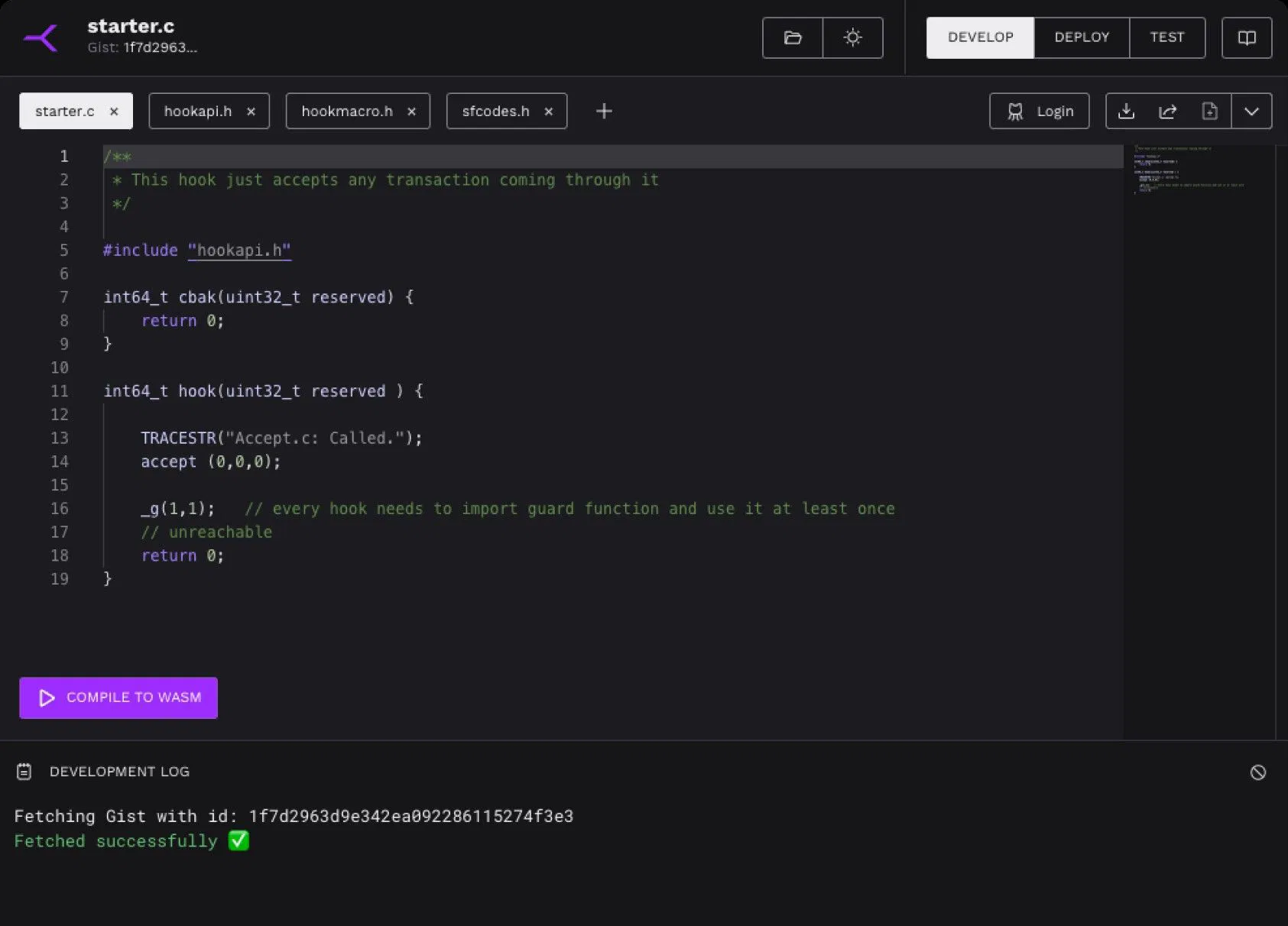
*Using Hooks Builder, you can develop, test, debug and deploy your own Hooks on our testnet, using our examples or building your own from scratch.*
The Hooks Builder serves as an integrated development environment, facilitating the crafting, testing, debugging, and deployment of your Hooks on our testnet.
Whether you’re utilizing our examples or building from scratch, Hooks Builder provides a helpful environment for honing and deploying your smart contract solutions.
### Some Examples of specific Hooks and Use Cases[](#some-examples-of-specific-hooks)
[Section titled “Some Examples of specific Hooks and Use Cases ”](#some-examples-of-specific-hooks-and-use-cases)
Showcasing the potential of Hooks with these concrete examples, each illustrating a unique application of smart contract functionality on Xahau:
* **Auto-Savings Hook**: Automate savings by configuring a Hook to transfer a set amount of XAH to a separate savings account on the ledger. This could be done to help save a portion of XAH and build up savings at specified intervals—daily, weekly, or monthly. This recurring transfer mechanism can be a base for developing personal finance applications or subscription-based models.
* **Carbon-Offset Hook**: Each transaction triggers an additional transfer of 1% of the amount to a carbon offset account managed by a trusted non-governmental organization (NGO) using the money for a good cause. This feature can be used as a base for building applications that contribute to environmental sustainability with every transaction made.
* **Firewall Hook**: By filtering incoming and outgoing transactions. The Firewall Hook can block malicious transactions originating from known scam accounts or containing suspicious memos. By retrieving an updated blocklist from a Hook on a different account, the firewall maintains a robust defense against fraud without the need for manual intervention. Additionally, implementing spending limits to deny high-value unauthorized withdrawals could be a crucial feature for financial applications.
### **Distinguishing Hooks from Ethereum Virtual Machine (EVM)**
[Section titled “Distinguishing Hooks from Ethereum Virtual Machine (EVM)”](#distinguishing-hooks-from-ethereum-virtual-machine-evm)
Xahau Hooks and the EVM allow developers to build and deploy custom logic and automation within their platforms. However, some key differences between these two technologies set them apart.
* **Platform Compatibility**: Hooks are tailored for Xahau, while EVM smart contracts are designed for Ethereum-based blockchains.
* **Execution Efficiency**: Hooks utilize WebAssembly (WASM), outperforming the bytecode used by the EVM in terms of speed and efficiency.
* **Predictable Execution Time**: Xahau Hooks use guards to ensure maximum execution time is well-bounded and known ahead of time, improving efficiency.
### Alternatives to Hooks on the XRPL ecosystem
[Section titled “Alternatives to Hooks on the XRPL ecosystem”](#alternatives-to-hooks-on-the-xrpl-ecosystem)
Ripple and Peersyst announced that an EVM-compatible sidechain is now live [on the company’s devnet](https://opensource.ripple.com/docs/evm-sidechain/intro-to-evm-sidechain/). This sidechain functions as an autonomous blockchain, complete with its unique consensus protocol and transaction rules. The EVM sidechain is an alternative to Hooks, adding smart contract functionality to the ecosystem.
However, it’s essential to note that EVM sidechain contracts function on Layer 2, which requires a two-step process where XRP is transitioned onto the sidechain for contract execution and then back to the main ledger. Once on the sidechain, then again on the XRPL, meaning Layer 2 smart contracts cannot influence the flow. Hooks can decide if a transaction is allowed in the first place. Layer 2 can make a retroactive decision, but the initial transaction has already happened.
Hooks are more closely integrated with XRPL, operating directly on Xahau, an Layer 1 XRPL-core fork, so they are more tightly integrated with the underlying blockchain technology than the EVM-compatible sidechain to take advantage of the specific features and capabilities of the XRPL platform. With the inherent scalability and performance of WebAssembly, Hooks are optimal to enhance Xahau’s functionality.
### Hooks Will Expand the On-ledger Functionality and Help Xahau Grow
[Section titled “Hooks Will Expand the On-ledger Functionality and Help Xahau Grow”](#hooks-will-expand-the-on-ledger-functionality-and-help-xahau-grow)
Hooks add native smart contract capabilities to Xahau, enabling the crafting of custom applications that meet the unique needs of users, bringing new functionalities, and opening up whole new domains of functionality. With Hooks, the possibilities are virtually unlimited.
As Xahau continues to grow, there is no doubt that Hooks will play a significant role in driving further innovation and adoption of the platform by retail and enterprise users.
# Chaining
> Chain multiple hooks together to do more useful tasks
Hook Design Philosophy
*Each Hook should do one thing, and do it really well.*
### History
[Section titled “History”](#history)
In the early days of Hooks it was only possible to install one Hook per account. This meant users were forced to produce omnibus Hooks if they wanted to do more than one thing: for example offset carbon and firewall at the same time.
This was counter to the Hook Design Philosophy, so Hook Chaining was introduced.
### Chaining
[Section titled “Chaining”](#chaining)
A Hook Chain is a sequence of up to **10** Hooks installed on an Xahau account.
* A Hook Chain executes successfully when every Hook in the chain has been individually executed and subsequently calls [accept](/docs/hooks/functions/control/accept).
* Each chain’s execution starts at chain position 0 and ends at chain position 9. If a position is blank (because it was never filled or because the hook that was installed there has been removed) then that position is skipped and treated as successful.
* In order for a transaction to succeed, both ends of the transaction (sending side and receiving side) must have executed successfully. This means if there is a Hook Chain installed on both sides, then both Hook Chains must execute successfully for the transaction to succeed.
Hooks are installed into the chain using the [SetHook Transaction](/docs/hooks/concepts/sethook-transaction). When they are installed, the installer may specify install-time [Parameters](/docs/hooks/concepts/parameters) which may change the behaviour of the installed Hook.
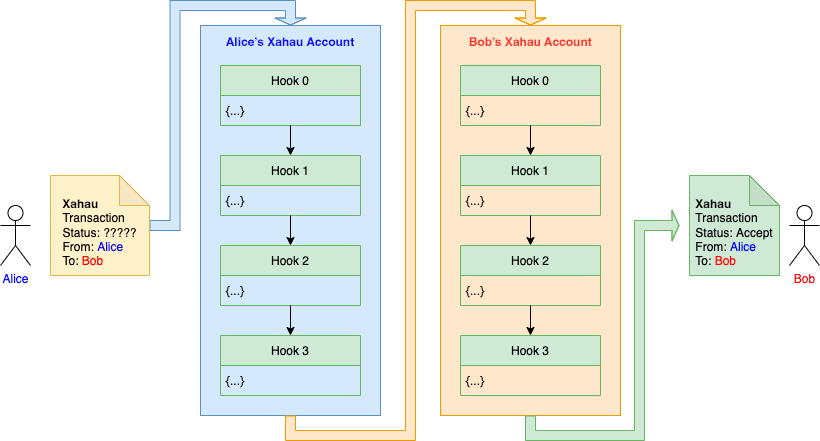
*Example: Execution flow for a transaction passing through two Hook Chains*
### Chain Manipulation
[Section titled “Chain Manipulation”](#chain-manipulation)
In addition to the *install-time* operations specified in the [SetHook Transaction](/docs/hooks/concepts/sethook-transaction), Hooks have some runtime control over chain execution:
* A Hook may determine its own `HookHash` by calling [hook\_hash](/docs/hooks/functions/hook-context/hook_hash).
* A Hook may determine its location in the Hook Chain using [hook\_pos](/docs/hooks/functions/hook-context/hook_pos).
* A Hook may skip (or re-enable) another Hook further down the chain using [hook\_skip](/docs/hooks/functions/hook-context/hook_skip).
* A Hook may modify the [Parameters](/docs/hooks/concepts/parameters) of a Hook further down the chain using [hook\_param\_set](/docs/hooks/functions/hook-context/hook_param_set).
### Weak Executions
[Section titled “Weak Executions”](#weak-executions)
Hook Chains are [Strongly Executed](/docs/hooks/concepts/weak-and-strong). However any Hook in any chain may flag that it requires a second, Weak Execution by calling [hook\_again](/docs/hooks/functions/hook-context/hook_again). If all Hook Chains execute successfully then the originating transaction is applied. Once the originating transaction has been applied any Weak Executions may happen, in the following order:
1. `cbak` execution if this was an Emitted Transaction.
2. Weak Transactional Stake Holders who have opted in to allow a [Collect Call](/docs/hooks/concepts/collect-call). Execution order is first-come first-serve according to the event that caused the TSH to be flagged (such as pathing).
3. Any *Again as Weak* (AAW) Hooks. Execution order for AAW is first numerically according to Account ID then numerically according to Hook position.
# Collect Call
Hook Design Philosophy
*Every party affected by a transaction should have the opportunity to have their hooks executed.*
When hooks are not Strongly Executed it is unfair to bill the originating transaction for their execution. For example an *OfferCreate* which crosses 20 offers on the DEX should not be forced to pay for the execution of each of those account’s Hooks.
Therefore during typical Weak execution the fee for the execution is collected from the owner of the Hook. To enable this:
* The Hook owner must have set `asfTshCollect` on their Xahau account using the AccountSet transaction.
* The Hook owner must have set `hsfCollect` on the specific Hook they wish to be called as a Weak TSH.
### Fee Responsibility Table
[Section titled “Fee Responsibility Table”](#fee-responsibility-table)
| Type of Weak Execution | Fee |
| ------------------------------------------------------------------------------------------------------------------------------------------------- | -------------------------------------------------------------------------------------------------------------------------------------------------------------------------------------- |
| **Again As Weak** - Happens when a Strongly Executed Hook calls [hook\_again](/docs/hooks/functions/hook-context/hook_again) | Free (already paid by the Strong Execution). |
| **Callback** - Happens when an emitted transaction either makes it into a ledger or is flagged as being impossible to ever make it into a ledger. | Free (already paid during Emission). |
| **Weak Transactional Stakeholder** - Happens if a transaction in some way mildly affects your account. | Paid for by your account (not by the originating transaction) if and only if both your account is marked with `asfTshCollect` flag and your Hook is marked with the `hsfCollect` flag. |
Caution
This is an advanced feature most Hook Developers will probably not use.
# Compiling Hooks
### Constraints
[Section titled “Constraints”](#constraints)
All Hooks are compiled to a single [webassembly module](https://webassembly.github.io/spec/core/syntax/modules.html) before they can be set onto an Xahau account.
A Hook always implements and exports exactly one or both of the following functions:
`int64_t hook(uint32_t ctx) { ... }` *required*
* Executed whenever a transaction comes into or leaves from the account the Hook is set on (`ctx = 0`) or
* Executed when executed as a [Weak Transactional Stakeholder](/docs/hooks/concepts/weak-and-strong) (`ctx > 0`).
`int64_t cbak(uint32_t ctx) { ... }` *optional*
* Executed when an emitted transaction is successfully accepted into a ledger (`ctx = 0`) or
* Executed when an emitted transaction cannot be accepted into any ledger (`ctx = 1`).
Hooks are not allowed to specify other functions. Instead they must make clever use of macros to do all their computation within these two functions. This is part of a computational restriction on hooks to keep their runtime predictable.
Additionally Hooks are afforded no *heap* memory. All required memory must be reserved and used on the stack.
### Example
[Section titled “Example”](#example)
Here is an example Hook written in C. The Hook prints 0…3 to the trace log before accepting the originating transaction.
```c
#include
#define GUARD(maxiter) _g(__LINE__, (maxiter)+1)
extern int32_t _g (uint32_t id, uint32_t maxiter);
extern int64_t accept (uint32_t read_ptr, uint32_t read_len, int64_t error_code);
extern int64_t trace_num (uint32_t read_ptr, uint32_t read_len, int64_t number);
int64_t hook(uint32_t ctx)
{
for (int i = 0; GUARD(3), i < 3; ++i)
{
trace_num("test", 4, i);
}
accept (0,0,0);
return 0;
}
```
Tip
For educational purposes the above example deliberately does not include `hookapi.h` (which developers would typically use.)
### Compilation
[Section titled “Compilation”](#compilation)
A [variety of compilers](https://www.google.com/search?q=webassembly+compiler+C) will generate valid webassembly from a C source file. Once compiled, a Hook exists as a binary `.wasm` file. This contains a webassembly module. Using `wasmcc` to compile and the `wasm2wat` tool to convert to human readable webassembly this binary form can be rendered to the human readable form. Below appears the compilation result of the above example.
```plaintext
(module
(type (;0;) (func (param i32 i32) (result i32)))
(type (;1;) (func (param i32 i32 i64) (result i64)))
(type (;2;) (func))
(type (;3;) (func (param i32) (result i64)))
(import "env" "_g" (func $_g (type 0)))
(import "env" "trace_num" (func $trace_num (type 1)))
(import "env" "accept" (func $accept (type 1)))
(func $__wasm_call_ctors (type 2))
(func $cbak (type 3) (param i32) (result i64)
(local i32 i32 i32 i64)
global.get 0
local.set 1
i32.const 16
local.set 2
local.get 1
local.get 2
i32.sub
local.set 3
i64.const 0
local.set 4
local.get 3
local.get 0
i64.store offset=8
local.get 4
return)
(func $hook (type 3) (param i32) (result i64)
(local i32 i32 i32 i32 i32 i32 i32 i32 i32 i32 i32 i32 i32 i32 i32 i32 i32 i64 i32 i32 i32 i64 i32 i32 i32)
global.get 0
local.set 1
i32.const 16
local.set 2
local.get 1
local.get 2
i32.sub
local.set 3
local.get 3
global.set 0
i32.const 0
local.set 4
local.get 3
local.get 0
i64.store offset=8
local.get 3
local.get 4
i32.store offset=4
block ;; label = @1
loop ;; label = @2
i32.const 3
local.set 5
i32.const 14
local.set 6
i32.const 4
local.set 7
local.get 6
local.get 7
call $_g
drop
local.get 3
i32.load offset=4
local.set 8
local.get 8
local.set 9
local.get 5
local.set 10
local.get 9
local.get 10
i32.lt_s
local.set 11
i32.const 1
local.set 12
local.get 11
local.get 12
i32.and
local.set 13
local.get 13
i32.eqz
br_if 1 (;@1;)
i32.const 1024
local.set 14
i32.const 4
local.set 15
local.get 3
i32.load offset=4
local.set 16
local.get 16
local.set 17
local.get 17
i64.extend_i32_s
local.set 18
local.get 14
local.get 15
local.get 18
call $trace_num
drop
local.get 3
i32.load offset=4
local.set 19
i32.const 1
local.set 20
local.get 19
local.get 20
i32.add
local.set 21
local.get 3
local.get 21
i32.store offset=4
br 0 (;@2;)
end
end
i64.const 0
local.set 22
i32.const 0
local.set 23
local.get 23
local.get 23
local.get 22
call $accept
drop
i32.const 16
local.set 24
local.get 3
local.get 24
i32.add
local.set 25
local.get 25
global.set 0
local.get 22
return)
(table (;0;) 1 1 funcref)
(memory (;0;) 2)
(global (;0;) (mut i32) (i32.const 66576))
(global (;1;) i32 (i32.const 1029))
(global (;2;) i32 (i32.const 1024))
(global (;3;) i32 (i32.const 66576))
(global (;4;) i32 (i32.const 1024))
(export "memory" (memory 0))
(export "__wasm_call_ctors" (func $__wasm_call_ctors))
(export "__data_end" (global 1))
(export "__global_base" (global 2))
(export "__heap_base" (global 3))
(export "__dso_handle" (global 4))
(export "cbak" (func $cbak))
(export "hook" (func $hook))
(data (;0;) (i32.const 1024) "test\00"))
```
The average Hook developer will never need to examine webassembly directly. However it is a useful conceptual exercise to review the contents of the sample Hook.
Above we can see:
* Three functions are imported from the Hooks API (`_g`, `accept`, `trace_num`)
* Two functions are defined by the hook (`cbak`, `hook`)
* Two functions are exported by the hook (again: `cbak`, `hook`)
* Some static (constant) data is recorded in the hook (see `data` at the bottom).
It is very important to note that a Hook *must only* import functions available to it from the Hooks API and *must* only export the `cbak` and `hook` functions. In additional all hooks must import `_g` from the Hooks API, which is the `guard` function.
Tip
Webassembly is a platform-independent general computation `bytecode` language. It has a one-to-one mapping with a human readable equivalent. These are used interchangeably.
### Unwanted Exports
[Section titled “Unwanted Exports”](#unwanted-exports)
Most webassembly compilers (including the one above) produce additional exports for their own linking purposes. In many cases the generation of these is difficult or impossible to disable.
Unwanted exports will lead to an otherwise valid Hook being rejected. Therefore after compilation developers should use the [Hook Cleaner Utility](https://github.com/XRPLF/hook-cleaner-c) to strip out these out. Failure to do so will lead to your Hook being rejected.
Caution
Don’t forget to use the [Hook Cleaner Utility](https://github.com/XRPLF/hook-cleaner-c) or your Hooks will be rejected.
# Debugging Hooks
> How to print "hello world" from your Hook!
### How can I debug a Hook?
[Section titled “How can I debug a Hook?”](#how-can-i-debug-a-hook)
The Hook API provides a set of functions in the namespace `trace` which write output to the `xrpld` log file when xrpld is configured with the *trace* log-level. These functions, generally speaking, allow you to see the value of variables, buffers and otherwise trace the execution and state of a Hook at runtime.
Tip
At time of writing there is no interactive Hook Debugger. You must use the trace functions.
### Trace APIs
[Section titled “Trace APIs”](#trace-apis)
The following `trace` functions are available in the Hooks API
| Hook API | What it does |
| ------------------------------------------------------------- | ----------------------------------------------------------------------------------------- |
| [trace](/docs/hooks/functions/trace-debug/trace) | Print a utf-8 message, followed by a user-specified buffer (this last optionally as hex.) |
| [trace\_num](/docs/hooks/functions/trace-debug/trace_num) | Print a utf-8 message, followed by an integer. |
| [trace\_float](/docs/hooks/functions/trace-debug/trace_float) | Print a utf-8 message, followed by an XFL Floating point number. |
### Example
[Section titled “Example”](#example)
The following code will print a single trace line then accept the Originating Transaction.
```c
#include "../hookapi.h"
int64_t hook(int64_t reserved)
{
trace_num(SBUF("A number"), 10);
accept(0,0,0);
return 0;
}
```
An example of the log-line produced by `xahaud` when a payment is sent out of or into the Hook Account:
```plaintext
2021-Apr-13 13:59:11.083700726 UTC View:TRC
HookTrace[rHb9CJAWyB4rj91VRWn96DkukG4bwdtyTh-rE3SfnjwfzZFL3JK9cLVfJuy8Ar1XnCqPw]:
A number 10
```
The above appears in the log as all-one-line, but split here for visibility.
Use testnet
The [Xahau Testnet](https://xahau-test.net/) is the perfect place to test your Hooks.
### Log format
[Section titled “Log format”](#log-format)
A breakdown of the log format appears in the table below
| Part | Description | # |
| ------------------------------------------- | ---------------------------------------------------------------------------------------------------------------------------------------------------------------------- | - |
| 2021-Apr-13 13:59:11.083700726 UTC View:TRC | `xahaud`’s prefix to the log line | 1 |
| HookTrace | This is a trace initiated by the Hook itself not some other information about the Hook. Other information is available on tags `HookError`, `HookEmit` and `HookInfo`. | 2 |
| \[rHb9CJAWyB4rj91VRWn96DkukG4bwdtyTh | The first account in the square brackets is the Hook Account. | 3 |
| -rE3SfnjwfzZFL3JK9cLVfJuy8Ar1XnCqPw]: | The second account in the square brackets is the Originating Account. | 4 |
| A number | This is the message the Hook was told to deliver before the trace payload | 5 |
| 10 | This is the trace payload | 6 |
Tip
`Xahaud` produces a lot of output. It is therefore generally advisible to grep logs for the account/s you are interested in.
For example use: `tail -f log | grep HookTrace | grep `
# Emitted Transactions
> Your Hook can do a lot more than just block or allow transactions!
### Background
[Section titled “Background”](#background)
**All** changes made to Xahau *must* be the result of applying a valid transaction to the ledger. Thus if some change *X* is made then some transaction *Y* is responsible.
When designing the Hooks API we needed a way for Hooks to make changes to the ledger *beyond* simply accepting or rejecting a transaction. However attaching these changes to the Originating Transaction was confusing and resulted in a large increase in the general complexity of the system.
Suppose for example that a Hook needs to send you some funds… the send operation would be effectively enacted onto the ledger by the Originating Transaction which might have been something completely unrelated such as an Account Set transaction. Additionally this send operation would need to be able to potentially trigger another Hook on the receiving end of a payment.
The solution: **Emitted Transactions**. We allow the Originating Transaction to do exactly what the contents of the Transaction say it will do. If our Hook needs to make an additional change to the ledger such as sending a payment, it creates and then *emits* a brand new transaction.
### What are Emitted Transactions?
[Section titled “What are Emitted Transactions?”](#what-are-emitted-transactions)
Emitted Transactions are *new* transactions created by the execution of a Hook and entered into consensus for processing in the next ledger. The transaction may be of any Transaction Type but must follow strict emission rules.
To emit a transaction the Hook first prepares the serialized transaction then calls [emit](/docs/hooks/functions/emitted-transaction/emit). With the [HooksUpdate2 amendment](/docs/features/amendments/#hooksupdate2), the [prepare()](/docs/hooks/functions/emitted-transaction/prepare) API can build the complete emission-ready transaction automatically from a partial input, removing the need to manually set `Account`, `Sequence`, `SigningPubKey`, `Fee`, `FirstLedgerSequence`, `LastLedgerSequence`, and `EmitDetails`.
Because emitted transactions can trigger Hooks in the next ledger which in turn may emit more transactions, all emitted transactions carry a `burden` and a `generation` field in their `EmitDetails` block. The `EmitDetails` block replaces the signature field in a traditional transaction.
The `burden` and `generation` fields collectively prevent [Fork bomb](https://en.wikipedia.org/wiki/Fork_bomb) attacks on the ledger by exponentially increasing the cost of exponentially expanding emtited transactions.
It is important to note that the Hooks API follows the strict rule of *no rewriting*. You *must* present an emitted transaction in full, valid and canonically formed to xahaud for emission or it will be rejected. With the [HooksUpdate2 amendment](/docs/features/amendments/#hooksupdate2), the [prepare()](/docs/hooks/functions/emitted-transaction/prepare) API automates this: the Hook provides only the transaction-type-specific fields and the runtime injects all required emission boilerplate. Without HooksUpdate2, the Hook must construct the complete transaction itself.
### Callbacks
[Section titled “Callbacks”](#callbacks)
As introduced in [Introduction and Terminology](/docs/hooks/concepts/terminology) emitted transactions trigger callbacks when they are accepted into a ledger. Due to the decentralised nature of consensus acceptance into a ledger of an emitted transaction is **not a guarantee**, although it is usually all-but guaranteed.
If an emitted transaction expires before it can be accepted into a ledger (for any number of reasons: the ledgers may be full, the fee may be too high for the emitted transaction or the emitted transaction may be somehow invalid) then a *pseudo transaction* is created in the ledger to clean up the emitted transaction. This pseudo transaction also calls the callback of your hook, with `parameter = 1` to indicate the emitted transaction indeed failed.
### Emission Rules
[Section titled “Emission Rules”](#emission-rules)
The [emit](/docs/hooks/functions/emitted-transaction/emit) Hook API will enforce the following rules on a proposed (to be emitted) transaction.
| # | Emission Rule | Explanation |
| - | ------------------------------------------------------ | -------------------------------------------------------------------------------------------------------------------------------------------------------------------------------------------------------------------------------------------------------- |
| 1 | `sfSequence` = 0 | Emitted Transactions *do not* increase the sequence number of the Hook Account. This must always be set to zero. |
| 2 | `sfPubSigningKey` = 0 | Emitted Transactions are not signed but this is a required field for xrpld processing. It must be set to all zeros. |
| 3 | `sfEmitDetails` present and valid | Emitted Transactions require an `sfEmitDetails` block and this must be correctly filled. See EmitDetails section below. |
| 4 | `sfSignature` absent | This field must be absent in the emitted transaction because if it were not then the transaction would be ambiguous. |
| 5 | `LastLedgerSequence` valid and in the future | All emitted transactions must have a last ledger sequence set so that the Hook knows if the emitted transaction failed (since it did not get a callback in time). This is currently set to a maximum of 5 ledgers after the current ledger. |
| 6 | `FirstLedgerSequence` valid and set to the next ledger | All emitted transactions must have a first ledger sequence set to the next ledger (after the current ledger) so that Hooks do not recursively cascade within a single ledger. This is currently enforced to be the next ledger after the current ledger. |
| 7 | Fee appropirately computed and set | The fee is dependent on the size of the emtited transaction and the burden on the network (i.e. whether this emitted transaction was the result of another emitted transaction.) |
| 8 | Generation cap not exceeded | An emitted transaction can produce other emitted transactions, and these can form a chain. The length of the chain is the `sfEmitGeneration`. This is currently capped at 10. |
### EmitDetails block
[Section titled “EmitDetails block”](#emitdetails-block)
All emitted transactions must contain an `sfEmitDetails` object correctly populated with the fields in the table below.
| Field | Required Value | Description |
| ----------------- | ------------------------------------------------------------------------------------------------------------------------------------------------------------------------------------------------------------------------------------------------------------------------------------------------------------------------------------------------------------------------------------------------------------------------------------------------------------------ | ------------------------------------------------------------------------------------------------------------------------------------------------------------------------------------------------------------------------------------------------------------------------------- |
| sfEmitGeneration | If the Originating Transaction was itself an emitted transaction then one more than the `sfEmitGeneration` of that transaction. If the Originating Transaction was not an emitted transaction then `1`. This should be populated using [etxn\_generation](/docs/hooks/functions/emitted-transaction/etxn_generation). | This field keeps track of a chain of emitted transactions that in turn cause other transactions to be emitted. |
| sfEmitBurden | If the Originating Transaction was itself an emitted transaction then the `burden` of the Originating Transaction multiplied by the maximum number of transactions the Hook has declared it will emit using [etxn\_reserve](/docs/hooks/functions/emitted-transaction/etxn_reserve). If the Originating Transaction was not an emitted transaction then `1`. This should be populated using [etxn\_burden](/docs/hooks/functions/emitted-transaction/etxn_burden). | This field is a heuristic for detecting forkbombs. Fees are based on burden and will increase exponentially when a chain reaction is started to prevent the network becoming overun by self-reinforcing emitted transactions. |
| sfEmitParentTxnID | The transaction ID of the Originating Transaction | The Hook Execution that emitted the transaction is connected to the Originating Transaction. Therefore this field is always required for the efficient tracing of behaviour. |
| sfEmitNonce | A special deterministic nonce produced by a call to [nonce](/docs/hooks/functions/emitted-transaction/etxn_nonce) | Emitted Transactions would be identical with the same fields and therefore have identical transaction hashes if a nonce were not used. However every node on the network needs to agree on the nonce, so a special Hook API to produce a deterministic nonce is made available. |
| sfEmitCallback | The 20 byte Hook Account ID | This field is used by xahaud when it needs to intitate a callback, such that it knows which Hook and account to initate the callback on. Callbacks happen when an emitted transaction is accepted into a ledger. |
Check the examples
The [Example Hooks](https://github.com/XRPL-Labs/xrpld-hooks/tree/hooks-ssvm/hook-api-examples), in particular Peggy, Carbon and Doubler, demonstrate how to emit both simple and more complicated transactions.
# Execution Metadata
> What to expect when your Hook runs.
When Hooks execute they leave behind information about the status of that execution. This appears in the Originating Transaction metadata as an `sfHookExecutions` block. This block contains the following fields:
| Field | Description |
| ---------------------- | ---------------------------------------------------------------------------------------------------------------------- |
| sfHookResult | Hooks can end in three ways: `accept`, `rollback` and `error`. This is *not* the same as sfHookReturnCode! |
| sfHookHash | The SHA512H of the Hook at the time it was executed. |
| sfHookAccount | The account the Hook ran on. |
| sfHookReturnCode | The integer returned as the third parameter of `accept` or `rollback`. |
| sfHookReturnString | The string returned in the first two parameters of `accept` or `rollback`, if any. |
| sfHookInstructionCount | The total number of webassembly instructions that were executed when the Hook ran. |
| sfHookEmitCount | The total number of [Emitted Transactions](/docs/hooks/concepts/emitted-transactions) produced by the Hook. |
| sfHookExecutionIndex | The order in which the Hook was executed (as distinct from other Hook Executions on the same Originating Transaction.) |
| sfHookStateChangeCount | The number of [Hook State](/docs/hooks/concepts/state-management) changes the Hook made during execution. |
# Floating Point Numbers (XFL)
> High precision calculations are native to Hooks.
### Background
[Section titled “Background”](#background)
[Floating point numbers](https://en.wikipedia.org/wiki/Floating-point_arithmetic) are widely used in computer science to do calculation of finite precision but arbitrary scale numbers.
Most modern CPUs are capable of performing fast floating point operations using the [IEEE binary floating point standard](https://en.wikipedia.org/wiki/Double-precision_floating-point_format) however `xahaud` does **not** use this format. Instead Xahau uses a [bespoke decimal floating point standard](/docs/protocol-reference/binary-format).
This custom format has three basic properties:
1. The format is inherently decimal, expressed as a decimal `mantissa` multipled by `10` to the power of an `exponent`.
2. All values expressed have 16 significant (decimal) figures.
3. The range of exponents is `-96` to `+80`
When serialized the mantissa is 54 bits, and the exponent is 8 bits, with a final sign bit bringing the total size of the serialized floating point to 63 bits.
### What is XFL?
[Section titled “What is XFL?”](#what-is-xfl)
[XLS-17d](https://github.com/XRPLF/XRPL-Standards/discussions/39) is an XRPL standards proposal that defines an efficient way to pack and store xrpld floating point numbers (as described above).
XFLs store the bits of the floating point number within an *enclosing number*. This is always an `int64_t`. Negative enclosing numbers represent invalid XFLs (for example as a result of division by zero.)
Tip
Use the XFL-tool [here](https://richardah.github.io/xfl-tools/) to compose and decompose XFLs in your browser!
Some example XFLs follow
| loating Point Value | Enclosing Number | Representation |
| ------------------- | ------------------- | ----------------------------- |
| -1 | 1478180677777522688 | -1000000000000000 \* 10^(-15) |
| 0 | 0 | 0 (*canonical zero*) |
| 1 | 6089866696204910592 | +1000000000000000 \* 10^(-15) |
| *PI* | 6092008288858500385 | +3141592653589793 \* 10^(-15) |
| -*PI* | 1480322270431112481 | -3141592653589793 \* 10^(-15) |
This format is very convenient for Hooks, as Hooks can only exchange *integer* values with xrpld. By enclosing the floating point inside an integer in a well defined way it becomes possible to do complex floating point computations from a Hook. This is useful for computing exchange rates.
### Canonical Zero
[Section titled “Canonical Zero”](#canonical-zero)
Floating point regimes typically have a number of different ways to express zero, which can be a problem for testing for zero. For example `0 x 10 ^ 1` is zero and `0 x 10 ^ 2` is also zero. For this reason there is a canonical zero enforced by the standard and the Hook API. The canonical zero is also enclosing number zero (`0`).
### Hook Float API
[Section titled “Hook Float API”](#hook-float-api)
Once you have an XFL you can use the Float API to do various computations. The Float API appears in the table below. Each API takes one or more XFL enclosing numbers and returns an XFL enclosing number. Negative return values *always* represent a computational error (such as division by zero). There are no valid negative enclosing numbers.
| Hook API | What it does |
| ------------------------------------------------------------- | --------------------------------------------------------------------- |
| [float\_set](/docs/hooks/functions/float/float_set) | Create a float from an exponent and mantissa |
| [float\_multiply](/docs/hooks/functions/float/float_multiply) | Multiply two XFL numbers together |
| [float\_mulratio](/docs/hooks/functions/float/float_mulratio) | Multiply an XFL floating point by a non-XFL numerator and denominator |
| [float\_negate](/docs/hooks/functions/float/float_negate) | Negate an XFL floating point number |
| [float\_compare](/docs/hooks/functions/float/float_compare) | Perform a comparison on two XFL floating point numbers |
| [float\_sum](/docs/hooks/functions/float/float_sum) | Add two XFL numbers together |
| [float\_sto](/docs/hooks/functions/float/float_sto) | Output an XFL as a serialized object |
| [float\_sto\_set](/docs/hooks/functions/float/float_sto_set) | Read a serialized amount into an XFL |
| [float\_invert](/docs/hooks/functions/float/float_invert) | Divide one by an XFL floating point number |
| [float\_divide](/docs/hooks/functions/float/float_divide) | Divide an XFL by another XFL floating point number |
| [float\_one](/docs/hooks/functions/float/float_one) | Return the number 1 represented in an XFL enclosing number |
| [float\_exponent](/docs/hooks/functions/float/float_exponent) | Get the exponent of an XFL enclosing number |
| [float\_mantissa](/docs/hooks/functions/float/float_mantissa) | Get the mantissa of an XFL enclosing number |
| [float\_sign](/docs/hooks/functions/float/float_sign) | Get the sign of an XFL enclosing number |
| float\_exponent\_set | Set the exponent of an XFL enclosing number |
| float\_mantissa\_set | Set the mantissa of an XFL enclosing number |
| float\_sign\_set | Set the sign of an XFL enclosing number |
| [float\_int](/docs/hooks/functions/float/float_int) | Convert an XFL floating point into an integer floor |
| [float\_root](/docs/hooks/functions/float/float_root) | Compute the nth root of an XFL |
| [float\_log](/docs/hooks/functions/float/float_log) | Compute the decimal log of an XFL |
Caution
You should never do any direct math or comparison on the *enclosing number*. This will almost always result in incorrect computations.
The *sole exception* is checking for canonical zero.
### Example
[Section titled “Example”](#example)
In the below example an exchange rate conversion is performed, followed by a high precision fraction multiplication.
```c
int64_t max_vault_pusd =
float_multiply(vault_xrp, exchange_rate);
max_vault_pusd =
float_mulratio(max_vault_pusd, 0,
NEW_COLLATERALIZATION_NUMERATOR, NEW_COLLATERALIZATION_DENOMINATOR);
```
Tip
If a float API returns a negative value and you do not check for negatives, then passing that negative value into another float API will also produce a negative value. In this way, errors are propagated much like `NaN` (not a number) is propagated in other languages.
If you ever end up with a negative enclosing number, an error occurred somewhere in your floating point calculations.
# Grants
> Hook Grants
Caution
Most Hook Developers will rarely need to use HookGrants, and should exercise extreme caution when granting state mutation permission to foreign Hooks and accounts.
While a HookGrant cannot be used to directly steal funds, intentional external modification of a Hook’s State may lead a Hook to behave in an unintended way, which in some cases could lead to a theft.
If you think you need to use a Grant, please re-check your design first to ensure you actually need to use one before continuing.
### Grants
[Section titled “Grants”](#grants)
Grants provide a way for a Hook Installer to assign [State Management](/docs/hooks/concepts/state-management) permissions to a *foreign* Hook on other Xahau accounts.
A [SetHook Transaction](/docs/hooks/concepts/sethook-transaction) may specify a `HookGrants` array within any `Hook` object in its `Hooks` array. The `HookGrants` array contains one or more `HookGrant` objects (up to 8).
Unlike [Parameters](/docs/hooks/concepts/parameters), the `HookGrants` array is always set exactly as specified in the [SetHook Transaction](/docs/hooks/concepts/sethook-transaction). Therefore if you wish to update a particular `HookGrant` whilst retaining multiple other `HookGrant` entires that were previously set, you must first obtain the old `HookGrants` array, modify it, and then resubmit the entire array in an [*Update* Operation](/docs/hooks/concepts/sethook-transaction).
To delete all Grants submit an empty `HookGrants` array.
Caution
Unlike [Parameters](/docs/hooks/concepts/parameters), the `HookGrants` array is always set exactly as specified in the [SetHook Transaction](/docs/hooks/concepts/sethook-transaction).
A Grant permits a foreign XRPL account or Hook to modify the Hook State within the namespace of the specific Hook for which the Grant is defined.
The HookGrant must specify at least:
* `HookHash`\
And may also specify an account:
* `Authorize`
Only the Hook specified by HookHash may modify the Hook State within the namespace of the Hook for which the HookGrant is specified. If `Authorize` is specified then this permission is tightened further to only the Hook specified by the HookHash when it is installed on the account specified by `Authorize`.
Tip
Grants only apply to external Hooks and never limit the operation of Hooks with respect to the Hook State on the account they are installed on.
### Example
[Section titled “Example”](#example)
```json
Account: "rALicebv3hMYNBWtu1VEEWkToArgYsYERs",
TransactionType: "SetHook",
Hooks:
[
{
Hook: {
...,
HookNamespace: "3963ADEB1B0E8934C0963680531202FD511FF1E16D5864402C2DA63861C420A8",
HookGrants:
[
{
HookGrant: // first grant
{
HookHash: "78CAF69EEE950A6C55A450AC2A980DE434D624CD1B13148E007E28B7B6461CC8"
},
HookGrant: // second grant
{
Authorize: "rCLairev2ma2gNZdcHJeTk7fCQ1ki84vr9",
HookHash: "A5B8D62154DA1C329BE13582086B52612476720CEBD097EB85CEE1455E1C70A6"
}
},
]
}
}
],
...
```
The *first grant* above allows:
* any instance of the Hook whose code that hashes to `78CAF69EEE950A6C55A450AC2A980DE434D624CD1B13148E007E28B7B6461CC8`
* executing on **any account**
* to modify the Hook State of account `rALicebv3hMYNBWtu1VEEWkToArgYsYERs`
* inside the Namespace `3963ADEB1B0E8934C0963680531202FD511FF1E16D5864402C2DA63861C420A8`
The *second grant* above allows:
* any instance of the Hook whose code that hashes to `A5B8D62154DA1C329BE13582086B52612476720CEBD097EB85CEE1455E1C70A6`
* but only when executed on account `rCLairev2ma2gNZdcHJeTk7fCQ1ki84vr9`
* to modify the Hook State of account `rALicebv3hMYNBWtu1VEEWkToArgYsYERs`
* inside the Namespace `3963ADEB1B0E8934C0963680531202FD511FF1E16D5864402C2DA63861C420A8`
### Using the Grant
[Section titled “Using the Grant”](#using-the-grant)
To make use of a grant, a Hook modifies State objects on a foreign account by calling [state\_foreign\_set](/docs/hooks/functions/state/state_foreign_set).
# Hook Fees
> What to expect when your Hook runs.
### Hook Creation Fees
[Section titled “Hook Creation Fees”](#hook-creation-fees)
SetHook transactions are charged per byte of created webassembly. The rate is 500 drops per byte. Thus a 1kib Hook will cost 0.5 XAH to create.
### Hook Execution Fees
[Section titled “Hook Execution Fees”](#hook-execution-fees)
When Hooks are [Strongly Executed](/docs/hooks/concepts/weak-and-strong) the originating transaction must pay for the Strong Executions in the originating transaction’s fee.
Hook Execution fees are charged at a rate of 1 drop per web assembly instruction in the worst-case execution of the function `hook` (or `cbak` in the case of a callback). Thus a small Hook with a lot of looping may end up attracting high runtime fees.
### Fee RPC Helper
[Section titled “Fee RPC Helper”](#fee-rpc-helper)
Transaction fees on a ledger with the Hooks Amendment enabled become non-trivial to compute for end-users and/or wallet applications. This is because strong hooks must be paid for by the originator of a transaction, and there may be as many as 4 strong hooks on the sending account and 4 on the receiving account, as well as any other strong transactional stakeholders involved (as can be the case with some exotic transaction types). Further, if the transaction is a SetHook then the size of the parameters, the size of the code and whether it is a *create* operation or an *install* operation all determine the size of the fee.
Therefore it is highly recommended that **all** transactions be run through the updated fee RPC call before they are submitted to the ledger.
To invoke the RPC call:
1. Open a websocket connection to the Hooks node you will be working with.
2. Compose the serialized transaction you wish to know the fee for with the following:
* `Fee: "0"`
* `SigningPubKey: ""` (That is: 0 byte VL of type 0x73. In hex:`0x7300`.)
* Do **not** sign the transaction.
3. Submit it as a hex blob to the RPC as follows:
```json
{"command":"fee", "tx_blob":""}
```
For HTTP POST RPC submit it as follows:
```json
{"method":"fee", "params": [{"tx_blob":""}] }
```
The response should look something like
```json
{
result: {
drops: {
base_fee: '130520',
},
//...
},
type: 'response'
}
```
Take the base fee and set it as the `Fee` field in the transaction. Now sign and submit it as per the normal transaction submission process.
If there is an invalid value for `tx_blob` or `tx_blob` is missing, a regular JSON result will be returned with a `base_fee` of 10.
### Emission Fees
[Section titled “Emission Fees”](#emission-fees)
Hooks have access to the same computation the *Fee RPC Helper* does. To use this simply call [etxn\_fee\_base](/docs/hooks/functions/emitted-transaction/etxn_fee_base) with a buffer containing the serialised transaction as the arguments. As with the RPC call, you must ensure that the `Fee` field is present in the serialised transaction. The value is irrelevant.
When `etxn_fee_base` returns the recommended fee you may use [sto\_emplace](/docs/hooks/functions/serialization/sto_emplace) to emplace it into the serialised transaction before emission. The relevant field is `sfFee`.
# HookOn Field
> Specify which transaction types a Hook should be triggered on
### Understanding the HookOn field
[Section titled “Understanding the HookOn field”](#understanding-the-hookon-field)
Each bit in this unsigned 256-bit integer indicates whether the Hook should execute on a particular transaction type. All bits are *active low* **except** bit 22 which is *active high*. Since 22 is ttHOOK\_SET this means the default value of all 0’s will not fire on a SetHook transaction but will fire on every other transaction type. This is a deliberate design choice to help people avoid bricking their Xahau account with a misbehaving hook.
Bits are numbered from right to left:
* bit 0 - right most, i.e. the least significant bit.
* bit 63 - the left-most, i.e. the most significant bit.
Examples (assuming a 256-bit unsigned integer type):
1. If we want to completely disable the hook:
```c
~(1ULL << 22) /* every bit is 1 except bit 22 which is 0 */
```
2. If we want to disable the hook on everything except ttPAYMENT:
```c
~(1ULL << 22) & ~(1ULL)
```
3. If we want to enable the hook on everything except ttHOOK\_SET
```c
0
```
4. If we want to enable hook firing on ttHOOK\_SET (dangerous) and every other transaction type:
```c
(1ULL << 22)
```
### HookOn Calculator
[Section titled “HookOn Calculator”](#hookon-calculator)
[HookOn Calculator ](https://richardah.github.io/xrpl-hookon-calculator/)
### HookCanEmit Field
[Section titled “HookCanEmit Field”](#hookcanemit-field)
*(Added by the [HookCanEmit amendment](/docs/features/amendments/#hookcanemit).)*
`HookCanEmit` uses the same 256-bit bitmask syntax as `HookOn` but controls which transaction types a Hook is allowed to **emit**, rather than which types trigger it.
* Uses the same active-low semantics as `HookOn`, with bit 22 (`ttHOOK_SET`) being active high.
* If `HookCanEmit` is absent, the Hook may emit any transaction type, including `SetHook`.
### HookOnIncoming and HookOnOutgoing Fields
[Section titled “HookOnIncoming and HookOnOutgoing Fields”](#hookonincoming-and-hookonoutgoing-fields)
*(Added by the [HookOnV2\_1 amendment](/docs/features/amendments/#hookonv2_1), which replaces the unsupported HookOnV2 amendment.)*
Instead of specifying a single `HookOn` field, Hooks may optionally replace it with two separate fields that differentiate the direction of the triggering transaction:
* **`HookOnIncoming`** — triggers the Hook on transactions **originating from another account** (the Hook account is not the initiator).
* **`HookOnOutgoing`** — triggers the Hook on transactions **originating from the Hook account itself**.
Both fields use the same bit-field syntax as `HookOn`. The following rules apply, on both install and update operations:
* `HookOn` and `HookOnIncoming`/`HookOnOutgoing` are **mutually exclusive** in a Hook entry. You must use either `HookOn` alone or the `HookOnIncoming`/`HookOnOutgoing` pair, not both.
* `HookOnIncoming` and `HookOnOutgoing` must be supplied **together**. Supplying only one of them makes the entry invalid.
* The two values must **differ**. If they would be equal, use `HookOn` instead.
* Without the amendment, `HookOn` remains mandatory when creating a Hook.
Valid example:
```json
{ "Hook": { "CreateCode": "...", "HookOnIncoming": "FFFF...FFBF", "HookOnOutgoing": "FFFF...FFFE", "HookNamespace": "...", "HookApiVersion": 0 } }
```
Invalid: `HookOn` together with `HookOnIncoming`; only `HookOnOutgoing`; or `HookOnIncoming` equal to `HookOnOutgoing`.
Using `HookOn` alone continues to work exactly as before.
# Introduction
Hooks add smart contract functionality to the Xahau: *layer one* custom code to influence the behaviour and flow of transactions. Hooks are small, efficient pieces of code being defined on an Xahau account, allowing logic to be executed before and/or after Xahau transactions.
Note
Please note: you’re reading the **technical documentation** of Hooks. This documentation is highly technical & assumes prior knowledge of programming and the Xahau Network. If you are looking for examples on what Hooks are, will bring to the Xahau Network and what they could do, please [check this page](/docs/hooks/concepts/introduction/example-usage).
Xahau is known and is being appreciated for its transaction throughput, speed and the low fees. Combined with available advanced transaction types like multi sign, escrows, payment channels and even a decentralized exchange (all on ledger, out of the box, without requiring smart contracts) Xahau has a lot to offer businesses and creative developers.
Hooks add smart contract functionality to Xahau: *layer one* custom code to influence the behaviour and flow of transactions. Hooks are small, efficient pieces of code being defined on an Xahau account, allowing logic to be executed before and/or after Xahau transactions. These Hooks can be really simple, like: “reject payments < 10 XAH”, or “for all outgoing payments, send 10% to my savings account” or more advanced.
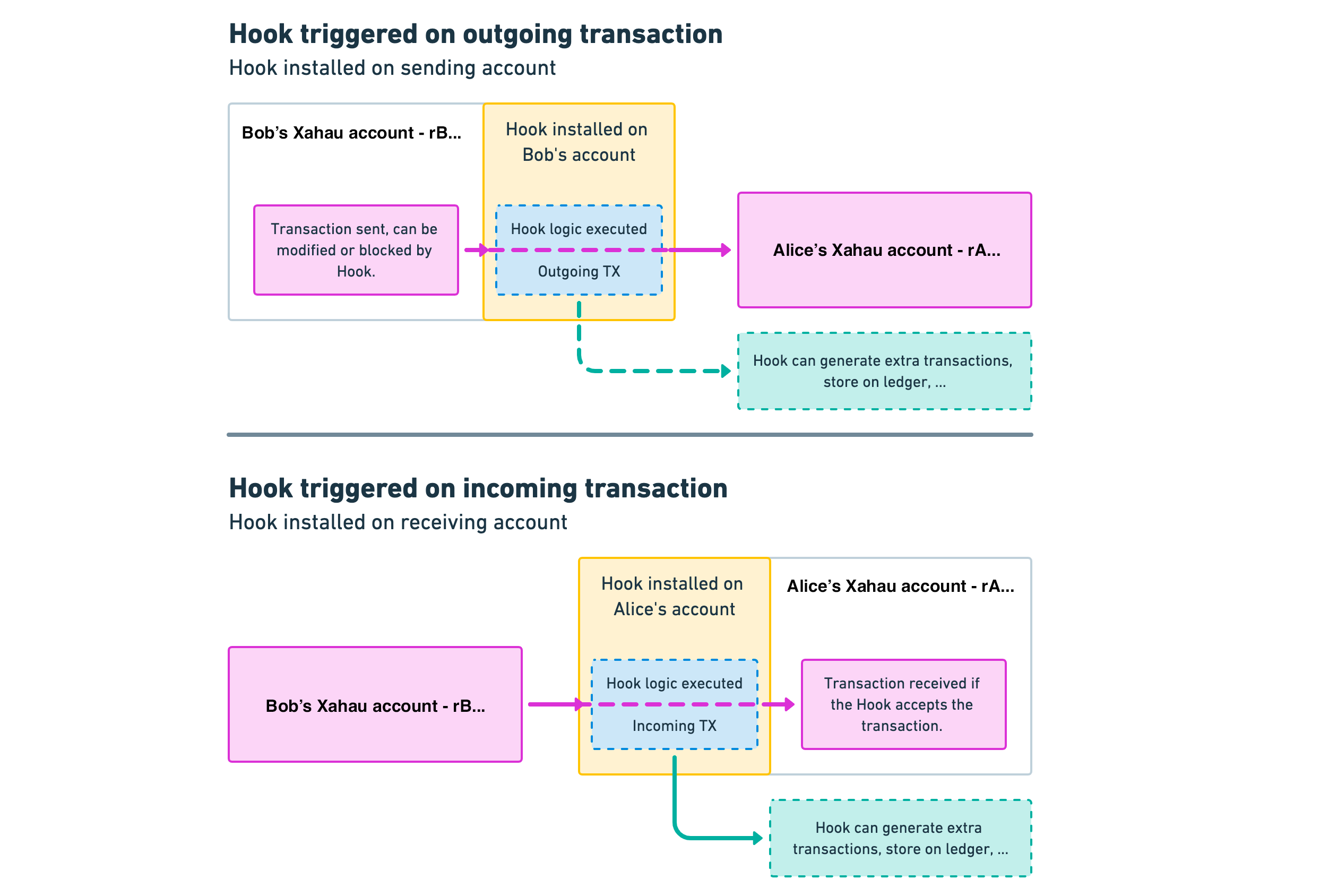
*Hooks high level concept*
By allowing Hooks to not only execute efficient logic but also to store small, simple data objects, one could define a Hook like: “for incoming payments transactions, check if the sending account is in a list maintained by another Hook, and if present: reject the transaction”.
Hooks are deliberately not Turing-Complete. While often touted as the holy grail of smart contracts, Turing-Completeness is actually inappropriate for smart contracts. (See [Blog 2](https://dev.to/wietse/hooked-2-hooks-security-smart-contracts-on-the-xrp-ledger-83e).)
Hooks are currently live on a public testnet. It’s time for testing, coding, having fun & breaking things, so a future amendment to add Hooks to Xahau livenet can be drafted with confidence.
### Resources
[Section titled “Resources”](#resources)
* [Xahau Testnet](https://xahau-test.net/)
* [Xahau Testnet Explorer](https://explorer.xahau-test.net/)
* [Examples (source code)](https://github.com/XRPL-Labs/xrpld-hooks/tree/hooks-ssvm/hook-api-examples)
* [Blogs concepts](https://dev.to/t/xrplhooks/top/infinity)
# Example Usage
Please read [the introduction of Hooks in this blog](https://coil.com/p/XUMM/XRPL-Labs-is-working-on-the-transaction-HOOKS-amendment-for-the-XRP-Ledger-Supporting-business-logic/kEmqhoqMW).
While working on Hooks we published a number of blogs on our progress, insights & Hooks concepts. You can [read all about that in our blogs on Dev.to](https://dev.to/t/xrplhooks/top/infinity)
### Examples (scenarios)
[Section titled “Examples (scenarios)”](#examples-scenarios)
#### 1. Receiving Hook executes additional logic
[Section titled “1. Receiving Hook executes additional logic”](#1-receiving-hook-executes-additional-logic)
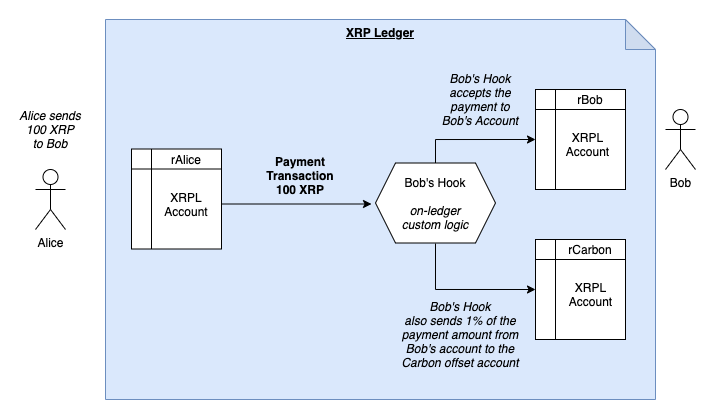
#### 2. Receiving Hook blocks incoming transaction
[Section titled “2. Receiving Hook blocks incoming transaction”](#2-receiving-hook-blocks-incoming-transaction)
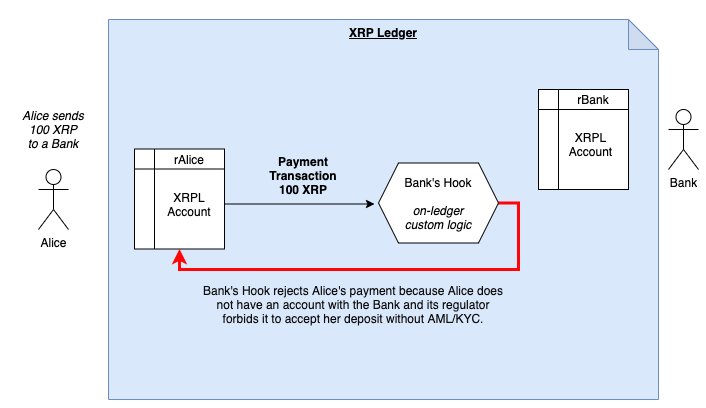
#### 3. Sending Hook blocks outgoing transaction
[Section titled “3. Sending Hook blocks outgoing transaction”](#3-sending-hook-blocks-outgoing-transaction)
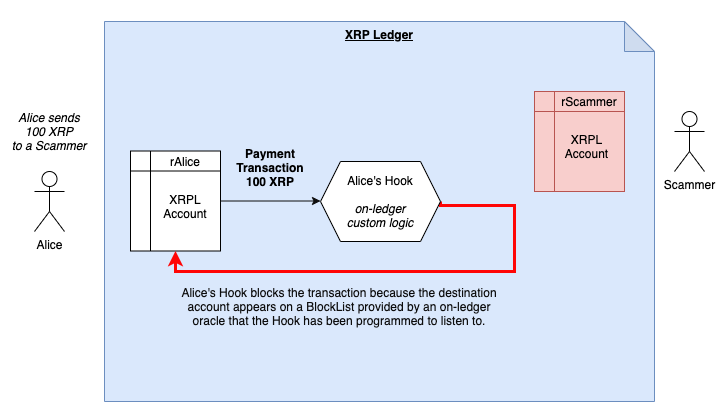
#### 4. Hook controls an institutional account
[Section titled “4. Hook controls an institutional account”](#4-hook-controls-an-institutional-account)
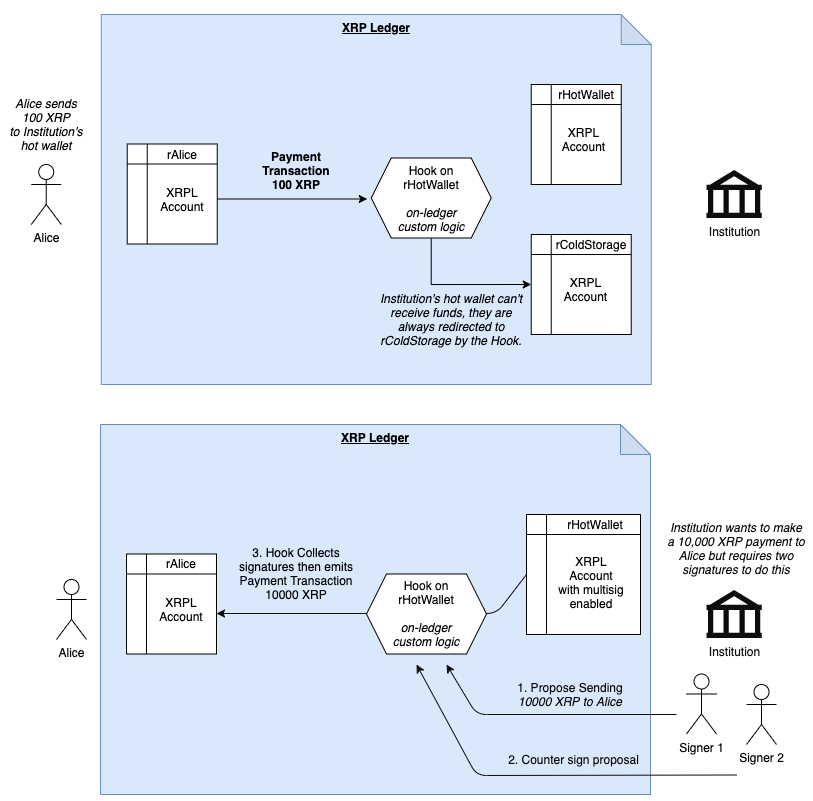
# Loops and Guarding
> Guards are needed to perform loops in a Hook.
### What are guards?
[Section titled “What are guards?”](#what-are-guards)
Hooks are deliberately not [Turing Complete](https://en.wikipedia.org/wiki/Turing_completeness). This means arbitrary looping is forbidden. Instead you must *guard* your loops against a hard “maximum iteration” boundary.
A guard is a marker placed in your code at the top of each loop. The marker informs the Xahau what the upper bound of your loop will be *in every possible scenario*. Thus if your loop usually executes twice but sometimes executes *500* times, then your guard will say 500.
Guards are used by the Xahau to determine the *worst case execution time* (in instructions) of your Hook before execution. This is the basis for the fee the Xahau charges for the execution of a Hook and makes execution times predictable and controllable.
Tip
Existing developers migrating from other smart contract platforms may find guards to be annoying at first, but once you get used to them they are no harder to use than a normal for-loop.
### The guard function
[Section titled “The guard function”](#the-guard-function)
The guard function tells the ledger the **maximum number of iterations** a loop will make. Specifically the function takes two arguments:
```c
int32_t _g (uint32_t id, uint32_t maxiter);
```
The first argument `id` is the identifier for this guard. This is a unique constant chosen by the developer, typically the line number in the source file is used.
The second argument `maxiter` is a promise the developer makes to the ledger that this guard will not be *hit* more than `maxiter` times during the execution of the Hook. If the guard call is executed more than this many times the Hook will automatically rollback with a `GUARD_VIOLATION` ([Hook API return codes](/docs/hooks/functions/overview/return-codes)). Because the guard will be hit *before* the loop condition is checked, it is important to add one to the total number of expected iterations. (Note: The GUARD() macro already adds one).
Caution
Guards must be set using numerical literals. You cannot use a variable or runtime value in a Guard.
### Guard enforcement
[Section titled “Guard enforcement”](#guard-enforcement)
Consider the following for-loop in C:
```c
#define GUARD(maxiter) _g(__LINE__, (maxiter)+1)
for (int i = 0; GUARD(3), i < 3; ++i)
{
...
}
```
In C, the comma operator executes each expression in a list of expressions (e.g. `A, B, C`) and returns the last expression (e.g. `C`). Thus the condition above is still `i < 3`, but the guard is called before the condition is checked. This is the only way to satisify the *guard rule* when using a for-loop in C.
The Guard Rule
A call to `_g` (the guard function) must be the first branch instruction after a loop instruction.
Below appears the webassembly output when the above is compiled. Note the guard function being called at the start of the loop. The only instructions allowed before this call are non-branch instructions (typically manipulating constants.)
```plaintext
block ;; label = @1
loop ;; label = @2
i32.const 3
i32.const 14
=====> call $_g <=====
drop
...
```
### Nested Loops
[Section titled “Nested Loops”](#nested-loops)
When using nested loops the `maxiter` argument must reflect the total number of times the guard will be *hit*. This means you must multiply the nestings together.
Consider the example below:
```c
#define GUARD(maxiter) _g(__LINE__, (maxiter)+1)
for (int i = 0; GUARD(3), i < 3; ++i)
{
for (int j = 0; GUARD(15), j < 5; ++j)
{
...
}
}
```
Notice the inner-loop’s guard is set to **15**. You must multiply the loops together to compute the maximum number of times an inner guard will be hit during Hook execution.
### No recursion
[Section titled “No recursion”](#no-recursion)
Calls to non-Hook API functions are disallowed in the Hooks ammendment. All user code must fit within the two allowed Hook functions `cbak` and `hook`.
Caution
Failure to use guards correctly will cause an attempted `SetHook` transaction to be rejected.
# Named Hooks
> Selectively activate specific hooks on an account using a name-based execution gate.
*(Added by the [NamedHooks amendment](/docs/features/amendments/#namedhooks).)*
### Overview
[Section titled “Overview”](#overview)
By default, every installed hook on an account executes on every transaction type it has been configured for via `HookOn`. Named Hooks allow an installed hook to declare an **execution gate**: the hook only runs if the triggering transaction carries a matching `HookName` value.
This enables multiple hooks to coexist on the same account, each serving a different use case, with callers selecting which hook to activate by including the appropriate `HookName` in their transaction.
### How It Works
[Section titled “How It Works”](#how-it-works)
**1. Name the hook at installation time**
Set the `HookName` field inside the `Hook` slot of a [SetHook transaction](/docs/protocol-reference/transactions/transaction-types/sethook):
```json
{
"TransactionType": "SetHook",
"Account": "rHookOwner...",
"Hooks": [
{
"Hook": {
"HookHash": "A5663784D04ED1B4408C6B97193464D27C9C3334AAF8BBB4FA5EB8E557FC4A2C",
"HookOn": "0000000000000000",
"HookNamespace": "...",
"HookName": "6D795F68616E646C6572"
}
}
]
}
```
`HookName` is a hex-encoded UTF-8 string (e.g. `6D795F68616E646C6572` = `"my_handler"`). It is stored per-installation on the account’s [Hook ledger object](/docs/protocol-reference/ledger-data/ledger-objects-types/hook) and is not shared with the [HookDefinition](/docs/protocol-reference/ledger-data/ledger-objects-types/hook-definition).
**2. Activate the hook by name in a transaction**
Any transaction type can include the top-level `HookName` field to target the named hook:
```json
{
"TransactionType": "Payment",
"Account": "rSender...",
"Destination": "rHookOwner...",
"Amount": "1000000",
"HookName": "6D795F68616E646C6572"
}
```
When the ledger processes this transaction and reaches the hook chain on `rHookOwner`:
* Hooks **without** a `HookName` set → execute normally (unchanged behaviour).
* Hooks **with** a `HookName` that matches the transaction’s `HookName` → execute.
* Hooks **with** a `HookName` that does **not** match → silently skipped (no error).
Transactions that carry **no** `HookName` field will skip all named hooks on the account.
### HookName Constraints
[Section titled “HookName Constraints”](#hookname-constraints)
| Constraint | Value |
| -------------- | ----------------------------------------------- |
| Minimum length | 4 bytes (8 hex chars in JSON) |
| Maximum length | 16 bytes (32 hex chars in JSON) |
| Encoding | Valid UTF-8 |
| Remove name | Set to empty blob (`""`) in an update operation |
### Removing a Name
[Section titled “Removing a Name”](#removing-a-name)
To remove a previously assigned name from a hook slot, submit an Update Operation with `HookName` set to an empty blob:
```json
{
"TransactionType": "SetHook",
"Account": "rHookOwner...",
"Hooks": [
{
"Hook": {
"HookName": ""
}
}
]
}
```
After removal, the hook reverts to unconditional execution (governed only by its `HookOn` / `HookOnIncoming` / `HookOnOutgoing` settings).
### Fee Calculation
[Section titled “Fee Calculation”](#fee-calculation)
Hook fee calculation respects the same gating logic: named hooks that would be skipped by a transaction (name mismatch or absent) are **not** counted when computing the hook execution fee for that transaction.
### Error Cases
[Section titled “Error Cases”](#error-cases)
| Error Code | Condition |
| -------------- | -------------------------------------------------------------------------------------------------------------------------------------------- |
| `temDISABLED` | `HookName` is present in a Hook slot but the `NamedHooks` amendment is not enabled. |
| `temMALFORMED` | `HookName` present as a top-level transaction field but `Hooks` or `NamedHooks` is not active; or the value fails UTF-8 / length validation. |
### Use Cases
[Section titled “Use Cases”](#use-cases)
* **Multi-purpose accounts**: install several specialised hooks (e.g. payment processor, governance handler, escrow manager), each gated by a different name.
* **Selective invocation**: external contracts or users can selectively trigger only the hook relevant to their interaction without affecting others.
* **Gradual migration**: deploy a new hook version under a different name and migrate callers incrementally without removing the old hook.
# Namespaces
> Prevent state clobbering by using the correct namespace
### Namespaces
[Section titled “Namespaces”](#namespaces)
To avoid two or more Hooks installed on the same account unintentionally clobbering each-other’s [Hook State](/docs/hooks/concepts/state-management), a 32 byte namespace must be provided when creating or installing each Hook.
The namespace may be any arbitrary 32 byte value the developer chooses. Provided the namespace is unique in the Hook chain no state clobbering will occur.
We strongly recommended using `SHA256` over the developer’s working name for the Hook. SHA256 is one of the two hashing algorithms used in the derivation of Xahau addresses (from an account master key), and, as such, it should be readily available to the developer.
The `HookNamespace` field is supplied as a 32 byte *hex* blob inside each `Hook` object in a `Hooks` array when [executing a SetHook transaction](/docs/hooks/concepts/sethook-transaction).
The configured Namespace a Hook operates under alters the [Keylets](/docs/hooks/concepts/slots-and-keylets) its [State](/docs/hooks/concepts/state-management) is stored under. Therefore two Hooks under two different Namespaces installed on the same Xahau account may use the same state key to refer to different state objects. Conversely, two different Hooks using the same Namespace on the same Xahau account can access and modify eachother’s state objects using the same state keys.
### Example
[Section titled “Example”](#example)
In javascript, importing the `ripple-address-codec` yields access to SHA256.\
(It is also possible to use `crypto.subtle` in browser, or `crypto.createHash` in node to access this hash algorithm.)
```js
HookNamespace: addr.codec.sha256('carbon').toString('hex')
```
### Default Namespace
[Section titled “Default Namespace”](#default-namespace)
The first user to [set a novel Hook](/docs/hooks/concepts/sethook-transaction) defines a `HookNamespace` which becomes the *Default Namespace* for that Hook. This means any subsequent users who [reference the same *HookDefinition*](/docs/hooks/concepts/reference-counted-hook-definitions) will receive this originally set Namespace by default.
The subsequent user may specify their own Namespace, overriding the Default Namespace for their installation only.
### Hook APIs Affected
[Section titled “Hook APIs Affected”](#hook-apis-affected)
Choice of HookNamespace affects the behaviour of the following Hook APIs:
* [state](/docs/hooks/functions/state/state)
* [state\_set](/docs/hooks/functions/state/state_set)
### Namespace API Helper
[Section titled “Namespace API Helper”](#namespace-api-helper)
See [account\_info](/docs/hooks/functions/websocket-apis/account_info) and [account\_namespace](/docs/hooks/functions/websocket-apis/account_namespace) for information about how to query the ledger regarding namespaces.
# Parameters
> Install-time parameters allow Hooks to be generic and flexible
### Parameters
[Section titled “Parameters”](#parameters)
Hook developers may opt to use *install-time* parameters (called Hook Parameters) in their Hook. This allows subsequent installers of the Hook to change certain behaviours the programmer defines without recompiling or re-uploading the Hook (assuming at least one account still [references](/docs/hooks/concepts/reference-counted-hook-definitions) the existing Hook Definition.)
Hook Parameters are a set of Key-Value pairs set during the [SetHook Transaction](/docs/hooks/concepts/sethook-transaction) and retrievable by the Hook during runtime. Both the `ParameterName` key and the `ParameterValue` are set as *hex* blobs, and have a maximum length of 32 bytes and 256 bytes respectively.
A [SetHook Transaction](/docs/hooks/concepts/sethook-transaction) may define up to *16* Hook Parameters per installed Hook.
### Setting Parameters
[Section titled “Setting Parameters”](#setting-parameters)
The `HookParameters` array is optionally defined inside each `Hook` in the `Hooks` array as shown below:
```json
TransactionType: "SetHook",
Hooks:
[
{
Hook: {
...,
HookParameters:
[
{
HookParameter:
{
HookParameterName: "ABCDEF12",
HookParameterValue: "12345678"
}
},
... // optionally up to 15 more Hook Parameters
]
}
}
],
...
```
### Default Parameters
[Section titled “Default Parameters”](#default-parameters)
The first user to [set a novel Hook](/docs/hooks/concepts/sethook-transaction) may define Hook Parameters which then become the *Default Parameters* for that Hook. This means any subsequent users who [references the same *HookDefinition*](/docs/hooks/concepts/reference-counted-hook-definitions) will receive these originally set Hook Parameters by default.
The subsequent user may specify their own Parameters, overriding the Default Parameters for their installation.
To erase a Parameter in a subsequent installation, specify the `ParameterName` key without specifying a `ParameterValue` key.
### Using Parameters in Hooks
[Section titled “Using Parameters in Hooks”](#using-parameters-in-hooks)
Parameters can be read by the Hooks they are set on using [hook\_param](/docs/hooks/functions/hook-context/hook_param).
If more than one Hook is installed in a Hook Chain, then [hook\_param\_set](/docs/hooks/functions/hook-context/hook_param_set) can be used in limited circumstances to modify the Hook Parameters of a Hook further down the chain on the same account.
### Runtime Parameters
[Section titled “Runtime Parameters”](#runtime-parameters)
On Xahau and the Xahau testnet, HookParameters may also be included at the top level of any transaction type according to the foregoing rules and size limits. These parameters can be accessed inside a hook using the [otxn\_param](/docs/hooks/functions/originating-transaction/otxn_param) API.
# Reference Counted Hook Definitions
> Avoid re-uploading the same bytecode to the ledger
When a novel Hook’s web assembly byte-code is uploaded to Xahau, a significant storage burden is imposed on the network. This storage burden is reflected in the [Hook Fees](/docs/hooks/concepts/hook-fees) charged by the network.
To avoid this burden (and high fees for end users) reference counting is used:
* The first time a novel Hook is installed, the [SetHook Transaction](/docs/hooks/concepts/sethook-transaction) must provide a significant fee.
* The Hook’s web assembly byte-code becomes an unowned and reference counted object on the ledger (called a `HookDefinition`).
* Subsequent installations by the same or other users for an identical Hook (i.e. with identical byte-code) increment the reference count. These installations point at the same object on the ledger. These transactions are billed in a similar way to setting a Trust Line, as the storage burden for the Hook was already paid for in the original Set Hook transaction.
* While the reference count on the Hook Definition is greater than zero (meaning one or more accounts still have the Hook installed) the object remains on the ledger.
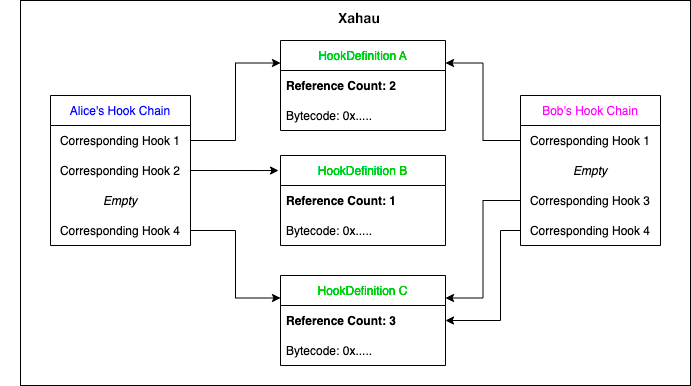
# Serialized Objects
> Manipulate raw serialized xahaud objects!
### What are Serialized Objects?
[Section titled “What are Serialized Objects?”](#what-are-serialized-objects)
Xahau has canonical [serialized](/docs/protocol-reference/binary-format) forms of all objects subject to consensus. When writing a Hook it is inevitable you will come across serialized objects. These manifest as buffers containing what might appear to the developer as opaque binary blobs. In fact you can read these with the [XRPL-Binary-Visualiser](https://richardah.github.io/xrpl-binary-visualizer/).
For example an `sfAmount` field serializes to a collection of bytes like `61D50F26109A32B7EC`
### Serialized Object API
[Section titled “Serialized Object API”](#serialized-object-api)
To assist Hook developers in working with serialized objects the `sto` namespace was created within the Hooks API. These functions manipulate pointers within a Hook-provided buffer. See table below.
| Hook API | at it does |
| ----------------------------------------------------------------- | ------------------------------------------------------------------------------------- |
| [sto\_subfield](/docs/hooks/functions/serialization/sto_subfield) | Index into a xrpld serialized object and return the location and length of a subfield |
| [sto\_subarray](/docs/hooks/functions/serialization/sto_subarray) | Index into a xrpld serialized array and return the location and length of an index |
| [sto\_emplace](/docs/hooks/functions/serialization/sto_emplace) | Emplace a field into an existing STObject at its canonical placement |
| [sto\_erase](/docs/hooks/functions/serialization/sto_erase) | Remove a field from an STObject |
| [sto\_validate](/docs/hooks/functions/serialization/sto_validate) | Validate an STObject |
Where applicable these APIs return an *offset* and a *length* encoded into a single int64\_t. See individual documentation for details.
### Example
[Section titled “Example”](#example)
At typical scenario in which you would use the STO API is in processing memos on an Originating Transaction. Since you will likely need access to the whole memo anyway, an efficient way to process a set of memos is simply to dump the whole `sfMemos` field into a buffer then index around within it. While it is also possible to use the slot API to do this by slotting the Originating Transaction it would result in additional code and additional copying.
```c
#define SUB_OFFSET(x) ((int32_t)(x >> 32))
#define SUB_LENGTH(x) ((int32_t)(x & 0xFFFFFFFFULL))
#define SBUF(str) (uint32_t)(str), sizeof(str)
uint8_t memos[2048];
int64_t memos_len = otxn_field(SBUF(memos), sfMemos);
for (int i = 0; GUARD(3), i < 3; ++i)
{
int64_t memo_lookup = sto_subarray(memos, memos_len, i);
if (memo_lookup < 0)
rollback(SBUF("Memo lookup error"), 1);
uint8_t* memo_ptr = SUB_OFFSET(memo_lookup) + memos;
uint32_t memo_len = SUB_LENGTH(memo_lookup);
// the above now point at the memo ... do something here
}
```
### PathSet Support and Supported Serialized Types
[Section titled “PathSet Support and Supported Serialized Types”](#pathset-support-and-supported-serialized-types)
PathSet parsing bug (pre-HookAPISerializedType240)
Without the [HookAPISerializedType240 amendment](/docs/features/amendments/#hookapiserializedtype240), all `sto_` functions incorrectly parse `sfPaths` (STPathSet fields, used in Payment transactions with cross-currency routing). The internal parser misreads the PathSet boundary, corrupting the results for any field that appears after `sfPaths` in the serialized object. Hook developers processing Payment transactions with cross-currency paths must ensure this amendment is enabled.
With the [HookAPISerializedType240 amendment](/docs/features/amendments/#hookapiserializedtype240), the following serialized types are correctly handled by all `sto_` functions:
| STI Type | Code | Examples |
| ------------------- | ---- | ----------------------------------------------- |
| `STI_UINT16` | 1 | `sfTransactionType` |
| `STI_UINT32` | 2 | `sfFlags`, `sfSequence`, `sfOfferSequence` |
| `STI_UINT64` | 3 | `sfHookOn` |
| `STI_HASH128` | 4 | `sfEmailHash` |
| `STI_HASH256` | 5 | `sfLedgerHash`, `sfTransactionHash` |
| `STI_AMOUNT` | 6 | `sfAmount`, `sfFee` |
| `STI_VL` | 7 | `sfPublicKey`, blobs |
| `STI_ACCOUNT` | 8 | `sfAccount`, `sfDestination` |
| `STI_OBJECT` | 14 | `sfTransaction`, inner objects |
| `STI_ARRAY` | 15 | `sfHooks`, `sfMemos`, `sfSigners` |
| `STI_UINT8` | 16 | `sfCloseResolution` |
| `STI_UINT160` | 17 | `sfTakerPaysCurrency` |
| `STI_PATHSET` | 18 | `sfPaths` *(fixed by HookAPISerializedType240)* |
| `STI_VECTOR256` | 19 | `sfHookNamespaces` |
| `STI_ISSUE` | 24 | *(added by HookAPISerializedType240)* |
| `STI_XCHAIN_BRIDGE` | 25 | *(added by HookAPISerializedType240)* |
| `STI_CURRENCY` | 26 | *(added by HookAPISerializedType240)* |
### Overlap with slots
[Section titled “Overlap with slots”](#overlap-with-slots)
You may notice some overlap between slot APIs and STO APIs. The key difference here is who *owns* the underlying data:
* If you are using *slots* then xrpld owns the object you are interacting with.
* If you are using the *STO API* then the **Hook** owns the buffer you are interacting with.
Both sets of functions index into a Serialized Object without unnecessary copying.
# SetHook Transaction
### SetHook Transaction
[Section titled “SetHook Transaction”](#sethook-transaction)
Hook web assembly bytecode is installed onto an Xahau account using the `SetHook` transaction.
An example appears below:
```js
{
Account: "r4GDFMLGJUKMjNhhycgt2d5LXCdXzCYPoc",
TransactionType: "SetHook",
Fee: "2000000",
Hooks:
[
{
Hook: {
CreateCode: fs.readFileSync('accept.wasm').toString('hex').toUpperCase(),
HookOn: '0000000000000000',
HookNamespace: addr.codec.sha256('accept').toString('hex').toUpperCase(),
HookApiVersion: 0
}
}
]
}
```
The transaction is deceptively simple, but hides significant complexity, described below.
### Hooks Array
[Section titled “Hooks Array”](#hooks-array)
The main body of the SetHook transaction is the hooks array:
```js
{
Account: "r4GDFMLGJUKMjNhhycgt2d5LXCdXzCYPoc",
TransactionType: "SetHook",
Hooks: // This is the Hooks Array
[
{ Hook: { ... } }, // HookSet Object (position 0)
{ Hook: { ... } },
{ Hook: { ... } },
{ Hook: { ... } }. // HookSet Object (position 3)
]
}
```
This array *mirrors* the [Hook Chain](/docs/hooks/concepts/chaining) installed on the account:
* Position 0 in the array *corresponds* to position 0 in the Hook Chain.
* Position 3 in the array *corresponds* to position 3 in the Hook Chain, etc.
### HookSet Object and Corresponding Hook
[Section titled “HookSet Object and Corresponding Hook”](#hookset-object-and-corresponding-hook)
Each entry in the Hooks Array (in the SetHook Transaction) is called a *HookSet Object*, and its corresponding Hook in the account’s Hook Chain is called the *Corresponding Hook*.
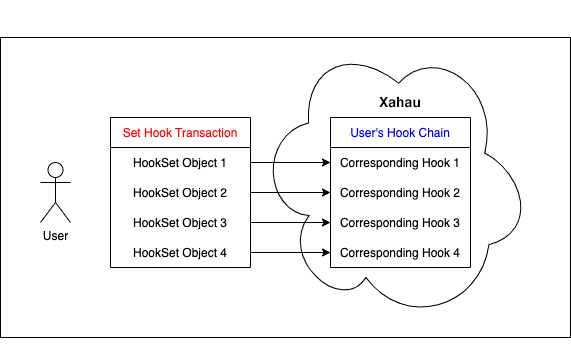
*Example: A user performs an operation on each Hook in his/her Hook chain with a SetHook transaction.*
### HookDefinition
[Section titled “HookDefinition”](#hookdefinition)
Each Corresponding Hook is an object containing a *reference* (pointer) to a `HookDefinition` object.
The HookDefinition object is an unowned reference-counted ledger object that provides for de-duplication of identical web assembly bytecode. Two users using an identical hook will both point to the same HookDefinition.

*Example: Hook Definitions on Xahau*
For more information see: [Reference Counting](/docs/hooks/concepts/reference-counted-hook-definitions)
### Hook Defaults
[Section titled “Hook Defaults”](#hook-defaults)
When a `HookDefinition` is created it contains the initial [Parameters](/docs/hooks/concepts/parameters), [Namespace](/docs/hooks/concepts/namespaces) and [Grants](/docs/hooks/concepts/grants) supplied by the user. These become the Hook Defaults. Any Hook referencing this Hook Definition will use these defaults *unless* the SetHook Transaction that creates that reference explicitly overrides those defaults, or a subsequent Update Operation overrides them.
### HookSet Operations
[Section titled “HookSet Operations”](#hookset-operations)
There are six possible operations: No Operation, Create, Update, Delete, Install and Namespace Delete
Each operation is specified by the inclusion or omission of certain HookSet Object fields. This might seem confusing at first but by working through a few examples the reader should find it intuitive; Essentially HookSet operations are a type of **diff** between a specific Hook’s *defaults*, *existing* and newly specified fields.
Achieving each type of operation is explained in a subsection below.
### No Operation
[Section titled “No Operation”](#no-operation)
**Occurs when**:
* The HookSet Object is empty
**Behaviour**:
* No change of any kind is made.
**Example**:
```json
{
Account: "r4GDFMLGJUKMjNhhycgt2d5LXCdXzCYPoc",
TransactionType: "SetHook",
Fee: "2000000",
Hooks:
[
{
Hook: {}
}
]
}
```
### Create Operation
[Section titled “Create Operation”](#create-operation)
**Occurs when**:
*All* of the following conditions are met:
* The Corresponding Hook does not exist *or*`FLAG_OVERRIDE` is specified.
* `CreateCode` field is specified and is not blank and contains the valid web assembly bytecode for a valid Hook.
* No instance of the same web assembly bytecode already exists on Xahau. (If it does and all other requirements are met then interpret as an Install Operation — see below.)
**Behaviour**:
* A reference counted `HookDefinition` object is created on Xahau containing the fields in the HookSet Object, with all specified fields (Namespace, Parameters, HookOn) becoming defaults (but not Grants.)
* A `Hooks` array is created on the executing account, if it doesn’t already exist. (This is the structure that contains the Corresponding Hooks.)
* A `Hook` object is created at the Corresponding Hook position if one does not already exist.
* The `Hook` object points at the `HookDefinition`.
* The `Hook` object contains no fields except `HookHash` which points at the created `HookDefinition`.
* If `hsfNSDELETE` flag is specified then any HookState entires in the destination namespace are deleted if they currently exist.
**Example**:
```json
{
Account: "r4GDFMLGJUKMjNhhycgt2d5LXCdXzCYPoc",
TransactionType: "SetHook",
Fee: "2000000",
Hooks:
[
{
Hook: {
CreateCode: fs.readFileSync('accept.wasm').toString('hex').toUpperCase(),
HookOn: '0000000000000000',
HookNamespace: addr.codec.sha256('accept').toString('hex').toUpperCase(),
HookApiVersion: 0
}
}
]
}
```
### Install Operation
[Section titled “Install Operation”](#install-operation)
**Occurs when**:
*All* of the following conditions are met:
* The Corresponding Hook does not exist *or*`FLAG_OVERRIDE` is specified.
* `HookHash` field is specified and is not blank and contains the hash of a Hook that already exists as a `HookDefinition` on the ledger *or* `CreateCode` field is specified and is not blank and contains the valid web assembly bytecode for a valid hook that already exists on the ledger as a `HookDefinition`.
**Behaviour**:
* The reference count of the `HookDefinition` object is incremented.
* A `Hooks` array is created on the executing account, if it doesn’t already exist. (This is the structure that contains the Corresponding Hooks.)
* A `Hook` object is created at the Corresponding Hook position if one does not already exist.
* The `Hook` object points at the `HookDefinition`.
* The `Hook` object contains all the fields in the HookSet Object, except and unless:
* A field or key-pair within a field is identical to the Hook Defaults set on the `HookDefinition`, in which case it is omitted due to defaults.
* If `hsfNSDELETE` flag is specified then any HookState entires in the destination namespace are deleted if they currently exist.
**Example**:
```json
{
Account: "r4GDFMLGJUKMjNhhycgt2d5LXCdXzCYPoc",
TransactionType: "SetHook",
Fee: "2000000",
Hooks:
[
{
Hook: {
HookHash: "A5663784D04ED1B4408C6B97193464D27C9C3334AAF8BBB4FA5EB8E557FC4A2C",
HookOn: '0000000000000000',
HookNamespace: addr.codec.sha256('accept').toString('hex').toUpperCase(),
}
}
]
}
```
### Update Operation
[Section titled “Update Operation”](#update-operation)
**Occurs when**:
*All* of the following conditions are met:
* The Corresponding Hook exists.
* `HookHash` is absent.
* `CreateCode` is absent.
* One or more of `HookNamespace`, `HookParameters` or `HookGrants` is present.
**General Behaviour**:
* The Corresponding Hook is updated in such a way that the desired changes are reflected in the Corresponding Hook.
**Specific Behaviour**:
If `HookNamespace` is specified and differs from the Corresponding Hook’s Namespace:
* the Corresponding Hook’s `HookNamespace` is updated, and
* if the `hsfNSDELETE` flag is specified all HookState entires in the old namespace are deleted.
If `HookParameters` is specified, then for each entry:
* If `HookParameterName` exists but `HookParameterValue` is absent and the Corresponding Hook’s Parameters (either specifically or via defaults) contains this `HookParameterName` then the parameter is marked as deleted on the Corresponding Hook.
* If `HookParameterName` exists and `HookParameterValue` exists then the Corresponding Hook’s Parameters are modified to include the new or updated parameter.
If `HookGrants` is specified then:
* The Corresponding Hook’s `HookGrants` array is replaced with the array.
**Example**:
```json
{
Account: "r4GDFMLGJUKMjNhhycgt2d5LXCdXzCYPoc",
TransactionType: "SetHook",
Fee: "2000000",
Hooks:
[
{
Hook: {
HookNamespace: addr.codec.sha256('new_accept').toString('hex').toUpperCase(),
}
}
]
}
```
### Delete Operation
[Section titled “Delete Operation”](#delete-operation)
**Occurs when**:
*All* of the following conditions are met:
* The Corresponding Hook exists.
* `hsfOVERRIDE` is specified.
* optionally `hsfNSDELETE` is also specified.
* `HookHash` is absent.
* `CreateCode` is present but empty.
**Behaviour**:
* The reference count of the `HookDefinition` object is decremented.
* If the reference count is now zero the `HookDefintion` is removed from the ledger.
* The `Hook` object in the Corresponding Hook position is deleted, leaving an empty position.
* If `hsfNSDELETE` is specified the namespace and all HookState entries are also deleted.
**Example**:
```json
{
Account: "r4GDFMLGJUKMjNhhycgt2d5LXCdXzCYPoc",
TransactionType: "SetHook",
Fee: "2000000",
Hooks:
[
{
Hook: {
CreateCode: "",
Flags: 1,
}
}
]
}
```
### Namespace Reset
[Section titled “Namespace Reset”](#namespace-reset)
**Occurs when**:
*All* of the following conditions are met:
* `flags` is present and `hsfNSDELETE` is set. `hsfOVERRIDE` can optionally also be specified if the Hook at this position is to be deleted.
* `HookNamespace` is specified.
* `CreateCode` is absent.
* `HookHash` is absent.
* `HookGrants`, `HookParameters`, `HookOn` and `HookApiVersion` are absent.
**Behaviour**:
* If the Corresponding Hook exists, it remains, nothing happens to it.
* A subset of HookState objects and the HookState directory for the specified namespace are removed from the ledger, up to the defined limit of 512. Further transactions are needed to continue the deletion process until all relevant records are removed.
**Example**:
```json
{
Account: "r4GDFMLGJUKMjNhhycgt2d5LXCdXzCYPoc",
TransactionType: "SetHook",
Fee: "2000000",
Hooks:
[
{
Hook: {
HookNamespace: addr.codec.sha256('accept').toString('hex').toUpperCase(),
Flags: 3,
}
}
]
}
```
# Slots and Keylets
> Inspect and manipulate on-ledger objects.
### Background
[Section titled “Background”](#background)
Xahau contains numerous heterogenous object types which a Hook has read-access to. For example: *transactions*, *accounts*, *ledgers*, and the subcomponents of each of these, to name just a few.
It is very easy to carelessly program a computer to do a lot of needless copy operations when disciplined access to the same underlying data (i.e. through a view) would suffice. The deliberate avoidance of copy operations in programming is referred to as [Zero copy](https://en.wikipedia.org/wiki/Zero-copy) in programming.
With Hooks the same principle applies. We want to avoid copying where possible. In particular we want to avoid as much as possible needlessly copying large objects such as whole ledgers, we also want to avoid serializaing and unserializing these where possible.
### What are slots?
[Section titled “What are slots?”](#what-are-slots)
Slots are part of the Hook API and provide a zero-copy *heterogenous* access system for on-ledger objects and transactions.
* Each Hook has access to 255 slots during runtime.
* Each slot may be empty or may contain a *slotted* object.
* The slot API allows traversal into inner objects, and allows these inner objects themselves to be slotted.
* The slot API allows slotted objects to be dumped to a buffer or otherwise read by the Hook.
The avilable slot APIs are:
| Hook API | What it does |
| ---------------------------------------------------------- | -------------------------------------------------------------------------------------- |
| [slot](/docs/hooks/functions/slot/slot) | Serialize and output a slotted object |
| [slot\_clear](/docs/hooks/functions/slot/slot_clear) | Free up a currently occupied slot |
| [slot\_count](/docs/hooks/functions/slot/slot_count) | Count the elements of an array object in a slot |
| slot\_id | Compute the canonical hash of the slotted object and return it |
| [slot\_set](/docs/hooks/functions/slot/slot_set) | Locate an object based on its keylet and place it into a slot |
| [slot\_subarray](/docs/hooks/functions/slot/slot_subarray) | Index into a slotted array and assign a sub-object to another slot |
| [slot\_subfield](/docs/hooks/functions/slot/slot_subfield) | Index into a slotted object and assign a sub-object to another slot |
| [slot\_type](/docs/hooks/functions/slot/slot_type) | Retrieve the field code of an object in a slot and, optionally, some other information |
| [slot\_float](/docs/hooks/functions/slot/slot_float) | Parse the STI\_AMOUNT in the specified slot and return it as an XFL enclosed number |
| [slot\_size](/docs/hooks/functions/slot/slot_size) | Compute the serialized size of an object in a slot |
### What are keylets?
[Section titled “What are keylets?”](#what-are-keylets)
Keylets are used to locate (point to) on-ledger objects. In brief they are a *hash* of identifying information from the object, which is the canonical *handle* for that object.
Hooks use a serialized 34 byte keylet format which can be derrived using the important [util\_keylet](/docs/hooks/functions/utilities/util_keylet) function. Without this looking up and slotting objects would be generally impossible.
Tip
The Hook APIs which accept a 34 byte keylet will also generally accept a 32 byte canonical transaction hash.
### Example
[Section titled “Example”](#example)
In the following example a 34 byte keylet for a `signers` object is used to slot that object.
```c
uint8_t keylet[34];
if (util_keylet(SBUF(keylet), KEYLET_SIGNERS, SBUF(hook_accid), 0, 0, 0, 0) != 34)
rollback(SBUF("Notary: Internal error, could not generate keylet"), 10);
// then requesting XRPLD slot that keylet into a new slot for us
int64_t slot_no = slot_set(SBUF(keylet), 0);
if (slot_no < 0)
rollback(SBUF("Notary: Could not set keylet in slot"), 10);
```
# State Management
> Hooks can read and save small pieces of on-ledger data 🚀
### What is Hook State?
[Section titled “What is Hook State?”](#what-is-hook-state)
[State](https://en.wikipedia.org/wiki/State_\(computer_science\)) in computer science describes information held by a system between executions (as distinct from inputs and outputs.) For example your browser leaves you logged in to a website even after you close and reopen it. The login cookie is held in the browser’s *state*.
**Hook State** refers to a key-value mapping that logically exists for each account on Xahau whether or not any keys are currently present. The keys are always 32 bytes (unsigned 256 bit integer) and the values are variable length with a maximum size determined by validator voting, at time of writing 256 bytes.
State Management is achieved using
* [state](/docs/hooks/functions/state/state)
* [state\_set](/docs/hooks/functions/state/state_set)
* [state\_foreign](/docs/hooks/functions/state/state_foreign)
### Storing and fetching
[Section titled “Storing and fetching”](#storing-and-fetching)
The below example uses the [state\_set](/docs/hooks/functions/state/state_set) Hook API to assign the value `0xC001CAFE` to the key `0x0..000001` (uint256 = 1) in the Hook State of the Hook Account.
```c
uint8_t key[32] = {
0x00U, 0x00U, 0x00U, 0x00U, 0x00U, 0x00U, 0x00U, 0x00U,
0x00U, 0x00U, 0x00U, 0x00U, 0x00U, 0x00U, 0x00U, 0x00U,
0x00U, 0x00U, 0x00U, 0x00U, 0x00U, 0x00U, 0x00U, 0x00U,
0x00U, 0x00U, 0x00U, 0x00U, 0x00U, 0x00U, 0x00U, 0x01U
};
uint8_t value[4] = { 0xC0U, 0x01U, 0xCAU, 0xFEU };
if (state_set(value, 4, key, 32) == 4)
{
// ... state successfully saved
}
```
In a subsequent Hook execution this value can now be retrieved using the same key:
```c
uint8_t value[4];
uint8_t key[32] = {
0x00U, 0x00U, 0x00U, 0x00U, 0x00U, 0x00U, 0x00U, 0x00U,
0x00U, 0x00U, 0x00U, 0x00U, 0x00U, 0x00U, 0x00U, 0x00U,
0x00U, 0x00U, 0x00U, 0x00U, 0x00U, 0x00U, 0x00U, 0x00U,
0x00U, 0x00U, 0x00U, 0x00U, 0x00U, 0x00U, 0x00U, 0x01U
};
if (state(value, 4, key, 32) < 0)
{
// ... state fetch failed
}
```
After the above code has run the `value` buffer will be populated with the value found at the key.
Tip
The buffer that `state()` reads into (`writeptr`) must be large enough to store the value currently held at that key. If it isn’t, the Hook API returns with a `TOO_SMALL` error.
### Foreign state
[Section titled “Foreign state”](#foreign-state)
From time to time it may be advantageous for one Hook running on one account to read the Hook State of another Hook running on another account. The [state\_foreign](/docs/hooks/functions/state/state_foreign) Hook API does exactly this. Because the ledger is public there is no reasonable expectation of privacy anyway. Any Hook may therefore *read* (but not write) the Hook State of any other Hook.
### Namespaces and querying
[Section titled “Namespaces and querying”](#namespaces-and-querying)
Please see [Namespaces](/docs/hooks/concepts/namespaces)
# Terminology
> Welcome to Hooks 👋
### What are Hooks?
[Section titled “What are Hooks?”](#what-are-hooks)
Hooks are small, efficient web assembly modules designed specifically for Xahau. Hooks can be written in any language (compilable to WebAssembly) and most business logic and most smart contract concepts can be implemented in a hook. Typically Hooks are written in C.
Hooks are set onto an Xahau account using a `SetHook` transaction. Once installed on an account, a hook can:
1. Block or allow incoming and outgoing transactions on the account,
2. Modify and maintain internal state and logic specific to the hook on that account, and
3. Emit new transactions on behalf of the account.
### Glossary
[Section titled “Glossary”](#glossary)
This Hooks documentation and the Hooks API use a set of unfamiliar terms. Use the lookup table below if you find yourself lost.
| Term | Explanation |
| ------------------------ | ------------------------------------------------------------------------------------------------------------------------------------------------------------------------------------------------------------------------------------------------------------------------------------------------------------------------------------------------------------- |
| Hook | *This term refers to a range of things depending on context* 1. A webassembly binary uploadable to Xahau with the [SetHook Transaction](/docs/hooks/concepts/sethook-transaction) type. 2. A webassembly binary already uploaded to and set or configured onto an Xahau account. 3. The [source code](/docs/hooks/concepts/compiling-hooks) of such a binary. |
| Originating Transaction | The transaction that triggered the Hook to fire. This could be either a transaction sent out of or into an account with a Hook set on it. |
| Originating Account | The account that sent an Originating Transaction. |
| Hook Account | The account where the currently executing Hook lives. This is the account that owns the Hook, the account that performed the [SetHook Transaction](/docs/hooks/concepts/sethook-transaction) which created the Hook and the account to whom belongs the Hook State for the currently executing Hook. |
| Installer | The account which is currently installing a Hook using the SetHook transaction. |
| Emitted Transaction | A new transaction created by a Hook during the Hook’s execution that is not the Originating Transaction. These are typically used for sending funds back to the Originating Account. See: [Emitted Transactions](/docs/hooks/concepts/emitted-transactions). |
| State | A per-account key-value map of 32 byte keys to arbitrary data. All Hooks present on an account have access to the same Hook State and can modify it. Note that the Hook State lives on the Hook Account **not** on the Originating Account. See: [State Management](/docs/hooks/concepts/state-management). |
| SetHook | A new Transaction Type introduced in the Hooks ammendment which sets a Hook onto an Xahau account. See: [SetHook Transaction](/docs/hooks/concepts/sethook-transaction). |
| Guards | A special control mechanism you need to use if you write a loop into in a Hook. See: [Loops and Guarding](/docs/hooks/concepts/loops-and-guarding). |
| Grants | Special permission a Hook Installer can give another account or a specific Hook (regardless of where it is installed) to modify Hook State on the Installer’s account. |
| Namespace | A unique 32 byte code delineating one set of state keys from another. The same state key may be used by two different Hooks without interfering with each-other if the namespaces set on the Hooks are different. |
| Parameters | Install-time parameters that can be optionally set on a Hook. |
| Reference Counting | An unowned object on the ledger may be reference counted, meaning it is deleted when the final account which referenced (used) it removes their reference to it. |
| XFL or Floating Point | A way to do high precision math in Hooks such as for exchange rate computation. See: [Floating Point Numbers (XFL)](/docs/hooks/concepts/floating-point-numbers-xfl). |
| Serialized Objects (STO) | The way xahaud transmits and stores ledger objects. See: [Serialized Objects](/docs/hooks/concepts/serialized-objects). |
| Slots and Keylets | Slots can contain ledger objects and keylets identify those objects. See: [Slots and Keylets](/docs/hooks/concepts/slots-and-keylets). |
| Trace | A way to print a log line to the xrpld output from a Hook. See: [Debugging Hooks](/docs/hooks/concepts/debugging-hooks). |
# Weak and Strong
> Which Hooks are allowed to run and when?
Hook Design Philosophy
Every party affected by a transaction should have the opportunity to have their Hooks executed.
Transactional Stake Holders (TSH) are parties that somehow have a stake in or are otherwise affected by a transaction. Their particular stake may be a *weak* or *strong*. The degree of connection with the transaction dictates whether the party has the right to have their Hooks executed and who has to pay for that execution.
For example:
* In a conventional direct XAH **Payment** transaction the two TSH are the *originating account* and the *destination account*.
* In a **SetSignerList** transaction the TSH are the *originating account* and each account whose address appears in the signer list, where such accounts are active on the ledger.
* In an **OfferCreate** transaction, other account’s offers which are crossed by the originating transaction are all weak TSH and may opt for weak execution.
* With the **IOUIssuerWeakTSH** amendment, currency issuers have their hooks executed in third-party transactions that touch or mention their currency, if they have opted into weak execution.
Due to the heterogenous nature of transactions on Xahau, TSH come in all shapes and sizes and can be exotic and non-intuitive. This becomes more true as time passes and more transaction types are added to the Ledger.
### Weak and Strong
[Section titled “Weak and Strong”](#weak-and-strong)
Each TSH has either a weak or a strong connection to the transaction.
A **Strong** connection means:
1. The originating transaction must pay the fee for the execution of the TSH Hook Chain
2. The TSH has the right to rollback the whole transaction by calling `rollback()` from their Hook during execution.
A **Weak** connection means:
1. The originating transaction **does not** pay for the execution of the TSH Hook Chain.
2. The TSH pays for the execution of their own Hook Chain through a feature called [Collect Call Hooks](/docs/hooks/concepts/collect-call).
3. The TSH must have set an account flag `asfTshCollect` prior to the execution of the originating transaction.
4. The TSH **does not** have the right to rollback the whole transaction by calling `rollback()` from their Hook during execution (but can still modify their own Hook state and Emit transactions.)
### Before or After
[Section titled “Before or After”](#before-or-after)
Strong TSHes have their hooks executed *before* the originating transaction is applied to the ledger. This means they have the ability to [rollback](/docs/hooks/functions/control/rollback) the transaction (because it hasn’t yet been applied.) This gives strongly executed hooks the ability to completely block a transaction from occurring.
Weak TSHes have their hooks executed *after* the originating transaction has been applied to the ledger. This means they have access to the [transaction metadata](/docs/hooks/functions/originating-transaction/meta_slot) but cannot prevent the transaction from occurring.
Tip
Strongly executed hooks can call [hook\_again](ref:hook_again) to be executed a second time as a weak execution after the originating transaction has been applied.
### Execution Context
[Section titled “Execution Context”](#execution-context)
The `uint32_t` parameter in `hook(uint32_t)` and `cbak(uint32_t)` carries important context information from the Hooks Amendment to your Hook.
During the execution of `hook`:
* 0 means the Hook is being executed *strongly*
* 1 means the Hook is being executed *weakly*
* 2 means the Hook is being executed *weakly* after being executed *strongly* due to a [hook\_again](/docs/hooks/functions/hook-context/hook_again) call.
During the execution of `cbak`:
* 0 means the Hook is being called back after a transaction it emitted was successfully accepted into a ledger.
* 1 means the Hook is being called back after a transaction it emitted was marked as never able to be applied to any ledger (EmitFailure).
### Reference Table
[Section titled “Reference Table”](#reference-table)
If a Transaction Type does not appear in the table then it has no TSHes **other than its originating account.**
| Transaction Type | TSH Type | Who is the TSH |
| ----------------------- | ------------- | -------------------------------------------------------------------------------------------- |
| AccountDelete | Strong | Destination account funds are paid out to after deletion |
| AccountSet | None | N/A |
| CheckCancel | Weak | Destination account |
| CheckCash | None | N/A |
| CheckCreate | Strong | Destination account |
| ClaimReward | Strong | Issuer Account |
| DepositPreauth | Strong | Authorized account |
| EscrowCancel | Weak | Destination account |
| EscrowCreate | Strong | Destination account |
| EscrowFinish | Strong | Destination account |
| GenesisMint | Weak | Each Destination in the GenesisMints Array |
| Import | Strong | Issuer Account |
| Invoke | Strong | Destination account |
| OfferCancel | None | N/A |
| OfferCreate | Weak | Accounts whose offers were crossed by this action. |
| Payment | Strong + Weak | Strong: Destination account. Weak: Any non-issuer the payment is rippled through. |
| PaymentChannelClaim | Weak | Destination account |
| PaymentChannelCreate | Strong | Destination account |
| PaymentChannelFund | Weak | Destination account |
| SetHook | None | N/A |
| SetRegularKey | Strong | The account whose address is being set as the key. |
| SignerListSet | Strong | Accounts whose addresses are set as signing keys (if they exist and have Hooks set on them). |
| TicketCreate | None | N/A |
| TrustSet | Weak | Issuer account |
| URITokenCancelSellOffer | None | N/A |
| URITokenCreateSellOffer | Strong | Destination account, Issuer if tfBurnable Flag is set |
| URITokenBurn | Strong | Issuer if tfBurnable Flag is set |
| URITokenBuy | Strong | Owner account, Issuer if tfBurnable Flag is set |
| URITokenMint | None | N/A |
**AccountSet**
| OTXN | TSH | AccountSet |
| ------- | ------- | ---------- |
| Account | Account | Strong |
**AccountDelete**
| OTXN | TSH | AccountDelete |
| ------- | ----------- | ------------- |
| Account | Account | None |
| Account | Beneficiary | Strong |
**Check**
| OTXN | TSH | CheckCancel | CheckCreate | CheckCash |
| ----------- | ----------- | ----------- | ----------- | --------- |
| Account | Account | Strong | Strong | None |
| Account | Destination | Weak | Strong | None |
| Destination | Destination | Strong | None | Strong |
| Destination | Account | Weak | None | Weak |
**ClaimReward**
| OTXN | TSH | ClaimReward |
| ------- | ------- | ----------- |
| Account | Account | Strong |
| Account | Issuer | Strong |
**DepositPreauth**
| OTXN | TSH | DepositPreauth |
| ------- | ---------- | -------------- |
| Account | Account | Strong |
| Account | Authorized | Strong |
**Escrow**
| OTXN | TSH | EscrowCancel | EscrowCreate | EscrowFinish |
| ----------- | ----------- | ------------ | ------------ | ------------ |
| Account | Account | Strong | Strong | Strong |
| Account | Destination | Weak | Strong | Weak |
| Destination | Destination | Strong | None | Strong |
| Destination | Account | Weak | None | Weak |
*With the [EscrowDestinationCancel amendment](/docs/features/amendments/#escrowdestinationcancel), the destination of an escrow can cancel it at any time. In that case the escrow owner is only a **weak** TSH, so the owner’s Hooks cannot roll back the cancellation. In all other cancellations the owner remains a strong TSH.*
**GenesisMint**
| OTXN | TSH | GenesisMint |
| ------- | ----------- | ----------- |
| Account | Account | Strong |
| Account | Destination | Strong |
| Account | Beneficiary | Weak |
**Import**
| OTXN | TSH | Import |
| ------- | ------- | ------ |
| Account | Account | Strong |
| Account | Issuer | Strong |
**Invoke**
| OTXN | TSH | Invoke |
| ------- | ----------- | ------ |
| Account | Account | Strong |
| Account | Destination | Weak |
**Offer**
| OTXN | TSH | OfferCancel | OfferCreate |
| ------- | ------- | ----------- | ----------- |
| Account | Account | Strong | Strong |
| Account | Crossed | None | Weak |
**Payment**
| OTXN | TSH | Payment |
| ------- | ----------- | ------- |
| Account | Account | Strong |
| Account | Destination | Strong |
| Account | Crossed | Weak |
**PaymentChannel**
| OTXN | TSH | PaymentChannelClaim | PaymentChannelCreate | PaymentChannelFund |
| ----------- | ----------- | ------------------- | -------------------- | ------------------ |
| Account | Account | Strong | Strong | Strong |
| Account | Destination | Weak | Strong | Weak |
| Destination | Destination | Strong | None | None |
| Destination | Account | Weak | None | None |
**SetHook**
| OTXN | TSH | SetHook |
| ------- | ------- | ------- |
| Account | Account | Strong |
**SetRegularKey**
| OTXN | TSH | SetRegularKey |
| ------- | ---------- | ------------- |
| Account | Account | Strong |
| Account | RegularKey | Strong |
**SignerListSet**
| OTXN | TSH | SignerListSet |
| ------- | ------- | ------------- |
| Account | Account | Strong |
| Account | Signer | Strong |
**Ticket**
| OTXN | TSH | TicketCreate |
| ------- | ------- | ------------ |
| Account | Account | Strong |
**TrustSet**
| OTXN | TSH | TrustSet |
| ------- | ------- | -------- |
| Account | Account | Strong |
| Account | Issuer | Weak |
**URIToken**
| OTXN | Burnable | TSH | Mint | Burn | Buy | Sell | Cancel |
| ------ | -------- | ------ | ------ | ------ | ------ | ------ | ------ |
| Owner | False | Owner | None | Strong | Strong | Strong | Strong |
| Owner | False | Issuer | None | Weak | Weak | Weak | None |
| Owner | False | Buyer | None | None | None | Strong | Weak |
| Owner | True | Buyer | None | None | None | Strong | Weak |
| Owner | True | Owner | None | Strong | Strong | Strong | Strong |
| Owner | True | Issuer | None | Weak | Strong | Strong | None |
| Issuer | False | Owner | None | None | None | None | None |
| Issuer | False | Issuer | Strong | None | None | None | None |
| Issuer | False | Buyer | Weak | None | None | None | None |
| Issuer | True | Owner | None | Weak | None | None | None |
| Issuer | True | Issuer | Strong | Strong | None | None | None |
| Issuer | True | Buyer | Weak | None | None | None | None |
| Buyer | True | Buyer | None | None | Strong | None | None |
| Buyer | True | Owner | None | None | Weak | None | None |
# accept
> Accept the originating transaction and commit any changes the hook made.
### Concepts
[Section titled “Concepts”](#concepts)
[Introduction ](/docs/hooks/concepts/introduction/)[Execution Metadata](/docs/hooks/concepts/execution-metadata)
### Behaviour
[Section titled “Behaviour”](#behaviour)
End the execution of the hook with status: success.
* Record a return string and return code in transaction metadata.
* Commit all state changes.
* Submit all `emit()` transactions.
* Allow originating transaction to continue.
Caution
If the originating transaction is stopped for some other reason then this accept becomes a rollback. See: Execution Order.
### Definition
[Section titled “Definition”](#definition)
* C
```c
int64_t accept (
uint32_t read_ptr,
uint32_t read_len,
uint64_t error_code
);
```
* JavaScript
```javascript
function accept(msg: string, code: number): number
```
### Example
[Section titled “Example”](#example)
* C
```c
accept("Success", 7, 100);
```
* JavaScript
```javascript
accept('Success', 100)
```
### Parameters
[Section titled “Parameters”](#parameters)
* C
| Name | Type | Description |
| ----------- | --------- | ---------------------------------------------------------------------------------------------------------------------------------------------------------------------- |
| read\_ptr | uint32\_t | Pointer to a return string to be stored in execution metadata. This is any string the hook-developer wishes to return with the acceptance. *May be null.* |
| read\_len | uint32\_t | The length of the return string. At most 32. *May be null.* |
| error\_code | uint64\_t | A return code specific to this hook to be stored in execution metadata. Similar to the return code of an application on a \*nix system. By convention success is zero. |
* JavaScript
| Name | Type | Description |
| ---- | ------ | ---------------------------------------------------------------------------------------------------------------------------------------------------------------------- |
| msg | string | String to be stored in execution metadata. This is any string the hook-developer wishes to return with the acceptance. *May be null.* |
| code | number | A return code specific to this hook to be stored in execution metadata. Similar to the return code of an application on a \*nix system. By convention success is zero. |
### Return Code
[Section titled “Return Code”](#return-code)
* C
| Type | Description |
| -------- | ------------------------------------------------------------------------------------------------------------------------------------------------------- |
| int64\_t | Accept ends the hook, therefore no value is returned to the caller. By convention all Hook APIs return `int64_t`, but in this case nothing is returned. |
* JavaScript
| Type | Description |
| ------ | -------------------------------------------------------------------------------------------------------------------------------------------------------- |
| number | Accept ends the hook, therefore no value is returned to the caller. By convention all Hook APIs return `a number`, but in this case nothing is returned. |
# rollback
### Concepts
[Section titled “Concepts”](#concepts)
[Introduction ](/docs/hooks/concepts/introduction/)[Execution Metadata](/docs/hooks/concepts/execution-metadata)
### Behaviour
[Section titled “Behaviour”](#behaviour)
End the execution of the hook with status: reject.
* Record a return string and return code in transaction metadata.
* Discard all state changes.
* Discard all `emit()` transactions.
* Disallow originating transaction to continue.
Caution
The originating transaction will fail with `tecHOOK_REJECTED` and a fee will be charged. See: Execution Order.
### Definition
[Section titled “Definition”](#definition)
* C
```c
int64_t rollback (
uint32_t read_ptr,
uint32_t read_len,
uint64_t error_code
);
```
* JavaScript
```javascript
function rollback(error_msg: string, error_code: number): number
```
### Example
[Section titled “Example”](#example)
* C
```c
rollback("Rejected!", 9, 100);
```
* JavaScript
```javascript
rollback('Rejected!', 100)
```
### Parameters
[Section titled “Parameters”](#parameters)
* C
| Name | Type | Description |
| ----------- | --------- | ------------------------------------------------------------------------------------------------------------------------------------------------------------------------------ |
| read\_ptr | uint32\_t | Pointer to a return string to be stored in execution metadata. This is any string the hook-developer wishes to return with the acceptance. *May be null.* |
| read\_len | uint32\_t | The length of the return string. At most 32. *May be null.* |
| error\_code | uint64\_t | A return code specific to this hook to be stored in execution metadata. Similar to the return code of an application on a \*nix system. By convention non-success is non-zero. |
* JavaScript
| Name | Type | Description |
| ----------- | ------ | ------------------------------------------------------------------------------------------------------------------------------------------------------------------------------ |
| error\_msg | string | String to be stored in execution metadata. This is any string the hook-developer wishes to return with the acceptance. *May be null.* |
| error\_code | number | A return code specific to this hook to be stored in execution metadata. Similar to the return code of an application on a \*nix system. By convention non-success is non-zero. |
### Return Code
[Section titled “Return Code”](#return-code)
* C
| Type | Description |
| -------- | --------------------------------------------------------------------------------------------------------------------------------------------------------- |
| int64\_t | Rollback ends the hook, therefore no value is returned to the caller. By convention all Hook APIs return `int64_t`, but in this case nothing is returned. |
* JavaScript
| Type | Description |
| ------ | -------------------------------------------------------------------------------------------------------------------------------------------------------- |
| number | Rollback ends the hook, therefore no value is returned to the caller. By convention all Hook APIs return `number`, but in this case nothing is returned. |
# cbak / Callback
> The callback function of your hook
### Concepts
[Section titled “Concepts”](#concepts)
[Compiling Hooks](/docs/hooks/concepts/compiling-hooks)
### Behaviour
[Section titled “Behaviour”](#behaviour)
* `cbak` is a user defined function called by `xahaud` in order to inform your hook about the status of a previously emitted transaction
* State changes and further emit calls can be made from cbak but it cannot `rollback` a transaction.
* When cbak is executed the emitted transaction to which the callback relates is now the originating transaction.
### Definition
[Section titled “Definition”](#definition)
* C
```c
int64_t cbak (
uint32_t what
)
```
* JavaScript
```javascript
type Callback = (reserved: number) => number
```
### Example
[Section titled “Example”](#example)
* C
```c
int64_t cbak(uint32_t reserved)
{
return 0;
}
```
* JavaScript
```javascript
const Callback = (reserved: number) => {
return 0
}
```
### Parameters
[Section titled “Parameters”](#parameters)
* C
| Name | Type | Description |
| -------- | --------- | ---------------------------------------------------------------------------------------------------------------------------------------------------------------------------------------------------------------------------------------- |
| reserved | uint32\_t | if `0`: - the emittted transaction to which this callback relates was successfully accepted into a ledger. If `1` - the emitted transaction to which the callback relates was NOT successfully accepted into a ledger before it expired. |
* JavaScript
| Name | Type | Description |
| -------- | ------ | ---------------------------------------------------------------------------------------------------------------------------------------------------------------------------------------------------------------------------------------- |
| reserved | number | if `0`: - the emittted transaction to which this callback relates was successfully accepted into a ledger. If `1` - the emitted transaction to which the callback relates was NOT successfully accepted into a ledger before it expired. |
### Return Code
[Section titled “Return Code”](#return-code)
* C
| Type | Description |
| -------- | -------------------------------------------------------------------------------------------------------------------------------- |
| int64\_t | An arbitrary return code you wish to return from your hook. This will be present in the metadata of the originating transaction. |
* JavaScript
| Type | Description |
| ------ | -------------------------------------------------------------------------------------------------------------------------------- |
| number | An arbitrary return code you wish to return from your hook. This will be present in the metadata of the originating transaction. |
# hook
> The main function of your hook
### Concepts
[Section titled “Concepts”](#concepts)
[Compiling Hooks](/docs/hooks/concepts/compiling-hooks)
### Behaviour
[Section titled “Behaviour”](#behaviour)
* `hook` is a user defined function called by `xahaud` in order to fire your hook.
* Your `hook` function calls either `accept` or `reject` to pass or reject the originating transaction.
* If execution reaches the end of the function it is implicitly an `accept`.
### Definition
[Section titled “Definition”](#definition)
* C
```c
int64_t hook (
uint32_t reserved
)
```
* JavaScript
```javascript
type Hook = (reserved: number) => number
```
### Example
[Section titled “Example”](#example)
* C
```c
int64_t hook(uint32_t reserved)
{
return 0;
}
```
* JavaScript
```javascript
const Hook = (reserved: number) => {
return 0
}
```
### Parameters
[Section titled “Parameters”](#parameters)
* C
| Name | Type | Description |
| -------- | --------- | ------------------------ |
| reserved | uint32\_t | Reserved for future use. |
* JavaScript
| Name | Type | Description |
| -------- | ------ | ------------------------ |
| reserved | number | Reserved for future use. |
### Return Code
[Section titled “Return Code”](#return-code)
* C
| Type | Description |
| -------- | -------------------------------------------------------------------------------------------------------------------------------- |
| int64\_t | An arbitrary return code you wish to return from your hook. This will be present in the metadata of the originating transaction. |
* JavaScript
| Type | Description |
| ------ | -------------------------------------------------------------------------------------------------------------------------------- |
| number | An arbitrary return code you wish to return from your hook. This will be present in the metadata of the originating transaction. |
# emit
> Emit a new transaction from the hook
### Concepts
[Section titled “Concepts”](#concepts)
[Emitted Transactions ](/docs/hooks/concepts/emitted-transactions)[prepare()](/docs/hooks/functions/emitted-transaction/prepare)
### Behaviour
[Section titled “Behaviour”](#behaviour)
* C
* Read a transaction from `read_ptr`
* Validate the transaction against the emission rules
* Emit the transaction into consensus when valid
* Write canonical transaction hash to `write_ptr`
With the [HooksUpdate2 amendment](/docs/features/amendments/#hooksupdate2), use [`prepare()`](/docs/hooks/functions/emitted-transaction/prepare) before `emit()` to automatically inject all required emission fields (`Account`, `Sequence`, `SigningPubKey`, `Fee`, `EmitDetails`, etc.) from a partial transaction.
* JavaScript
* This function emits the provided transaction JSON.
* On success, it returns the emitted transaction hashes.
* If there is an error, it returns an error code.
### Definition
[Section titled “Definition”](#definition)
* C
```c
int64_t emit (
uint32_t write_ptr,
uint32_t write_len,
uint32_t read_ptr,
uint32_t read_len
);
```
* JavaScript
```javascript
function emit(
txJson: Record | Transaction
): ErrorCode | ByteArray
```
### Example
[Section titled “Example”](#example)
* C
```c
uint8_t emithash[32];
if (emit(SBUF(emithash), SBUF(tx)) < 0)
rollback(SBUF("hook: emit failed"), __LINE__);
```
* JavaScript
```javascript
const emitResult = emit(txJson)
if(typeof emitResult === 'number')
rollback("Failed to emit!", 1)
```
### Parameters
[Section titled “Parameters”](#parameters)
* C
| Name | Type | Description |
| ---------- | --------- | ----------------------------------------------------------------------- |
| write\_ptr | uint32\_t | Pointer to a buffer to write the transaction hash to |
| write\_len | uint32\_t | The size of the buffer to write the transaction hash to (should be 32.) |
| read\_ptr | uint32\_t | Pointer to the transaction to emit |
| read\_len | uint32\_t | The length of the transaction |
* JavaScript
| Name | Type | Description |
| ------ | ----------------------------------- | -------------------- |
| txJson | Record\ \| Transaction | The TX JSON to emit. |
### Return Code
[Section titled “Return Code”](#return-code)
* C
| Type | Description |
| -------- | ---------------------------------------------------------------------------------------------------------------------------------------------------------------------------------------------------------------------------------------------------------------------------------------------------------------------------------------------------------------------------------------------------------------------------------------------------------- |
| int64\_t | On success, the number of bytes of transaction hash written (32), or: If negative, an error: `OUT_OF_BOUNDS` - pointers/lengths specified outside of hook memory. `PREREQUISITE_NOT_MET` - `etxn_reserve` must be called first `TOO_MANY_EMITTED_TXN` - the number of emitted transactions is now greater than the promise made when `etxn_reserve` was called earlier `EMISSION_FAILURE` - the transaction was malformed according to the emission rules. |
* JavaScript
| Type | Description |
| ---------------------- | ------------------------------------------------------------------------------------------------ |
| ErrorCode \| ByteArray | Returns an ErrorCode if there is an error, or an array of emitted transaction hashes on success. |
# etxn_burden
> Get the burden of a hypothetically emitted transaction
### Concepts
[Section titled “Concepts”](#concepts)
[Emitted Transactions](/docs/hooks/concepts/emitted-transactions)
### Behaviour
[Section titled “Behaviour”](#behaviour)
* Return the burden an emitted transaction will carry.
### Definition
[Section titled “Definition”](#definition)
* C
```c
int64_t etxn_burden (
void
);
```
* JavaScript
```javascript
function etxn_burden(): ErrorCode | number
```
### Example
[Section titled “Example”](#example)
* C
```c
int64_t burden = etxn_burden();
```
* JavaScript
```javascript
const burden = etxn_burden()
```
### Parameters
[Section titled “Parameters”](#parameters)
None
### Return Code
[Section titled “Return Code”](#return-code)
* C
| Type | Description |
| -------- | ------------------------------------------------------------------------------------------ |
| int64\_t | The burden an emitted transaction will need in order to be successfully passed to `emit()` |
* JavaScript
| Type | Description |
| ------ | -------------------------------------------------------------------------- |
| number | An ErrorCode if there is an error, or the current burden value on success. |
# etxn_details
> Produce an sfEmitDetails suitable for a soon-to-be emitted transaction
### Concepts
[Section titled “Concepts”](#concepts)
[Emitted Transactions](/docs/hooks/concepts/emitted-transactions)
### Behaviour
[Section titled “Behaviour”](#behaviour)
* C
* Generate and write a 105 byte sfEmitDetails object into the `write_ptr` if cbak is not defined
* Generate and write a 127 byte sfEmitDetails object into the `write_ptr` if cbak is defined.
* JavaScript
* This function provides detailed information about the transaction.
* Returns an ErrorCode if there is an error, or an array of transaction details on success.
### Definition
[Section titled “Definition”](#definition)
* C
```c
int64_t etxn_details (
uint32_t write_ptr,
uint32_t write_len
);
```
* JavaScript
```javascript
function etxn_details(): ErrorCode | ByteArray
```
### Example
[Section titled “Example”](#example)
* C
```c
uint8_t emitdet[105];
int64_t result =
etxn_details(emitdet, 105);
if (result != 105)
rollback("Etxndetails failed.", 19, 1);
```
* JavaScript
```javascript
const emitdet = etxn_details()
if (typeof emitdet === 'string || emitdet.length != 105)
rollback("Etxndetails failed.", 1)
```
### Parameters
[Section titled “Parameters”](#parameters)
* C
| Name | Type | Description |
| ---------- | --------- | -------------------------------------------------------- |
| write\_ptr | uint32\_t | Pointer to the buffer receiving the sfEmitDetails record |
| write\_len | uint32\_t | Length of the buffer |
* JavaScript
No parameters for JavaScript
### Return Code
[Section titled “Return Code”](#return-code)
* C
| Type | Description |
| -------- | ----------------------------------------------------------------------------------------------------------------------------------------------------------------------------------------------------------------------------------------------------------------------------------------------------------------------------------------------------------------------------------------------------------------------------------- |
| int64\_t | The number of bytes written. If negative, an error: `OUT_OF_BOUNDS` - pointers/lengths specified outside of hook memory. `TOO_SMALL` - Buffer isn’t large enough to receive record `PREREQUISITE_NOT_MET` - The hook failed to call `etxn_reserve(n)` first `FEE_TOO_LARGE` - The burden would be too high for the network to allow. `INTERNAL_ERROR` - A generic error in which rippled had trouble generating the required field. |
* JavaScript
| Type | Description |
| --------- | ----------- |
| ErrorCode | ByteArray |
# etxn_fee_base
Caution
Fees on a Hooks-enabled ledger are non trivial. See: [Hook Fees](/docs/hooks/concepts/hook-fees) for details.
### Concepts
[Section titled “Concepts”](#concepts)
[Emitted Transactions](/docs/hooks/concepts/emitted-transactions)
### Behaviour
[Section titled “Behaviour”](#behaviour)
* Return the amount of the fee in drops recommended for a to-be emitted transaction.
### Definition
[Section titled “Definition”](#definition)
* C
```c
int64_t etxn_fee_base (
uint32_t read_ptr,
uint32_t read_len
);
```
* JavaScript
```javascript
function etxn_fee_base(txblob: ByteArray | HexString): ErrorCode | number
```
### Example
[Section titled “Example”](#example)
* C
```c
int64_t fee_to_pay =
etxn_fee_base(tx_blob, tx_blob_len);
```
* JavaScript
```javascript
const fee_to_pay = etxn_fee_base(tx_blob)
```
### Parameters
[Section titled “Parameters”](#parameters)
* C
| Name | Type | Description |
| --------- | --------- | -------------------------------------------------------------------------------------------------------------------------------------------------------------------------------------------------------------- |
| read\_ptr | uint32\_t | Pointer to the buffer containing the serialized transaction you intend to emit. The fee field is required but ignored (you may use zero). Use the output of this function to populate the fee field correctly. |
| read\_len | uint32\_t | The length of the tx blob. |
* JavaScript
| Name | Type | Description |
| ------ | ---------------------- | ------------------------------------------------------------------- |
| txblob | ByteArray \| HexString | The transaction blob, which can be an array of numbers or a string. |
### Return Code
[Section titled “Return Code”](#return-code)
* C
| Type | Description |
| -------- | ------------------------------------------------------------------------------------------------------------------------------------------------------------------------------------------------------------------------------------------------------------------------------------------------------------------------------------------------------------------------------------------------- |
| int64\_t | The smallest number of drops that an emitted txn would need to be accepted. If negative, an error: `OUT_OF_BOUNDS` - The provided buffer is not validly within the hook memory. `PREREQUISITE_NOT_MET` - `etxn_reserve` has not been called first. `INVALID_TXN` - The provided buffer did not contain a valid serialized transaction. (Deserialization failed, or a required field was missing.) |
* JavaScript
| Type | Description |
| ------ | ------------------------------------------------------------------------- |
| number | An ErrorCode if there is an error, or the calculated base fee on success. |
# etxn_generation
> Get the generation of a hypothetically emitted transaction
### Concepts
[Section titled “Concepts”](#concepts)
[Emitted Transactions](/docs/hooks/concepts/emitted-transactions)
### Behaviour
[Section titled “Behaviour”](#behaviour)
* Return the generation an emitted transaction will carry.
### Definition
[Section titled “Definition”](#definition)
* C
```c
int64_t etxn_generation (
void
);
```
* JavaScript
```javascript
function etxn_generation(): ErrorCode | number
```
### Example
[Section titled “Example”](#example)
* C
```c
int64_t generation =
etxn_generation();
```
* JavaScript
```javascript
const generation = etxn_generation()
```
### Parameters
[Section titled “Parameters”](#parameters)
None
### Return Code
[Section titled “Return Code”](#return-code)
* C
| Type | Description |
| -------- | ---------------------------------------------------------------------------------------------- |
| int64\_t | The generation an emitted transaction will need in order to be successfully passed to `emit()` |
* JavaScript
| Type | Description |
| ------ | --------------------------------------------------------------------------------------------------- |
| number | Returns An ErrorCode if there is an error, or a number indicating the generation result on success. |
# etxn_nonce
> Generate a 32 byte nonce for use in an emitted transaction
### Concepts
[Section titled “Concepts”](#concepts)
[Emitted Transactions](/docs/hooks/concepts/emitted-transactions)
### Behaviour
[Section titled “Behaviour”](#behaviour)
* C
* Write the 32 byte Hash to the write\_ptr
* JavaScript
* Returns an ErrorCode if there is an error, or an array containing the nonce value on success.
### Definition
[Section titled “Definition”](#definition)
* C
```c
int64_t etxn_nonce (
uint32_t write_ptr,
uint32_t write_len
);
```
* JavaScript
```javascript
function etxn_nonce(): ErrorCode | ByteArray
```
### Example
[Section titled “Example”](#example)
* C
```c
uint8_t n[32];
int64_t bytes_written =
etxn_nonce(n, 32);
```
* JavaScript
```javascript
const nonce = etxn_nonce()
```
### Parameters
[Section titled “Parameters”](#parameters)
* C
| Name | Type | Description |
| ---------- | --------- | ---------------------------------------------------------------------------------------- |
| write\_ptr | uint32\_t | Pointer to a buffer of a suitable size to store the output. Should be at least 32 bytes. |
| write\_len | uint32\_t | Length of the output buffer. |
* JavaScript
No parameters
### Return Code
[Section titled “Return Code”](#return-code)
* C
| Type | Description |
| -------- | ----------------------------------------------------------------------------------------------------------------------- |
| int64\_t | The number of bytes written If negative, an error: `OUT_OF_BOUNDS` - pointers/lengths specified outside of hook memory. |
* JavaScript
| Type | Description |
| ---------------------- | --------------------------------------------------------------------------------------------- |
| ErrorCode \| ByteArray | Returns an ErrorCode if there is an error, or an array containing the nonce value on success. |
# etxn_reserve
> Estimate the required fee for a txn to be emitted successfully
### Concepts
[Section titled “Concepts”](#concepts)
[Emitted Transactions](/docs/hooks/concepts/emitted-transactions)
### Behaviour
[Section titled “Behaviour”](#behaviour)
* Specifies a number of emitted transactions this hook might emit during execution.
### Definition
[Section titled “Definition”](#definition)
* C
```c
int64_t etxn_fee_base (
uint32_t count
);
```
* JavaScript
```javascript
function etxn_reserve(count: number): ErrorCode | number
```
### Example
[Section titled “Example”](#example)
* C
```c
etxn_reserve(2);
```
* JavaScript
```javascript
etxn_reserve(2)
```
### Parameters
[Section titled “Parameters”](#parameters)
* C
| Name | Type | Description |
| ----- | --------- | ------------------------------------------------------------------------------------------- |
| count | uint32\_t | The largest number of transactions this hook might emit during the course of one execution. |
* JavaScript
| Name | Type | Description |
| ----- | ------ | ---------------------------------------------------------------- |
| count | number | The maximum amount of transactions this Hook is allowed to emit. |
### Return Code
[Section titled “Return Code”](#return-code)
* C
| Type | Description |
| -------- | ------------------------------------------------------------------------------------------------------------------------------------------------------------------------------------------------------------------------------------------------------------------------------------------------------- |
| int64\_t | The maximum number of emitted transactions this hook may emit. This will always be the same as the `count` parameter or an error as below. If negative, an error: `ALREADY_SET` - The hook already called this function earlier. `TOO_BIG` - The specified number of emitted transactions is too large. |
* JavaScript
| Type | Description |
| ------ | ---------------------------------------------------------------------------------- |
| number | An ErrorCode if there is an error, or the configured transaction count on success. |
# prepare
> Prepares a transaction for emission by automatically injecting all required emission fields.
### Concepts
[Section titled “Concepts”](#concepts)
[Emitted Transactions](/docs/hooks/concepts/emitted-transactions)
### Behaviour
[Section titled “Behaviour”](#behaviour)
* C
*(Requires the [HooksUpdate2 amendment](/docs/features/amendments/#hooksupdate2).)*
* Reads a partial serialized transaction from `read_ptr`/`read_len`. The input must contain at minimum the `TransactionType` and all fields required by that transaction type, but included emission-specific fields will be **overwritten**.
* Automatically injects all fields required for emission: `Account` (the Hook account), `Sequence` (0), `SigningPubKey` (all zeros), `Fee` (computed), `FirstLedgerSequence` (current ledger + 1), `LastLedgerSequence` (current ledger + 5), and `EmitDetails`.
* Writes the complete, emission-ready transaction blob to `write_ptr`.
* The output can be passed directly to [`emit()`](/docs/hooks/functions/emitted-transaction/emit).
* `etxn_reserve()` must be called before `prepare()`.
* JavaScript
* This function takes a transaction JSON object and prepares it for emission.
* The transaction must be complete except for the Account, Sequence, SigningPubKey, Fee, FirstLedgerSequence, LastLedgerSequence, and EmitDetails fields.
### Definition
[Section titled “Definition”](#definition)
* C
```c
int64_t prepare (
uint32_t write_ptr,
uint32_t write_len,
uint32_t read_ptr,
uint32_t read_len
);
```
* JavaScript
```javascript
function prepare(
txJson: Record | Transaction
): ErrorCode | Record | Transaction
```
### Example
[Section titled “Example”](#example)
* C
```c
etxn_reserve(1);
// Build a minimal payment transaction (TransactionType + required fields only)
uint8_t tx[256];
// ... populate tx with TransactionType, Destination, Amount ...
int64_t tx_len = /* size of tx */;
// prepare() fills in Account, Sequence, Fee, EmitDetails, etc.
uint8_t prepared[512];
int64_t prepared_len = prepare(prepared, sizeof(prepared), tx, tx_len);
if (prepared_len < 0)
rollback("Prepare failed", 14, prepared_len);
// emit() submits the fully-formed transaction
uint8_t txid[32];
if (emit(txid, 32, prepared, prepared_len) != 32)
rollback("Emit failed", 11, EMISSION_FAILURE);
```
* JavaScript
```javascript
const prepared_txn = prepare({
TransactionType: "Payment",
Destination: util_raddr(p1address_ns),
Amount: parseFloat(drops_sent)*2
})
```
### Parameters
[Section titled “Parameters”](#parameters)
* C
| Name | Type | Description |
| ----------- | --------- | ------------------------------------------------------------------------------------------------------------------ |
| `write_ptr` | uint32\_t | Pointer to a buffer to receive the complete prepared transaction blob. |
| `write_len` | uint32\_t | Length of the write buffer. Must be large enough to hold the prepared transaction (input size + injected fields). |
| `read_ptr` | uint32\_t | Pointer to a partial serialized transaction. Must include `TransactionType` and all type-specific required fields. |
| `read_len` | uint32\_t | Length of the input transaction. |
* JavaScript
| Name | Type | Description |
| ------ | ----------------------------------- | -------------------------------------------------------------------------------------------------- |
| txJson | Record\ \| Transaction | The transaction JSON, must be a complete transaction except for Account (always the Hook account). |
### Return Code
[Section titled “Return Code”](#return-code)
* C
| Type | Description |
| -------- | --------------------------------------------------------------------------------------------------------------------------------------------------------------------------------------------------------------------------------------------------------------------------------------------------------------------------------------------------------------------------------------------------------------------------------------------------------------------------------------------------------------------------------------------------------------------------------------------------------------------------------------------------------------------------- |
| int64\_t | On success, the number of bytes written to `write_ptr` (the size of the prepared transaction blob). The returned value is the length of the prepared transaction. Pass the original buffer as `read_ptr` and the returned length as `read_len` when calling `emit()`. If negative, an error: `OUT_OF_BOUNDS` — pointers/lengths fall outside hook memory. `PREREQUISITE_NOT_MET` — `etxn_reserve()` must be called before `prepare()`. `INVALID_ARGUMENT` — the input blob is not a valid serialized transaction, or the transaction cannot be prepared (e.g. fee computation failed). `INTERNAL_ERROR` — failed to generate `EmitDetails` or re-serialize the transaction. |
* JavaScript
| Type | Description |
| ------------------------------------------------ | -------------------------------------------------------------------------------------------------- |
| ErrorCode \| Record\ \| Transaction | Returns an ErrorCode if there is an error, or the prepared transaction JSON or Transaction object. |
# float_compare
> Perform a comparison on two XFL floating point numbers
### Concepts
[Section titled “Concepts”](#concepts)
[Floating Point Numbers (XFL)](/docs/hooks/concepts/floating-point-numbers-xfl)
### Behaviour
[Section titled “Behaviour”](#behaviour)
* C
* Evaluate a comparison of two XFL floating point numbers
* Return the result of the comparison as a boolean encoded in an int64\_t.
* JavaScript
* Evaluate a comparison of two XFL floating point numbers
* Returns an error code or the comparison result as a number.
### Definition
[Section titled “Definition”](#definition)
* C
```c
int64_t float_compare (
int64_t float1,
int64_t float2,
uint32_t mode
);
```
* JavaScript
```javascript
function float_compare(
f1: bigint,
f2: bigint,
mode: number
): ErrorCode | number
```
### Example
[Section titled “Example”](#example)
* C
```c
if (float_compare(pusd_to_send, 0, COMPARE_LESS) == 1)
{
// pusd_to_send is less than 0
}
```
* JavaScript
```javascript
if (float_compare(pusd_to_send, 0n, COMPARE_LESS) == 1)
{
// pusd_to_send is less than 0
}
```
### Parameters
[Section titled “Parameters”](#parameters)
* C
| Name | Type | Description |
| ------ | --------- | ----------------------------------------------------------------------------------------------------------------------------------------------------------------------------------------------------------------------------------------------------------------------------------------------------------------------------------------------------------------- |
| float1 | int64\_t | An XFL floating point enclosing number representing the first operand to the comparison |
| float2 | int64\_t | An XFL floating point enclosing number representing the second operand to the comparison |
| mode | uint32\_t | A bit-flag field consisting of any of (or any logically valid combination of) the following flags: `COMPARE_EQUAL` `1` `COMPARE_LESS` `2` `COMPARE_GREATER` `4` Valid combinations are: `COMPARE_LESS` \| `COMPARE_GREATER` - Not equal `COMPARE_LESS` \| `COMPARE_EQUAL` - Less than or equal to `COMPARE_GREATER` \| `COMPARE_EQUAL` - Greater than or equal to |
Caution
Always verify the function returned `1` rather than `non-zero`, as negative error codes will be classed as `non-zero`.
* JavaScript
| Name | Type | Description |
| ---- | ------ | -------------------------------------------------------------- |
| f1 | bigint | The first float to compare. |
| f2 | bigint | The second float to compare. |
| mode | number | The comparison mode (e.g., less than, equal to, greater than). |
### Return Code
[Section titled “Return Code”](#return-code)
* C
| Type | Description |
| -------- | ------------------------------------------------------------------------------------------------------------------------------------------------------------------------------------------------------------------------------------------------------------------------ |
| int64\_t | `0` if the comparison was logically false. `1` if the comparison was logically true. If negative, an error: `INVALID_FLOAT` - one of the supplied parameters was not a valid XFL enclosing number `INVALID_ARGUMENT` - invalid combination of supplied comparison flags. |
* JavaScript
| Type | Description |
| ------------------- | ----------------------------------------------------------- |
| ErrorCode or number | Returns an error code or the comparison result as a number. |
# float_divide
> Divide an XFL by another XFL floating point number
### Concepts
[Section titled “Concepts”](#concepts)
[Floating Point Numbers (XFL)](/docs/hooks/concepts/floating-point-numbers-xfl)
### Behaviour
[Section titled “Behaviour”](#behaviour)
* C
* Divide an XFL by another XFL
* Return a new XFL as an int64\_t
* JavaScript
* Divides one float representation by another.
* An error code or the quotient as a bigint.
### Definition
[Section titled “Definition”](#definition)
* C
```c
int64_t float_divide (
int64_t float1,
int64_t float2
);
```
* JavaScript
```javascript
function float_divide(f1: bigint, f2: bigint): ErrorCode | bigint
```
### Example
[Section titled “Example”](#example)
* C
```c
int64_t still_one =
float_divide(float_one(), float_one());
```
* JavaScript
```javascript
const still_one =
float_divide(float_one(), float_one())
```
### Parameters
[Section titled “Parameters”](#parameters)
* C
| Name | Type | Description |
| ------ | -------- | ------------------------------------------------------------ |
| float1 | int64\_t | An XFL floating point enclosing number to act as numerator |
| float2 | int64\_t | An XFL floating point enclosing number to act as denominator |
* JavaScript
| Name | Type | Description |
| ---- | ------ | ------------------- |
| f1 | bigint | The dividend float. |
| f2 | bigint | The divisor float. |
### Return Code
[Section titled “Return Code”](#return-code)
* C
| Type | Description |
| -------- | ---------------------------------------------------------------------------------------------------------------------------------------------------------------------------------------------------------------------------------------------------------- |
| int64\_t | The XFL (xls17) enclosing number If negative, an error: `INVALID_FLOAT` - the supplied parameter was not a valid XFL enclosing number or the division resulted in an XFL that cannot be represented. `DIVISION_BY_ZERO` - the supplied parameter was zero. |
* JavaScript
| Type | Description |
| ------------------- | ------------------------------------------ |
| bigint or ErrorCode | An error code or the quotient as a bigint. |
# float_exponent
> Get the exponent of an XFL enclosing number
* C
Replaced by macro
This function was replaced by a macro. Please use the macro below in your code instead. To check the validity of the XFL please use float\_mantissa in conjunction with this macro.
### Concepts
[Section titled “Concepts”](#concepts)
[Floating Point Numbers (XFL)](/docs/hooks/concepts/floating-point-numbers-xfl)
### Behaviour
[Section titled “Behaviour”](#behaviour)
* C
* Return the exponent part of an XFL as a signed integer
### Definition
[Section titled “Definition”](#definition)
* C
Because exponents can be negative, and because negatives are reserved for error states, exponents cannot be returned from functions. Therefore this function has become a macro as shown below.
```c
#define float_exponent(f)\
(((int32_t)(((f) >> 54U) & 0xFFU)) - 97)
```
* JavaScript
```javascript
const float_exponent = (f) => (Number(((f) >> 54n) & 0xFFn) - 97)
```
### Example
[Section titled “Example”](#example)
* C
```c
int64_t exponent =
float_exponent(float_one());
```
### Parameters
[Section titled “Parameters”](#parameters)
* C
| Name | Type | Description |
| ------ | -------- | -------------------------------------- |
| float1 | int64\_t | An XFL floating point enclosing number |
# float_int
> Convert an XFL floating point into an integer (floor)
### Concepts
[Section titled “Concepts”](#concepts)
[Floating Point Numbers (XFL)](/docs/hooks/concepts/floating-point-numbers-xfl)
### Behaviour
[Section titled “Behaviour”](#behaviour)
* C
* Left shift (multiply by 10) the XFL by the number of specified decimal places
* Convert the resulting XFL to an integer, discarding any remainder
* Return the integer
* JavaScript
* Converts a float representation to an integer with specified decimal places.
* An error code or the resulting integer as a number.
### Definition
[Section titled “Definition”](#definition)
* C
```c
int64_t float_int (
int64_t float1,
uint32_t decimal_places,
uint32_t absolute
);
```
* JavaScript
```javascript
function float_int(
f1: bigint,
decimal_places: number,
abs: number
): ErrorCode | number
```
### Example
[Section titled “Example”](#example)
* C
```c
int64_t drops =
float_int(xahbalance, 6, 0);
```
* JavaScript
```javascript
const drops =
float_int(xahbalance, 6, 0);
```
### Parameters
[Section titled “Parameters”](#parameters)
* C
| Name | Type | Description |
| --------------- | --------- | -------------------------------------------------------------------------------------------------------- |
| float1 | int64\_t | An XFL floating point enclosing number representing the first operand to the addition |
| decimal\_places | uint32\_t | The number of places to shift the decimal to the right before computing the floor of the floating point. |
| absolute | uint32\_t | If `1` also take the absolute of the value before returning it. |
Tip
Negative return values are reserved for error codes. Therefore if you need to execute this function against a negative XFL you should use `absolute = 1`
* JavaScript
| Name | Type | Description |
| --------------- | ------ | --------------------------------------------- |
| f1 | bigint | The float to convert |
| decimal\_places | number | The number of decimal places to consider. |
| abs | number | Indicates whether to take the absolute value. |
### Return Code
[Section titled “Return Code”](#return-code)
* C
| Type | Description |
| -------- | ----------------------------------------------------------------------------------------------------------------------------------------------------------------------------------------------------------------------------------------------------------------------------------------------------------------------------- |
| int64\_t | The computed positive integer If negative, an error: `INVALID_FLOAT` - one of the supplied parameters was not a valid XFL enclosing number `INVALID_ARGUMENT` - attempted to specify more than 15 decimal places. `CANT_RETURN_NEGATIVE` - attempted to return a negative integer but this is not allowed, use `absolute = 1` |
* JavaScript
| Type | Description |
| ------------------- | ----------------------------------------------------------- |
| number or ErrorCode | Returns an error code or the resulting integer as a number. |
# float_invert
> Divide one by an XFL floating point number
### Concepts
[Section titled “Concepts”](#concepts)
[Floating Point Numbers (XFL)](/docs/hooks/concepts/floating-point-numbers-xfl)
### Behaviour
[Section titled “Behaviour”](#behaviour)
* C
* Inverts a float representation.
* Return a inverted float as a bigint or an ErrorCode
* JavaScript
* Divide `1` by an XFL
* Return a new XFL as an int64\_t
### Definition
[Section titled “Definition”](#definition)
* C
```c
int64_t float_invert (
int64_t float1
);
```
* JavaScript
```javascript
function float_invert(f1: bigint): ErrorCode | bigint
```
### Example
[Section titled “Example”](#example)
* C
```c
int64_t still_one =
float_invert(float_one());
```
* JavaScript
```javascript
const still_one =
float_invert(float_one())
```
### Parameters
[Section titled “Parameters”](#parameters)
* C
| Name | Type | Description |
| ------ | -------- | -------------------------------------- |
| float1 | int64\_t | An XFL floating point enclosing number |
* JavaScript
| Name | Type | Description |
| ---- | ----- | ------------------- |
| f1 | float | The float to invert |
### Return Code
[Section titled “Return Code”](#return-code)
* C
| Type | Description |
| -------- | ---------------------------------------------------------------------------------------------------------------------------------------------------------------------------------------------------------------------------------------------------------- |
| int64\_t | The XFL (xls17) enclosing number If negative, an error: `INVALID_FLOAT` - the supplied parameter was not a valid XFL enclosing number or the division resulted in an XFL that cannot be represented. `DIVISION_BY_ZERO` - the supplied parameter was zero. |
* JavaScript
| Type | Description |
| ------------------- | ------------------------------------------------ |
| ErrorCode \| bigint | An error code or the inverted float as a bigint. |
# float_log
> Compute the decimal log of an XFL
### Concepts
[Section titled “Concepts”](#concepts)
[Floating Point Numbers (XFL)](/docs/hooks/concepts/floating-point-numbers-xfl)
### Behaviour
[Section titled “Behaviour”](#behaviour)
* C
* Compute a the decimal logarithm of an XFL number
* Return the new XFL
Caution
Due to speed constraints,`float_log` converts the argument to an IEEE base-2 double precision floating point before applying base 10 log. Therefore the returned result will often contain less precision than expected.
* JavaScript
* Calculates the logarithm of a float representation.
* Returns an error code or the logarithm as a bigint.
### Definition
[Section titled “Definition”](#definition)
* C
```c
int64_t float_log (
int64_t float1
);
```
* JavaScript
```javascript
function float_log(f1: bigint): ErrorCode | bigint
```
### Example
[Section titled “Example”](#example)
* C
```c
int64_t zero =
float_log(float_one());
```
Caution
If a negative number is passed the function will return `COMPLEX_NOT_SUPPORTED` if the root is an even root.
* JavaScript
```javascript
const zero =
float_log(float_one())
```
### Parameters
[Section titled “Parameters”](#parameters)
* C
| Name | Type | Description |
| ------ | -------- | ------------------------------------------------------------------------------------------------------ |
| float1 | int64\_t | An XFL floating point enclosing number representing the floating point number to take the logarithm of |
* JavaScript
| Name | Type | Description |
| ---- | ------ | ---------------------------------------- |
| f1 | bigint | The float to calculate the logarithm of. |
### Return Code
[Section titled “Return Code”](#return-code)
* C
| Type | Description |
| -------- | ------------------------------------------------------------------------------------------------------------------------------------------------------------------------------------------------------------------------------------------------ |
| int64\_t | The computed logarithm If negative, an error: `INVALID_FLOAT` - the supplied parameter was not a valid XFL enclosing number `COMPLEX_NOT_SUPPORTED` - the supplied parameter was a negative number which would result in a complex return value. |
* JavaScript
| Type | Description |
| ------------------- | --------------------------------------------------- |
| bigint or ErrorCode | Returns an error code or the logarithm as a bigint. |
# float_mantissa
> Get the mantissa of an XFL enclosing number
### Concepts
[Section titled “Concepts”](#concepts)
[Floating Point Numbers (XFL)](/docs/hooks/concepts/floating-point-numbers-xfl)
### Behaviour
[Section titled “Behaviour”](#behaviour)
* C
* Return the mantissa part of an XFL as an unsigned integer
* JavaScript
* Retrieves the mantissa of a float representation.
* An error code or the mantissa as a bigint.
### Definition
[Section titled “Definition”](#definition)
* C
```c
int64_t float_mantissa (
int64_t float1
);
```
* JavaScript
```javascript
function float_mantissa(f1: bigint): ErrorCode | bigint
```
### Example
[Section titled “Example”](#example)
* C
```c
int64_t mantissa =
float_mantissa(float_one());
```
Tip
The mantissa of a negative XFL is always positive. Use `float_sign` to determine the sign of the number.
* JavaScript
```javascript
const mantissa =
float_mantissa(float_one());
```
### Parameters
[Section titled “Parameters”](#parameters)
* C
| Name | Type | Description |
| ---- | ------ | ---------------------------------------- |
| f1 | bigint | The float to retrieve the mantissa from. |
* JavaScript
| Name | Type | Description |
| ------ | -------- | -------------------------------------- |
| float1 | int64\_t | An XFL floating point enclosing number |
### Return Code
[Section titled “Return Code”](#return-code)
* C
| Type | Description |
| -------- | ---------------------------------------------------------------------------------------------------------------------------- |
| int64\_t | The mantissa of the XFL If negative, an error: `INVALID_FLOAT` - the supplied parameter was not a valid XFL enclosing number |
* JavaScript
| Type | Description |
| ------------------- | ------------------------------------------ |
| bigint or ErrorCode | An error code or the mantissa as a bigint. |
# float_mulratio
> Multiply an XFL floating point by a non-XFL numerator and denominator
### Concepts
[Section titled “Concepts”](#concepts)
[Floating Point Numbers (XFL)](/docs/hooks/concepts/floating-point-numbers-xfl)
### Behaviour
[Section titled “Behaviour”](#behaviour)
* C
* Compute the multiplication of an XFL (xls17) floating point number and the quotient of two integers
* Return a new XFL as an int64\_t
* JavaScript
* Multiplies a float by a ratio defined by a numerator and denominator.
* Returns an error code or new XFL as a bigint.
### Definition
[Section titled “Definition”](#definition)
* C
```c
int64_t float_mulratio (
int64_t float1,
uint32_t round_up,
uint32_t numerator,
uint32_t denominator
);
```
* JavaScript
```javascript
function float_mulratio(
f1: bigint,
round_up: number,
numerator: number,
denominator: number
): ErrorCode | bigint
```
### Example
[Section titled “Example”](#example)
* C
```c
int64_t max_vault_pusd =
float_mulratio(max_vault_pusd, 0,
COLLATERALIZATION_NUMERATOR, COLLATERALIZATION_DENOMINATOR);
```
* JavaScript
```javascript
const max_vault_pusd =
float_mulratio(max_vault_pusd, 0,
COLLATERALIZATION_NUMERATOR, COLLATERALIZATION_DENOMINATOR);
```
### Parameters
[Section titled “Parameters”](#parameters)
* C
| Name | Type | Description |
| ----------- | --------- | ------------------------------------------------------------------------------------------- |
| float1 | int64\_t | An XFL floating point enclosing number representing the first operand to the multiplication |
| round\_up | uint32\_t | If non-zero all computations will be rounded up |
| numerator | uint32\_t | The numerator of the quotient that the float will be multiplied by |
| denominator | uint32\_t | The denominator of the quotient that the float will be multiplied by |
Caution
Certain multiplications may overflow, which return with an `INVALID_FLOAT` error. However an **underflow** returns as XFL Canonical Zero (i.e. enclosing number = 0).
* JavaScript
| Name | Type | Description |
| ----------- | ------ | ------------------------------------------------------------------------------------------- |
| f1 | bigint | An XFL floating point enclosing number representing the first operand to the multiplication |
| round\_up | number | If non-zero all computations will be rounded up |
| numerator | number | The numerator of the quotient that the float will be multiplied by |
| denominator | number | The denominator of the quotient that the float will be multiplied by |
### Return Code
[Section titled “Return Code”](#return-code)
* C
| Type | Description |
| -------- | ------------------------------------------------------------------------------------------------------------------------------------------------------------------------------------------------------------------------------------------------------------------------------------- |
| int64\_t | The XFL (xls17) enclosing number If negative, an error: `INVALID_FLOAT` - one of the supplied parameters was not a valid XFL enclosing number `OVERFLOW` - the result of the multiplication was too large to store in an XFL. `DIVISION_BY_ZERO` - the supplied denominator was zero. |
* JavaScript
| Type | Description |
| ------------------- | ----------------------------------------------------------- |
| ErrorCode or bigint | Returns an error code or tThe XFL (xls17) enclosing number. |
# float_multiply
> Multiply two XFL numbers together
### Concepts
[Section titled “Concepts”](#concepts)
[Floating Point Numbers (XFL)](/docs/hooks/concepts/floating-point-numbers-xfl)
### Behaviour
[Section titled “Behaviour”](#behaviour)
* C
* Compute the multiplication of two XFL (xls17) floating point numbers
* Return a new XFL as an int64\_t
* JavaScript
* Compute the multiplication of two XFL (xls17) floating point numbers
* Return n error code or new XFL as a bigint.
### Definition
[Section titled “Definition”](#definition)
* C
```c
int64_t float_multiply (
int64_t float1,
int64_t float2
);
```
* JavaScript
```javascript
function float_multiply(f1: bigint, f2: bigint): ErrorCode | bigint
```
### Example
[Section titled “Example”](#example)
* C
```c
int64_t max_vault_pusd =
float_multiply(vault_xrp, exchange_rate);
```
* JavaScript
```javascript
const max_vault_pusd =
float_multiply(vault_xrp, exchange_rate)
```
### Parameters
[Section titled “Parameters”](#parameters)
* C
| Name | Type | Description |
| ------ | -------- | -------------------------------------------------------------------------------------------- |
| float1 | int64\_t | An XFL floating point enclosing number representing the first operand to the multiplication |
| float2 | int64\_t | An XFL floating point enclosing number representing the second operand to the multiplication |
Caution
Certain multiplications may overflow, which return with an `INVALID_FLOAT` error. However an **underflow** returns as XFL Canonical Zero (i.e. enclosing number = 0).
* JavaScript
| Name | Type | Description |
| ---- | ------ | -------------------------------------------------------------------------------------------- |
| f1 | bigint | An XFL floating point enclosing number representing the first operand to the multiplication |
| f2 | bigint | An XFL floating point enclosing number representing the second operand to the multiplication |
### Return Code
[Section titled “Return Code”](#return-code)
* C
| Type | Description |
| -------- | ----------------------------------------------------------------------------------------------------------------------------------------------------------------------------------------------------------------------------- |
| int64\_t | The XFL (xls17) enclosing number If negative, an error: `INVALID_FLOAT` - one of the supplied parameters was not a valid XFL enclosing number `OVERFLOW` - the result of the multiplication was too large to store in an XFL. |
* JavaScript
| Type | Description |
| ------------------ | ------------------------------------------------- |
| Errorcor or bigint | An error code or The XFL (xls17) enclosing number |
# float_negate
> Negate an XFL floating point number
### Concepts
[Section titled “Concepts”](#concepts)
[Floating Point Numbers (XFL)](/docs/hooks/concepts/floating-point-numbers-xfl)
### Behaviour
[Section titled “Behaviour”](#behaviour)
* C
* Multiply an XFL by `-1`
* Return a new XFL as an int64\_t
* JavaScript
* Negates a float representation.
* Returns an error code or the negated float as a bigint.
### Definition
[Section titled “Definition”](#definition)
* C
```c
int64_t float_negate (
int64_t float1
);
```
* JavaScript
```javascript
function float_negate(f1: bigint): ErrorCode | bigint
```
### Example
[Section titled “Example”](#example)
* C
```c
int64_t negative_one =
float_negate(float_one());
```
Special case
The negation of Canonical Zero is Canonical Zero. Unlike some floating point standards (such as IEEE) there is no “negative zero” in XFL.
* JavaScript
```javascript
const negative_one =
float_negate(float_one());
```
### Parameters
[Section titled “Parameters”](#parameters)
* C
| Name | Type | Description |
| ------ | -------- | -------------------------------------- |
| float1 | int64\_t | An XFL floating point enclosing number |
* JavaScript
| Name | Type | Description |
| ---- | ------ | -------------------- |
| f1 | bigint | The float to negate. |
### Return Code
[Section titled “Return Code”](#return-code)
* C
| Type | Description |
| -------- | --------------------------------------------------------------------------------------------------------------------------------------------- |
| int64\_t | The XFL (xls17) enclosing number If negative, an error: `INVALID_FLOAT` - one of the supplied parameters was not a valid XFL enclosing number |
* JavaScript
| Type | Description |
| ------------------- | -------------------------------------------------- |
| ErrorCode or bigint | An error code or The XFL (xls17) enclosing number. |
# float_one
> Return the number 1 represented in an XFL enclosing number
### Concepts
[Section titled “Concepts”](#concepts)
[Floating Point Numbers (XFL)](/docs/hooks/concepts/floating-point-numbers-xfl)
### Behaviour
[Section titled “Behaviour”](#behaviour)
* C
* Return one(`1`) as an XFL int64\_t
* JavaScript
* Retrieves the float representation of a number.
### Definition
[Section titled “Definition”](#definition)
* C
```c
int64_t float_one();
```
* JavaScript
```javascript
function float_one(): ErrorCode | bigint
```
### Example
[Section titled “Example”](#example)
* C
```c
int64_t one =
float_one();
```
* JavaScript
```javascript
const one = float_one()
```
### Parameters
[Section titled “Parameters”](#parameters)
This function has no parameters.
### Return Code
[Section titled “Return Code”](#return-code)
* C
| Type | Description |
| -------- | -------------------------------- |
| int64\_t | The XFL (xls17) enclosing number |
* JavaScript
| Type | Description |
| ------------------- | -------------------------------- |
| ErrorCode \| bigint | The XFL (xls17) enclosing number |
# float_root
> Compute the nth root of an XFL
### Concepts
[Section titled “Concepts”](#concepts)
[Floating Point Numbers (XFL)](/docs/hooks/concepts/floating-point-numbers-xfl)
### Behaviour
[Section titled “Behaviour”](#behaviour)
* C
* Compute a the `nth` root of an XFL number
* Return the new XFL
Caution
Due to speed constraints,`float_root` converts the argument to an IEEE base-2 double precision floating point before applying n-th root. Therefore the returned result will often contain less precision than expected. If you need better precision you should consider dividing your XFL into a high and a low product then individually take the square roots of those products and multiply the results together.
* JavaScript
* Calculates the nth root of a float representation.
* An error code or the resulting root as a bigint.
### Definition
[Section titled “Definition”](#definition)
* C
```c
int64_t float_root (
int64_t float1,
uint32_t n
);
```
* JavaScript
```javascript
function float_root(f1: bigint, n: number): ErrorCode | bigint
```
### Example
[Section titled “Example”](#example)
* C
```c
int64_t three =
float_root(nine, 2);
```
Caution
If a negative number is passed the function will return `COMPLEX_NOT_SUPPORTED` if the root is an even root.
* JavaScript
```javascript
const three =
float_root(nine, 2)
```
### Parameters
[Section titled “Parameters”](#parameters)
* C
| Name | Type | Description |
| ------ | --------- | -------------------------------------------------------------------------------------------------------- |
| float1 | int64\_t | An XFL floating point enclosing number representing the floating point number to take the square root of |
| n | uint32\_t | The root to compute, for example `2` is a square root. |
* JavaScript
| Name | Type | Description |
| ---- | ------ | ------------------------------------ |
| f1 | bigint | The float to calculate the root of. |
| n | number | The degree of the root to calculate. |
### Return Code
[Section titled “Return Code”](#return-code)
* C
| Type | Description |
| -------- | --------------------------------------------------------------------------------------------------------------------------------------------------------------------------------------------------------------------------------------- |
| int64\_t | The computed nth root If negative, an error: `INVALID_FLOAT` - the supplied parameter was not a valid XFL enclosing number `COMPLEX_NOT_SUPPORTED` - the supplied parameter was a negative number which would result in a complex root. |
* JavaScript
| Type | Description |
| ------------------- | -------------------------------------------------------- |
| bigint or ErrorCode | Returns an error code or the resulting root as a bigint. |
# float_set
> Create a float from an exponent and mantissa
### Concepts
[Section titled “Concepts”](#concepts)
[Floating Point Numbers (XFL)](/docs/hooks/concepts/floating-point-numbers-xfl)
### Behaviour
[Section titled “Behaviour”](#behaviour)
* C
* Compute an XFL (xls17) floating point from the provided exponent and mantissa
* Return that XFL as an int64\_t
* JavaScript
* Sets the exponent and mantissa for a float representation.
* Returns an error code or a new XFL as a bigint.
### Definition
[Section titled “Definition”](#definition)
* C
```c
int64_t float_set (
int32_t exponent,
int64_t mantissa
);
```
* JavaScript
```javascript
function float_set(exponent: number, mantissa: number): ErrorCode | bigint
```
### Example
[Section titled “Example”](#example)
* C
```c
int64_t small_amount =
float_set(-81, 1);
```
* JavaScript
```javascript
const small_amount = float_set(-81, 1);
```
### Parameters
[Section titled “Parameters”](#parameters)
* C
| Name | Type | Description |
| -------- | -------- | --------------------------------------------------------------- |
| exponent | int32\_t | An exponent in the range `-96` to `80` |
| mantissa | int64\_t | A mantissa. If negative then the sign of the float is negative. |
Caution
When setting a mantissa that is greater or fewer than 16 decimal digits the exponent will be adjusted to ensure the mantissa is exactly 16 digits. This adjustment may result in an `INVALID_FLOAT` in some circumstances.
Special case
XFL canonical 0 is also 0 in the enclosing number. Thus there is never a need to call `float_set(0,0);`
* JavaScript
| Name | Type | Description |
| -------- | ------ | --------------------------------------------------------------- |
| exponent | bigint | An exponent in the range `-96` to `80` |
| mantissa | bigint | A mantissa. If negative then the sign of the float is negative. |
### Return Code
[Section titled “Return Code”](#return-code)
* C
| Type | Description |
| -------- | ---------------------------------------------------------------------------------------------------------------------------------------------------- |
| int64\_t | The XFL (xls17) enclosing number If negative, an error: `INVALID_FLOAT` - The adjustment of the mantissa to 16 digits produced an under or overflow. |
* JavaScript
| Type | Description |
| ------------------- | -------------------------------------------------- |
| ErrorCode \| bigint | An error code or the XFL (xls17) enclosing number. |
# float_sign
> Get the sign of an XFL enclosing number
### Concepts
[Section titled “Concepts”](#concepts)
[Floating Point Numbers (XFL)](/docs/hooks/concepts/floating-point-numbers-xfl)
### Behaviour
[Section titled “Behaviour”](#behaviour)
* C
* Return `1` if the XFL is negative, otherwise return 0
* JavaScript
* Return 1 if the XFL is negative, otherwise return 0
### Definition
[Section titled “Definition”](#definition)
* C
```c
int64_t float_sign (
int64_t float1
);
```
* JavaScript
```javascript
function float_sign(f1: bigint): ErrorCode | number
```
### Example
[Section titled “Example”](#example)
* C
```c
int64_t sign =
float_sign(float_one());
```
Tip
The sign bit inside the XFL is the `0` when the XFL is negative, however this function follows the standard computing convention to return `1` if it is negative.
* JavaScript
```javascript
const sign =
float_sign(float_one());
```
### Parameters
[Section titled “Parameters”](#parameters)
* C
| Name | Type | Description |
| ------ | -------- | -------------------------------------- |
| float1 | int64\_t | An XFL floating point enclosing number |
* JavaScript
| Name | Type | Description |
| ---- | ------ | ---------------------------------------- |
| f1 | bigint | The float to retrieve the mantissa from. |
### Return Code
[Section titled “Return Code”](#return-code)
* C
| Type | Description |
| -------- | ----------------------------------------------------------------------------------------------------------------------------------------------------------- |
| int64\_t | The sign of the XFL: `0` if positive, `1` if negative. If negative, an error: `INVALID_FLOAT` - the supplied parameter was not a valid XFL enclosing number |
* JavaScript
| Type | Description |
| ------------------- | ------------------------------------------ |
| bigint or ErrorCode | An error code or the mantissa as a bigint. |
# float_sto
> Output an XFL as a serialized object
### Concepts
[Section titled “Concepts”](#concepts)
[Floating Point Numbers (XFL) ](/docs/hooks/concepts/floating-point-numbers-xfl)[Serialized Objects](/docs/hooks/concepts/serialized-objects)
### Behaviour
[Section titled “Behaviour”](#behaviour)
* C
* Read an XFL floating point number and optionally a field code and currency code
* Write a serialized amount to `write_ptr` according to the parameters provided
* JavaScript
* Stores a float representation into a specified field.
* Returns an error code or the updated value as an array of numbers.
### Definition
[Section titled “Definition”](#definition)
* C
```c
int64_t float_sto (
uint32_t write_ptr,
uint32_t write_len,
uint32_t cread_ptr,
uint32_t cread_len,
uint32_t iread_ptr,
uint32_t iread_len,
int64_t float1,
uint32_t field_code
);
```
* JavaScript
```javascript
function float_sto(
currency: ByteArray | HexString | undefined,
issuer: ByteArray | HexString | undefined,
f1: bigint,
field_code: number
): ErrorCode | ByteArray
```
### Example
[Section titled “Example”](#example)
* C
```c
#define SBUF(str) (uint32_t)(str), sizeof(str)
uint8_t amt_out[48];
if (float_sto(SBUF(amt_out),
SBUF(currency), SBUF(hook_accid), pusd_to_send, -1) < 0)
rollback(SBUF("Peggy: Could not dump pusd amount into sto"), 1);
```
* JavaScript
```javascript
const amt_out = float_sto(currency, hook_accid, pusd_to_send, -1)
if (typeof amt_out === 'number')
rollback("Peggy: Could not dump pusd amount into sto", 1)
```
### Parameters
[Section titled “Parameters”](#parameters)
* C
| Name | Type | Description |
| ----------- | --------- | -------------------------------------------------------------------------------------------------------------------------------------------------------------------------------------------------------------------------------------------------------------------------------------------------------------------------------------------------------------------------------------------------------------------------------------------------------------------------------------------------- |
| write\_ptr | uint32\_t | Pointer to a buffer of a suitable size to store the serialized amount field. Recommend at least 48 bytes. |
| write\_len | uint32\_t | The length of the output buffer. |
| cread\_ptr | uint32\_t | Pointer to a buffer contianing the currency code to serialize into the output. *May be null.* |
| cread\_len | uint32\_t | The length of the currency code. This must be 20 or 3 or 0 (null). |
| iread\_ptr | uint32\_t | Pointer to a buffer containing the issuer’s Account ID to serialize into the output. *May be null.* |
| iread\_len | uint32\_t | The length of the issuer’s Account ID. This must be either 20 or 0 (null). |
| float1 | int64\_t | An XFL floating point enclosing number to serialize. |
| field\_code | uint32\_t | The `sf` field code to prefix the serialized amount with. E.g. `sfAmount`. If this field is `0xFFFFFFFFU` (i.e. `(uint32_t)(-1)`) then no field code is prepended to the output, and no issuer or currency code is appended, but serialization proceeds as a floating point amount. If this field is 0 no field code is prepended to the output, and no issuer or currency code is appended, but serialization proceeds as though the amount is an XRP native amount rather than a floating point. |
Tip
To output an `XAH` amount prepopulate the field code in the output buffer then pass the output buffer incremented to the new start and `0` as field\_code
* JavaScript
| Name | Type | Description |
| ----------- | ----------------------------------- | ---------------------------------------------------------- |
| currency | ByteArray \| HexString \| undefined | The current value to store into. |
| issuer | ByteArray \| HexString \| undefined | The value to store. |
| f1 | bigint | The field code indicating where to store the float. |
| field\_code | number | An error code or the updated value as an array of numbers. |
### Return Code
[Section titled “Return Code”](#return-code)
* C
| Type | Description |
| -------- | --------------------------------------------------------------------------------------------------------------------------------------------------------------------------------------------------------------------------------------------------------------------------------------------------------------------------------------------------------------------------------------------------------------------------------------------------------------------------------------------------------------------------------- |
| int64\_t | The number of bytes written to the output buffer. If negative, an error: `INVALID_FLOAT` - the supplied float was not a valid XFL enclosing number `OUT_OF_BOUNDS` - pointers/lengths specified outside of hook memory. `INVALID_ARGUMENT` - If instructed to output as `XRP` or without `field code` then all non-write pointers and lengths should be 0 (null). `TOO_SMALL` - The output buffer was too small to receive the serialized object. `XFL_OVERFLOW` - Expressing the output caused an overflow during normalization. |
* JavaScript
| Type | Description |
| ---------------------- | ------------------------------------------------------------------ |
| ErrorCode \| ByteArray | Returns an error code or the updated value as an array of numbers. |
# float_sto_set
> Read a serialized amount into an XFL
### Concepts
[Section titled “Concepts”](#concepts)
[Floating Point Numbers (XFL) ](/docs/hooks/concepts/floating-point-numbers-xfl)[Serialized Objects](/docs/hooks/concepts/serialized-objects)
### Behaviour
[Section titled “Behaviour”](#behaviour)
* C
* Read a serialized floating point number.
* If there are more fields/data after the serialized floating pointer number then ignore them.
* Return it as an XFL enclosing number
* JavaScript
* Sets the buffer for storing float representations.
* Returns ErrorCode or the result as a number.
### Definition
[Section titled “Definition”](#definition)
* C
```c
int64_t float_sto_set (
uint32_t read_ptr,
uint32_t read_len
);
```
* JavaScript
```javascript
function float_sto_set(buf: ByteArray | HexString): ErrorCode | number
```
### Example
[Section titled “Example”](#example)
* C
```c
int64_t vault_pusd = float_sto_set(vault, 8);
if (vault_pusd < 0)
rollback("Failed to parse serialized float.", 33, 1);
```
* JavaScript
```javascript
const vault_pusd = float_sto_set(vault)
if (typeof vault_pusd === 'string')
rollback("Failed to parse serialized float.", 1)
```
### Parameters
[Section titled “Parameters”](#parameters)
* C
| Name | Type | Description |
| --------- | --------- | ----------------------------------------------------------------- |
| read\_ptr | uint32\_t | Pointer to a buffer contianing the serialized XFL. *May be null.* |
| read\_len | uint32\_t | The length of the buffer. |
* JavaScript
| Name | Type | Description |
| ---- | ---------------------- | ------------------ |
| buf | ByteArray \| HexString | The buffer to set. |
### Return Code
[Section titled “Return Code”](#return-code)
* C
| Type | Description |
| -------- | -------------------------------------------------------------------------------------------------------------------------------------------------------------------------------------------------------------------------------------------- |
| int64\_t | The number of bytes written to the output buffer. If negative, an error: `NOT_AN_OBJECT` - the supplied buffer did not contain a valid serialized floating point number `OUT_OF_BOUNDS` - pointers/lengths specified outside of hook memory. |
* JavaScript
| Type | Description |
| ------------------- | ---------------------------------------- |
| ErrorCode or number | An error code or the result as a number. |
# float_sum
> Add two XFL numbers together
### Concepts
[Section titled “Concepts”](#concepts)
[Floating Point Numbers (XFL)](/docs/hooks/concepts/floating-point-numbers-xfl)
### Behaviour
[Section titled “Behaviour”](#behaviour)
* C
* Compute the addition of two XFL (xls17) floating point numbers
* Return a new XFL as an int64\_t
* JavaScript
* Sums two float representations.
* Returns an error code or the sum as a bigint.
### Definition
[Section titled “Definition”](#definition)
* C
```c
int64_t float_sum (
int64_t float1,
int64_t float2
);
```
* JavaScript
```javascript
function float_sum(f1: bigint, f2: bigint): ErrorCode | bigint
```
### Example
[Section titled “Example”](#example)
* C
```c
int64_t two =
float_sum(float_one(), float_one());
```
* JavaScript
```javascript
const two =
float_sum(float_one(), float_one());
```
### Parameters
[Section titled “Parameters”](#parameters)
* C
| Name | Type | Description |
| ------ | -------- | -------------------------------------------------------------------------------------- |
| float1 | int64\_t | An XFL floating point enclosing number representing the first operand to the addition |
| float2 | int64\_t | An XFL floating point enclosing number representing the second operand to the addition |
Tip
To subtract two floats use `float_negate` on the second float then use `float_sum`.
* JavaScript
| Name | Type | Description |
| ---- | ------ | ------------------------ |
| f1 | bigint | The first float to sum. |
| f2 | bigint | The second float to sum. |
### Return Code
[Section titled “Return Code”](#return-code)
* C
| Type | Description |
| -------- | ----------------------------------------------------------------------------------------------------------------------------------------------------------------------------------------------------------------------- |
| int64\_t | The XFL (xls17) enclosing number If negative, an error: `INVALID_FLOAT` - one of the supplied parameters was not a valid XFL enclosing number `OVERFLOW` - the result of the addition was too large to store in an XFL. |
* JavaScript
| Type | Description |
| ------------------- | ------------------------------------- |
| ErrorCode or bigint | An error code or the sum as a bigint. |
# hook_account
> Retreive the 20 byte Account ID the Hook is executing on
### Behaviour
[Section titled “Behaviour”](#behaviour)
* C
* Write the 20 byte Account ID to the write\_ptr
* JavaScript
* Retrieve the 20 byte Account ID the Hook is executing on.
### Definition
[Section titled “Definition”](#definition)
* C
```c
int64_t hook_account (
uint32_t write_ptr,
uint32_t write_len
);
```
* JavaScript
“JavaScript function hook\_account(): ErrorCode | ByteArray
````plaintext
### Example
```c
uint8_t hook_acc_id[20];
int64_t bytes_written =
hook_account(hook_acc_id, 20);
````
* JavaScript
```javascript
const hook_acc_id =hook_account()
```
### Parameters
[Section titled “Parameters”](#parameters)
* C
| Name | Type | Description |
| ---------- | --------- | ---------------------------------------------------------------------------------------- |
| write\_ptr | uint32\_t | Pointer to a buffer of a suitable size to store the output. Should be at least 20 bytes. |
| write\_len | uint32\_t | Length of the output buffer. |
* JavaScript
No parameters
### Return Code
[Section titled “Return Code”](#return-code)
* C
| Type | Description |
| -------- | ----------------------------------------------------------------------------------------------------------------------- |
| int64\_t | The number of bytes written If negative, an error: `OUT_OF_BOUNDS` - pointers/lengths specified outside of hook memory. |
* JavaScript
| Type | Description |
| ---------------------- | ----------------------------------------------------------------------------------------- |
| ErrorCode or ByteArray | Returns the Account ID the Hook is executing on, or an error code if the retrieval fails. |
# hook_again
> Returns the position in the hook chain the currently executing hook occupies
### Behaviour
[Section titled “Behaviour”](#behaviour)
* If the hook is being strongly executed then flag this specific hook in the chain for [Again As Weak Execution](/docs/hooks/concepts/weak-and-strong).
* If the originating transaction successfully is applied then the hook will be called again in a second, Weak Execution.
### Definition
[Section titled “Definition”](#definition)
* C
```c
int64_t hook_again(void);
```
* JavaScript
```javascript
function hook_again(): ErrorCode | number
```
### Example
[Section titled “Example”](#example)
* C
```c
int64_t result =
hook_again();
```
* JavaScript
```javascript
const result = hook_again()
```
### Parameters
[Section titled “Parameters”](#parameters)
This API has no parameters
### Return Code
[Section titled “Return Code”](#return-code)
* C
| Type | Description |
| -------- | ------------------------------------------------------------------------------------------------------------------------------------------------------------------------------------------------------------ |
| int64\_t | `1` iff successfully flagged for Again As Weak. `PREREQUISITE_NOT_MET` - This hook is already being executed weakly at the time of the call. `ALREADY_SET` - The function was already called this execution. |
* JavaScript
| Type | Description |
| ------ | ------------------------------------------------------------- |
| number | Returns a status code indicating the result of the operation. |
# hook_hash
> Retreive the 32 byte namespace biased SHA512H of the currently executing Hook
### Behaviour
[Section titled “Behaviour”](#behaviour)
* C
* Look up the hash of the hook installed on hook account at position `hook_no`
* Write the 32 byte hash to `write_ptr`
* JavaScript
* Look up the hash of the hook installed on the hook account at the specified position.
* The Namespace biased SHA512H of the currently executing Hook, or an error code if the lookup fails.
### Definition
[Section titled “Definition”](#definition)
* C
```c
int64_t hook_hash (
uint32_t write_ptr,
uint32_t write_len,
int32_t hook_no
);
```
* JavaScript
```javascript
function hook_hash(hookno: number): ErrorCode | ByteArray
```
### Example
[Section titled “Example”](#example)
* C
```c
uint8_t hash[32];
int64_t bytes_written =
hook_hash(hash, 32, -1);
```
* JavaScript
```javascript
const hash = hook_hash(hookno)
```
### Parameters
[Section titled “Parameters”](#parameters)
* C
| Name | Type | Description |
| ---------- | --------- | ---------------------------------------------------------------------------------------------- |
| write\_ptr | uint32\_t | Pointer to a buffer of a suitable size to store the output. Should be at least 32 bytes. |
| write\_len | uint32\_t | Length of the output buffer. |
| hook\_no | int32\_t | The position in the hook chain the hook is located at, or -1 for the currently executing hook. |
* JavaScript
| Name | Type | Description |
| -------- | ------ | ---------------------------------------------------------------------------------------------- |
| hook\_no | number | The position in the hook chain the hook is located at, or -1 for the currently executing hook. |
### Return Code
[Section titled “Return Code”](#return-code)
* C
| Type | Description |
| -------- | ------------------------------------------------------------------------------------------------------------------------------------------------------------------------------------------------------------ |
| int64\_t | The number of bytes written If negative, an error: `OUT_OF_BOUNDS` - pointers/lengths specified outside of hook memory. `DOESNT_EXIST` - The specified hook sequence number doesn’t exist in the hook chain. |
* JavaScript
| Type | Description |
| ---------------------- | ----------------------------------------------------------------------------------------------------------- |
| ByteArray or ErrorCode | Returns the Namespace biased SHA512H of the currently executing Hook, or an error code if the lookup fails. |
# hook_param
> Retrieve the parameter value for a named hook parameter
### Behaviour
[Section titled “Behaviour”](#behaviour)
* C
* Look up the value for a named parameter specified in `read_ptr`
* Write the parameter’s value to `write_ptr`
* JavaScript
* Retrieve the value of a parameter associated with the specified key.
* Returns the value associated with the key, or an error code if the retrieval fails.
### Definition
[Section titled “Definition”](#definition)
* C
```c
int64_t hook_param (
uint32_t write_ptr,
uint32_t write_len,
uint32_t read_ptr,
uint32_t read_len
);
```
* JavaScript
```javascript
function hook_param(key: ByteArray | HexString): ErrorCode | ByteArray
```
### Example
[Section titled “Example”](#example)
* C
```c
uint8_t pname[] = {0xCAU, 0xFEU};
uint8_t pvalue[32];
int64_t value_len =
hook_param(pvalue, 32, pname, 2);
```
* JavaScript
```javascript
const pname = [0xCA, 0xFE]
const pvalue = hook_param(pname)
```
### Parameters
[Section titled “Parameters”](#parameters)
* C
| Name | Type | Description |
| ---------- | --------- | ---------------------------------------------------------------------------------------- |
| write\_ptr | uint32\_t | Pointer to a buffer of a suitable size to store the output. Should be at least 32 bytes. |
| write\_len | uint32\_t | Length of the output buffer. |
| read\_ptr | uint32\_t | Pointer to a buffer containing the parameter’s name |
| read\_len | uint32\_t | Length of the parameter’s name |
* JavaScript
| Name | Type | Description |
| ---- | ---------------------- | -------------------------------------------------- |
| key | ByteArray or HexString | The key for which to retrieve the parameter value. |
### Return Code
[Section titled “Return Code”](#return-code)
* C
| Type | Description |
| -------- | ------------------------------------------------------------------------------------------------------------------------------------------------------------------------------------------------------------------------------------------------------------------------------------------------ |
| int64\_t | The number of bytes written If negative, an error: `OUT_OF_BOUNDS` - pointers/lengths specified outside of hook memory. `DOESNT_EXIST` - The specified paramater doesn’t exist or is null `TOO_SMALL` - The parameter name can’t be null `TOO_BIG` - The parameter name is greater than 32 bytes |
* JavaScript
| Type | Description |
| ---------------------- | ----------------------------------------------------------------------------------- |
| ByteArray or ErrorCode | Returns the value associated with the key, or an error code if the retrieval fails. |
# hook_param_set
> Set or delete a parameter on a hook on the same account further down the execution chain
### Behaviour
[Section titled “Behaviour”](#behaviour)
* C
* Search the hook chain on the hook account for a 32 byte hash indicated by `hread_ptr`
* If found: set a parameter:
* With the parameter name indicated by `kread_ptr` and
* The parameter value indicated by `read_ptr`
* JavaScript
* Set a parameter for the hook with the specified value and key, and associate it with a hash.
* Returns a status code indicating the result of the operation.
### Definition
[Section titled “Definition”](#definition)
* C
```c
int64_t hook_param_set (
uint32_t read_ptr,
uint32_t read_len,
uint32_t kread_ptr,
uint32_t kread_len,
uint32_t hread_ptr,
uint32_t hread_len
);
```
* JavaScript
```javascript
function hook_param_set(
val: ByteArray | HexString,
key: ByteArray | HexString,
hash: ByteArray | HexString
): number
```
### Example
[Section titled “Example”](#example)
* C
```c
uint8_t pvalue[] = "some parameter value";
uint8_t pname[] = "paramname";
uint8_t phash[] = { 0x19U, 0xFEU, 0x69U, 0xF1U, 0x53U, 0x66U, 0x4EU, 0x8CU,
0x97U, 0xF4U, 0x4CU, 0x5CU, 0x3CU, 0x65U, 0x63U, 0x79U,
0xC2U, 0xD0U, 0x26U, 0xE7U, 0x90U, 0xEFU, 0x38U, 0xF7U,
0xEDU, 0x73U, 0xE9U, 0xCEU, 0x9CU, 0x9DU, 0xBFU, 0x03U };
int64_t result =
hook_param_set(pvalue, sizeof(pvalue),
pname, sizeof(pname),
phash, sizeof(phash));
```
* JavaScript
```javascript
const pvalue = "some parameter value"
const pname = "paramname"
const phash = [ 0x19, 0xFE, 0x69, 0xF1, 0x53, 0x66, 0x4E, 0x8C,
0x97, 0xF4, 0x4C, 0x5C, 0x3C, 0x65, 0x63, 0x79,
0xC2, 0xD0, 0x26, 0xE7, 0x90, 0xEF, 0x38, 0xF7,
0xED, 0x73, 0xE9, 0xCE, 0x9C, 0x9D, 0xBF, 0x03 ]
const result = hook_param_set(str2hex(pvalue), str2hex(pname), phash)
```
### Parameters
[Section titled “Parameters”](#parameters)
* C
| Name | Type | Description |
| ---------- | --------- | ------------------------------- |
| read\_ptr | uint32\_t | Pointer to parameter value |
| read\_len | uint32\_t | Length of the parameter value |
| kread\_ptr | uint32\_t | Pointer to the parameter name |
| kread\_len | uint32\_t | Length of the parameter name |
| hread\_ptr | uint32\_t | Pointer to hook hash |
| hread\_len | uint32\_t | Length of hook hash (always 32) |
* JavaScript
| Name | Type | Description |
| ---- | ---------------------- | ----------------------------------------- |
| val | ByteArray or HexString | The value to set for the parameter. |
| key | ByteArray or HexString | The key associated with the parameter. |
| hash | ByteArray or HexString | The hash to associate with the parameter. |
### Return Code
[Section titled “Return Code”](#return-code)
* C
| Type | Description |
| -------- | ----------------------------------------------------------------------------------------------------------------------------------------------------------------------------------------------------------------------------------------------------- |
| int64\_t | The length of the parameter value successfully set If negative, an error: `OUT_OF_BOUNDS` - pointers/lengths specified outside of hook memory. `TOO_SMALL` - The parameter name can’t be null `TOO_BIG` - The parameter name is greater than 32 bytes |
* JavaScript
| Type | Description |
| ------ | ------------------------------------------------------------- |
| number | Returns a status code indicating the result of the operation. |
# hook_pos
> Returns the position in the hook chain the currently executing hook occupies
### Behaviour
[Section titled “Behaviour”](#behaviour)
* Returns the position in the hook chain the currently executing hook occupies.
### Definition
[Section titled “Definition”](#definition)
* C
```c
int64_t hook_pos(void);
```
* JavaScript
```javascript
hook_pos()
```
### Example
[Section titled “Example”](#example)
* C
```c
int64_t pos =
hook_pos();
```
* JavaScript
```javascript
const pos = hook_pos()
```
### Parameters
[Section titled “Parameters”](#parameters)
This API has no parameters
### Return Code
[Section titled “Return Code”](#return-code)
* C
| Type | Description |
| -------- | ----------------------------------------------------------------------------------------- |
| int64\_t | The position in the chain the currently executing hook occupies. The first position is 0. |
* JavaScript
| Type | Description |
| ------ | ---------------------------------------------------------------------------------------- |
| number | Returns the current position in the hook chain, or an error code if the retrieval fails. |
# hook_skip
> Skip a hook that appears later in the hook chain on the hook account
### Behaviour
[Section titled “Behaviour”](#behaviour)
* C
* Search the hook chain for a hook identified by the hook hash at `read_ptr`
* Mark it as disabled for this chain execution
* JavaScript
* Skip the execution of a hook based on the provided hash and flag.
* Returns a status code indicating the result of the operation.
### Definition
[Section titled “Definition”](#definition)
* C
```c
int64_t hook_skip (
uint32_t read_ptr,
uint32_t read_len,
uint32_t flags
);
```
* JavaScript
```javascript
function hook_skip(
hash: ByteArray | HexString,
flag: number
): ErrorCode | number
```
### Example
[Section titled “Example”](#example)
* C
```c
uint8_t phash[] = { 0x19U, 0xFEU, 0x69U, 0xF1U, 0x53U, 0x66U, 0x4EU, 0x8CU,
0x97U, 0xF4U, 0x4CU, 0x5CU, 0x3CU, 0x65U, 0x63U, 0x79U,
0xC2U, 0xD0U, 0x26U, 0xE7U, 0x90U, 0xEFU, 0x38U, 0xF7U,
0xEDU, 0x73U, 0xE9U, 0xCEU, 0x9CU, 0x9DU, 0xBFU, 0x03U };
int64_t result =
hook_skip(phash, 32, 0);
```
* JavaScript
```javascript
const phash = [ 0x19, 0xFE, 0x69, 0xF1, 0x53, 0x66, 0x4E, 0x8C,
0x97, 0xF4, 0x4C, 0x5C, 0x3C, 0x65, 0x63, 0x79,
0xC2, 0xD0, 0x26, 0xE7, 0x90, 0xEF, 0x38, 0xF7,
0xED, 0x73, 0xE9, 0xCE, 0x9C, 0x9D, 0xBF, 0x03 ]
const result = hook_skip(phash, 0);
```
### Parameters
[Section titled “Parameters”](#parameters)
* C
| Name | Type | Description |
| --------- | --------- | ----------------------------------------------------------------------------------------- |
| read\_ptr | uint32\_t | Pointer to a buffer containing the hook hash |
| read\_len | uint32\_t | Length of the hook hash (always 32) |
| flags | uint32\_t | If 0: - add the hash to the hook skip list If 1 - remove the hash from the hook skip list |
* JavaScript
| Name | Type | Description |
| ---- | ---------------------- | --------------------------------------------------- |
| hash | ByteArray or HexString | The hash of the hook to skip. |
| flag | number | A flag indicating the reason for skipping the hook. |
### Return Code
[Section titled “Return Code”](#return-code)
* C
| Type | Description |
| -------- | ------------------------------------------------------------------------------------------------------------------------------------------------------------------------------------------------------------------------- |
| int64\_t | If successful `1` If negative, an error: `OUT_OF_BOUNDS` - pointers/lengths specified outside of hook memory. `DOESNT_EXIST` - The specified paramater doesn’t exist or is null `INVALID_ARGUMENT` - Hash is not 32 bytes |
* JavaScript
| Type | Description |
| ------------------- | ------------------------------------------------------------- |
| number or ErrorCode | Returns a status code indicating the result of the operation. |
# fee_base
> Fetch the fee base of the current ledger
### Concepts
[Section titled “Concepts”](#concepts)
[Hook Fees](/docs/hooks/concepts/hook-fees)
### Behaviour
[Section titled “Behaviour”](#behaviour)
* Return the fee base from the current ledger
### Definition
[Section titled “Definition”](#definition)
* C
```c
int64_t fee_base();
```
* JavaScript
```javascript
function fee_base(): number
```
### Example
[Section titled “Example”](#example)
* C
```c
int64_t fee =
fee_base();
```
* JavaScript
```javascript
const fee = fee_base()
```
### Parameters
[Section titled “Parameters”](#parameters)
This API takes no parameters.
### Return Code
[Section titled “Return Code”](#return-code)
* C
| Type | Description |
| -------- | ---------------------------------- |
| int64\_t | The fee base of the current ledger |
* JavaScript
| Type | Description |
| ------ | ---------------------------------- |
| number | The fee base of the current ledger |
# ledger_keylet
> Search for a keylet within a specified range on the current ledger
### Behaviour
[Section titled “Behaviour”](#behaviour)
* C
* Read a 34 byte Keylet from the `lread_ptr`
* Read a 32 byte Keylet from the `hread_ptr`
* Search the ledger for the first (lowest) Keylet of this type in this range.
* If any matching Keylet is found, write it to `write_ptr`.
* JavaScript
* This function searches the ledger for the first (`lowest`) Keylet of this type in the given range.
* Returns the number of bytes written (34 bytes) on success, or an error code if an error occurs.
### Definition
[Section titled “Definition”](#definition)
C
* C
```c
int64_t ledger_keylet (
uint32_t write_ptr,
uint32_t write_len,
uint32_t lread_ptr,
uint32_t lread_len,
uint32_t hread_ptr,
uint32_t hread_len
);
```
* JavaScript
```javascript
function ledger_keylet(
low: ByteArray | HexString,
high: ByteArray | HexString
): ErrorCode | ByteArray
```
### Example
[Section titled “Example”](#example)
C
* C
```c
//TODO
```
* JavaScript
```javascript
ledger_keylet(low, high)
```
### Parameters
[Section titled “Parameters”](#parameters)
* C
| Name | Type | Description |
| ---------- | --------- | ---------------------------------------------------------------------------------------------------------- |
| write\_ptr | uint32\_t | Pointer to a buffer to store the output serialised Keylet. . |
| write\_len | uint32\_t | Length of the output buffer. Must be 34 bytes |
| lread\_ptr | uint32\_t | Pointer to the 34 byte serialised Keylet that represents the lower boundary of the Keylet range to search. |
| lread\_len | uint32\_t | Always 34 bytes |
| hread\_ptr | uint32\_t | Pointer to the 34 byte serialised Keylet that represents the upper boundary of the Keylet range to search. |
| hread\_len | uint32\_t | Always 34 bytes |
* JavaScript
| Name | Type | Description |
| ---- | ---------------------- | ---------------------------------------------------------------------------------------------------------- |
| low | ByteArray \| HexString | Pointer to the 34-byte serialized Keylet that represents the lower boundary of the Keylet range to search. |
| high | ByteArray \| HexString | Pointer to the 34-byte serialized Keylet that represents the upper boundary of the Keylet range to search. |
### Return Code
[Section titled “Return Code”](#return-code)
* C
| Type | Description |
| -------- | -------------------------------------------------------------------------------------------------------------------------------------------------------------------------------------------------------------------------------------------------------------------------------------------------------------------------------------------------------------------------------------------------------------------------------------------------------------------------------- |
| int64\_t | The number of bytes written (34 bytes) on success. If negative, an error: `OUT_OF_BOUNDS` - pointers/lengths specified outside of hook memory. `TOO_SMALL` / `TOO_BIG` - `write_len`, `lread_len` or `hread_len` was not 34 bytes `INVALID_ARGUMENT` - One or more of the provided Keylets was not a valid serialised Keylet `DOES_NOT_MATCH` - The two provided Keylets were not of the same Keylet Type. `DOESNT_EXIST` - No matching Keylet was found in the specified range. |
* JavaScript
| Type | Description |
| ---------------------- | ----------------------------------------------------------------------------------------------- |
| ErrorCode \| ByteArray | Returns the number of bytes written (34 bytes) on success, or an error code if an error occurs. |
### Amendment Changes
[Section titled “Amendment Changes”](#amendment-changes)
* With the [RNG amendment](/docs/features/amendments/#rng), `ledger_keylet` refuses the [Random](/docs/protocol-reference/ledger-data/ledger-objects-types/random) ledger object, returning `DOESNT_EXIST`.
# ledger_last_hash
> Retreive the 32 byte namespace biased SHA512H of the last closed ledger
### Behaviour
[Section titled “Behaviour”](#behaviour)
* C
* Write the 32 byte Hash to the write\_ptr
* JavaScript
* Retrieves the hash of the last ledger.
### Definition
[Section titled “Definition”](#definition)
* C
```c
int64_t ledger_last_hash (
uint32_t write_ptr,
uint32_t write_len
);
```
* JavaScript
```javascript
function ledger_last_hash(): ErrorCode | ByteArray
```
### Example
[Section titled “Example”](#example)
* C
```c
uint8_t hash[32];
int64_t bytes_written =
ledger_last_hash(hash, 32);
```
* JavaScript
```javascript
const hash = ledger_last_hash()
```
### Parameters
[Section titled “Parameters”](#parameters)
* C
| Name | Type | Description |
| ---------- | --------- | ---------------------------------------------------------------------------------------- |
| write\_ptr | uint32\_t | Pointer to a buffer of a suitable size to store the output. Should be at least 32 bytes. |
| write\_len | uint32\_t | Length of the output buffer. |
* JavaScript
### Return Code
[Section titled “Return Code”](#return-code)
* C
| Type | Description |
| -------- | ----------------------------------------------------------------------------------------------------------------------- |
| int64\_t | The number of bytes written If negative, an error: `OUT_OF_BOUNDS` - pointers/lengths specified outside of hook memory. |
* JavaScript
| Type | Description |
| ------ | ----------------------------------------------------------------------------------------------- |
| number | Returns an error code if an error occurs, or an array representing the hash of the last ledger. |
# ledger_last_time
> Fetch the last closed ledger's timestamp
### Behaviour
[Section titled “Behaviour”](#behaviour)
* Return the Xahau Timestamp from the last closed ledger.
Tip
Xahau timestamps are identical to a unix timestamps except that they are offset by `-946684800`.
The equivalent unix timestamp is: `ledger_last_time() + 946684800;`
### Definition
[Section titled “Definition”](#definition)
* C
```c
int64_t ledger_last_time();
```
* JavaScript
```javascript
function ledger_last_time(): ErrorCode | number
```
### Example
[Section titled “Example”](#example)
* C
```c
int64_t ts =
ledger_last_time();
```
* JavaScript
```javascript
const ts = ledger_last_time()
```
### Parameters
[Section titled “Parameters”](#parameters)
This API takes no parameters.
### Return Code
[Section titled “Return Code”](#return-code)
* C
| Type | Description |
| -------- | -------------------------------------------- |
| int64\_t | The XRPL timestamp of the last closed ledger |
* JavaScript
| Type | Description |
| ------ | ---------------------------------------------------------------------------------------------------- |
| number | Returns an error code if an error occurs, or a number representing the timestamp of the last ledger. |
# ledger_nonce
> Generate a 32 byte nonce for use in an emitted transaction
### Behaviour
[Section titled “Behaviour”](#behaviour)
* C
* Write a 32 byte random value to the write\_ptr
* JavaScript
* Retrieves the nonce of the current ledger.
### Definition
[Section titled “Definition”](#definition)
C
* C
```c
int64_t ledger_nonce (
uint32_t write_ptr,
uint32_t write_len
);
```
* JavaScript
```javascript
function ledger_nonce(): ErrorCode | ByteArray
```
### Example
[Section titled “Example”](#example)
* C
```c
uint8_t n[32];
int64_t bytes_written =
ledger_nonce(n, 32);
```
* JavaScript
```javascript
const nonce = ledger_nonce()
```
### Parameters
[Section titled “Parameters”](#parameters)
* C
| Name | Type | Description |
| ---------- | --------- | ---------------------------------------------------------------------------------------- |
| write\_ptr | uint32\_t | Pointer to a buffer of a suitable size to store the output. Should be at least 32 bytes. |
| write\_len | uint32\_t | Length of the output buffer. |
* JavaScript
### Return Code
[Section titled “Return Code”](#return-code)
* C
| Type | Description |
| ---------------------- | ------------------------------------------------------------------------------------------------------------------------------------- |
| ErrorCode \| ByteArray | Returns an error code if an error occurs, or an array representing the nonce of the current ledger. specified outside of hook memory. |
* JavaScript
| Type | Description |
| -------- | ----------------------------------------------------------------------------------------------------------------------- |
| int64\_t | The number of bytes written If negative, an error: `OUT_OF_BOUNDS` - pointers/lengths specified outside of hook memory. |
# ledger_seq
> Fetch the current ledger sequence number
### Behaviour
[Section titled “Behaviour”](#behaviour)
* Return the sequence number from the current ledger
### Definition
[Section titled “Definition”](#definition)
C
* C
```c
int64_t ledger_seq();
```
* JavaScript
```javascript
function ledger_seq(): ErrorCode | number
```
### Example
[Section titled “Example”](#example)
* C
```c
int64_t seq =
ledger_seq();
```
* JavaScript
```javascript
const seq = ledger_seq()
```
### Parameters
[Section titled “Parameters”](#parameters)
This API takes no parameters.
### Return Code
[Section titled “Return Code”](#return-code)
* C
| Type | Description |
| -------- | ----------------------------------------- |
| int64\_t | The sequence number of the current ledger |
* JavaScript
| Type | Description |
| ------ | ----------------------------------------- |
| number | The sequence number of the current ledger |
# meta_slot
> Load the metadata of the originating transaction into a slot
### Behaviour
[Section titled “Behaviour”](#behaviour)
* If the Hook is being [Weakly Executed](/docs/hooks/concepts/weak-and-strong) then emplace the metadata of the originating transaction into the slot specified or into a new slot if no slot is specified
### Definition
[Section titled “Definition”](#definition)
* C
```c
int64_t meta_slot (
uint32_t slot_no
);
```
* JavaScript
```javascript
function meta_slot(slotno: number): ErrorCode | number
```
### Example
[Section titled “Example”](#example)
* C
```c
int64_t meta_slot_no =
meta_slot(0);
```
* JavaScript
```javascript
const meta_slot_no = meta_slot(0)
```
### Parameters
[Section titled “Parameters”](#parameters)
* C
| Name | Type | Description |
| -------- | --------- | ----------------------------------------------------------------------------- |
| slot\_no | uint32\_t | The slot number to emplace into, or 0 if you wish to pick the next available. |
* JavaScript
| Name | Type | Description |
| ------ | ------ | ----------------------------------------- |
| slotno | number | The slot number to retrieve metadata for. |
### Return Code
[Section titled “Return Code”](#return-code)
* C
| Type | Description |
| -------- | ------------------------------------------------------------------------------------------------------------------------------------------------------------------------------------------------------------------------------------------------------------------------------------------------------------------------------------------------------------------------------------------------------------ |
| int64\_t | The slot the otxn was placed in `INVALID_ARGUMENT` - specified slot number exceeds the largest possible slot number `NO_FREE_SLOTS` - the request could not granted because no free slot was avaialble to place the originating transaction into. `PREREQUISITE_NOT_MET` - The hook is being [Strongly Executed](/docs/hooks/concepts/weak-and-strong) and therefore no transactional metadata is available. |
* JavaScript
| Type | Description |
| ------------------- | --------------------------------------------- |
| ErrorCode \| number | Returns an error code or the slot’s metadata. |
# otxn_burden
> Get the burden of the originating transaction
### Behaviour
[Section titled “Behaviour”](#behaviour)
* C
* Return the burden of the originating transaction or `1` if no burden field is present.
* JavaScript
* Retrieve the burden of the originating transaction.
* Returns the burden as a number, or an ErrorCode if the retrieval fails.
### Definition
[Section titled “Definition”](#definition)
* C
```c
int64_t otxn_burden (
void
);
```
* JavaScript
```javascript
function otxn_burden(): ErrorCode | number
```
### Example
[Section titled “Example”](#example)
* C
```c
int64_t burden =
otxn_burden();
```
* JavaScript
```javascript
const burden = otxn_burden()
```
### Parameters
[Section titled “Parameters”](#parameters)
None
### Return Code
[Section titled “Return Code”](#return-code)
* C
| Type | Description |
| -------- | ---------------------------------------------------------------------------------------------------------- |
| int64\_t | The burden of the originating transaction, or `1` if no burden was present on the originating transaction. |
* JavaScript
| Type | Description |
| ------------------- | ----------------------------------------------------------------------- |
| number or ErrorCode | Returns the burden as a number, or an ErrorCode if the retrieval fails. |
# otxn_field
> Serialize and output a field from the originating transaction
### Behaviour
[Section titled “Behaviour”](#behaviour)
* C
* Find the specified `sf` field in the originating transaction
* Write the serialized version of the field to the output buffer
* JavaScript
* Retrieve the value of a specific field in the originating transaction.
* Returns the value of the specified field as an array of numbers, or an ErrorCode if the lookup fails.
### Definition
[Section titled “Definition”](#definition)
* C
```c
int64_t otxn_field (
uint32_t write_ptr,
uint32_t write_len,
uint32_t field_id
);
```
* JavaScript
```javascript
function otxn_field(field_id: number): ErrorCode | ByteArray
```
### Example
[Section titled “Example”](#example)
* C
```c
int64_t account_field_len =
otxn_field(account_field, 20, sfAccount);
```
* JavaScript
```javascript
const account_field = otxn_field(sfAccount)
```
### Parameters
[Section titled “Parameters”](#parameters)
* C
| Name | Type | Description |
| ---------- | --------- | ------------------------------------------------------------------------------------------------------------------------------------------------------------------------------------------------------------------------------------------------------------------------------------------------------ |
| write\_ptr | uint32\_t | Pointer to a buffer of a suitable size to store the output. |
| write\_len | uint32\_t | Length of the output buffer. |
| field\_id | uint32\_t | The `sf` code of the field you are searching for. To compute this manually take the serialized `type` and shift it into the 16 highest bits of uint32\_t, then take the `field` and place it in the 16 lowest bits. For example: `sfEmitNonce` has `type` 5 and `field` 11 thus its value is `0x050BU` |
Important
The field code is *not* written to the output buffer, only the *payload* of the field is.
At time of writing for Hooks Public Testnet, `STI_ACCOUNT` fields like `sfAccount` are returned *without* the leading variable length byte.
* JavaScript
| Name | Type | Description |
| --------- | ------ | ------------------------------------------------------------------------------------- |
| field\_id | number | Returns the value of the specified field as an array of numbers, if the lookup fails. |
### Return Code
[Section titled “Return Code”](#return-code)
* C
| Type | Description |
| -------- | ------------------------------------------------------------------------------------------------------------------------------------------------------------------------------------------------------------------------------------------------------------------------------------------------------------------------------ |
| int64\_t | The number of bytes written If negative, an error: `OUT_OF_BOUNDS` - pointers/lengths specified outside of hook memory. `TOO_SMALL` - output buffer was not large enough to hold the serialized field `INVALID_FIELD` - the `sf` field\_id was invalid `DOESNT_EXIST` - the field was not found in the originating transaction |
* JavaScript
| Type | Description |
| ---------------------- | ----------------------------------------------------------------------------------------------------- |
| ByteArray or ErrorCode | Returns the value of the specified field as an array of numbers, or an ErrorCode if the lookup fails. |
# otxn_generation
> Get the generation of the originating transaction
### Behaviour
[Section titled “Behaviour”](#behaviour)
* C
* Return the generation of the originating transaction or `1` if no generation field is present.
* JavaScript
* Retrieve the generation number of the originating transaction.
* Returns the generation number as a number.
### Definition
[Section titled “Definition”](#definition)
* C
```c
int64_t otxn_generation (
void
);
```
* JavaScript
```javascript
function otxn_generation(): number
```
### Example
[Section titled “Example”](#example)
* C
```c
int64_t generation =
otxn_generation();
```
* JavaScript
```javascript
const generation = otxn_generation()
```
### Parameters
[Section titled “Parameters”](#parameters)
None
### Return Code
[Section titled “Return Code”](#return-code)
* C
| Type | Description |
| ------ | ------------------------------------------ |
| number | Returns the generation number as a number. |
* JavaScript
| Type | Description |
| -------- | ------------------------------------------------------------------------------------------------------------------ |
| int64\_t | The generation of the originating transaction, or `1` if no generation was present on the originating transaction. |
# otxn_id
> Output the canonical hash of the originating transaction
### Behaviour
[Section titled “Behaviour”](#behaviour)
* C
* Write the canonical hash of the originating transaction to the output buffer.
* If flags = 1 and the transaction is an EMIT\_FAILURE transaction then write the canonical hash of the originating transaction that caused the emission.
* JavaScript
* Output the canonical hash of the originating transaction.
* Returns the transaction hash as an array of numbers, or an ErrorCode if the retrieval fails.
### Definition
[Section titled “Definition”](#definition)
* C
```c
int64_t otxn_id (
uint32_t write_ptr,
uint32_t write_len,
uint32_t flags
);
```
* JavaScript
```javascript
function otxn_id(flag: number): ErrorCode | ByteArray
```
### Example
[Section titled “Example”](#example)
* C
```c
uint8_t txn_id[32];
int64_t bytes_written =
otxn_id(txn_id, 32, 0);
```
* JavaScript
```javascript
const tx_id = otxn_id(0)
```
### Parameters
[Section titled “Parameters”](#parameters)
* C
| Name | Type | Description |
| ---------- | --------- | ---------------------------------------------------------------------------------------------------------------------------------------------------------------------------------- |
| write\_ptr | uint32\_t | Pointer to a buffer of to store the hash. |
| write\_len | uint32\_t | Length of the output buffer. Should be at least 32 bytes. |
| flags | uint32\_t | If `0`: Write the canonical hash of the originating transaction. If `1` AND the originating transaction is an EMIT\_FAILURE: Write the canonical hash of the emitting transaction. |
* JavaScript
| Name | Type | Description |
| ----- | ------ | ---------------------------------------------------------------------------------------------------------------------------------------------------------------------------------- |
| flags | number | If `0`: Write the canonical hash of the originating transaction. If `1` AND the originating transaction is an EMIT\_FAILURE: Write the canonical hash of the emitting transaction. |
### Return Code
[Section titled “Return Code”](#return-code)
* C
| Type | Description |
| -------- | ------------------------------------------------------------------------------------------------------------------------------------------------------------------------------------------------------ |
| int64\_t | The number of bytes written If negative, an error: `OUT_OF_BOUNDS` - pointers/lengths specified outside of hook memory. `TOO_SMALL` - output buffer was not large enough to hold the serialized object |
* JavaScript
| Type | Description |
| ---------------------- | -------------------------------------------------------------------------------------------- |
| ErrorCode \| ByteArray | Returns the transaction hash as an array of numbers, or an ErrorCode if the retrieval fails. |
# otxn_json
> Output the originating transaction in JSON format.
### Behaviour
[Section titled “Behaviour”](#behaviour)
* JavaScript
* Output the originating transaction in JSON format.
* Returns the originating transaction as a JSON object or Transaction, or an ErrorCode if the retrieval fails.
### Definition
[Section titled “Definition”](#definition)
* JavaScript
```javascript
function otxn_json(): ErrorCode | Record | Transaction
```
### Example
[Section titled “Example”](#example)
* JavaScript
```javascript
const tx_json = otxn_json()
```
### Parameters
[Section titled “Parameters”](#parameters)
No parameters
### Return Code
[Section titled “Return Code”](#return-code)
* JavaScript
| Type | Description |
| ------------------------------------------------ | ------------------------------------------------------------------------------------------------------------ |
| ErrorCode \| Record\ \| Transaction | Returns the originating transaction as a JSON object or Transaction, or an ErrorCode if the retrieval fails. |
# otxn_param
> Retrieve the parameter value for a named Invoke transaction parameter
### Behaviour
[Section titled “Behaviour”](#behaviour)
* C
* Look up the value for a named parameter specified in `read_ptr` on the originating transaction.
* Write the parameter’s value to `write_ptr`
* JavaScript
* Look up the value for a named parameter specified on the originating transaction.
* Returns the value of the specified parameter, or an ErrorCode if the lookup fails.
### Definition
[Section titled “Definition”](#definition)
* C
```c
int64_t otxn_param (
uint32_t write_ptr,
uint32_t write_len,
uint32_t read_ptr,
uint32_t read_len
);
```
* JavaScript
```javascript
function otxn_param(name: ByteArray | HexString): ErrorCode | ByteArray
```
### Example
[Section titled “Example”](#example)
* C
```c
uint8_t pname[] = {0xCAU, 0xFEU};
uint8_t pvalue[32];
int64_t value_len =
otxn_param(pvalue, 32, pname, 2);
```
* JavaScript
```javascript
const pname = [0xCA, 0xFE]
const pvalue = otxn_param(pname)
```
### Parameters
[Section titled “Parameters”](#parameters)
* C
| Name | Type | Description |
| ---------- | --------- | ---------------------------------------------------------------------------------------- |
| write\_ptr | uint32\_t | Pointer to a buffer of a suitable size to store the output. Should be at least 32 bytes. |
| write\_len | uint32\_t | Length of the output buffer. |
| read\_ptr | uint32\_t | Pointer to a buffer containing the parameter’s name |
| read\_len | uint32\_t | Length of the parameter’s name |
* JavaScript
| Name | Type | Description |
| ---- | ---------------------- | ------------------------------------------------------------------------- |
| name | ByteArray \| HexString | The name of the parameter to look up, specified as a ByteArray or string. |
### Return Code
[Section titled “Return Code”](#return-code)
* C
| Type | Description |
| -------- | ------------------------------------------------------------------------------------------------------------------------------------------------------------------------------------------------------------------------------------------------------------------------------------------------ |
| int64\_t | The number of bytes written If negative, an error: `OUT_OF_BOUNDS` - pointers/lengths specified outside of hook memory. `DOESNT_EXIST` - The specified paramater doesn’t exist or is null `TOO_SMALL` - The parameter name can’t be null `TOO_BIG` - The parameter name is greater than 32 bytes |
* JavaScript
| Type | Description |
| ---------------------- | ---------------------------------------------------------------------------------- |
| ErrorCode \| ByteArray | Returns the value of the specified parameter, or an ErrorCode if the lookup fails. |
# otxn_slot
> Load the originating transaction into a slot
### Behaviour
[Section titled “Behaviour”](#behaviour)
* Emplace the originating transaction into the slot specified or into a new slot if no slot is specified
### Definition
[Section titled “Definition”](#definition)
* C
```c
int64_t otxn_slot (
uint32_t slot_no
);
```
* JavaScript
```javascript
function otxn_slot(slotno: number): ErrorCode | ByteArray
```
### Example
[Section titled “Example”](#example)
* C
```c
int64_t otxn_slot_no =
otxn_slot(0);
```
* JavaScript
```javascript
const otxn_slot_no = otxn_slot(0)
```
### Parameters
[Section titled “Parameters”](#parameters)
* C
| Name | Type | Description |
| -------- | --------- | ----------------------------------------------------------------------------- |
| slot\_no | uint32\_t | The slot number to emplace into, or 0 if you wish to pick the next available. |
* JavaScript
| Name | Type | Description |
| ------ | ------ | --------------------------- |
| slotno | number | The slot number to look up. |
### Return Code
[Section titled “Return Code”](#return-code)
* C
| Type | Description |
| -------- | ------------------------------------------------------------------------------------------------------------------------------------------------------------------------------------------------------------------------------------------------- |
| int64\_t | The slot the otxn was placed in `INVALID_ARGUMENT` - specified slot number exceeds the largest possible slot number `NO_FREE_SLOTS` - the request could not granted because no free slot was avaialble to place the originating transaction into. |
* JavaScript
| Type | Description |
| ---------------------- | ------------------------------------------------------------------------------------------------------------------------ |
| ErrorCode \| ByteArray | Returns the value associated with the specified slot number as an array of numbers, or an ErrorCode if the lookup fails. |
# otxn_type
> Get the Transaction Type of the originating transaction
### Behaviour
[Section titled “Behaviour”](#behaviour)
* Return the Transaction Type of the originating transaction
### Definition
[Section titled “Definition”](#definition)
* C
```c
int64_t otxn_type (
void
);
```
* JavaScript
```javascript
function otxn_type(): ErrorCode | number
```
### Example
[Section titled “Example”](#example)
* C
```c
int64_t tt =
otxn_type();
```
* JavaScript
```javascript
const tt = txn_type()
```
### Parameters
[Section titled “Parameters”](#parameters)
None
### Return Code
[Section titled “Return Code”](#return-code)
* C
| Type | Description |
| -------- | ----------------------------------------------------------------------------------------------------------------------------------- |
| int64\_t | The Transaction Type of the originating transaction. Check the table below for a list of known Transaction Types at time of writing |
* JavaScript
| Type | Description |
| ------------------- | --------------------------------------------------------------------------------- |
| ErrorCode \| number | Returns the Transaction Type as a number, or an ErrorCode if the retrieval fails. |
### Known Transaction Types
[Section titled “Known Transaction Types”](#known-transaction-types)
| Name | Value |
| ------------------------------- | ----- |
| ttPAYMENT | 0 |
| ttESCROW\_CREATE | 1 |
| ttESCROW\_FINISH | 2 |
| ttACCOUNT\_SET | 3 |
| ttESCROW\_CANCEL | 4 |
| ttREGULAR\_KEY\_SET | 5 |
| ttOFFER\_CREATE | 7 |
| ttOFFER\_CANCEL | 8 |
| ttTICKET\_CREATE | 10 |
| ttTICKET\_CANCEL | 11 |
| ttSIGNER\_LIST\_SET | 12 |
| ttPAYCHAN\_CREATE | 13 |
| ttPAYCHAN\_FUND | 14 |
| ttPAYCHAN\_CLAIM | 15 |
| ttCHECK\_CREATE | 16 |
| ttCHECK\_CASH | 17 |
| ttCHECK\_CANCEL | 18 |
| ttDEPOSIT\_PREAUTH | 19 |
| ttTRUST\_SET | 20 |
| ttACCOUNT\_DELETE | 21 |
| ttHOOK\_SET | 22 |
| ttURITOKEN\_MINT | 45 |
| ttURITOKEN\_BURN | 46 |
| ttURITOKEN\_BUY | 47 |
| ttURITOKEN\_CREATE\_SELL\_OFFER | 48 |
| ttURITOKEN\_CANCEL\_SELL\_OFFER | 49 |
| ttGENESIS\_MINT | 96 |
| ttIMPORT | 97 |
| ttCLAIM\_REWARD | 98 |
| ttINVOKE | 99 |
| ttAMENDMENT | 100 |
| ttFEE | 101 |
| ttUNL\_MODIFY | 102 |
| ttEMIT\_FAILURE | 103 |
| ttUNL\_REPORT | 104 |
# Hook API Conventions
### Naming conventions
[Section titled “Naming conventions”](#naming-conventions)
All Hook APIs follow a standard naming convention:
| | | | |
| --------- | --------------- | ------------ | --------------- |
| namespace | \[ \_ noun #1 ] | \[ \_ verb ] | \[ \_ noun #2 ] |
This may look confusing at first but is actually quite simple:
* If the first noun is missing then it is implicitly the same as the namespace
* If the verb is missing then it is implicitly `get`
Thus:
* `state()` means: fetch a hook state.
* `state_set()` means: set a hook.
* `state_foreign()` means: fetch a foreign hook state.
### Memory model
[Section titled “Memory model”](#memory-model)
Each Hook executes as a singular stack frame. All working memory must exist within this stackframe. There is no heap and no dynamic memory.
When Hooks communicate with `xahaud` they can only pass *integer* values. Typically these integers are pointers within the Hook’s memory. Since the Hook runs within xahaud, these points can then be resolved by xahaud and written to or read from as needed to perform the Hook API function.
### Allowed functions
[Section titled “Allowed functions”](#allowed-functions)
Only two functions are allowed within a Hook: `hook()` and `cbak()`. Read about this [here](/docs/hooks/concepts/compiling-hooks)
### Parameters
[Section titled “Parameters”](#parameters)
* C
All parameters passed to a Hook API must be one of: `uint32_t, int32_t, uint64_t, int64_t`. Typically these are pointers and lengths of buffers within the Hook’s stack frame. Sometimes they are [Integer Encoded Floating Point Numbers (XFL)](/docs/hooks/concepts/floating-point-numbers-xfl) or other data.
The parameters to a Hook API are always in the following order:
1. Writing pointer *if any*
2. Writing length *if any*
3. Reading pointer *if any*
4. Reading length *if any*
5. Specifics / other fields *if any*
Some Hook APIs may only write or may only read from memory, and some might not do either and return a value only by return code.
* JavaScript
All parameters passed to a Hook API must be one of: `string, number[], bigint(xfl), object(json)`. Typically these are pointers and lengths of buffers within the Hook’s stack frame. Sometimes they are [Integer Encoded Floating Point Numbers (XFL)](/docs/hooks/concepts/floating-point-numbers-xfl) or other data.
The parameters to a Hook API are always in the following order:
1. Writing variable *if any*
2. Reading variable *if any*
3. Specifics / other fields *if any*
Some Hook APIs may only write or may only read from memory, and some might not do either and return a value only by return code.
### Return codes
[Section titled “Return codes”](#return-codes)
All Hook APIs return a *signed integer*. Read about return codes here: [Return codes](/docs/hooks/functions/overview/return-codes)
# Return Codes
### Return code design
[Section titled “Return code design”](#return-code-design)
Web assembly allows for exceptions (traps) however this language feature is not used for Hooks. Instead there is only one way to return from any Hook API (you may think of every Hook API as being `noexcept`).
To provide for efficient error handling:
1. All Hook API functions return a *signed* integer.
2. All negative return codes are an error.
3. All return codes `0` or greater are a function specific output, usually but not always the number of bytes read or written.
### Error codes
[Section titled “Error codes”](#error-codes)
Error codes are global across all Hook APIs and may be found in the table below.
| Name | Value | Description |
| ---------------------------------- | ------ | -------------------------------------------------------------------------------------------------------------------------------------------------------------------------------------------------------------------------------------------------------------------------- |
| SUCCESS | >= 0 | Non-negative return codes refer always to success and usually indicate the number of bytes written or events performed, depending on the specific API. |
| OUT\_OF\_BOUNDS | -1 | A pointer or buffer length provided as a parameter described memory outside of the Hook’s allowed memory region. |
| INTERNAL\_ERROR | -2 | Reserved for internal invariant trips, generally unrelated to inputs. These should be reported with an issue. |
| TOO\_BIG | -3 | Attempted to set a parameter or value larger than the allowed space. |
| TOO\_SMALL | -4 | The API was unable to produce output to the write\_ptr because the specified write\_len was too small. |
| DOESNT\_EXIST | -5 | The requested object or item wasn’t found. |
| NO\_FREE\_SLOTS | -6 | The Hook attempted to allocate an item into a slot, but there were no slots free. To avoid ensure re-use of existing slots. The maximum number of slots is 255. |
| INVALID\_ARGUMENT | -7 | One or more of the parameters to the API were invalid according to the individual API’s specification. |
| ALREADY\_SET | -8 | Some APIs allow for a once-per-execution parameter to be set. A second attempt to set a once-per-execution parameter results in this error. |
| PREREQUISITE\_NOT\_MET | -9 | An API required the Hook to do something before the API is allowed to be called. Check the API’s documentation. |
| FEE\_TOO\_LARGE | -10 | During fee calculation if an absurdly large fee is calculated this error is returned. |
| EMISSION\_FAILURE | -11 | An attempt to `emit()` a TXN was unsccessful for any of a number of reasons. Check the `trace` log of the rippled to which you are submitting the originating TXN. |
| TOO\_MANY\_NONCES | -12 | A Hook may only use up to 256 calls to `nonce()` per execution. Further calls result in this error code. The same limit of 256 draws per execution applies, shared, to `dice()` and `util_random()`. |
| TOO\_MANY\_EMITTED\_TXN | -13 | A Hook must declare ahead of time how many TXN it intends to `emit()`. If it emits fewer than this many, this is allowed. If it emits more than this many this error is returned. |
| NOT\_IMPLEMENTED | -14 | While Hooks is/was in development an API may return this if some or all of that API is planned but not yet implemented. |
| INVALID\_ACCOUNT | -15 | An API which accepts a 20 byte Account ID may return this if, in its opinion, the Account ID was not valid for any reason. |
| GUARD\_VIOLATION | -16 | All loops inside a Hook must declare at the top of the loop, as the first non trivial instruction, before any branch instruction, the promised maximum number of iterations of the loop. If this promise is violated the hook terminates immediately with this error code. |
| INVALID\_FIELD | -17 | The requested serialized field could not be found in the specified object. |
| PARSE\_ERROR | -18 | While parsing serialized content an error was encountered (typically indicating an invalidly serialized object). |
| RC\_ROLLBACK | -19 | Used internally to communicate a rollback event. |
| RC\_ACCEPT | -20 | Used internally to communicate an accept event. |
| NO\_SUCH\_KEYLET | -21 | Specified keylet could not be found, or keylet is invalid |
| NOT\_AN\_ARRAY | -22 | API was asked to assume object under analysis is an STArray but it was not. |
| NOT\_AN\_OBJECT | -23 | API was asked to assume object under analysis is an STObject but it was not. |
| INVALID\_FLOAT | -10024 | A floating point operation resulted in Not-A-Number or API call attempted to specify an XFL floating point number outside of the expressible range of XFL. |
| DIVISION\_BY\_ZERO | -25 | API call would result in a division by zero, so API ended early. |
| MANITSSA\_OVERSIZED | -26 | When attempting to create an XFL the mantissa must be 16 decimal digits. |
| MANTISSA\_UNDERSIZED | -27 | When attempting to create an XFL the mantissa must be 16 decimal digits. |
| EXPONENT\_OVERSIZED | -28 | When attempting to create an XFL the exponent must not exceed 80. |
| EXPONENT\_UNDERSIZED | -29 | When attempting to create an XFL the exponent must not be less than -96. |
| OVERFLOW | -30 | A floating point operation done on an XFL resulted in a value larger than XFL format is able to represent. |
| NOT\_IOU\_AMOUNT | -31 | An API assumed an STAmount was an IOU when in fact it was XRP. |
| NOT\_AN\_AMOUNT | -32 | An API assumed an STObject was an STAmount when in fact it was not. |
| CANT\_RETURN\_NEGATIVE | -33 | An API would have returned a negative integer except that negative integers are reserved for error codes (i.e. what you are reading.) |
| NOT\_AUTHORIZED | -34 | Hook attempted to set foreign state but was not authorized to do so (grant was missing or invalid.) |
| PREVIOUS\_FAILURE\_PREVENTS\_RETRY | -35 | Hook previously received a `NOT_AUTHORIZED` return code and is not allowed to retry. |
| TOO\_MANY\_PARAMS | -36 | Attempted to set a hook parameter for a later hook in the chain, but there are now too many parameters. |
| INVALID\_TXN | -37 | Serialized transaction was not a valid transaction (usually because of a missing required field or data corruption / truncation.) |
| RESERVE\_INSUFFICIENT | -38 | Setting an additional state object on this account would cause the reserve requirements to exceed the account’s balance. |
| COMPLEX\_NOT\_SUPPORTED | -39 | Hook API would be forced to return a complex number, which it cannot do. |
| DOES\_NOT\_MATCH | -40 | Two arguments were required to be of the same type but are not. |
| INVALID\_KEY | -41 | The provided public key was not valid. |
| NOT\_A\_STRING | -42 | The buffer did not contain a nul terminated string. |
| MEM\_OVERLAP | -43 | The writing pointer points to a buffer that overlaps with the reading pointer. |
| TOO\_MANY\_STATE\_MODIFICATIONS | -44 | More than 5000 modified state entries in the combined hook chains |
| TOO\_MANY\_NAMESPACES | -45 | More than 256 namespaces on this account |
| TOO\_LITTLE\_ENTROPY | -46 | `dice()` or `util_random()` could not draw: no random seed exists for this ledger, or fewer than 80% of the UNLReport contributed to it. *(Added by the [RNG amendment](/docs/features/amendments/#rng).)* |
# sto_emplace
> Emplace a field into an existing STObject at its canonical placement
### Concepts
[Section titled “Concepts”](#concepts)
[Serialized Objects](/docs/hooks/concepts/serialized-objects)
### Behaviour
[Section titled “Behaviour”](#behaviour)
* C
* Parse an STObject `S` (source object) pointed to by `sread_ptr`
* Parse an STObject `F` (to inject/emplace) pointed to by `fread_ptr`
* Write a new STObject to `write_ptr` which places `F` into `S` at the canonical position `field_id`
Field ID encoding
The `sto_` apis accept a `field_id` parameter encoded as follows: `(type << 16U) + field`\
Thus type 1 field 2 would be `0x10002U`.
* JavaScript
* Ask for the STO object by the param `sto`
* Ask for the bytes representing the field to be added by the param `field_bytes`
* Ask for the ID of the field to be added by the param `field_id`
* Return the updated STO object in binary encoded ledger data format, or an error code if the operation fails.
### Definition
[Section titled “Definition”](#definition)
C
* C
```c
int64_t sto_emplace (
uint32_t write_ptr,
uint32_t write_len,
uint32_t sread_ptr,
uint32_t sread_len,
uint32_t fread_ptr,
uint32_t fread_len,
uint32_t field_id
);
```
* JavaScript
```javascript
function sto_emplace(
sto: ByteArray | HexString,
field_bytes: ByteArray | HexString,
field_id: number
): ErrorCode | ByteArray
```
### Example
[Section titled “Example”](#example)
* C
```c
uint8_t tx_out[1024];
int64_t tx_len =
sto_emplace(tx_out, sizeof(tx_out),
tx_in, tx_len,
sequence_field, 5, sfSequence);
if (tx_len <= 0)
rollback("Emplacing failed.", 17, 1);
```
* JavaScript
```javascript
const tx_out = sto_emplace(tx_in, sequence_field, sfSequence)
if (typeof tx_out === 'number')
rollback("Emplacing failed.", 1)
```
### Parameters
[Section titled “Parameters”](#parameters)
* C
| Name | Type | Description |
| ---------- | --------- | ----------------------------------------------------------------------------------------------------------------------------------------------------------------------- |
| write\_ptr | uint32\_t | The buffer to write the modified STObject to |
| write\_len | uint32\_t | The length of the output buffer |
| sread\_ptr | uint32\_t | The buffer to read the source STObject from |
| sread\_len | uint32\_t | The Length of the source object |
| fread\_ptr | uint32\_t | The buffer to read the field to be emplaced/injected from |
| fread\_len | uint32\_t | The length of the field to be emplaced/injected |
| field\_id | uint32\_t | The `sf` code (location) to form the emplacement. If this already exists in the source object then the existing field is overriden. If it doesn’t exist it is inserted. |
* JavaScript
| Name | Type | Description |
| ------------ | ---------------------- | ----------------------------------------------------------------------------- |
| sto | ByteArray \| HexString | The STO object (binary encoded ledger data) to which the field will be added. |
| field\_bytes | ByteArray \| HexString | The bytes representing the field to be added. |
| field\_id | number | The ID of the field to be added. |
### Return Code
[Section titled “Return Code”](#return-code)
* C
| Type | Description |
| -------- | ---------------------------------------------------------------------------------------------------------------------------------------------------------------------------------------------------------------------------------------------------------------------------------------------------------------------------------------------------------------------------------------------------------------------- |
| int64\_t | The number of bytes written to `write_ptr` If negative, an error: `OUT_OF_BOUNDS` - pointers/lengths specified outside of hook memory. `TOO_SMALL` - Output buffer must be at least as large as the source object + the injected field, even if the field is only being overriden. `TOO_BIG` - Field you are attempting to emplace is too large `PARSE_ERROR` - The supplied STObject is malformed or not an STObject. |
* JavaScript
| Type | Description |
| ---------------------- | ----------------------------------------------------------------------------------------------------- |
| ErrorCode \| ByteArray | The updated STO object in binary encoded ledger data format, or an error code if the operation fails. |
# sto_erase
> Remove a field from an STObject
### Concepts
[Section titled “Concepts”](#concepts)
[Serialized Objects](/docs/hooks/concepts/serialized-objects)
### Behaviour
[Section titled “Behaviour”](#behaviour)
* C
* Parse an STObject pointed to by `read_ptr`
* Write a new STObject to `write_ptr` but without `field_id` if it was present in the original object.
* JavaScript
* It will look for the STO object (binary encoded ledger data) from which the field will be removed.
* It will look for the ID of the field to be erased.
* Returns the updated STO object in binary encoded ledger data format, or an error code if the operation fails.
### Definition
[Section titled “Definition”](#definition)
* C
```c
int64_t sto_erase (
uint32_t write_ptr,
uint32_t write_len,
uint32_t read_ptr,
uint32_t read_len,
uint32_t field_id
);
```
Field ID encoding
The `sto_` apis accept a `field_id` parameter encoded as follows: `(type << 16U) + field` Thus type 1 field 2 would be `0x10002U`.
* JavaScript
```javascript
function sto_erase(
sto: ByteArray | HexString,
field_id: number
): ErrorCode | ByteArray
```
### Example
[Section titled “Example”](#example)
* C
```c
int64_t result =
sto_erase(tx_out, sizeof(tx_out),
tx_in, tx_len, sfSigners);
if (tx_len <= 0)
rollback("Erasing failed.", 15, 1);
```
Emplace equivalence
`sto_erase` is the same as `sto_emplace` with `0,0` for `field_ptr, field_len` parameters.
* JavaScript
```javascript
const tx_out = sto_erase(tx_in, sfSigners)
if (typeof tx_out === 'number')
rollback("Erasing failed.", 1)
```
### Parameters
[Section titled “Parameters”](#parameters)
* C
| Name | Type | Description |
| ---------- | --------- | -------------------------------------------- |
| write\_ptr | uint32\_t | The buffer to write the modified STObject to |
| write\_len | uint32\_t | The length of the output buffer |
| read\_ptr | uint32\_t | The buffer to read the source STObject from |
| read\_len | uint32\_t | The Length of the source object |
| field\_id | uint32\_t | The `sf` code (location) to erase |
* JavaScript
| Name | Type | Description |
| --------- | ---------------------- | --------------------------------------------------------------------------------- |
| sto | ByteArray \| HexString | The STO object (binary encoded ledger data) from which the field will be removed. |
| field\_id | number | The ID of the field to be erased. |
### Return Code
[Section titled “Return Code”](#return-code)
* C
| Type | Description |
| -------- | ---------------------------------------------------------------------------------------------------------------------------------------------------------------------------------------------------------------------------------------------------------------------------------------------------------------------------------------------------------------------------------------------------------------------------------- |
| int64\_t | The number of bytes written to `write_ptr` If negative, an error: `OUT_OF_BOUNDS` - pointers/lengths specified outside of hook memory. `TOO_SMALL` - Output buffer must be at least as large as the source object. `TOO_BIG` - Field you are attempting to erase from is too large `PARSE_ERROR` - The supplied STObject is malformed or not an STObject. `DOESNT_EXIST` - The specified `field_id` isn’t present in the STObject. |
* JavaScript
| Type | Description |
| ---------------------- | ----------------------------------------------------------------------------------------------------- |
| ErrorCode \| ByteArray | The updated STO object in binary encoded ledger data format, or an error code if the operation fails. |
# sto_from_json
> Format JSON as an STO object (binary encoded ledger data).
### Concepts
[Section titled “Concepts”](#concepts)
[Serialized Objects](/docs/hooks/concepts/serialized-objects)
### Behaviour
[Section titled “Behaviour”](#behaviour)
* JavaScript
* Takes a JSON object and converts it into a binary encoded ledger data format.
* Returns STO Object in binary encoded ledger data format, or an error code if the conversion fails.
### Definition
[Section titled “Definition”](#definition)
* JavaScript
```javascript
function sto_from_json(
jsonobj: Record | Transaction
): ErrorCode | ByteArray
```
### Example
[Section titled “Example”](#example)
* JavaScript
```javascript
const stoBlob = sto_from_json(stoJson)
```
### Parameters
[Section titled “Parameters”](#parameters)
* JavaScript
| Name | Type | Description |
| ------- | ----------------------------------- | ----------------------------------------------- |
| jsonobj | Record\ \| Transaction | JSON object to be converted into an STO object. |
### Return Code
[Section titled “Return Code”](#return-code)
* JavaScript
| Type | Description |
| ---------------------- | ------------------------------------------------------------------------------------------ |
| ErrorCode \| ByteArray | STO Object in binary encoded ledger data format, or an error code if the conversion fails. |
# sto_subarray
> Index into a xahaud serialized array and return the location and length of an index
### Concepts
[Section titled “Concepts”](#concepts)
[Serialized Objects](/docs/hooks/concepts/serialized-objects)
### Behaviour
[Section titled “Behaviour”](#behaviour)
* C
* Parse a STArray pointed to by `read_ptr`
* Find the array index specified by `array_id`
* Return the byte offset and length of the serialized field within the STObject, if it is found
Field ID encoding
The `sto_` apis accept a `field_id` parameter encoded as follows: `(type << 16U) + field` Thus type 1 field 2 would be `0x10002U`.
In the case of this array field ID is `array_id`.
* JavaScript
* Ask for the STO object (binary encoded ledger data) from which to extract the subarray.
* Find the array index specified by `array_id`
* Return a subarray from an STO object.
### Definition
[Section titled “Definition”](#definition)
* C
```c
int64_t sto_subarray (
uint32_t read_ptr,
uint32_t read_len,
uint32_t array_id
);
```
* JavaScript
```javascript
function sto_subarray(
sto: ByteArray | HexString,
array_id: number
): bigint | number
```
### Example
[Section titled “Example”](#example)
* C
```c
#define SUB_OFFSET(x) ((int32_t)(x >> 32))
#define SUB_LENGTH(x) ((int32_t)(x & 0xFFFFFFFFULL))
int64_t memo_lookup =
sto_subarray(memos, memos_len, 0);
if (memo_lookup < 0)
{
// sfMemo was not found in the STObject pointed at by memo_ptr
}
else
{
// 0th index of the STArray was found and its location is as follows:
uint8_t* memo_ptr = SUB_OFFSET(memo_lookup) + memos;
uint32_t memo_len = SUB_LENGTH(memo_lookup);
}
```
Tip
hookmacro.h already contains the `SUB_OFFSET` and `SUB_LENGTH` macros.
* JavaScript
```javascript
const SUB_OFFSET = (x) => Number(x >> 32n)
const SUB_LENGTH = (x) => Number(x & 0xFFFFFFFFn)
const memo_lookup = sto_subarray(memos, 0)
if (typeof memo_lookup === 'number')
{
// sfMemo was not found in the STObject pointed at
}
else
{
// 0th index of the STArray was found and its location is as follows:
const memo_start = SUB_OFFSET(memo_lookup)
const memo_len = SUB_LENGTH(memo_lookup)
const memo = memos.slice(memo_start, memo_len)
}
```
### Parameters
[Section titled “Parameters”](#parameters)
* C
| Name | Type | Description |
| --------- | --------- | ------------------------------------------------------------------------- |
| read\_ptr | uint32\_t | Pointer to the buffer containing the STArray |
| read\_len | uint32\_t | Length of STArray |
| array\_id | uint32\_t | The index of the entry within the STArray you are seeking. Starts from 0. |
* JavaScript
| Name | Type | Description |
| --------- | ---------------------- | ------------------------------------------------------------------------------- |
| sto | ByteArray \| HexString | The STO object (binary encoded ledger data) from which to extract the subarray. |
| array\_id | number | The ID of the array to be extracted. |
### Return Code
[Section titled “Return Code”](#return-code)
* C
| Type | Description |
| -------- | ----------------------------------------------------------------------------------------------------------------------------------------------------------------------------------------------------------------------------------------------------------------------------------------------------------------------------------------------------------------------------------------------------------------------------------------------------------------------- |
| int64\_t | The location of the field within the specified buffer: - The high 32 bits are the offset location. - The low 32 bits are the length. If negative, an error: `OUT_OF_BOUNDS` - pointers/lengths specified outside of hook memory. `TOO_SMALL` - Input buffer isn’t large enough to possibly contain a valid STArray. `DOESNT_EXIST` - The searched for index isn’t present in the supplied STArray. `PARSE_ERROR` - The supplied STArray is malformed or not an STArray. |
* JavaScript
| Type | Description |
| ------------------ | ------------------------------------------------------------------------------------------------------------------------------------------------------------------------------ |
| bigint / ErrorCode | The location of the field within the specified buffer: - The high 32 bits are the offset location. - The low 32 bits are the length. or an error code if the extraction fails. |
# sto_subfield
> Index into a xahaud serialized object and return the location and length of a subfield
### Concepts
[Section titled “Concepts”](#concepts)
[Serialized Objects](/docs/hooks/concepts/serialized-objects)
### Behaviour
[Section titled “Behaviour”](#behaviour)
* C
* Parse a STObject pointed to by `read_ptr`
* Find the field specified by `field_id`
* If the field is found, and:
* 1. It is an array, then return the start and length of the array including the leadin/leadout bytes, or
* 2. It is **not** an array, then return the start and length of the PAYLOAD of the field (excluding the leadin bytes).
Field ID encoding
The `sto_` apis accept a `field_id` parameter encoded as follows: `(type << 16U) + field` Thus type 1 field 2 would be `0x10002U`.
* JavaScript
* Parse a STObject into `sto` variable
* Find the field specified by `field_id`
### Definition
[Section titled “Definition”](#definition)
* C
```c
int64_t sto_subfield (
uint32_t read_ptr,
uint32_t read_len,
uint32_t field_id
);
```
* JavaScript
```javascript
function sto_subfield(
sto: ByteArray | HexString,
field_id: number
): ErrorCode | bigint
```
### Example
[Section titled “Example”](#example)
* C
```c
#define SUB_OFFSET(x) ((int32_t)(x >> 32))
#define SUB_LENGTH(x) ((int32_t)(x & 0xFFFFFFFFULL))
int64_t memos_lookup =
sto_subfield(txn_ptr, txn_len, sfMemos);
if (memos_lookup < 0)
{
// sfMemos was not found in the STObject pointed at by memo_ptr
}
else
{
// sfMemos was found and its location is as follows:
uint8_t* memos_ptr = SUB_OFFSET(memos_lookup) + memos_ptr;
int64_t memos_len = SUB_LENGTH(memos_lookup);
}
```
Tip
hookmacro.h already contains the `SUB_OFFSET` and `SUB_LENGTH` macros.
* JavaScript
```javascript
const SUB_OFFSET = (x) => Number(x >> 32n)
const SUB_LENGTH = (x) => Number(x & 0xFFFFFFFFn)
const memos_lookup = sto_subfield(txn, sfMemos);
if (typeof memos_lookup === 'number')
{
// sfMemos was not found in the STObject pointed at by memo_ptr
}
else
{
// sfMemos was found and its location is as follows:
const memo_start = SUB_OFFSET(memos_lookup)
const memo_len = SUB_LENGTH(memos_lookup)
const memo = txn.slice(memo_start, memo_len)
}
```
### Parameters
[Section titled “Parameters”](#parameters)
* C
| Name | Type | Description |
| --------- | --------- | ------------------------------------------------------------------------------------------------------------------------------------------------------------------------------------------------------------------------------------------------------------------------------------------------------ |
| read\_ptr | uint32\_t | Pointer to the buffer containing the STObject |
| read\_len | uint32\_t | Length of STObject |
| field\_id | uint32\_t | The `sf` code of the field you are searching for. To compute this manually take the serialized `type` and shift it into the 16 highest bits of uint32\_t, then take the `field` and place it in the 16 lowest bits. For example: `sfEmitNonce` has `type` 5 and `field` 11 thus its value is `0x050BU` |
* JavaScript
| Name | Type | Description |
| --------- | ---------------------- | ------------------------------------------------------------------------------- |
| sto | ByteArray or HexString | The STO object (binary encoded ledger data) from which to extract the subfield. |
| field\_id | number | The ID of the field to be extracted. |
### Return Code
[Section titled “Return Code”](#return-code)
* C
| Type | Description |
| -------- | --------------------------------------------------------------------------------------------------------------------------------------------------------------------------------------------------------------------------------------------------------------------------------------------------------------------------------------------------------------------------------------------------------------------------------------------------------------------------- |
| int64\_t | The location of the field within the specified buffer: - The high 32 bits are the offset location. - The low 32 bits are the length. If negative, an error: `OUT_OF_BOUNDS` - pointers/lengths specified outside of hook memory. `TOO_SMALL` - Input buffer isn’t large enough to possibly contain a valid STObject. `DOESNT_EXIST` - The searched for field isn’t present in the supplied STObject. `PARSE_ERROR` - The supplied STObject is malformed or not an STObject. |
* JavaScript
| Type | Description |
| ------------------ | ----------------------------------------------------------------------------------------------------------------------------------------------------------------------------- |
| bigint / ErrorCode | The location of the field within the specified buffer: - The high 32 bits are the offset location. - The low 32 bits are the length.or an error code if the extraction fails. |
# sto_to_json
> Format an STO object (binary encoded ledger data) as JSON format.
### Concepts
[Section titled “Concepts”](#concepts)
[Serialized Objects](/docs/hooks/concepts/serialized-objects)
### Behaviour
[Section titled “Behaviour”](#behaviour)
* JavaScript
* Format an STO object (binary encoded ledger data) as JSON format.
This function takes a serialized transaction `blob` and converts it into a human-readable JSON format.
* Returns Decoded JSON representation of the STO object, or an error code if the conversion fails.
### Definition
[Section titled “Definition”](#definition)
* JavaScript
```javascript
function sto_to_json(
blob: ByteArray | HexString
): ErrorCode | Record | Transaction
```
### Example
[Section titled “Example”](#example)
* JavaScript
```javascript
const jsonSto = sto_to_json(stoBlob)
```
### Parameters
[Section titled “Parameters”](#parameters)
* JavaScript
| Name | Type | Description |
| ---- | ---------------------- | ------------------------------------------------------- |
| blob | ByteArray \| HexString | The blob (e.g. serialized transaction) to be converted. |
### Return Code
[Section titled “Return Code”](#return-code)
* JavaScript
| Type | Description |
| ------------------------------------------------ | ---------------------------------------------------------------------------------------- |
| ErrorCode \| Record\ \| Transaction | Decoded JSON representation of the STO object, or an error code if the conversion fails. |
# sto_validate
> Validate an STObject
### Concepts
[Section titled “Concepts”](#concepts)
[Serialized Objects](/docs/hooks/concepts/serialized-objects)
### Behaviour
[Section titled “Behaviour”](#behaviour)
* C
* Parse an STObject pointed to by `read_ptr`
* Return 1 if the serialization is valid, 0 otherwise.
* JavaScript
* The `blob` (e.g. serialized transaction) is provided to be validated.
* Returns number 1 if the STObject is valid, 0 if it isn’t, or an error code if validation fails.
### Definition
[Section titled “Definition”](#definition)
* C
```c
int64_t sto_validate (
uint32_t read_ptr,
uint32_t read_len
);
```
* JavaScript
```javascript
function sto_validate(blob: ByteArray | HexString): ErrorCode | number
```
### Example
[Section titled “Example”](#example)
* C
```c
int64_t result =
sto_validate(tx_out, sizeof(tx_out));
if (tx_len <= 0)
rollback("Invalid STO.", 12, 1);
```
* JavaScript
```javascript
const result = sto_validate(tx_out)
if (result <= 0)
rollback("Invalid STO.", 1)
```
### Parameters
[Section titled “Parameters”](#parameters)
* C
| Name | Type | Description |
| --------- | --------- | ------------------------------------------- |
| read\_ptr | uint32\_t | The buffer to read the source STObject from |
| read\_len | uint32\_t | The Length of the source object |
* JavaScript
| Name | Type | Description |
| ---- | ---------------------- | ------------------------------------------------------- |
| blob | ByteArray \| HexString | The blob (e.g. serialized transaction) to be validated. |
### Return Code
[Section titled “Return Code”](#return-code)
* C
| Type | Description |
| -------- | ------------------------------------------------------------------------------------------------------------------------------------------------------------------------------ |
| int64\_t | `1` if the STObject pointed to by `read_ptr` is a valid STObject. `0` if it isn’t. If negative, an error: `OUT_OF_BOUNDS` - pointers/lengths specified outside of hook memory. |
* JavaScript
| Type | Description |
| ------------------- | ----------------------------------------------------------------------------------------------- |
| ErrorCode \| number | Returns number 1 if the STObject is valid, 0 if it isn’t, or an error code if validation fails. |
# slot
> Serialize and output a slotted object
### Behaviour
[Section titled “Behaviour”](#behaviour)
* C
* Serialize the object currently occupying the specified slot
* Write the serialized version of the object to the output buffer
Alternative use
For small objects you may avoid using a buffer. Specify `0, 0` for `write_ptr, write_len` to attempt to return the slotted object as big endian packed data in the `int64_t` return code. Up to 63 bits of data may be returned this way.
* JavaScript
* Retrieves the JSON Retrieves the data associated with the specified slot. of the specified slot.
* Returns an error code or the slot’s data.
### Definition
[Section titled “Definition”](#definition)
* C
```c
int64_t slot (
uint32_t write_ptr,
uint32_t write_len,
uint32_t slot_no
);
```
* JavaScript
```javascript
function slot(slotno: number): ErrorCode | ByteArray
```
### Example
[Section titled “Example”](#example)
* C
```c
uint8_t txn[512];
int64_t bytes_written =
slot(txn, 512, 1); // assumes a transaction is slotted into slot=1
```
* JavaScript
```javascript
const txn = slot(1) // assumes a transaction is slotted into slot=1
```
### Parameters
[Section titled “Parameters”](#parameters)
* C
| Name | Type | Description |
| ---------- | --------- | ----------------------------------------------------------- |
| write\_ptr | uint32\_t | Pointer to a buffer of a suitable size to store the output. |
| write\_len | uint32\_t | Length of the output buffer. |
| slot\_no | uint32\_t | The slot number |
* JavaScript
| Name | Type | Description |
| ------ | ------ | --------------- |
| slotno | number | The slot number |
### Return Code
[Section titled “Return Code”](#return-code)
* C
| Type | Description |
| -------- | ------------------------------------------------------------------------------------------------------------------------------------------------------------------------------------------------------ |
| int64\_t | The number of bytes written If negative, an error: `OUT_OF_BOUNDS` - pointers/lengths specified outside of hook memory. `TOO_SMALL` - output buffer was not large enough to hold the serialized object |
* JavaScript
| Type | Description |
| ---------------------- | ----------------------------------------- |
| ErrorCode \| ByteArray | Returns an error code or the slot’s data. |
# slot_clear
> Free up a currently occupied slot
### Behaviour
[Section titled “Behaviour”](#behaviour)
* Free the specified slot, releasing any object that was slotted there
### Definition
[Section titled “Definition”](#definition)
* C
```c
int64_t slot_clear (
uint32_t slot_no
);
```
* JavaScript
```javascript
function slot_clear(slotno: number): ErrorCode | number
```
### Example
[Section titled “Example”](#example)
* C
```c
slot_clear(1); // assumes a transaction is slotted into slot=1
```
* JavaScript
```javascript
slot_clear(1) // assumes a transaction is slotted into slot=1
```
### Parameters
[Section titled “Parameters”](#parameters)
* C
| Name | Type | Description |
| -------- | --------- | --------------- |
| slot\_no | uint32\_t | The slot number |
* JavaScript
| Name | Type | Description |
| ------ | ------ | --------------- |
| slotno | number | The slot number |
### Return Code
[Section titled “Return Code”](#return-code)
* C
| Type | Description |
| -------- | ------------------------------------------------------------------------------------------------------------------------------- |
| int64\_t | `1` or an error If negative, an error: `DOESNT_EXIST` - the specified slot does not contain any object or it is an invalid slot |
* JavaScript
| Type | Description |
| ------------------- | ----------------------------------------------------------- |
| ErrorCode \| number | Returns an error code or the result of the clear operation. |
# slot_count
> Count the elements of an array object in a slot
### Behaviour
[Section titled “Behaviour”](#behaviour)
* Count the elements of an array in the specified slot
* Return the count
### Definition
[Section titled “Definition”](#definition)
* C
```c
int64_t slot_count (
uint32_t slot_no
);
```
* JavaScript
```javascript
function slot_count(slotno: number): ErrorCode | number
```
### Example
[Section titled “Example”](#example)
* C
```c
slot_count(1); // assumes an array is slotted into slot=1
```
* JavaScript
```javascript
slot_count(1) // assumes an array is slotted into slot=1
```
### Parameters
[Section titled “Parameters”](#parameters)
* C
| Name | Type | Description |
| -------- | --------- | --------------- |
| slot\_no | uint32\_t | The slot number |
* JavaScript
| Name | Type | Description |
| ------ | ------ | --------------- |
| slotno | number | The slot number |
### Return Code
[Section titled “Return Code”](#return-code)
* C
| Type | Description |
| -------- | ------------------------------------------------------------------------------------------------------------------------------------------------------------------------------------------------------------------------------------ |
| int64\_t | The number of elements inside the slotted array If negative, an error: `DOESNT_EXIST` - the specified slot does not contain any object or it is an invalid slot `NOT_AN_ARRAY` - the specified slot does not contain an array object |
* JavaScript
| Type | Description |
| ------------------- | ---------------------------------------------- |
| ErrorCode or number | Returns an error code or the count of entries. |
# slot_float
> Parse the STI_AMOUNT in the specified slot and return it as an XFL enclosed number
### Behaviour
[Section titled “Behaviour”](#behaviour)
* C
* Parse the STI\_AMOUNT in the specified slot and return it as an XFL enclosed number
* JavaScript
* Retrieves the bigint value associated with the specified slot.
* Returns an error code or the bigint value.
### Definition
[Section titled “Definition”](#definition)
* C
```c
int64_t slot_float (
uint32_t slot_no
);
```
* JavaScript
```javascript
function slot_float(slotno: number): ErrorCode | bigint
```
### Example
[Section titled “Example”](#example)
* C
```c
int64_t xfl =
slot_float(amt_slot);
```
* JavaScript
```javascript
const xfl = slot_float(amt_slot)
```
### Parameters
[Section titled “Parameters”](#parameters)
* C
| Name | Type | Description |
| -------- | --------- | --------------- |
| slot\_no | uint32\_t | The slot number |
* JavaScript
| Name | Type | Description |
| ------ | ------ | -------------------------------------------------- |
| slotno | number | The slot number to retrieve the bigint value from. |
### Return Code
[Section titled “Return Code”](#return-code)
* C
| Type | Description |
| -------- | --------------------------------------------------------------------------------------------------------------------------------------------------------------------------------------------------------------------- |
| int64\_t | The XFL enclosing number If negative, an error: `DOESNT_EXIST` - the specified slot does not contain any object or it is an invalid slot `NOT_AN_AMOUNT` - the specified slot does not contain an `STI_AMOUNT` object |
* JavaScript
| Type | Description |
| ------------------- | ------------------------------------------ |
| bigint or ErrorCode | Returns an error code or the bigint value. |
# slot_set
> Locate an object based on its keylet and place it into a slot
### Behaviour
[Section titled “Behaviour”](#behaviour)
* C
* Locate an object given the Keylet provided in `read_ptr`
* Emplace the located object into the slot specified or into a new slot if no slot (zero) is specified
* JavaScript
* Sets the data for the specified slot.
* Returns an error code or the result of the set operation.
### Definition
[Section titled “Definition”](#definition)
* C
```c
int64_t slot_set (
uint32_t read_ptr,
uint32_t read_len,
uint32_t slot_no
);
```
* JavaScript
```javascript
function slot_set(
kl: ByteArray | HexString,
slotno: number
): ErrorCode | number
```
### Example
[Section titled “Example”](#example)
* C
```c
int64_t slot_no =
slot_set(keylet, 34, 0);
```
* JavaScript
```javascript
const slot_no = slot_set(keylet, 0)
```
### Parameters
[Section titled “Parameters”](#parameters)
* C
| Name | Type | Description |
| --------- | --------- | ----------------------------------------------------------------------------------------------- |
| read\_ptr | uint32\_t | Pointer to a buffer containing the keylet of the object to locate. This can also be a txn hash. |
| read\_len | uint32\_t | Length of the read buffer. Should always be 32 or 34. |
| slot\_no | uint32\_t | The slot number to emplace into, or 0 if you wish to pick the next available. |
* JavaScript
| Name | Type | Description |
| ------ | ---------------------- | --------------------------------------------------------- |
| kl | ByteArray \| HexString | The data to set in the slot, can be an array or a string. |
| slotno | number | The slot number to set data for. |
### Return Code
[Section titled “Return Code”](#return-code)
* C
| Type | Description |
| -------- | ------------------------------------------------------------------------------------------------------------------------------------------------------------------------------------------------------------------------------------------------------------------------------------------------------------------------------------------------------------------- |
| int64\_t | The slot number the object was inserted into If negative, an error: `OUT_OF_BOUNDS` - pointers/lengths specified outside of hook memory. `INVALID_ARGUMENT` - `read_len` must be either 32 or 34 bytes depending on whether a txn hash or a keylet is being used in `read_ptr` - the hash or keylet was invalid `DOESNT_EXIST` - the requested object was not found |
* JavaScript
| Type | Description |
| ------------------- | --------------------------------------------------------- |
| ErrorCode or number | Returns an error code or the result of the set operation. |
### Amendment Changes
[Section titled “Amendment Changes”](#amendment-changes)
* With the [RNG amendment](/docs/features/amendments/#rng), `slot_set` refuses the [Random](/docs/protocol-reference/ledger-data/ledger-objects-types/random) ledger object (returning `DOESNT_EXIST`) and [Entropy](/docs/protocol-reference/transactions/pseudo-transaction-types/entropy) pseudo-transactions.
# slot_size
> Compute the serialized size of an object in a slot
### Behaviour
[Section titled “Behaviour”](#behaviour)
* C
* Return the number of bytes the object in the specified slot occupies when serialized
* JavaScript
* Retrieves the size of the specified slot.
### Definition
[Section titled “Definition”](#definition)
* C
```c
int64_t slot_size (
uint32_t slot_no
);
```
* JavaScript
```javascript
function slot_size(slotno: number): ErrorCode | number
```
### Example
[Section titled “Example”](#example)
* C
```c
int64_t bytes_needed = slot_size(1); // get size of slot 1
```
* JavaScript
```javascript
const bytes_needed = slot_size(1); // get size of slot 1
```
### Parameters
[Section titled “Parameters”](#parameters)
* C
| Name | Type | Description |
| -------- | --------- | --------------- |
| slot\_no | uint32\_t | The slot number |
* JavaScript
| Name | Type | Description |
| ------ | ------ | ------------------------------------- |
| slotno | number | The slot number to check the size of. |
### Return Code
[Section titled “Return Code”](#return-code)
* C
| Type | Description |
| -------- | ----------------------------------------------------------------------------------------------------------------------------------------------------------------------- |
| int64\_t | The number of bytes the object occupies when serialized If negative, an error: `DOESNT_EXIST` - the specified slot does not contain any object or it is an invalid slot |
* JavaScript
| Type | Description |
| ------------------- | ---------------------------------------------- |
| ErrorCode \| number | Returns an error code or the size of the slot. |
# slot_subarray
> Index into a slotted array and assign a sub-object to another slot
### Behaviour
[Section titled “Behaviour”](#behaviour)
* C
* Look up the array in slot `parent_slot`
* Retrieve the sub-object at the index specified in `array_id`
* Place sub-object into the slot `new_slot` or the next available slot if `new_slot` is 0.
* Return the new slot number.
* JavaScript
* Creates a subarray in the specified parent slot.
* Returns an error code or the result of the subarray creation.
### Definition
[Section titled “Definition”](#definition)
* C
```c
int64_t slot_subarray (
uint32_t parent_slot,
uint32_t array_id,
uint32_t new_slot
);
```
* JavaScript
```javascript
function slot_subarray(
parent_slotno: number,
array_id: number,
new_slotno: number
): ErrorCode | number
```
### Example
[Section titled “Example”](#example)
* C
```c
int64_t subslot = 0;
subslot =
slot_subarray(slot_no, i, (uint32_t)subslot);
```
* JavaScript
```javascript
let subslot = 0
subslot = slot_subarray(slot_no, i, subslot)
```
### Parameters
[Section titled “Parameters”](#parameters)
* C
| Name | Type | Description |
| ------------ | --------- | ------------------------------------------------------------------------------------------------------------------------------------------------------------------------------------------------------------------------------------------------------------------------------------------------------ |
| parent\_slot | uint32\_t | Slot the parent array is in |
| array\_id | uint32\_t | The `sf` code of the field you are searching for. To compute this manually take the serialized `type` and shift it into the 16 highest bits of uint32\_t, then take the `field` and place it in the 16 lowest bits. For example: `sfEmitNonce` has `type` 5 and `field` 11 thus its value is `0x050BU` |
| new\_slot | uint32\_t | New slot number to place the object from the selected array index into. If null, choose the next available slot. *May be null.* |
* JavaScript
| Name | Type | Description |
| -------------- | ------ | --------------------------------------------- |
| parent\_slotno | number | The parent slot number. |
| array\_id | number | The ID of the array to create a subarray for. |
| new\_slotno | number | The new slot number for the subarray. |
### Return Code
[Section titled “Return Code”](#return-code)
* C
| Type | Description |
| -------- | -------------------------------------------------------------------------------------------------------------------------------------------------------------------------------------------------------------------------------------------------------------------------------------------------------------------------------------------------------------------------- |
| int64\_t | The slot number of the newly allocated object If negative, an error: `DOESNT_EXIST` - The specified `array_id` doesn’t exist in the array pointed to by `parent_slot` `NO_FREE_SLOTS` - The API would require a new slot to be allocated but the Hook is already at the maximum number of slots. `NOT_AN_ARRAY` - The specified `parent_slot` does not contain an STArray. |
* JavaScript
| Type | Description |
| ------ | ------------------------------------------------------------- |
| number | Returns an error code or the result of the subarray creation. |
# slot_subfield
> Index into a slotted object and assign a sub-object to another slot
### Behaviour
[Section titled “Behaviour”](#behaviour)
* C
* Look up the object in slot `parent_slot`
* Retrieve the sub-object at `field_id`
* Place sub-object into the slot `new_slot` or the next available slot if `new_slot` is 0.
* Return the new slot number.
* JavaScript
* Creates a subfield in the specified parent slot.
* Returns an error code or the result of the subfield creation.
### Definition
[Section titled “Definition”](#definition)
* C
```c
int64_t slot_subfield (
uint32_t parent_slot,
uint32_t field_id,
uint32_t new_slot
);
```
* JavaScript
```javascript
function slot_subfield(
parent_slotno: number,
field_id: number,
new_slotno: number
): ErrorCode | number
```
### Example
[Section titled “Example”](#example)
* C
```c
int64_t amt_slot =
slot_subfield(oslot, sfAmount, 0);
```
* JavaScript
```javascript
const amt_slot = slot_subfield(oslot, sfAmount, 0)
```
### Parameters
[Section titled “Parameters”](#parameters)
* C
| Name | Type | Description |
| ------------ | --------- | ------------------------------------------------------------------------------------------------------------------------------------------------------------------------------------------------------------------------------------------------------------------------------------------------------ |
| parent\_slot | uint32\_t | Slot the parent object is in |
| field\_id | uint32\_t | The `sf` code of the field you are searching for. To compute this manually take the serialized `type` and shift it into the 16 highest bits of uint32\_t, then take the `field` and place it in the 16 lowest bits. For example: `sfEmitNonce` has `type` 5 and `field` 11 thus its value is `0x050BU` |
| new\_slot | uint32\_t | New slot number to place the object from the selected field into. If null, choose the next available slot. *May be null.* |
* JavaScript
| Name | Type | Description |
| -------------- | ------ | --------------------------------------------- |
| parent\_slotno | number | The parent slot number. |
| field\_id | number | The ID of the field to create a subfield for. |
| new\_slotno | number | The new slot number for the subfield. |
### Return Code
[Section titled “Return Code”](#return-code)
* C
| Type | Description |
| -------- | --------------------------------------------------------------------------------------------------------------------------------------------------------------------------------------------------------------------------------------------------------------------------------------------------------------------------------------------------------------------------------------------------------------------------------------- |
| int64\_t | The slot number of the newly allocated object If negative, an error: `DOESNT_EXIST` - The searched for field isn’t present in the parent slot or the parent slot is unfilled. `NO_FREE_SLOTS` - The API would require a new slot to be allocated but the Hook is already at the maximum number of slots. `INVALID_FIELD` - The specified field is not a valid `sf` field. `NOT_AN_OBJECT` - The slotted object is not a valid STObject. |
* JavaScript
| Type | Description |
| ------------------- | ------------------------------------------------------------- |
| number or ErrorCode | Returns an error code or the result of the subfield creation. |
# slot_type
> Retrieve the field code of an object in a slot and, optionally, some other information
### Behaviour
[Section titled “Behaviour”](#behaviour)
* C
* Locate the object pointed to by the specified `slot_no`
* Determine its `sf` field code and return this, or some other information (see below) if `flags` are used
* JavaScript
* Retrieves the type of the specified slot.
* Returns an error code or the type of the slot.
### Definition
[Section titled “Definition”](#definition)
* C
```c
int64_t slot_type (
uint32_t slot_no,
uint32_t flags
);
```
* JavaScript
```javascript
function slot_type(slotno: number, flags: number): ErrorCode | number
```
### Example
[Section titled “Example”](#example)
* C
```c
int64_t fidle_code =
slot_type(1, 0);
```
* JavaScript
```javascript
const field_code = slot_type(1, 0)
```
### Parameters
[Section titled “Parameters”](#parameters)
* C
| Name | Type | Description |
| -------- | --------- | --------------------------------------------------------------------------------------------------------------------------------------------------------------------- |
| slot\_no | uint32\_t | The slot number |
| flags | uin32\_t | For normal operation this should be `0`. To determine whether or not an `STI_AMOUNT` type contains a native (XAH) amount or a floating point (IOU) amount set to `1`. |
* JavaScript
| Name | Type | Description |
| ------ | ------ | ------------------------------------- |
| slotno | number | The slot number to check the type of. |
| flags | number | Flags to determine the type. |
### Return Code
[Section titled “Return Code”](#return-code)
* C
| Type | Description |
| -------- | ------------------------------------------------------------------------------------------------------------------------------------------------------------------------------------------------------------------------------------------------------------------------------------------------------------------------------------------------------------------------------- |
| int64\_t | If `flags` is `0` then: The `sf` field code of the slotted object If `flags` is `1` then: `1` if and only if the slotted object is an `STI_AMOUNT` and the type of the amount is XAH. If negative, an error: `DOESNT_EXIST` - the specified `slot_no` does not contain an object. `NOT_AN_AMOUNT` - `flags` was set to `1` but the slotted object is not an `STI_AMOUNT` object |
* JavaScript
| Type | Description |
| ------------------- | ---------------------------------------------- |
| ErrorCode or number | Returns an error code or the type of the slot. |
# xpop_slot
> Serialize and output the xpop transaction blob and metadata
### Behaviour
[Section titled “Behaviour”](#behaviour)
* Locate the xpop blob on the `Import` transaction
* Emplace the located tx and meta objects into the slots specified
### Definition
[Section titled “Definition”](#definition)
* C
```c
int64_t xpop_slot (
uint32_t slot_no_tx,
uint32_t slot_no_meta
);
```
* JavaScript
```javascript
function xpop_slot(slotno_tx: number, slotno_meta: number): ErrorCode | number
```
### Example
[Section titled “Example”](#example)
* C
```c
int64_t bytes_written =
xpop_slot(1, 2); // assumes a txn is slotted into slot=1 meta is slotted into slot=2
```
* JavaScript
```javascript
const bytes_written = xpop_slot(1, 2)
```
### Parameters
[Section titled “Parameters”](#parameters)
* C
| Name | Type | Description |
| -------------- | --------- | ---------------------------------------------- |
| slot\_no\_tx | uint32\_t | The slot number to emplace the tx blob into. |
| slot\_no\_meta | uin32\_t | The slot number to emplace the meta blob into. |
* JavaScript
| Name | Type | Description |
| ------------ | ------ | ----------------------------------- |
| slotno\_tx | number | The transaction slot number to pop. |
| slotno\_meta | number | The metadata slot number to pop. |
### Return Code
[Section titled “Return Code”](#return-code)
* C
| Type | Description |
| -------- | --------------------------------------------------------------------------------------------------------------------------------------------------------------------------------------------- |
| int64\_t | `PREREQUISITE_NOT_MET` - The originating tx type was not `Import`. `NO_FREE_SLOTS` - The API would require a new slot to be allocated but the Hook is already at the maximum number of slots. |
* JavaScript
| Type | Description |
| ------------------- | --------------------------------------------------------- |
| number or ErrorCode | Returns an error code or the result of the pop operation. |
# state
> Retrieve the data pointed to by a Hook State key and write it to an output buffer
### Behaviour
[Section titled “Behaviour”](#behaviour)
* C
* Read a 32 byte Hook State key from the `kread_ptr`
* Write the data (value) at that key to the buffer pointed to by `write_ptr`
* JavaScript
* Retrieves the Hook State value associated with the specified key.
* Returns an error code or the Hook State value for the key.
### Definition
[Section titled “Definition”](#definition)
* C
```c
int64_t state (
uint32_t write_ptr,
uint32_t write_len,
uint32_t kread_ptr,
uint32_t kread_len
);
```
* JavaScript
```javascript
function state(key: ByteArray | HexString): ErrorCode | ByteArray
```
### Example
[Section titled “Example”](#example)
* C
```c
#define SBUF(str) (uint32_t)(str), sizeof(str)
if (state(SBUF(vault), SBUF(vault_key)) != 16)
rollback(SBUF("Error: could not read state!"), 1);
```
* JavaScript
```javascript
const value = state(SBUF(vault), SBUF(vault_key))
if (typeof value === 'number' || value.length != 16)
rollback("Error: could not read state!", 1);
```
### Parameters
[Section titled “Parameters”](#parameters)
* C
| Name | Type | Description |
| ---------- | --------- | ----------------------------------------------------------------- |
| write\_ptr | uint32\_t | A pointer to the buffer to write the data in the Hook State into. |
| write\_len | uint32\_t | The length of the write buffer. |
| kread\_ptr | uint32\_t | Pointer to a buffer containing the Hook State key. |
| kread\_len | uint32\_t | The length of the Hook State key. (Should be 32.) |
Tip
Ensure you check the return value. A state lookup can fail of a range of reasons and the buffer will then contain whatever it did before the call (typically all zeros).
* JavaScript
| Name | Type | Description |
| ---- | ---------------------- | ----------------------------------------------------- |
| key | ByteArray or HexString | The key of the Hook State to retrieve the value from. |
### Return Code
[Section titled “Return Code”](#return-code)
* C
| Type | Description |
| -------- | ----------------------------------------------------------------------------------------------------------------------------------------------------------------------------------------------------------------------------------------------------------------------------------------------------------------------------------------------------------------------------------------------------------------------------------- |
| int64\_t | The number of bytes written to the write buffer. If negative, an error: `OUT_OF_BOUNDS` - pointers/lengths specified outside of hook memory. `DOESNT_EXIST` - the specified Hook State key doesn’t have an associated value on the ledger at the time of the call. `TOO_BIG` - the key specified by `read_ptr` and `read_len` was larger than 32 bytes. `TOO_SMALL` - the output buffer was too small to store the Hook State data. |
* JavaScript
| Type | Description |
| ---------------------- | ---------------------------------------------------------- |
| ByteArray or ErrorCode | Returns an error code or the Hook State value for the key. |
# state_foreign
> Retrieve the data pointed to, on another account, by a Hook State key and write it to an output buffer
### Behaviour
[Section titled “Behaviour”](#behaviour)
* C
* Read a 20 byte Account ID from the `aread_ptr`
* Read a 32 byte Hook State key from the `kread_ptr`
* Write the data (value) at that key at that Account ID to the buffer pointed to by `write_ptr`
* JavaScript
* Retrieves the Foreign Hook State value belonging to another account for the specified key.
* Returns an error code or the Hook State value for the key.
### Definition
[Section titled “Definition”](#definition)
* C
```c
int64_t state_foreign (
uint32_t write_ptr,
uint32_t write_len,
uint32_t kread_ptr,
uint32_t kread_len,
uint32_t nread_ptr,
uint32_t nread_len,
uint32_t aread_ptr,
uint32_t aread_len
);
```
* JavaScript
```javascript
function state_foreign(
key: ByteArray | HexString,
namespace: ByteArray | HexString | undefined | null,
accountid: ByteArray | HexString | undefined | null
): ErrorCode | ByteArray
```
### Example
[Section titled “Example”](#example)
* C
```c
#define SBUF(str) (uint32_t)(str), sizeof(str)
uint8_t ns[32] = {0,0,0,0,0,0,0,0,0,0,0,0,0,0,0,0,0,0,0,0,0,0,0,0,0,0,0,0,0,0,0,0};
int64_t lookup =
state_foreign(SBUF(blacklist_status), SBUF(otxn_accid), SBUF(ns), SBUF(blacklist_accid));
if (lookup < 0)
rollback(SBUF("Error: could not find key on foreign state."), 1);
```
* JavaScript
```javascript
const ns = [0,0,0,0,0,0,0,0,0,0,0,0,0,0,0,0,0,0,0,0,0,0,0,0,0,0,0,0,0,0,0,0]
const blacklist_status =
state_foreign(otxn_accid, ns, blacklist_accid)
if (typeof blacklist_status === 'number')
rollback("Error: could not find key on foreign state.", 1);
```
### Parameters
[Section titled “Parameters”](#parameters)
* C
| Name | Type | Description |
| ---------- | --------- | ------------------------------------------------------------------------------- |
| write\_ptr | uint32\_t | A pointer to the buffer to write the data in the Hook State into. |
| write\_len | uint32\_t | The length of the write buffer. |
| kread\_ptr | uint32\_t | Pointer to a buffer containing the Hook State key. |
| kread\_len | uint32\_t | The length of the Hook State key. (Should be 32.) |
| nread\_ptr | uint32\_t | A pointer to the buffer containing the 32 byte Namespace to lookup the state on |
| nread\_len | uint32\_t | The length of the namespace buffer (Should be 32). |
| aread\_ptr | uint32\_t | A pointer to a buffer containing the 20 byte Account ID to look up state on. |
| aread\_len | uint32\_t | The length of the Account buffer. (Should always be 20). |
Tip
Ensure you check the return value. A state lookup can fail of a range of reasons and the buffer will then contain whatever it did before the call (typically all zeros).
* JavaScript
| Name | Type | Description |
| --------- | ---------------------- | ----------------------------------------------------- |
| key | ByteArray or HexString | The key of the Hook State to retrieve the value from. |
| namespace | ByteArray or HexString | The Hook namespace to look in. |
| accountid | ByteArray or HexString | The owner of the state. |
| | | |
### Return Code
[Section titled “Return Code”](#return-code)
* C
| Type | Description |
| -------- | -------------------------------------------------------------------------------------------------------------------------------------------------------------------------------------------------------------------------------------------------------------------------------------------------------------------------------------------------------------------------------------------------------------------------------------------------------------------------------------------------------------------------- |
| int64\_t | The number of bytes written to the write buffer. If negative, an error: `OUT_OF_BOUNDS` - pointers/lengths specified outside of hook memory. `DOESNT_EXIST` - the specified Hook State key doesn’t have an associated value on the ledger at the time of the call. `TOO_BIG` - the key specified by `read_ptr` and `read_len` was larger than 32 bytes. `TOO_SMALL` - the output buffer was too small to store the Hook State data. `INVALID_ACCOUNT` - the account specified at `aread_ptr` is invalid or does not exist. |
* JavaScript
| Type | Description |
| ---------------------- | ---------------------------------------------------------- |
| ErrorCode or ByteArray | Returns an error code or the Hook State value for the key. |
# state_foreign_set
> Set the Hook State on another account for a given key, value and namespace
### Behaviour
[Section titled “Behaviour”](#behaviour)
* C
* Read a 32 byte Hook State key from the `kread_ptr`
* Read an arbitrary amount of data from `read_ptr` (the value)
* Read a 32 byte Namespace from the `nread_ptr`
* Read a 20 byte Account ID from `aread_ptr`
* Update the Hook State key on the specified account within the specified namespace with the value
* But only if a [Grant](https://xrpl-hooks.readme.io/docs/grants) on that account allows this.
* If the Hook Account is specified in `aread_ptr` then the behaviour is that of state\_set but still allows specification of namespace through `nread_ptr`
* JavaScript
* Sets the Foreign Hook State with the specified value, key, namespace, and account ID.
* This operation requires authorization and a Grant to allow this action.
* Returns the number of bytes written to Hook State (the length of the data), negative on error.
### Definition
[Section titled “Definition”](#definition)
* C
```c
int64_t state_foreign_set (
uint32_t read_ptr,
uint32_t read_len,
uint32_t kread_ptr,
uint32_t kread_len,
uint32_t nread_ptr,
uint32_t nread_len,
uint32_t aread_ptr,
uint32_t aread_len
);
```
* JavaScript
```javascript
function state_foreign_set(
value: ByteArray | HexString | undefined | null,
key: ByteArray | HexString,
namespace: ByteArray | HexString | undefined | null,
accountid: ByteArray | HexString | undefined | null
): ErrorCode | number
```
### Example
[Section titled “Example”](#example)
* C
```c
#define SBUF(str) (uint32_t)(str), sizeof(str)
if (state_foreign_set(SBUF(vault), SBUF(vault_key), SBUF(namespace), SBUF(account)) < 0)
rollback(SBUF("Error: could not set foreign state!"), 1);
```
* JavaScript
```javascript
if (state_foreign_set(vault, vault_key, namespace, account) < 0)
rollback("Error: could not set foreign state!", 1);
```
### Parameters
[Section titled “Parameters”](#parameters)
* C
| Name | Type | Description |
| ---------- | --------- | ---------------------------------------------------------------------------------------------------------------------------- |
| read\_ptr | uint32\_t | Pointer to the data (value) to write into Hook State. If this is `0` (null) then delete the data at this key. *May be null.* |
| read\_len | uint32\_t | The length of the data. If this is `0` (null) then delete the data at this key. *May be null.* |
| kread\_ptr | uint32\_t | A pointer to the Hook State key at which to store the value. |
| kread\_len | uint32\_t | The length of the key. (Should always be 32.) |
| nread\_ptr | uint32\_t | A pointer to the namespace which the key belongs to. |
| nread\_len | uint32\_t | The length of the namespace. (Should always be 32.) |
| aread\_ptr | uint32\_t | A pointer to the Account ID whose state we are trying to modify. |
| aread\_len | uint32\_t | The length of the Account ID. (Should always be 20.) |
Caution
Xahau sets internally a maximum hook data size. At time of writing and for public testnet this is hard coded at 128 bytes, however in future it will be a validator-votable number.
* JavaScript
| Name | Type | Description |
| --------- | ---------------------- | ----------------------------------------------- |
| value | ByteArray or HexString | The value of data to persist. |
| key | ByteArray or HexString | The key of the Hook State to set the value for. |
| namespace | ByteArray or HexString | The Hook namespace to look in. |
| accountid | ByteArray or HexString | The owner of the state. |
### Return Code
[Section titled “Return Code”](#return-code)
* C
| Type | Description |
| -------- | ------------------------------------------------------------------------------------------------------------------------------------------------------------------------------------------------------------------------------------------------------------------------------------------------------------------------------------------------------------------------------------------------------------------------------------------------------------------------------------------------------------------------------------------------------------------------------------------------------------------------------ |
| int64\_t | The number of bytes written to Hook State (the length of the data.) If negative, an error: `OUT_OF_BOUNDS` - pointers/lengths specified outside of hook memory. `TOO_BIG` - `kread_len` was greater than 32, or - `read_len` was greater than the maximum hook data size. `TOO_SMALL` - `kread_len` was 0. `NOT_AUTHORIZED` - no appropriate HookGrant was present on the foreign account to allow this state mutation. `PREVIOUS_FAILURE_PREVENTS_RETRY` - during this execution a previous `state_foreign_set` failed with NOT\_AUTHORIZED, and consequently no further calls to this API are allowed during this execution. |
* JavaScript
| Type | Description |
| ------------------- | ---------------------------------------------------------------------------------------------- |
| number or ErrorCode | Returns the number of bytes written to Hook State (the length of the data), negative on error. |
# state_set
> Set the Hook State for a given key and value
### Behaviour
[Section titled “Behaviour”](#behaviour)
* C
* Read a 32 byte Hook State key from the `kread_ptr`
* Read an arbitrary amount of data from `read_ptr` (the value)
* Update the Hook State key with the value
* JavaScript
* Sets the Hook State with the specified value and key.
* Returns the number of bytes written to Hook State (the length of the data), negative on error.
### Definition
[Section titled “Definition”](#definition)
* C
```c
int64_t state_set (
uint32_t read_ptr,
uint32_t read_len,
uint32_t kread_ptr,
uint32_t kread_len
);
```
* JavaScript
```javascript
function state_set(
value: ByteArray | HexString | undefined | null,
key: ByteArray | HexString
): ErrorCode | number
```
### Example
[Section titled “Example”](#example)
* C
```c
#define SBUF(str) (uint32_t)(str), sizeof(str)
if (state_set(SBUF(vault), SBUF(vault_key)) < 0)
rollback(SBUF("Error: could not set state!"), 1);
```
Tip
To delete the state use `state_set(0, 0, SBUF(key);`.
* JavaScript
```javascript
const result = state_set(vault, vault_key)
if (result < 0)
rollback("Error: could not set state!", 1);
```
Tip
To delete the state use `state_set(null, key);`.
### Parameters
[Section titled “Parameters”](#parameters)
* C
| Name | Type | Description |
| ---------- | --------- | ---------------------------------------------------------------------------------------------------------------------------- |
| read\_ptr | uint32\_t | Pointer to the data (value) to write into Hook State. If this is `0` (null) then delete the data at this key. *May be null.* |
| read\_len | uint32\_t | The length of the data. If this is `0` (null) then delete the data at this key. *May be null.* |
| kread\_ptr | uint32\_t | A pointer to the Hook State key at which to store the value. |
| kread\_len | uint32\_t | The length of the key. (Should always be 32.) |
Caution
Xahaud sets internally a maximum hook data size. At time of writing and for mainnet this is hard coded at 256 bytes, however in future it will be a validator-votable number.
* JavaScript
| Name | Type | Description |
| ----- | ---------------------- | ----------------------------------------------- |
| value | ByteArray or HexString | The value of data to persist. |
| key | ByteArray or HexString | The key of the Hook State to set the value for. |
### Return Code
[Section titled “Return Code”](#return-code)
* C
| Type | Description |
| -------- | ---------------------------------------------------------------------------------------------------------------------------------------------------------------------------------------------------------------------------------------------------------------------------------------------------------- |
| int64\_t | The number of bytes written to Hook State (the length of the data.) If negative, an error: `OUT_OF_BOUNDS` - pointers/lengths specified outside of hook memory. `TOO_BIG` - `kread_len` was greater than 32, or - `read_len` was greater than the maximum hook data size. `TOO_SMALL` - `kread_len` was 0. |
* JavaScript
| Type | Description |
| ------------------- | ---------------------------------------------------------------------------------------------- |
| number or ErrorCode | Returns the number of bytes written to Hook State (the length of the data), negative on error. |
# trace
> Write the contents of a buffer to the Xahaud trace log
### Behaviour
[Section titled “Behaviour”](#behaviour)
* Write a buffer from inside the Hook to the trace log along with a message (if any)
### Definition
[Section titled “Definition”](#definition)
* C
```c
int64_t trace (
uint32_t mread_ptr,
uint32_t mread_len,
uint32_t dread_ptr,
uint32_t dread_len,
uint32_t as_hex
);
```
* JavaScript
```javascript
function trace(
message: string | null,
data: any,
hex: boolean | 0 | 1
): ErrorCode
```
### Example
[Section titled “Example”](#example)
* C
```c
#define SBUF(str) (uint32_t)(str), sizeof(str)
trace(SBUF("Buffer conatained"), SBUF(some_buffer), 1);
```
* JavaScript
```javascript
trace("Buffer conatained", some_buffer, 1);
```
### Parameters
[Section titled “Parameters”](#parameters)
* C
| Name | Type | Description |
| ---------- | --------- | ------------------------------------------------------------------- |
| mread\_ptr | uint32\_t | Pointer to a message to output before the buffer. *May be null.* |
| mread\_len | uint32\_t | Length of the message. *May be null.* |
| dread\_ptr | uint32\_t | Pointer to the buffer to output. |
| dread\_len | uint32\_t | Length of the buffer to output. |
| as\_hex | uint32\_t | If `1` output the buffer as hex. If `0` output the buffer as utf-8. |
* JavaScript
| Name | Type | Description |
| ------- | ------- | -------------------------------------------------------------------- |
| message | string | The ‘logging key’, message to output before the buffer (can be null) |
| data | any | The data to log |
| hex | boolean | Should it log formatted in HEX? 0 - NO 1 - YES |
### Return Code
[Section titled “Return Code”](#return-code)
* C
| Type | Description |
| -------- | ------------------------------------------------------------------------------------------------------------- |
| int64\_t | `0` if successful If negative, an error: `OUT_OF_BOUNDS` - pointers/lengths specified outside of hook memory. |
* JavaScript
| Type | Description |
| --------- | ------------------------------------------------------------------------ |
| ErrorCode | int64\_t, value is 0 if successfulIf negative, an error: OUT\_OF\_BOUNDS |
# trace_float
> Write a XFL float to the Xahaud trace log
### Behaviour
[Section titled “Behaviour”](#behaviour)
* Write a XFL floating point to the trace log along with a message (if any)
### Definition
[Section titled “Definition”](#definition)
* C
```c
int64_t trace_float (
uint32_t mread_ptr,
uint32_t mread_len,
int64_t float1
);
```
### Example
[Section titled “Example”](#example)
* C
```c
#define SBUF(str) (uint32_t)(str), sizeof(str)
trace_float(SBUF("This is a float"), float_one());
```
### Parameters
[Section titled “Parameters”](#parameters)
* C
| Name | Type | Description |
| ---------- | --------- | --------------------------------------------------------------------------------------------------------- |
| rmead\_ptr | uint32\_t | Pointer to a message to output before the hex-encoded serialized object found in the slot. *May be null.* |
| mread\_len | uint32\_t | Length of the message. *May be null.* |
| float1 | int64\_t | The enclosing XFL integer. |
### Return Code
[Section titled “Return Code”](#return-code)
* C
| Type | Description |
| -------- | ------------------------------------------------------------------------------------------------------------- |
| int64\_t | `0` if successful If negative, an error: `OUT_OF_BOUNDS` - pointers/lengths specified outside of hook memory. |
# trace_num
> Write an integer to the Xahaud trace log
### Behaviour
[Section titled “Behaviour”](#behaviour)
* Write an integer to the trace log along with a message (if any)
### Definition
[Section titled “Definition”](#definition)
* C
```c
int64_t trace_num (
uint32_t mread_ptr,
uint32_t mread_len,
int64_t number
);
```
### Example
[Section titled “Example”](#example)
* C
```c
#define SBUF(str) (uint32_t)(str), sizeof(str)
trace_num(SBUF("This is an integer"), 10);
```
### Parameters
[Section titled “Parameters”](#parameters)
* C
| Name | Type | Description |
| ---------- | --------- | --------------------------------------------------------------------------------------------------------- |
| rmead\_ptr | uint32\_t | Pointer to a message to output before the hex-encoded serialized object found in the slot. *May be null.* |
| mread\_len | uint32\_t | Length of the message. *May be null.* |
| number | int64\_t | The number. |
### Return Code
[Section titled “Return Code”](#return-code)
* C
| Type | Description |
| -------- | ------------------------------------------------------------------------------------------------------------- |
| int64\_t | `0` if successful If negative, an error: `OUT_OF_BOUNDS` - pointers/lengths specified outside of hook memory. |
# dice
> Draw a uniformly distributed random integer from the consensus random number generator.
### Concepts
[Section titled “Concepts”](#concepts)
[Random ledger object](/docs/protocol-reference/ledger-data/ledger-objects-types/random)
### Behaviour
[Section titled “Behaviour”](#behaviour)
* C
*(Requires the [RNG amendment](/docs/features/amendments/#rng).)*
* Returns a uniformly distributed random integer in the range `[0, sides)`.
* Uses rejection sampling, so every face is exactly equally likely (no modulo bias).
* The value is derived from the ledger’s consensus random seed, mixed with the transaction ID, Hook account, Hook hash, chain position, strong/weak execution, callback flag and the WebAssembly parameter. Two executions never receive the same output.
* Each Hook execution can draw at most 256 times. The limit is shared with [`util_random`](/docs/hooks/functions/utilities/util_random).
* The function is only on the Hook import whitelist once the RNG amendment is enabled, so a Hook that imports it cannot be installed before then.
### Definition
[Section titled “Definition”](#definition)
* C
```c
int64_t dice (
uint32_t sides
);
```
### Example
[Section titled “Example”](#example)
* C
```c
int64_t roll = dice(6); // 0..5
if (roll < 0)
rollback(SBUF("RNG unavailable"), roll);
accept(SBUF("rolled"), roll + 1); // 1..6
```
### Parameters
[Section titled “Parameters”](#parameters)
* C
| Name | Type | Description |
| ----- | --------- | ---------------------------------------------------- |
| sides | uint32\_t | The number of possible outcomes. Must be at least 1. |
### Return Code
[Section titled “Return Code”](#return-code)
* C
| Type | Description |
| -------- | ---------------------------------------------------------------------------------------------------------------------------------------------------------------------------------------------------------------------------------------------------------------------------------------------------------------------------- |
| int64\_t | A random integer in the range `[0, sides)`. If negative, an error: `TOO_LITTLE_ENTROPY` - No seed exists for this ledger, or fewer than 80% of the UNLReport contributed to it. `TOO_MANY_NONCES` - The Hook has already drawn 256 times in this execution (shared with `util_random`). `INVALID_ARGUMENT` - `sides` is `0`. |
### Notes
[Section titled “Notes”](#notes)
* **Draws are never undone.** If the transaction fails with a `tec` code (including `tecHOOK_REJECTED`) after a Hook drew random numbers, the RNG state still advances. A rollback cannot be used to “re-roll”.
* **Open ledger is only a preview.** While a transaction is applied to the open ledger, draws may use the previous ledger’s seed. The authoritative result is decided when the ledger closes, so a Hook’s outcome in the open ledger may differ from its validated outcome.
* **Auditability.** The validated metadata of a transaction whose Hooks drew random numbers contains a `RandomData` field. It holds the RNG state seen by the transaction’s first draw, and every value its Hooks received is derived from it.
# util_accid
> Convert an r-address into a 20 byte Account ID
### Behaviour
[Section titled “Behaviour”](#behaviour)
* C
* Read an r-address from the `read_ptr`
* Write a 20 byte Account ID to the `write_ptr`
* JavaScript
* Read an r-address from the `raddress`
* Returns a 20 byte Account ID or an ErrorCode
### Definition
[Section titled “Definition”](#definition)
* C
```c
int64_t util_accid (
uint32_t write_ptr,
uint32_t write_len,
uint32_t read_ptr,
uint32_t read_len
);
```
* JavaScript
```javascript
function util_accid(raddress: string): ErrorCode | ByteArray
```
### Example
[Section titled “Example”](#example)
* C
```c
uint8_t accid_out[20];
uint8_t raddr_in[] = "rHb9CJAWyB4rj91VRWn96DkukG4bwdtyTh";
int64_t bytes_written =
util_accid(accid_out, 20, raddr_in, sizeof(raddr_in)-1);
// NB: if specified as a c-string as above, account for the nul char
```
* JavaScript
```javascript
const accId = util_accid('rHb9CJAWyB4rj91VRWn96DkukG4bwdtyTh')
```
### Parameters
[Section titled “Parameters”](#parameters)
* C
| Name | Type | Description |
| ---------- | --------- | ------------------------------------------------------------------------------------------------- |
| write\_ptr | uint32\_t | Pointer to a buffer of a suitable size to store the output Account ID. Must be at least 20 bytes. |
| write\_len | uint32\_t | Length of the output buffer. |
| read\_ptr | uint32\_t | Pointer to the r-address. |
| read\_len | uint32\_t | The length of the r-address. |
* JavaScript
| Name | Type | Description |
| -------- | ------ | ------------------------------------------ |
| raddress | string | The r-address to format as HEX account ID. |
### Return Code
[Section titled “Return Code”](#return-code)
* C
| Type | Description |
| -------- | ----------------------------------------------------------------------------------------------------------------------------------------------------------------------------------------------------------------------------------------------------------------------------------------------------------------------------------------------------------------------------------------------------------------- |
| int64\_t | The number of bytes written (the length of the output r-address). If negative, an error: `OUT_OF_BOUNDS` - pointers/lengths specified outside of hook memory. `INVALID_ARGUMENT` - `read_ptr` pointed at something which wasn’t a valid r-address. `TOO_SMALL` - `write_len` was not large enough to store produced Account ID. (Should be 20 bytes). `TOO_BIG` - `read_len` was longer than an r-address can be. |
* JavaScript
| Type | Description |
| --------------- | ------------------------------------------------------------------------------------------------ |
| string / number | If there is an error in formatting, otherwise returns the HEX Account ID as an array of numbers. |
# util_keylet
> Compute a serialized keylet of a given type
### Concepts
[Section titled “Concepts”](#concepts)
[Slots and Keylets](/docs/hooks/concepts/slots-and-keylets)
Tip
Not every Keylet type is supported by this utility function. If you need another Keylet type you can derive it yourself using [util\_sha512h](https://xrpl-hooks.readme.io/reference/util_sha512h) and by checking the required fields [here](https://github.com/Xahau/xahaud/blob/dev/src/ripple/protocol/impl/Indexes.cpp). A further Keylet tool may [assist you.](https://richardah.github.io/xrpl-keylet-tools/)
### Behaviour
[Section titled “Behaviour”](#behaviour)
* Compute a keylet of the specified `keylet_type` according to the parameters `a` through `f` depending on type.
* Write the serialized 34 byte keylet into `write_ptr`
### Definition
[Section titled “Definition”](#definition)
* C
```c
int64_t util_keylet (
uint32_t write_ptr,
uint32_t write_len,
uint32_t keylet_type,
uint32_t a,
uint32_t b,
uint32_t c,
uint32_t d,
uint32_t e,
uint32_t f
);
```
* JavaScript
```javascript
function util_keylet(
keylet_type: number,
accountid: ByteArray | HexString,
statekey: ByteArray | HexString,
namespace: ByteArray | HexString
): ErrorCode | ByteArray
```
### Example
[Section titled “Example”](#example)
* C
```c
uint8_t keylet[34];
if (util_keylet(keylet, 34, KEYLET_LINE,
hook_accid, 20,
account_field, 20,
currency_code, 20) != 34)
rollback("Keylet Failed.", 14, 1);
```
* JavaScript
```javascript
if (util_keylet(
KEYLET_LINE, hook_accid, account_field, currency_code
).length < 34)
rollback("Keylet Failed.", 1)
```
### Parameters
[Section titled “Parameters”](#parameters)
* C
| Name | Type | Description |
| ------------ | --------- | ------------------------------------------------------------------------------------- |
| write\_ptr | uint32\_t | Pointer to a buffer the serialized keylet will be written to |
| write\_len | uint32\_t | Length of output buffer, should be at least 34. |
| keylet\_type | uint32\_t | One of the keylet types as defined in `hookapi.h` e.g. `KEYLET_LINE` for a trustline. |
| a | uint32\_t | See keylet table below |
| b | uint32\_t | See keylet table below |
| c | uint32\_t | See keylet table below |
| d | uint32\_t | See keylet table below |
| e | uint32\_t | See keylet table below |
| f | uint32\_t | See keylet table below |
* JavaScript
| Name | Type | Description |
| ------------ | ---- | -------------------------------------------------------------------------------------------------- |
| keylet\_type | | The type of the keylet to create |
| accountid | | (Optional) First piece of data for the keylet, can be an array of numbers, a string, or a number. |
| statekey | | (Optional) Second piece of data for the keylet, can be an array of numbers, a string, or a number. |
| namespace | | (Optional) Third piece of data for the keylet, can be an array of numbers, a string, or a number. |
### Keylet Table
[Section titled “Keylet Table”](#keylet-table)
* C
| Keylet Type | Parameters |
| -------------------------------------------------------------------------- | ------------------------------------------------------------------------------------------------------------------------------------------------------------------------------------------------------------------------------------------------------------------------------------------------------------------------------------------------------------------------------------------------------------------------------------------------ |
| KEYLET\_HOOK\_STATE | `a` points to an Account ID `b` is the length of the Account ID (should be 20) `c` points to a hook state key `d` is the length of the key (should be 32) `e` points to a hook state namespace `f` is the length of the namespace (should be 32) |
| KEYLET\_AMENDMENTS KEYLET\_FEES KEYLET\_NEGATIVE\_UNL KEYLET\_EMITTED\_DIR | `a`, `b`, `c`, `d`, `e`, `f` must all be zero |
| KEYLET\_SKIP | Either: `a`, `b`, `c`, `d`, `e`, `f` all zero Or: `a` is a `LedgerIndex` `b` is 1 `c`, `d`, `e`, `f` must all be zero |
| KEYLET\_LINE | `a` points to the High Account ID `b` is the length of the above (should be 20) `c` points to the Low Account ID `d` is the length of the above (should be 20) `e` points to the Currency Code `f` is the length of the above (should be 20) |
| KEYLET\_QUALITY | `a` points to a serialized keylet `b` is the length of the above (should be 34) `c` is the high 32 bits of the uint64 to pass `d` is the low 32 bits of the uint64 to pass `e`, `f` must all be zero |
| KEYLET\_DEPOSIT\_PREAUTH | `a` points to an Account ID `b` is the length (should be 20) `c` points to an Account ID `d` is the length (should be 20) `e`, `f` must all be zero |
| KEYLET\_UNCHECKED KEYLET\_CHILD KEYLET\_EMITTED\_TXN | `a` points to a key. `b` is the length of the key (should be 32.) `c`, `d`, `e`, `f` must both be zero |
| KEYLET\_OWNER\_DIR KEYLET\_SIGNERS KEYLET\_ACCOUNT KEYLET\_HOOK | `a` points to an Account ID. `b` is the length (should be 20.) `c`, `d`, `e`, `f` must all be zero. |
| KEYLET\_PAGE | `a` points to a key. `b` is the length of the key (should be 32.) `c` is the high 32 bits of the uint64 to pass `d` is the low 32 bits of the uint64 to pass `e`, `f` must both be zero |
| KEYLET\_OFFER KEYLET\_CHECK KEYLET\_ESCROW KEYLET\_NFT\_OFFER | `a` points to an Account ID. `b` is the length (should be 20.) And Either: `c` is a 32bit unsigned integer (sequence) `d` is 0 Or: `c` points to a 32 byte key `d` is the length of the key (32). In both cases: `e` and `f` must be 0. |
| KEYLET\_PAYCHAN | `a` points to an Account ID `b` is the length (should be 20) `c` points to an Account ID `d` is the length (should be 20) And Either: `e` 32bit unsigned int to pass `f` is zero Or: `e` points to a 32 byte key `f` is the length of the key (32) |
| KEYLET\_MANIFEST (37) | `a` points to a public key (a validator master key or ephemeral signing key) `b` is the length of the public key (33) `c`, `d`, `e`, `f` must all be zero Returns `INVALID_ARGUMENT` if the [OnChainManifests amendment](/docs/features/amendments/#onchainmanifests) is not enabled or the key is not a well-formed public key. Computes the keylet of a [Manifest](/docs/protocol-reference/ledger-data/ledger-objects-types/manifest) object. |
* JavaScript
### Return Code
[Section titled “Return Code”](#return-code)
* C
| Type | Description |
| -------- | ------------------------------------------------------------------------------------------------------------------------------------------------------------------------------------------------------------------------------------------------------------------- |
| int64\_t | The number of bytes written, should always be 34. If negative, an error: `OUT_OF_BOUNDS` - pointers/lengths specified outside of hook memory. `INVALID_ARGUMENT` - Call didn’t comply with the above table. `TOO_SMALL` - Writing buffer was smaller than 34 bytes. |
* JavaScript
| Type | Description |
| ------ | --------------------------------------------------------------------------------------------------------------------- |
| number | ErrorCode if there is an error in creating the keylet, otherwise returns the generated keylet as an array of numbers. |
# util_raddr
> Convert a 20 byte Account ID to an r-address
### Behaviour
[Section titled “Behaviour”](#behaviour)
* C
* Read a 20 byte Account ID from the `read_ptr`
* Write the equivalent r-address for that Account ID to `write_ptr`
* JavaScript
* Read a 20 byte Account ID from the `accountid`
* Return the equivalent r-address for that Account ID
### Definition
[Section titled “Definition”](#definition)
* C
```c
int64_t util_raddr (
uint32_t write_ptr,
uint32_t write_len,
uint32_t read_ptr,
uint32_t read_len
);
```
* JavaScript
```javascript
function util_raddr(accountid: ByteArray | HexString): ErrorCode | string
```
### Example
[Section titled “Example”](#example)
* C
```c
uint8_t raddr_out[40];
uint8_t acc_id[20] =
{
0x2dU, 0xd8U, 0xaaU, 0xdbU, 0x4eU, 0x15U,
0xebU, 0xeaU, 0xeU, 0xfdU, 0x78U, 0xd1U, 0xb0U,
0x35U, 0x91U, 0x4U, 0x7bU, 0xfaU, 0x1eU, 0xeU
};
int64_t bytes_written =
util_raddr(raddr_out, sizeof(raddr_out), acc_id, 20);
```
* JavaScript
```javascript
const raddr = util_raddr('8D329C03074A98EF0488AB6ABBF5883F68CCFD4E')
// or
const raddr = util_raddr([
0x8D, 0x32, 0x9C, 0x03, 0x07, 0x4A, 0x98, 0xEF, 0x04, 0x88,
0xAB, 0x6A, 0xBB, 0xF5, 0x88, 0x3F, 0x68, 0xCC, 0xFD, 0x4E
])
```
### Parameters
[Section titled “Parameters”](#parameters)
* C
| Name | Type | Description |
| ---------- | --------- | -------------------------------------------------------------------------------------------------- |
| write\_ptr | uint32\_t | Pointer to a buffer of a suitable size to store the output r-address. Recommend at least 35 bytes. |
| write\_len | uint32\_t | Length of the output buffer. |
| read\_ptr | uint32\_t | Pointer to the Account ID. |
| read\_len | uint32\_t | The length of the input. Always 20. |
* JavaScript
| Name | Type | Description |
| --------- | ---------------- | ---------------------------------------------------------------------------------------------- |
| accountid | number\[]/string | The HEX account ID to return as r-address, can be provided as an array of numbers or a string. |
### Return Code
[Section titled “Return Code”](#return-code)
* C
| Type | Description |
| -------- | ---------------------------------------------------------------------------------------------------------------------------------------------------------------------------------------------------------------------------------------------------------------------------------------- |
| int64\_t | The number of bytes written (the length of the output r-address). If negative, an error: `OUT_OF_BOUNDS` - pointers/lengths specified outside of hook memory. `INVALID_ARGUMENT` - `read_len` was not 20. `TOO_SMALL` - `write_len` was not large enough to store produced r-address in. |
* JavaScript
| Type | Description |
| ------------- | ----------------------------------------------------------------------------------------- |
| string/number | ErrorCode if there is an error in formatting, otherwise returns the r-address as a string |
# util_random
> Write random bytes from the consensus random number generator into a buffer.
### Concepts
[Section titled “Concepts”](#concepts)
[Random ledger object](/docs/protocol-reference/ledger-data/ledger-objects-types/random)
### Behaviour
[Section titled “Behaviour”](#behaviour)
* C
*(Requires the [RNG amendment](/docs/features/amendments/#rng).)*
* Writes `write_len` (1–512) random bytes to `write_ptr`.
* The bytes are derived from the ledger’s consensus random seed, mixed with the transaction ID, Hook account, Hook hash, chain position, strong/weak execution, callback flag and the WebAssembly parameter. Two executions never receive the same output.
* Each Hook execution can draw at most 256 times. The limit is shared with [`dice`](/docs/hooks/functions/utilities/dice).
* The function is only on the Hook import whitelist once the RNG amendment is enabled, so a Hook that imports it cannot be installed before then.
### Definition
[Section titled “Definition”](#definition)
* C
```c
int64_t util_random (
uint32_t write_ptr,
uint32_t write_len
);
```
### Example
[Section titled “Example”](#example)
* C
```c
uint8_t seed[32];
if (util_random(SBUF(seed)) != 32)
rollback(SBUF("RNG unavailable"), 1);
```
### Parameters
[Section titled “Parameters”](#parameters)
* C
| Name | Type | Description |
| ---------- | --------- | ----------------------------------------------------------- |
| write\_ptr | uint32\_t | Pointer to a buffer to write the random bytes into. |
| write\_len | uint32\_t | Number of random bytes to write. Must be between 1 and 512. |
### Return Code
[Section titled “Return Code”](#return-code)
* C
| Type | Description |
| -------- | ----------------------------------------------------------------------------------------------------------------------------------------------------------------------------------------------------------------------------------------------------------------------------------------------------------------------------------------------------------------------------------------------------------- |
| int64\_t | The number of bytes written. If negative, an error: `TOO_LITTLE_ENTROPY` - No seed exists for this ledger, or fewer than 80% of the UNLReport contributed to it. `TOO_MANY_NONCES` - The Hook has already drawn 256 times in this execution (shared with `dice`). `TOO_SMALL` - `write_len` is `0`. `TOO_BIG` - `write_len` is greater than 512. `OUT_OF_BOUNDS` - The write buffer is outside Hook memory. |
### Notes
[Section titled “Notes”](#notes)
* **Draws are never undone.** If the transaction fails with a `tec` code (including `tecHOOK_REJECTED`) after a Hook drew random numbers, the RNG state still advances. A rollback cannot be used to “re-roll”.
* **Open ledger is only a preview.** While a transaction is applied to the open ledger, draws may use the previous ledger’s seed. The authoritative result is decided when the ledger closes, so a Hook’s outcome in the open ledger may differ from its validated outcome.
* **Auditability.** The validated metadata of a transaction whose Hooks drew random numbers contains a `RandomData` field. It holds the RNG state seen by the transaction’s first draw, and every value its Hooks received is derived from it.
# util_sha512h
> Compute an sha512-half over some data
### Behaviour
[Section titled “Behaviour”](#behaviour)
* C
* Compute an `SHA512` hash over the data pointed to by `read_ptr`
* Write the first half of the hash to `write_ptr`
* JavaScript
* Compute an `SHA512` hash over the data pointed to by `data`
* Return the first half of the hash
### Definition
[Section titled “Definition”](#definition)
* C
```c
int64_t util_sha512h (
uint32_t write_ptr,
uint32_t write_len,
uint32_t read_ptr,
uint32_t read_len
);
```
* JavaScript
```javascript
function util_sha512h(data: ByteArray | HexString): ErrorCode | ByteArray
```
### Example
[Section titled “Example”](#example)
C
* C
```c
uint8_t hash_out[32];
if (util_sha512h(hash_out, 32, data_in_ptr, data_in_len) < 0)
rollback("Could not generate Hash", 23, 1);
```
* JavaScript
```javascript
if (util_sha512h(data) < 0)
rollback("Could not generate Hash", 1)
```
### Parameters
[Section titled “Parameters”](#parameters)
* C
| Name | Type | Description |
| ---------- | --------- | ----------------------------------------------------------------------- |
| write\_ptr | uint32\_t | Pointer to a buffer the hash will be written to |
| write\_len | uint32\_t | Length of output buffer, should be at least 32. |
| read\_ptr | uint32\_t | Pointer to the buffer data will be read from (to compute the hash over) |
| read\_len | uint32\_t | Length of input data |
* JavaScript
| Name | Type | Description |
| ---- | ---------------------- | -------------------------------------------------------------------------------------- |
| data | ByteArray or HexString | The data to compute the hash over, can be provided as an array of numbers or a string. |
### Return Code
[Section titled “Return Code”](#return-code)
* C
| Type | Description |
| -------- | -------------------------------------------------------------------------------------------------------------------------------------------------------------------------------------------- |
| int64\_t | The number of bytes written, should always be 32. If negative, an error: `OUT_OF_BOUNDS` - pointers/lengths specified outside of hook memory. `TOO_SMALL` - Output buffer isn’t large enough |
* JavaScript
| Type | Description |
| --------- | -------------------------------------------------------------------------------------------------------------------- |
| ByteArray | ErrorCode if there is an error in computing the hash, otherwise returns the SHA512-half hash as an array of numbers. |
# util_verify
> Verify a cryptographic signature
### Behaviour
[Section titled “Behaviour”](#behaviour)
Verify a cryptographic signature
* If the public key is prefixed with `0xED` then use `ED25519`
* Otherwise assume `SECP256k1`
### Definition
[Section titled “Definition”](#definition)
* C
```c
int64_t util_verify (
uint32_t dread_ptr,
uint32_t dread_len,
uint32_t sread_ptr,
uint32_t sread_len,
uint32_t kread_ptr,
uint32_t kread_len
);
```
* JavaScript
```javascript
function util_verify(
signedData: ByteArray | HexString,
signature: ByteArray | HexString,
pubkey: ByteArray | HexString
): 0 | 1
```
### Example
[Section titled “Example”](#example)
* C
```c
if (!util_verify(payload_ptr, payload_len,
signature_ptr, signature_len,
publickey_ptr, publickey_len))
rollback("Invalid Signature", 17, 60);
```
* JavaScript
```javascript
if (util_verify(signedData,signature,pubkey))
rollback("Invalid Signature", 60)
```
### Parameters
[Section titled “Parameters”](#parameters)
* C
| Name | Type | Description |
| ---------- | --------- | -------------------------- |
| dread\_ptr | uint32\_t | Pointer to the signed data |
| dread\_len | uint32\_t | Length of the signed data |
| sread\_ptr | uint32\_t | Pointer to the signature |
| sread\_len | uint32\_t | Length of the signature |
| kread\_ptr | uint32\_t | Pointer to the public key |
| kread\_len | uint32\_t | Length of the public key |
* JavaScript
| Name | Type | Description |
| ---------- | --------------- | ------------------------------------------------------------------------------------------------- |
| signedData | number / string | The signed data to verify, can be provided as an array of numbers or a string. |
| signature | number / string | The signature to verify, can be provided as an array of numbers or a string. |
| pubkey | number / string | The public key responsible for the signature, can be provided as an array of numbers or a string. |
### Return Code
[Section titled “Return Code”](#return-code)
* C
| Type | Description |
| -------- | -------------------------------------------------------------------------------------------------------------------------------------------------------------------------------------------------- |
| int64\_t | `0` - validation failed, the signature is invalid. `1` - validation succeeded, the signature is valid. If negative, an error: `OUT_OF_BOUNDS` - pointers/lengths specified outside of hook memory. |
* JavaScript
| Type | Description |
| ------ | ------------------------------------------------------------------------------------------------------ |
| number | `0` - validation failed, the signature is invalid. `1` - validation succeeded, the signature is valid. |
# account_info
### New features
[Section titled “New features”](#new-features)
The `account_info` API will now provide, in addition to its regular behaviour:
* A list of namespaces currently in use by at least one Hook State Object
* A total count of all Hook State Objects the account has
Example query:
JSON
```json
{
"command": "account_info",
"account": "raaFre81618XegCrzTzVotAmarBcqNSAvK"
}
```
E.g.
JSON
```json
{
"result": {
"account_data": {
"Account": "raaFre81618XegCrzTzVotAmarBcqNSAvK",
...,
"HookNamespaces": [
"01EAF09326B4911554384121FF56FA8FECC215FDDE2EC35D9E59F2C53EC665A0"
],
"HookStateCount": 49,
...
},
"ledger_current_index": 5555046,
"validated": false
},
"status": "success",
"type": "response"
}
```
# account_namespace
Use the `account_namespace` websocket API to query the Hook State Objects on a particular account in a particular namespace.
Usage:
JSON
```json
{
"command": "account_namespace",
"account": "",
"namespace_id": ""
}
```
Example query:
JSON
```json
{
"command": "account_namespace",
"account": "raaFre81618XegCrzTzVotAmarBcqNSAvK",
"namespace_id": "01EAF09326B4911554384121FF56FA8FECC215FDDE2EC35D9E59F2C53EC665A0"
}
```
Example result:
JSON
```json
{
"result": {
"account": "raaFre81618XegCrzTzVotAmarBcqNSAvK",
"ledger_current_index": 5554739,
"namespace_entries": [
{
"Flags": 0,
"HookStateData": "CE66D3EBD1A91E9D6F47ADCF8890C92C3EE65A42313174682047656E20496E74656C28522920436F726528544D292069372D31313635473720322E3800080AF0000C3500000009C400000FA0",
"HookStateKey": "4556520237F1F3A48DFAED331FDB8F894522B5CE634C86A0258BA1B300000018",
"LedgerEntryType": "HookState",
"OwnerNode": "0",
"index": "065E103AC0838155A392DECA99D77FAE768EC822BFEC6BC999268ECBD16C8FAF"
},
{
"Flags": 0,
"HookStateData": "00000000044E8000",
"HookStateKey": "4556520100000000000000000000000000000000000000000000000000000004",
"LedgerEntryType": "HookState",
"OwnerNode": "0",
"index": "0890BE9EE8CD129D21728FC3C2423CC0AB99D325A269A8A749C840F712989E5B"
},
...
],
"namespace_id": "01EAF09326B4911554384121FF56FA8FECC215FDDE2EC35D9E59F2C53EC665A0",
"validated": false
},
"status": "success",
"type": "response"
}
```
# Advanced xahaud Configuration
There are numerous configuration options available to xahaud operators. This section will cover some of the more commonly used options, including those required for clustering servers and configuring databases.
For complete documentation on configuration options, please see the example configuration files in the [xahaud GitHub repository](https://github.com/Xahau/xahaud/tree/dev/cfg).
## Running Databases in Memory
[Section titled “Running Databases in Memory”](#running-databases-in-memory)
Users seeking to maximize xahaud performance may choose to run databases in memory, rather than on dedicated storage media. Memory databases are not suited for machines storing history, as the databases are not persistent across xahaud restarts. Likewise, the amount of history stored is contingent on available system memory. When using a memory database, it is advisable to disable SWAP, as SWAP writes the contents of memory to disk, thereby potentially defeating the benefits obtained by storing the database in memory.
To enable the memory database, edit the `xahaud.cfg` file:
```plaintext
[ledger_history]
256
[relational_db]
backend=rwdb
[node_db]
type=rwdb # RWDB is the memory database
online_delete=256 # This value should be low on machines using memory databases. '256' is the minimum value.
advisory_delete=0 # Do not require human intervention to delete history. This is necessary for preventing out of memory errors.
```
Starting with 2026.10.13-release+4119, `rwdb` is a pure in-memory, “tree-only” node store. Ledger trees are kept alive only through the node’s retained ledger window; there is no rotation, copying or object cache. The configuration rules changed as follows:
| Rule | Before | Now |
| ------------------------------------------------------------------------------------------------------------ | ------------------------------------------------------------- | ------------------------------------------------------------------------------------------------------------------------------------------------------------------ |
| `online_delete` | Required on networked nodes (startup error if absent or `0`). | No longer required. If absent, it defaults to `ledger_history`, raised to the minimum deletion interval if needed. An explicit `online_delete=0` disables cleanup. |
| `[ledger_history]` | Any value. | Must be a finite number greater than `0`. `0` and `full` are startup errors with `rwdb`, because memory would either keep nothing or grow without bound. |
| `pinned_type` (used for [catalogues and pinned history](/docs/infrastructure/catalogues-and-pinned-history)) | Accepted. | A startup error with `rwdb`, because pinned data would be silently dropped. |
The example configuration above continues to work.
## UDP Superhighway (`[udp_highway]`)
[Section titled “UDP Superhighway (\[udp\_highway\])”](#udp-superhighway-udp_highway)
*(Experimental. Introduced in 2026.10.13-release+4119.)*
The Xahau UDP Superhighway (XUSH) is a best-effort UDP transport for transactions that runs **alongside** the peer protocol and never replaces it. It is disabled by default.
```plaintext
[udp_highway]
1
```
| Value | Meaning |
| ----- | ------------------- |
| `0` | Disabled (default). |
| `1` | Enabled. |
When enabled, the node:
* listens for UDP datagrams on its **peer port number** (TCP and UDP port numbers are independent, so no socket is shared);
* also sends every transaction it relays to its peers over UDP, to up to **16** randomly chosen highway-enabled nodes;
* learns highway endpoints from other nodes, and advertises up to 50 known endpoints to 4 nodes per second.
Anything sent over the highway is also relayed normally.
**Operator requirements:** inbound **UDP** must be allowed to the peer port, in addition to inbound TCP.
**Private nodes:** a node that keeps its address private (`peer_private = 1`, or any node configured as a validator) only exchanges highway traffic with the peers in `[ips_fixed]` (and is idle if there are none), and never advertises highway endpoints. Fixed peers are never advertised to other servers.
**Limits and safety:**
* Datagrams are at most 1232 bytes. Larger transactions are fragmented, up to 2 MB per transaction.
* Partial transactions time out after 30 seconds, and reassembly buffers are bounded.
* Datagrams are unauthenticated, so they are charged against the sender’s IP in the resource manager, exactly like an inbound peer connection. Misbehaving senders are ignored.
* Every transaction received gets the full signature and validity checks. Pseudo-transactions and emitted transactions are never accepted or relayed over the highway.
* Nothing is processed until the node has been in sync at least once.
* If the send socket would block, the remaining datagrams are dropped. The peer protocol still delivers them.
## Early Manifest Sync (`[early_manifest_sync]`)
[Section titled “Early Manifest Sync (\[early\_manifest\_sync\])”](#early-manifest-sync-early_manifest_sync)
*(Introduced in 2026.10.13-release+4119.)*
Controls whether a syncing node fetches [on-ledger validator manifests](/docs/protocol-reference/ledger-data/ledger-objects-types/manifest) before the rest of the ledger state, which resolves validators’ current keys within seconds.
```plaintext
[early_manifest_sync]
1
```
| Value | Meaning |
| ----- | --------------------------------------------------------------------------------------------------------------------------------------------------------------------------------- |
| `1` | (Default.) While acquiring its first ledger, fetch and read on-ledger validator manifests ahead of the rest of the state. If needed, also read them from peers’ reported ledgers. |
| `0` | Fetch state in the usual order, and read manifests once the ledger is complete. |
* The manifests read are those for the master keys on the node’s own validator lists (fetched by key), plus as many more from the on-ledger manifest directory as the manifest cache keeps.
* The cost is about a dozen request/response rounds with peers. With more than one peer these overlap with the state fetch; with only one peer they come first.
* **Bootstrap aid:** a node that starts with nothing but its validators’ master keys and a few peers can find its way. Until it has validated a ledger, and while it holds manifests for too few validators to form a quorum, it reads them every 15 seconds from up to three ledgers its peers report (the most widely reported first).
* **Safety:** every manifest read is checked against its master key’s signature. A ledger reported by a peer that is not on the network can leave manifests out, but cannot add any.
* On a ledger without on-ledger manifests the cost is negligible.
## Hook Validation RPC (`[hook_validate_rpc]`)
[Section titled “Hook Validation RPC (\[hook\_validate\_rpc\])”](#hook-validation-rpc-hook_validate_rpc)
*(Introduced in 2026.10.13-release+4119.)*
Controls the [hook\_validate](/docs/features/http-websocket-apis/hook-validate) RPC method.
```plaintext
[hook_validate_rpc]
1
```
| Value | Meaning |
| ----- | ------------------------------------------------------------------------------------------------ |
| `0` | `hook_validate` is disabled and returns `notSupported`. This is the default on networked nodes. |
| `1` | `hook_validate` is enabled for user-role clients. This is the default in standalone mode (`-a`). |
Running the guard checker and VM validation is CPU-intensive. Consider the cost before enabling it on a public-facing node.
## Serving PWA Apps (`pwa` ports)
[Section titled “Serving PWA Apps (pwa ports)”](#serving-pwa-apps-pwa-ports)
Ports with `protocol = pwa`, and the `[pwa_allowlist]` and `[pwa_blocklist]` sections, are covered in [Serving PWA Apps](/docs/infrastructure/serving-pwa-apps).
## Example Configuration Defaults
[Section titled “Example Configuration Defaults”](#example-configuration-defaults)
The comments in `xahaud-example.cfg` were corrected to match the code (no behaviour changed):
* `[transaction_queue] target_txn_in_ledger` defaults to **1000** (previously documented as 50).
* `[max_transactions]` defaults to **1000** (previously documented as 250).
## Clustering
[Section titled “Clustering”](#clustering)
Clustering allows xahaud operators to configure multiple xahaud servers so that the servers trust one another, thereby reducing workload. Properly clustered servers can share information about malicious or problematic websocket, rpc, and peer connections, while also automatically propagating submitted transactions throughout the cluster. Thus, if a transaction is submitted on a sever with a higher load than the transaction’s fee allows for, the transaction will still propagate to other servers in the cluster, thereby increasing the probability that the transaction is included in an upcoming ledger.
Administrators operating xahaud validators can benefit from clustering, as the cluster provides connectivity for the highly secure validator, thereby eliminating the need for the validator to connect to unknown or untrusted servers.
Server operators should not cluster their servers with servers outside of their own control. Likewise, clustered servers should have low latency connections, ideally being located in the same data center.
Generating cluster seeds (public/private keys) is done via the `validation_create` [API method](/docs/features/http-websocket-apis/admin-api-methods). While the method name includes the term ‘validation’, this method is not used to [create the keys](/docs/infrastructure/enabling-validation) used to sign validation messages. Instead, it is used to create keys to identify any xahaud server, validating or non-validating.
To create a cluster:
1. On each xahaud instance that will be included in the cluster, generate a public key and seed: `./xahaud validation_create`
2. Open each server’s `xahaud.cfg` file, and add or edit the following sections:
* `[ips_fixed]` - Include the IPv4/6 addresses and peer listening ports (e.g., `10.1.1.2 21337`) for other servers that will be in the cluster. The listening port is defined under the `[port_peer]` stanza in the `xahaud.cfg` file on the server listening for incoming connections. The default listening port for the main Xahau Network is `21337`.
* `[node_seed]` - The output in the `validation_seed` field from the `validation_create` command. This is a private key, and it must be installed on the same server on which it was generated.
* `[cluster_nodes]` - The output from the `validation_public_key` field of the `validation_create` command. This is a public key, and it must be installed on peer servers, not the server on which it was generated.
3. Restart xahaud on each server in the cluster: `systemctl restart xahaud`
4. Backup each server’s `xahaud.cfg`.
5. Verify connectivity among clustered peers via the [peers](/docs/features/http-websocket-apis/admin-api-methods) API method: `./xahaud peers`
The cluster section of a `xahaud.cfg` file might look like this:
```plaintext
[ips_fixed]
10.1.1.2 21337 # Clustered peer 1
10.1.1.3 21337 # Clustered peer 2
10.1.1.4 21337 # Clustered peer 3
[cluster_nodes]
n9LzAHaB7ka318dAJWLQD1WkpGR86NyvaCzrtUAt4PuNtDCTCqxn # validation_public_key from clustered peer 1
n9KWNMsRdQ66jYHLCVgFBAQAzb16DwDioVdXSuV8pTcfEfaHkdvZ # validation_public_key from clustered peer 2
n9JFK8xUcy9S9TBmCcZKKmY28LEVjTurcpzC5XkXnyAAj1Svytee # validation_public_key from clustered peer 3
[node_seed]
sn8QEFTpBM8nydnLD6FjxKN845uRG # Private validation_seed from the local xahaud instance
```
# Build xahaud
> Setting Up the xahaud Build Environment and Compiling xahaud
Building software, such as xahaud, from the openly available source code is a complex process that requires in-depth knowledge and experience. Thus, there are multiple approaches that developers might take, depending on the environment (e.g., Linux, MacOS, Windows). The instructions in the following documentation chapters are meant to simplify and expand on those in the [xahaud GitHub repository](https://github.com/Xahau/xahaud/blob/dev/BUILD.md). Developers might need to deviate from these instructions to accomplish specific tasks or to ensure compatibility with specific operating systems.
The following articles detail the process of setting up a build environment and building xahaud across various operating system environments.
Danger
Building software from source code is a complex task requiring advanced technical knowledge and experience. It is possible to make changes at an operating system level that cannot be easily recovered from. Undertake the build process at your own risk. This documentation is designed to guide, rather than be definitively accurate.
## Building Software from Source
[Section titled “Building Software from Source”](#building-software-from-source)
When developers write software, they do so in programming languages that are designed to be human readable. However, it is not efficient for computers to run this human readable code. Thus, there is a need for software to be “compiled” from human readable code into bytecode that can be quickly read and interpreted by a computer.
Adding complexity to this process, developers often rely on software that was written by other developers, called “dependencies” because one software package depends on (requires) the other. In order for these dependencies to be included in the final product, they must be “linked” to the code before the code is compiled. The linking process can be very intensive, as dependencies for the original software package might have their own dependencies (which in turn can have even more dependencies, adding layers). Developers rely on tools, such as Conan, to simplify the process of locating, configuring, and linking dependencies.
The entire process of ensuring dependencies are met, compiling software into a machine optimized format, and running tests against the final product is called “building”.
Since xahaud is [published as open source software on GitHub](https://github.com/Xahau/xahaud), anyone may view, audit, modify, build, and run the code. Building from the source code enables certainty that the product being run is based off of the publicly viewable source code, which also has a full audit trail. Thus, validator operators who prioritize a maximum level of security should consider building from source.
## Dependencies
[Section titled “Dependencies”](#dependencies)
For compatibility, it is important to attend to specific versions of software used in the build process. xahaud is written in the C++20 language.
Current requirements for building xahaud include:
| Dependency | Version |
| ---------- | ------- |
| Python3 | >= 3.7 |
| GCC / G++ | >= 14.x |
| CMake | >= 3.16 |
| Conan2 | 2.x |
| openssl | 1.1.1 |
| boost | 1.86.0 |
| SQLite3 | 3.42.0 |
| Snappy\* | 1.1.10 |
| SOCI\* | 4.0.3 |
| WasmEdge\* | 0.11.2 |
\* Included in the Xahau/xahaud GitHub repository.
# Linux Build Instructions
These instructions are designed to work for Debian (i.e., Ubuntu 22.04 and 24.04) and Red Hat Enterprise Linux (9 or 10) based distributions. Many instructions overlap, though differences across operating systems are noted throughout. Efforts are made to test builds across operating systems, however, Ubuntu is the most tested and supported environment for building and running xahaud.
For additional instructions, refer to the [BUILD.md](https://github.com/Xahau/xahaud/blob/dev/BUILD.md) file in the Xahau/xahaud GitHub Repository.
Caution
Creating an environment to build xahaud can cause permanent system damage. The [Build Environments](#build-environments-for-beginners) section of this page contains techniques for isolating your build environment from your underlying operating system. Undertake system changes at your own risk.
## Install Dependencies
[Section titled “Install Dependencies”](#install-dependencies)
Debian/Ubuntu users can install required dependencies using these commands:
```plaintext
sudo apt install -y git curl wget python3-pip python3-venv python3-dev ca-certificates gcc g++ build-essential cmake ninja-build libc6-dev libssl-dev libsqlite3-dev
```
Likewise, RHEL 9 or RHEL 10 users can install dependencies:
```plaintext
sudo dnf install epel-release && sudo dnf update -y
sudo dnf config-manager --set-enabled crb -y
sudo dnf groupinstall "Development Tools" -y
sudo dnf install curl wget git ca-certificates cmake glibc-headers glibc-devel ninja-build perl-interpreter perl perl-FindBin sqlite-devel libstdc++ libstdc++-devel libstdc++-static gcc-c++ -y
```
## Clone the Xahau/xahaud GitHub Repository
[Section titled “Clone the Xahau/xahaud GitHub Repository”](#clone-the-xahauxahaud-github-repository)
Before building, acquire a local copy of the GitHub xahaud repository:
`git clone https://github.com/Xahau/xahaud.git`
It is possible to build from other forks of the repository, simply adjust the above URL as needed.
### Select the Repository Branch
[Section titled “Select the Repository Branch”](#select-the-repository-branch)
The primary branch used for xahaud development is `dev`. Users who prefer to build from an alternate branch can do so:
`git checkout [branch name]`
### Prepare the build directory
[Section titled “Prepare the build directory”](#prepare-the-build-directory)
Create a directory inside the xahaud repository to store the files generated during the build process:
`mkdir [/path/to/xahaud_github_repo]/.build`
## Install and Configure Conan2
[Section titled “Install and Configure Conan2”](#install-and-configure-conan2)
1. Ensure you are in the build directory: `cd [/path/to/xahaud_github_repo]/.build`
2. Create a Python3 virtual environment (venv) in the `env` directory: `python3 -m venv env`
3. Activate the virtual environment: `source ./env/bin/activate`
4. Update pip so the latest software versions are available: `pip install --upgrade pip`
5. Install Conan2: `pip install conan`
6. Create a new Conan2 profile (if you haven’t already): `conan profile detect`
7. Install the Conan recipes for the Snappy, SOCI, and WasmEdge dependencies, included in the “xahaud” GitHub repository:
```plaintext
conan export external/snappy --version 1.1.10 --user xahaud --channel stable
conan export external/soci --version 4.0.3 --user xahaud --channel stable
conan export external/wasmedge --version 0.11.2 --user xahaud --channel stable
```
8. Review your Conan2 profile, located in: `/home/[username]/.conan2/profiles/default`. If needed, add:
```plaintext
[settings]
compiler.cppstd=20
compiler.libcxx=libstdc++11
```
9. It might be necessary to include the following lines at the end of your Conan2 profile:
```plaintext
[conf]
tools.build:cxxflags=['-Wno-restrict']
```
## Build xahaud
[Section titled “Build xahaud”](#build-xahaud)
1. Inside the `.build` directory, with the Python3 virtual environment active, adjust “build\_type” to either “Release” or “Debug” and run the below command. It is possible to run the command twice to generate files for each “build\_type”.
```plaintext
conan install .. --output-folder . --build missing --settings build_type=["Release" or "Debug"] -c tools.build:verbosity=verbose -c tools.compilation:verbosity=verbose
```
2. If needed, additional options can be passed to Conan2:
```plaintext
conan install .. --output-folder . --build missing --settings build_type=["Release" or "Debug"] -s compiler=gcc -s compiler.version=12 -s compiler.libcxx=libstdc++11 -s compiler.cppstd=20 -c tools.build:verbosity=verbose -c tools.compilation:verbosity=verbose -g VirtualBuildEnv -g VirtualRunEnv
```
3. After Conan2 is complete, run cmake. Do not specify “DCMAKE\_BUILD\_TYPE” if building from multiple configurations (both “Release” and “Debug”).
```plaintext
cmake -DCMAKE_POLICY_DEFAULT_CMP0091=NEW \
-DCMAKE_BUILD_TYPE=["Release" or "Debug"] \
-DCMAKE_TOOLCHAIN_FILE:FILEPATH=build/generators/conan_toolchain.cmake \
..
```
4. Finally, use cmake to complete the build process: `cmake --build . [add '--config Release' or '--config Debug' if multiple build types were generated]`.
The output file is named `rippled` and is located in the `.build` directory. If multiple build types (both “Release” and “Debug”) were specified, the final product will be located at: `.build/["Release" or "Debug"]/rippled` Rename the file to ‘xahaud’, and move it to it’s final location (being careful not to overwrite the ‘xahaud’ GitHub repository). Mark the final file as executable, and download a configuration file and validators file as needed.
## Test the Build
[Section titled “Test the Build”](#test-the-build)
To run unit tests: `./xahaud --unittest`
## Build Environments for Beginners
[Section titled “Build Environments for Beginners”](#build-environments-for-beginners)
Maintaining different build environments (Python3 venvs, Conan2 profiles, etc.) is a complex task, even more so as underlying operating systems often rely on or expect specific versions of software. Thus, those new to the build process may benefit from using containers or writing bash scripts that are used on virtual machines that reset their state at reboot.
The following subsections address the basics of configuring amnesiac and container based build environments.
### Containers
[Section titled “Containers”](#containers)
It is possible to use [Docker](https://docker.com) or other containerized environments (Podman, Kubernetes, etc.) to contain the build process, thereby keeping the underlying system clean. Using containers has the additional advantage of easily testing builds in multiple environments. For example, containers based on RHEL, Debian, and other distributions can be configured to use diverse compiler versions. Further, features like Multistage Dockerfiles enable users to build then deploy (run) xahaud using a single Dockerfile. Users can also take advantage of Docker’s `buildx` plugin, which allows users to build for multiple platforms concurrently.
#### Install Docker
[Section titled “Install Docker”](#install-docker)
```plaintext
# Debian/Ubuntu:
sudo apt update && sudo apt install docker.io docker-compose-v2 docker-buildx
# RHEL (requires adding the docker.com repository):
sudo dnf config-manager --add-repo https://download.docker.com/linux/rhel/docker-ce.repo
sudo dnf install -y docker-ce docker-ce-cli containerd.io docker-buildx-plugin docker-compose-plugin
```
After installing, it is possible to add your local user account to Docker, so interacting with Docker does not require root/sudo access: `sudo usermod -aG docker $USER`. For changes to take effect, you must logout and back in to your user session.
#### Example Dockerfile
[Section titled “Example Dockerfile”](#example-dockerfile)
For ease and consistency, it is possible to use Dockerfile scripts (e.g., buildx, multistage, docker-compose v2, etc.) to configure the build environment and to complete the build process.
For example, xahaud can be compiled inside an Ubuntu 24.04 Docker container using a Dockerfile to describe the container, download and install dependencies, and build the final product. Note that the following code follows the same steps outlined earlier on this page for the general Linux build process, the steps are simply applied inside an isolated container. It is possible to add additional variables or adjust the following code to customize the build process.
```plaintext
# ~~~~ Arguments used to customize the container and build ~~~~
ARG BASE_IMAGE=ubuntu:24.04 # Operating system for the build container
ARG REPO_URL=https://github.com/Xahau/xahaud # URL for the repository with the code to be compiled
ARG REPO_BRANCH=dev # Repository branch that will be used for the build
ARG RELEASE_TYPE=Release # Set to "Release" or "Debug"
ARG BASE_DIR=/build # Directory to build xahaud in
# ~~~~ Initiate a container ~~~~
FROM --platform=$BUILDPLATFORM ${BASE_IMAGE} AS builder
ARG REPO_URL
ARG REPO_BRANCH
ARG RELEASE_TYPE
ARG BASE_DIR
ARG TARGETPLATFORM
ARG BUILDPLATFORM
ENV DEBIAN_FRONTEND=noninteractive \
CONAN2_DIR=/root/.conan2
# ~~~~ Install build dependencies ~~~~
RUN set -ex; \
if [ -f /etc/os-release ]; then . /etc/os-release; fi; \
case " $ID $ID_LIKE " in \
*debian*|*ubuntu*) \
apt-get update && apt-get install -y -qq \
git curl wget python3-pip python3-venv python3-dev ca-certificates \
gcc g++ build-essential cmake ninja-build \
libc6-dev libssl-dev libsqlite3-dev \
&& rm -rf /var/lib/apt/lists/* \
;; \
*rhel*|*fedora*|*centos*|*rocky*|*alma*) \
dnf install -y config-manager epel-release && dnf update -y && \
dnf config-manager --set-enabled crb -y && \
dnf groupinstall -y "Development Tools" && \
dnf install -y curl wget git ca-certificates cmake glibc-headers glibc-devel \
ninja-build perl-interpreter perl perl-FindBin sqlite-devel \
libstdc++ libstdc++-devel libstdc++-static gcc-c++ python3-pip python3-devel \
&& dnf clean all \
;; \
*) echo "Unsupported OS"; exit 1 ;; \
esac
# ~~~~ Clone the xahaud GitHub repository and create a '.build' directory ~~~~
WORKDIR ${BASE_DIR}
RUN git clone ${REPO_URL} xahaud && \
cd xahaud && \
git checkout ${REPO_BRANCH} && \
mkdir -p .build
# ~~~~ Create a Python3 virtual environment and install Conan2 ~~~~
RUN python3 -m venv ${BASE_DIR}/env && \
. ${BASE_DIR}/env/bin/activate && \
pip install --upgrade pip && \
pip install conan
# ~~~~ Configure Conan2 profile (the following assumes the user wishes to use cppstd version 20) ~~~~
RUN . ${BASE_DIR}/env/bin/activate && \
conan profile detect && \
CONAN2_PROFILE="${CONAN2_DIR}/profiles/default" && \
if grep -q '^compiler\.cppstd=' "$CONAN2_PROFILE"; then \
sed -i 's/^compiler\.cppstd=.*/compiler.cppstd=20/' "$CONAN2_PROFILE"; \
else \
echo 'compiler.cppstd=20' >> "$CONAN2_PROFILE"; \
fi && \
if ! grep -Fqx "[conf]" "$CONAN2_PROFILE"; then \
printf "[conf]\ntools.build:cxxflags=['-Wno-restrict']\n" >> "$CONAN2_PROFILE"; \
fi
# ~~~~ Export Conan recipies for snappy, soci, and wasmedge ~~~~
RUN . ${BASE_DIR}/env/bin/activate && \
cd ${BASE_DIR}/xahaud && \
conan export external/snappy --version 1.1.10 --user xahaud --channel stable && \
conan export external/soci --version 4.0.3 --user xahaud --channel stable && \
conan export external/wasmedge --version 0.11.2 --user xahaud --channel stable
# ~~~~ Build xahaud ~~~~
RUN . ${BASE_DIR}/env/bin/activate && \
cd ${BASE_DIR}/xahaud/.build && \
conan install .. --output-folder . \
--settings build_type=${RELEASE_TYPE} \
--options *:shared=False \
--build missing \
-c tools.build:verbosity=verbose \
-c tools.compilation:verbosity=verbose \
-g VirtualBuildEnv \
-g VirtualRunEnv && \
cmake -DCMAKE_POLICY_DEFAULT_CMP0091=NEW \
-DCMAKE_BUILD_TYPE=${RELEASE_TYPE} \
-DBUILD_SHARED_LIBS=OFF \
-DCMAKE_EXE_LINKER_FLAGS="-static-libgcc -static-libstdc++" \
-DCMAKE_TOOLCHAIN_FILE:FILEPATH=build/generators/conan_toolchain.cmake \
.. && \
cmake --build . --parallel $(nproc)
# ~~~~ Copy the config files to the BASE_DIR ~~~~
RUN cp ${BASE_DIR}/xahaud/cfg/xahaud-example.cfg ${BASE_DIR}/xahaud.cfg && \
cp ${BASE_DIR}/xahaud/cfg/validators-example.txt ${BASE_DIR}/validators-xahau.txt && \
cp ${BASE_DIR}/xahaud/.build/rippled ${BASE_DIR}/rippled
# ~~~~ Copy the xahaud.cfg and validators-xahau.txt files into the host OS ~~~~
FROM scratch AS export
ARG BASE_DIR
COPY --from=builder ${BASE_DIR}/rippled /xahaud
COPY --from=builder ${BASE_DIR}/xahaud.cfg /xahaud.cfg
COPY --from=builder ${BASE_DIR}/validators-xahau.txt /validators-xahau.txt
# ~~~~ Create a Docker image with xahaud and configuration files ~~~~
FROM ${BASE_IMAGE} AS runtime
ARG BASE_DIR
ENV DEBIAN_FRONTEND=noninteractive
# ~~~~ Install runtime dependencies ~~~~
RUN set -ex; \
if [ -f /etc/os-release ]; then . /etc/os-release; fi; \
case " $ID $ID_LIKE " in \
*debian*|*ubuntu*) \
apt-get update && apt-get install -y -qq \
libssl3 libsqlite3-0 ca-certificates \
&& update-ca-certificates \
&& rm -rf /var/lib/apt/lists/* \
;; \
*rhel*|*fedora*|*centos*|*rocky*|*alma*) \
dnf install -y openssl-libs sqlite-libs ca-certificates \
&& dnf clean all && update-ca-trust \
;; \
esac
# ~~~~ Copy built binary and configs from builder ~~~~
RUN mkdir -p /opt/xahaud/etc /opt/xahaud/bin /opt/xahaud/db /var/log/xahaud
COPY --from=builder ${BASE_DIR}/rippled /opt/xahaud/bin/xahaud
COPY --from=builder ${BASE_DIR}/xahaud.cfg /opt/xahaud/etc/xahaud.cfg
COPY --from=builder ${BASE_DIR}/validators-xahau.txt /opt/xahaud/etc/validators-xahau.txt
# ~~~~ Create dicrectories and copy required shared libraries from builder ~~~~
RUN --mount=type=bind,from=builder,source=/root/.conan2,target=/tmp/conan \
find /tmp/conan -name "*.so*" -type f -exec cp {} /usr/local/lib/ \; && \
ldconfig
# ~~~~ Set permissions ~~~~
RUN chmod -R 755 /opt/xahaud /var/log/xahaud
WORKDIR /opt/xahaud
# ~~~~ Expose ports ~~~~
EXPOSE 5009 6009 50051 21337 21338
# ~~~~ Run xahaud ~~~~
ENTRYPOINT ["/opt/xahaud/bin/xahaud"]
CMD ["--conf", "/opt/xahaud/etc/xahaud.cfg"]
```
The above “multistage” Dockerfile can be used to build xahaud by running:
`docker buildx build -t xahaud-builder --target builder --load .`
This creates a Docker image named “xahaud-builder” from the Dockerfile. The `--target builder` flag stops the script at the build process and the `--load` flag imports the resultant image into Docker.
The built image can also be exported to the host operating system (along with configuration files):
`docker buildx build --target export --output type=local,dest=$HOME .`
To run the multistage build file and create a new Docker image with xahaud and the required configuration files:
`docker buildx build --target runtime --load -t xahaud:latest .`
The resultant image can be viewed with: `docker images` and run with:
`docker run --rm -d --name xahaud -p 5009:5009 -p 6009:6009 -p 21337:21337 -v /home/$USER/xahaud/opt:/opt/xahaud -v /home/$USER/xahaud/log:/var/log/xahaud xahaud:latest`
In the above command, you can adjust the `-d` flag to toggle running in detached mode, the `-p xxxx:xxxx` flags which define the port mappings, the `--name xahaud` flag to change the container’s name, and the `-v /path/on/host:/path/in/container` flag to change where persistent data is stored on the underlying operating system. If running in detached mode, logs can be viewed with `docker logs -f xahaud`.
### Amnesiac Operating Systems
[Section titled “Amnesiac Operating Systems”](#amnesiac-operating-systems)
Configuring a Linux system to completely forget all the software that was installed or modified during runtime provides an easy path to recover from build errors. Typically, an amnesiac operating system is run as a virtual machine with a very large amount of memory available, as all changes are written to memory instead of disk. Building xahaud can take over 20 GB of memory, if all software dependencies/requirements are installed in a memory based overlay file system. It is typically possible to install most of the software dependencies (using `apt` or `dnf`) prior to making the system amnesiac, thereby reducing required memory.
#### Configure an amnesic operating system using a Debian based virtual machine
[Section titled “Configure an amnesic operating system using a Debian based virtual machine”](#configure-an-amnesic-operating-system-using-a-debian-based-virtual-machine)
```plaintext
# Install the 'overlayroot' software package
apt update && apt install overlayroot
# Update the configuration file (/etc/overlayroot.conf) to enable an in-memory overlay file system.
sudo sed -i 's/^overlayroot=.*/overlayroot="tmpfs:swap=1,recurse=0"/' /etc/overlayroot.conf
# Rebuild initramfs
update-initramfs -u
# Reboot into the overlay
reboot
# After rebooting, it is possible to remount the overlay filesystem with more memory, as only 50% of available memory is dedicated to the overlayfs by default.
# When resizing memory, ensure some memory remains available for system use. The following will remount with the overlayfs set to use 30G of memory, adjust as needed.
# It is also possible to use a systemd file to enable persistent changes to the overlayfs size.
sudo mount -o remount,size=30G /media/root-rw
```
#### Configure an amnesic operating system using a RHEL based virtual machine
[Section titled “Configure an amnesic operating system using a RHEL based virtual machine”](#configure-an-amnesic-operating-system-using-a-rhel-based-virtual-machine)
```plaintext
# Ensure dracut is installed
dnf install dracut -y
# Configure dracut to support the overlay
printf 'add_drivers+=" overlay "\n' > /etc/dracut.conf.d/overlay.conf # Use this line for RHEL 9
printf 'add_drivers+=" overlay "\nadd_dracutmodules+=" overlayfs "\n' > /etc/dracut.conf.d/overlay.conf # Use this line for RHEL 10
# Rebuild
dracut -f
# Update the boot image to use a systemd volatile overlay
grubby --update-kernel=ALL --args="systemd.volatile=overlay"
```
#### Building xahaud
[Section titled “Building xahaud”](#building-xahaud)
Once an amnesiac virtual machine with sufficient memory has been created, it is possible to build xahaud following the instructions [above on this page](#_top).
#### Disabling amnesia
[Section titled “Disabling amnesia”](#disabling-amnesia)
Installing software updates or performing other tasks that should persist will require users to disable amnesia. This can be done temporarily or permanently. Some software updates require additional configuration after a reboot, so it recommended to disable amnesia a second time when rebooting following a software update.
To disable amnesia on Debian based systems:
1. Press `e` to edit the Ubuntu boot entry.
2. On the line starting with “linux…” edit or add `overlayroot=` option to read `overlayroot=disabled`. This will allow a one-time boot into a system with persistent storage.
3. To permanently disable amnesia, run `sudo sed -i '/^overlayroot=/c\overlayroot="disabled"' /etc/overlayroot.conf` to change `overlayroot="disabled"` in the /etc/overlayroot.conf file. Then update initramfs `sudo update-initramfs -u`.
To disable amnesia on RHEL 9/10 based systems:
1. Press `e` at the boot menu to edit the options.
2. Remove the “systemd.volatile=overlay” option.
3. Press `F10` to boot.
4. To permanently disable amnesia, run `grubby --update-kernel=ALL --remove-args="systemd.volatile=overlay"`
# macOS
Note
While this page is being updated, please refer to the [BUILD.md](https://github.com/Xahau/xahaud/blob/dev/BUILD.md) file in the Xahau/xahaud GitHub Repository.
# Catalogues & Pinned History
> Preserve chosen historical ledger ranges permanently while online_delete keeps recent data trimmed — using catalogue files and a persistent pinned backend.
Most xahaud servers run `online_delete` to keep disk usage bounded: old ledgers are pruned and only a recent window is kept. That is the right default, but it leaves a gap — there is no built-in way to keep a *specific* historical range online forever without turning deletion off entirely.
**Catalogues** and **pinned history** close that gap:
* A **catalogue** (`.catl`) is a single, optionally compressed archive file holding a contiguous range of ledgers.
* **Pinning** keeps loaded ranges in a separate persistent backend that `online_delete` never touches.
Together they let you run an archival or historical-query node: rotate the hot data as usual, but keep chosen historical ranges queryable indefinitely.
Note
All catalogue commands are **admin** methods — run them on an admin port or from the command line on the server itself. They are not available on public endpoints.
## When to use this
[Section titled “When to use this”](#when-to-use-this)
**Use pinned history when** you are loading historical ledgers from a catalogue file, or running a historical-query / explorer service that needs specific ranges to stay online permanently.
**You don’t need it** for a standard validator or tracking node — `online_delete` alone is enough, and pinning only adds disk overhead.
## Quick start (archival node)
[Section titled “Quick start (archival node)”](#quick-start-archival-node)
The common path is to **load** a catalogue produced elsewhere. Creating one is only for a node that already holds the range (see [Obtaining a catalogue](#obtaining-a-catalogue)).
1. Configure the persistent backend (`pinned_type` + `pinned_path`) alongside your rotating `node_db` — see [Configuration](#configuration).
2. Obtain or create a `.catl` file for the range you want.
3. Start the node normally.
4. Load it: `catalogue_load `.
5. Watch progress with `catalogue_status` — loads can take hours.
6. Verify with `server_info` → `complete_ledgers_pinned`.
## How it fits together
[Section titled “How it fits together”](#how-it-fits-together)
```plaintext
┌─────────────────────────────┐
│ [node_db] │
│ │
hot / recent → │ type (rotating) ───┼──► rotating backend
│ online_delete=N │ (pruned every N ledgers)
│ │
pinned history→ │ pinned_type (persistent)───┼──► persistent backend
│ pinned_path=/data/pinned │ (never rotated)
└─────────────────────────────┘
│
▼
state.db ▸ PinnedLedgers table
```
Pinned data lives in the persistent backend; the set of pinned ranges is recorded in `state.db` so it survives restarts. On startup the node reloads that range set, so `complete_ledgers_pinned` is accurate right away. (In network mode the ranges only fold into the overall `complete_ledgers` once the node syncs — see [Verifying pinned history](#verifying-pinned-history).)
## Configuration
[Section titled “Configuration”](#configuration)
Add `pinned_type` and `pinned_path` to the `[node_db]` stanza, alongside a rotating `type` and `online_delete`:
```ini
[node_db]
type=nudb # rotating backend (hot data)
path=/data/rotating
online_delete=2000 # rotation interval (see floor below)
pinned_type=nudb # persistent backend — must be durable
pinned_path=/data/pinned # where pinned data is kept; grows over time
```
All four are required together. Setting `pinned_type` turns on extra startup validation; if a rule is broken, the node refuses to start with the message shown:
| Rule | Error if broken |
| -------------------------------------------------- | ------------------------------------------------------------- |
| A rotating `type` must be set | `type must be specified when using pinned_type` |
| `pinned_path` must be set (for on-disk backends) | `pinned_path is required when pinned_type is set` |
| `online_delete` must be non-zero | `pinned_type requires online_delete ...` |
| `pinned_type` must be durable: `nudb` or `rocksdb` | `pinned_type must be a durable backend (NuDB or RocksDB) ...` |
`online_delete` also carries its own floor, independent of pinning: when set it must be at least **256** (8 in standalone) and not below `ledger_history`. See [Advanced Configuration](/docs/infrastructure/advanced-configuration) for tuning it.
Caution
Offline `--import` is **not** supported when `pinned_type` is configured. Migrate the NodeStore first, then enable pinning.
## Obtaining a catalogue
[Section titled “Obtaining a catalogue”](#obtaining-a-catalogue)
There is currently **no public catalogue archive**. Operators create their own catalogues (`catalogue_create`, on a node that already holds the range) and distribute them — for example by scp or HTTP. The producer and consumer needn’t be the same operator, but a catalogue is network-specific and is rejected on load if its network ID doesn’t match.
A catalogue carries a SHA-512 that `catalogue_load` verifies automatically, and the same hash is reported when the file is created. The format has **no built-in signature**, so *trusting* a file you didn’t make is out of band: rely on the producer publishing (and ideally signing) the catalogue’s SHA-512, and confirm your copy matches before loading.
### Creating a catalogue
[Section titled “Creating a catalogue”](#creating-a-catalogue)
```bash
# catalogue_create [compression_level]
xahaud --conf /etc/xahaud.cfg catalogue_create 1000000 2000000 /data/catl/1m-2m.catl 6
```
| Field | Required | Description |
| ------------------- | -------- | ----------------------------------------------------------------------------------------------------------------------------------------------- |
| `min_ledger` | yes | First ledger sequence (must be in the node’s `complete_ledgers`). |
| `max_ledger` | yes | Last ledger sequence, inclusive. Must be `>= min_ledger`. |
| `output_file` | yes | Absolute path. Must not already exist as a non-empty file. |
| `compression_level` | no | `0`–`9` zlib level (default `0` = none; higher = smaller file, slower). Over JSON-RPC a boolean is also accepted (`true` → `6`, `false` → `0`). |
Use compression for files you’ll store or share; `0` is fastest for a local one-off. The file carries a SHA-512 hash that `catalogue_load` verifies on the way in.
**Success response:**
```json
{
"result": {
"min_ledger": 1000000,
"max_ledger": 2000000,
"output_file": "/data/catl/1m-2m.catl",
"file_size_human": "2.50 GiB",
"ledgers_written": 1000001,
"hash": "A1B2C3...",
"status": "success"
}
}
```
Caution
`catalogue_create` doesn’t pre-check the whole range. If a ledger in `[min_ledger, max_ledger]` isn’t held, it aborts midway with `error: "ledgerMissing"` and leaves a **partial file** at `output_file`. Delete that file (or use a new path) before retrying.
## Loading a catalogue
[Section titled “Loading a catalogue”](#loading-a-catalogue)
`catalogue_load` reads a catalogue back into the node, reconstructs and verifies each ledger, **pins** it, and records the pinned range in `state.db`.
Danger
`catalogue_load` requires `pinned_type` to be configured. Without it the command fails immediately — otherwise the loaded history would land in the rotating backend and be discarded at the next `online_delete`.
```bash
# catalogue_load [ignore_hash]
xahaud --conf /etc/xahaud.cfg catalogue_load /data/catl/1m-2m.catl
```
| Field | Required | Description |
| ------------- | -------- | ------------------------------------------------------------------------------------------------- |
| `input_file` | yes | Absolute path to the catalogue file. |
| `ignore_hash` | no | Pass the literal word `ignore_hash` (CLI) or `true` (JSON-RPC) to skip the whole-file hash check. |
On load, the node checks the file’s magic bytes, version, network ID, size, and — unless `ignore_hash` is set — the whole-file hash. Each ledger’s hash is then recomputed and checked as it’s rebuilt; that per-ledger check runs even with `ignore_hash`, so `ignore_hash` weakens but doesn’t remove integrity protection.
You can load several catalogues over time; their pinned ranges accumulate (gaps are fine, as the disjoint ranges in `complete_ledgers` show).
**Success response** (field names differ from `catalogue_create`):
```json
{
"result": {
"ledger_min": 1000000,
"ledger_max": 2000000,
"ledger_count": 1000001,
"ledgers_loaded": 1000001,
"file_size_human": "2.50 GiB",
"hash": "A1B2C3...",
"ignore_hash": false,
"status": "success"
}
}
```
Note
Loading is intentionally slow: each ledger is saved through the job queue so the node keeps serving RPC and participating in consensus throughout, and memory stays flat. A large catalogue can take hours.
Note
The load is incremental, not atomic. Each ledger is pinned and recorded as it loads, so if the load fails partway (corrupt or truncated file, shutdown) the ledgers loaded so far stay pinned — there’s no rollback. Re-run with the same file to continue.
If the catalogue’s `max_ledger` is newer than the node’s current ledger, the load also advances the node’s last-closed ledger to it. For typical archival loads of *old* history this doesn’t happen.
## Monitoring progress
[Section titled “Monitoring progress”](#monitoring-progress)
Poll `catalogue_status` to watch a running job:
```bash
xahaud --conf /etc/xahaud.cfg catalogue_status
```
```json
{
"result": {
"job_status": "job_in_progress",
"job_type": "catalogue_load",
"min_ledger": 1000000,
"max_ledger": 2000000,
"current_ledger": 1015234,
"percent_complete": 1,
"elapsed_seconds": 480,
"estimated_time_remaining": "8 hours 37 minutes",
"file": "/data/catl/1m-2m.catl",
"file_size_human": "2.50 GiB"
}
}
```
If `current_ledger` keeps advancing, the load is healthy; if it’s stuck, check the node’s log. When nothing is running, `job_status` is `"no_job_running"`.
Note
Only one catalogue job runs at a time. Starting a second while one is in progress returns the running job’s status as an error (`error: "busy"`) instead of starting.
## Verifying pinned history
[Section titled “Verifying pinned history”](#verifying-pinned-history)
`server_info` reports the overall range and the pinned subset:
```bash
xahaud --conf /etc/xahaud.cfg server_info
```
```json
{
"result": {
"info": {
"complete_ledgers": "1000000-2000000,95000000-95001500",
"complete_ledgers_pinned": "1000000-2000000",
"server_state": "full"
}
}
}
```
* `complete_ledgers` — everything the node can serve (pinned history plus the rotating window).
* `complete_ledgers_pinned` — just the permanently retained ranges.
Note
In **network mode**, pinned history only becomes queryable once the node has synced (`server_state: "full"`) — until then RPC is gated and may return `notSynced` / `noNetwork`. In **standalone** mode (a single-node, no-network mode) there is no such gate.
To inspect the persisted ranges directly (the node’s SQLite/`database_path` directory holds `state.db`):
```bash
sqlite3 /data/state.db "SELECT RangeSet FROM PinnedLedgers WHERE Key = 1;"
```
## Reclaiming space
[Section titled “Reclaiming space”](#reclaiming-space)
The persistent backend is never rotated, so it grows as you add pinned history — monitor its disk usage. Note the on-disk size is **not** the catalogue file size: the file holds compressed deltas, while the backend stores reconstructed node data, so budget for more than the `.catl` size.
There is no command to un-pin a range. To reclaim the space you must stop the node and remove the pinned store manually.
Caution
Keep `pinned_type` / `pinned_path` pointed at the **same** store across restarts. On startup the node checks each persisted pinned range against the configured store; if the data is gone (e.g. `pinned_path` was moved or emptied) the node **refuses to start** (`Persisted pinned interval ... is not present in the currently configured pinned store`). To intentionally drop pinned history: stop the node, delete the `pinned_path` contents, and clear the range in `state.db` (`UPDATE PinnedLedgers SET RangeSet = '' WHERE Key = 1;` — back up first). Removing `pinned_type` from the config instead leaves the data but makes the node ignore those ranges.
## How pinning interacts with online\_delete
[Section titled “How pinning interacts with online\_delete”](#how-pinning-interacts-with-online_delete)
`online_delete` rotates the NodeStore every `online_delete` ledgers. Pinning changes that in two ways:
1. **Pinned data sits outside rotation.** It’s written to the persistent backend and never rotated or copied, so pinned ranges always survive.
2. **SQL pruning skips pinned ranges.** When trimming the relational tables, sequences inside pinned ranges are kept. Because pinned ranges can sit mid-window, pruning may loop over several disjoint intervals.
## Troubleshooting
[Section titled “Troubleshooting”](#troubleshooting)
| Symptom | Cause / Fix |
| ----------------------------------------------------------------------------------------------------------------------------- | ------------------------------------------------------------------------------------------------------------------------------------------------------------------- |
| Won’t start: `type must be specified when using pinned_type` | Add a rotating `type=` to `[node_db]`. |
| Won’t start: `pinned_path is required when pinned_type is set` | Add `pinned_path=/path`. |
| Won’t start: `pinned_type requires online_delete ...` | Set `online_delete` (non-zero, and see its floor below). |
| Won’t start: `pinned_type must be a durable backend ...` | Use `nudb` or `rocksdb` for `pinned_type`. |
| Won’t start: `online_delete must be at least 256` | Raise `online_delete` to ≥ 256 (8 in standalone). |
| Won’t start: `online_delete must not be less than ledger_history` | Raise `online_delete` to ≥ `ledger_history`, or lower `ledger_history`. |
| Won’t start: `Persisted pinned interval ... is not present ...` | `pinned_path`/`pinned_type` no longer points at the store with that data. Restore it, or clear the range in `state.db` (see [Reclaiming space](#reclaiming-space)). |
| `catalogue_load` fails immediately about `pinned_type` | Configure `pinned_type` before loading. |
| `error: "busy"` | Another catalogue job is running. Poll `catalogue_status` and retry when idle. |
| `output_file already exists and is non-empty` | Use a fresh path; create won’t overwrite. |
| `error: "ledgerMissing"` (partial file left) | A ledger in the range wasn’t held. Delete the partial file and create from a range the node fully holds. |
| `catalogue hash verification failed` / `network ID mismatch` / `file size mismatch` | File is corrupt or built for another network. Get a fresh copy. |
| `Catalogue file contains a corrupted ledger.` / `Unexpected ledger out of sequence ...` / `Unexpected end of catalogue file.` | File is damaged or truncated. Get a fresh copy; ledgers loaded before the failure stay pinned, so re-run to continue. |
| Loaded history not queryable yet | In network mode, wait for `server_state: "full"`. |
## Related
[Section titled “Related”](#related)
[Advanced xahaud Configuration ](/docs/infrastructure/advanced-configuration)node\_db, online\_delete, clustering and other operator configuration options.
[Admin API Methods ](/docs/features/http-websocket-apis/admin-api-methods)Full list of admin-only RPC methods, including the catalogue commands.
# Enable Validation in xahaud
Validators are xahaud nodes that are configured with an additional public/private keypair, which is used to sign each proposed ledger. Thus, validators are the primary mechanism used to achieve consensus regarding the order in which transactions are applied on the Xahau Network.
## Background Considerations
[Section titled “Background Considerations”](#background-considerations)
Running a validating xahaud server may seem straight forward, however, there are a number of considerations for production node operators including uptime and security. This following introductory sections provide background on these considerations.
### Security and Availability
[Section titled “Security and Availability”](#security-and-availability)
When running xahaud as a validator, system security and availability are critical. Validator operators are expected to actively monitor their servers and to respond quickly to outages. Some validator operators choose to host standby machines in diverse data centers, so they can quickly recover from outages. While it is possible to host a reliable validator in one’s home, it is unlikely that such a setup could provide sufficient stability and security for the validator to gain broader trust (e.g., inclusion on published UNLs). Similarly, validator operators are strongly discouraged from running software other than xahaud on a machine used as a xahaud validator, since this increases the probability of running out of resources or exposing a security vulnerability. System administrators who require websocket or RPC access to a server are encouraged to run different machines for queries, so resources are not taken away from the critical task of validating ledgers.
The private/public validation keypair should be stored and backed up in a secure, offline environment. Anyone with access to the keys of a trusted validator has potential to harm the network. After installing a validation token into the xahaud.cfg file, it is advised to restrict read access (`chmod 400 xahaud.cfg`) and change ownership of the file to “root” or “xahaud”, depending on the type of install (`chown root:root xahaud.cfg`).
### Identity Attestation
[Section titled “Identity Attestation”](#identity-attestation)
To avoid a [Sybil attack](https://en.wikipedia.org/wiki/Sybil_attack) and build trust, validating xahaud nodes attest to their identity by cryptographically signing a domain name with their validation keys. This signature is then hosted at the same domain, in a [TOML format file](/docs/infrastructure/identity). In addition to verifying the identity of a validator, this TOML file can also be used to verify the identity of individual account holders on the Xahau Network, by providing an attestation signed by the private account key instead of the private validation key. The TOML file should be hosted on a web server with TLS encryption enabled at:\
`https://[your-domain.com]/.well-known/xahau.toml`
### Peering
[Section titled “Peering”](#peering)
To maintain a high level of security, xahaud nodes that are configured as validators should only peer with known, trusted peers. Enabling the `peer_private` setting and explicitly defining `ips_fixed` in the xahaud.cfg file will force a server to only connect to defined peers. Operating system and hardware level protections, such as firewalls, provide additional reassurance that the server is only connecting to defined peers. However, this can be a challenge, as validators with too few peers, typically less than about five, are at risk of falling out of sync with the rest of the network.
### Governance and Trust
[Section titled “Governance and Trust”](#governance-and-trust)
The Xahau Network utilizes the [Governance Game](/docs/features/governance-game) as a democratic method for managing the Network. Additionally, each xahaud instance participating in the Network is required to install a list of trusted validating servers, called a Unique Node List or UNL. Thus, the existing governance participants can vote a new validator into a seat at the governance table. Separately, trusted UNL publishers, such as the [InFTF](https://inftf.org), can choose to include a validator in their recommended list of trusted validators. Running a validator does not guarantee inclusion in either the Governance Game or any UNL. Typically, validating servers that are selected for inclusion in the governance process have:
1. High availability
* Effective 24/7/365 monitoring with rapid responses to outages
2. High agreement with the rest of the network
3. An identified owner/operator and a clear geographic location
4. A proactive approach to updating and voting for [amendments](/docs/features/amendments) and fees
* This requires taking the time to watch what is in development
## Enabling Validation
[Section titled “Enabling Validation”](#enabling-validation)
Switching a stock xahaud server into a validator is a straight forward process. Essentially, users will generate a public/private keypair, which is then used to generate a token using an ephemeral key derived from the master pair. That token is installed into the `xahaud.cfg` file, thereby instructing xahaud to propose validations to the Network.
### Building the Validation Keys Tool
[Section titled “Building the Validation Keys Tool”](#building-the-validation-keys-tool)
At this time, there is not an official binary release of the software used for generating validation keys. Thus, users can either build the tool from scratch or rely on unofficial builds. The instructions for building the tool are the same as the instructions for [building xahaud](../build-xahaud), and they are provided on the [Xahau/validator-keys-tool](https://github.com/Xahau/validator-keys-tool) repository page. There are also some [packaged binaries](https://github.com/jscottbranson/xahau-examples/) available in unofficial repositories. Users seeking to generate keys for production validators should build the tool from scratch on a secure, air-gapped machine.
While xahaud provides the `validation_create` [Admin API method](/docs/features/http-websocket-apis/admin-api-methods), this method is NOT capable of generating the necessary validation token or allowing for domain verification. Thus, despite the name, the `validation_create` method is used to create public/private keys to identify a server broadly, for example when [clustering multiple servers](/docs/infrastructure/advanced-configuration).
### Generating and Installing Validation Keys
[Section titled “Generating and Installing Validation Keys”](#generating-and-installing-validation-keys)
Consider using an offline machine to generate validation keys and a validation token.
1. Navigate to the directory containing the validation keys tool: `cd [/path/to/tool]`
2. Generate a new keypair: `./validator-keys create_keys`
3. The newly generated keypair is stored in `/home/[username]/[.ripple or .xahaud]/validator-keys.json`. The storage path depends on which version of the validator-keys-tool is used.
4. Ideally, validators should provide identity attestation. To do so, set your domain in the validator-keys.json file: `./validator-keys set_domain [example.com]`
* If you do not wish to provide an identifying domain, generate a validation token without a domain: `./validator-keys create_token --keyfile /home/[username]/.xahaud/validator-keys.json`
5. Review the output of the previous command. Note the `[validator_token]`, as this will be installed in xahaud.cfg to enable validation. If a domain was set, note the `attestation=""` line, as it will need to be added into the TOML file served at your domain.
* Anytime the tool is used to generate a new `validator_token`, a field, `token_sequence`, is incremented in the `validator-keys.json` file. The Network will ignore validations from any server that has a token generated with a lower sequence number than the highest observed number. For example, if your validation token has sequence number “3” and you generate a new token with sequence number “2”, validations from any machine using the new token with the lower sequence number will be ignored. This feature enables server operators to generate a new token, rather than generating new master validation keys, in the event of a security compromise or other incident.
6. Open xahaud.cfg and paste in the `[validation_token]`, then restart the xahaud service.
7. Paste the `attestation=""` into your [TOML](/docs/infrastructure/identity) file to prove the identity of your validator.
8. Ensure private validation keys are stored securely, ideally separate from the validator.
## On-Ledger Manifests
[Section titled “On-Ledger Manifests”](#on-ledger-manifests)
*(Requires the [OnChainManifests amendment](/docs/features/amendments/#onchainmanifests).)*
A validator’s manifest binds its master key to its current ephemeral signing key. In addition to peer gossip and validator lists, a manifest can be published on ledger with a [SetManifest transaction](/docs/protocol-reference/transactions/transaction-types/setmanifest), so every node can learn the validator’s current keys, rotations and revocations directly from ledger state.
* Submit the manifest as **hex** with the `submit` method’s `manifest` parameter. The node builds the canonical transaction and fee. (Manifests are commonly distributed in base64, for example inside a validator token.)
* The fee is paid by the account derived from the manifest’s master public key, so that account must exist and be funded. Once a manifest is published, that account can no longer be deleted.
* After a validator has published once, nodes automatically re-publish newer manifests they receive for it (for example, after a key rotation). Validators that never published are left alone.
* Publishing on ledger does not change trust: which validators a node trusts is still decided by its UNL configuration.
## UNLReport Reliability
[Section titled “UNLReport Reliability”](#unlreport-reliability)
Starting with 2026.10.13-release+4119, generation of the [UNLReport](/docs/protocol-reference/ledger-data/ledger-objects-types/unl-report) is no longer blocked by the Negative UNL “local reliability” gate (at least 90% of the node’s own validations on-chain). Previously, whenever fewer than about half of the UNL cleared that bar, flag ledgers could carry no UNLReport at all. Validators also keep enough validation history for the next flag ledger even when they are not proposing. Negative UNL voting itself is unchanged. This is not an amendment-gated change.
The UNLReport also determines which validators contribute entropy to the consensus random number generator (see the [RNG amendment](/docs/features/amendments/#rng)). Contribution is automatic and needs no configuration.
# Serve a TOML File for Identity Verification
***Identity verification requires two parts. NEVER TRUST TOML FILES OR ON NETWORK VALIDATOR/ACCOUNT ATTESTATIONS ALONE TO CONFIRM IDENTITY, AS ANYONE CAN SET THEM. A website (URL) must claim ownership of the validator/account, and the on-network data must match.***
Given that trust is foundational to the Xahau Network, it is ideal for entities operating xahaud validators to take credit for their servers. Identity attestation provides users with assurances that one entity isn’t gaining disproportionate control over the trusted (default UNL) validators in the Network. This is is done by publishing two attestations: one from a validating server on the Xahau Network and a second from a web server that serves the identifying domain over TLS. Thus, the validator claims association with the web domain and the web domain claims association with the validator. *Without both of these claims, it is not possible to trust the identity attestation.*
Similarly, individual Xahau account holders might wish to publish a TOML file attesting that specific accounts on the network are under their control. Account ownership attestations are particularly relevant for enterprises, such as exchanges or financial institutions. As with validators, these attestations require two parts: a web server that claims ownership of a Xahau Network address as well as an on-network account address that claims to be owned by the same domain. Account attestations provide users with confidence that they are routing deposits to the correct address.
The contents and structure of this file are similar to those used by [Stellar](https://developers.stellar.org/docs/tokens/publishing-asset-info) and the [XRP Ledger](https://xrpl.org/docs/references/xrp-ledger-toml). Since the file can contain custom fields, it is important to allow flexibility when building tools designed to parse the TOML file.
## Web Server and DNS Configuration
[Section titled “Web Server and DNS Configuration”](#web-server-and-dns-configuration)
1. The file contents must be in the [TOML format](https://github.com/toml-lang/toml).
2. The TOML file must be served from: `https://[optional-subdomain.your-domain.com]/.well-known/xahau.toml`
* The path `/.well-known/xahau.toml` must not be altered. The path must be all lower case.
* [RFC 5785](https://datatracker.ietf.org/doc/html/rfc5785) contains more information on the “/.well-known/” path.
3. A TLS certificate chaining to a trusted certificate authority must be used to encrypt connections serving the TOML file.
4. DNS Sec is recommended for the domain.
5. Subdomains may be used to serve the file, and identical files may be hosted from multiple subdomains.
6. Content type for the file is `application/toml`.
7. The TOML file must be served with a CORS header: `Access-Control-Allow-Origin: *`
8. Additional headers may be served with the TOML file, if needed.
9. Custom or nonstandard fields may be added to the TOML file, as required by individual users.
10. No field is strictly required in the TOML file.
### CORS Configuration
[Section titled “CORS Configuration”](#cors-configuration)
Apache:
```plaintext
Header set Access-Control-Allow-Origin "*"
```
Nginx:
```plaintext
location /.well-known/xahau.toml {
add_header 'Access-Control-Allow-Origin' '*';
}
```
### TOML File Contents
[Section titled “TOML File Contents”](#toml-file-contents)
TOML files are typically subdivided into sections describing the TOML file itself (metadata), principals (responsible parties), and claimed assets including: validators, non-validating xahaud servers, accounts, and issued currencies.
#### Example TOML
[Section titled “Example TOML”](#example-toml)
The below example is intended to illustrate all sections that are commonly included in a Xahau Network TOML file. Individual users may not have all of these sections in their TOML file, and some users may need to include multiple of the same section. For example, if one exchange issues multiple currencies, it would include a `[[CURRENCIES]]` section for each IOU issued on the Network.
```plaintext
[METADATA]
modified = 2025-08-04T14:24:34.123Z
expired = 2025-12-31T14:24:34.123Z
[ORGANIZATION]
name = "A Company B.V."
website = "https://example.com"
email = "contact@example.com"
[[PRINCIPALS]]
name = "A. Person"
email = "a_person@example.com"
social_1 = "https://www.linkedin.com/company/incfintech"
x = "@IncFinTech"
[[VALIDATORS]]
public_key = "nHBixLw8q7XUP5AKceK2aZriN67PPjQW7JJ7hLkJgxvkTTs5go6k"
attestation = "07FA61020CA5E0605BE29D213DCC33F934B631EB6215F52D3E99D8AEA841272E300758B5C03CD2332190307324B4869838B77BAD275B31CF59D13E8FA6A8780B"
owner_country = "US"
server_country = "CA"
network_asn = "398726"
network = "21337"
unl = "https://vl.xahau.org"
[[SERVERS]]
ws = "wss://"
json_rpc = "https://"
peer = "https://"
network = "21337"
[[ACCOUNTS]]
address = "rabc..."
network = "21337"
desc = "This wallet is used for client deposits."
[[CURRENCIES]]
code = "USD"
issuer = "rabc..."
symbol = "$"
network = "21337"
display_decimals = 2
[[CURRENCIES]]
code = "EUR"
issuer = "rabc..."
symbol = "€"
network = "21337"
display_decimals = 2
```
#### Metadata
[Section titled “Metadata”](#metadata)
Dates/times in the TOML file should be specified in UTC and include millisecond precision. For example, `2025-08-04T14:24:34.123Z`. Only one metadata section can be included in a TOML file.
| Field | Data Type | Description |
| ---------- | --------- | -------------------------------------------------------------------------------- |
| `modified` | Date-Time | Date and time when the TOML was most recently modified. |
| `expires` | Date-Time | After this date/time, the TOML file will be considered expired and thus invalid. |
#### Organization
[Section titled “Organization”](#organization)
If an entity rather than an individual is claiming responsibility for the TOML file, that entity should use this section to identify itself. It would be unusual and likely an error for one TOML file to have multiple `[ORGANIZATION]` sections. If multiple sections are needed, ensure an additional set of brackets are added: `[[ORGANIZATION]]`.
| Field | Data Type | Description |
| ------------ | --------- | --------------------------------------------------------------------------------------------------------------------------------------------------------------- |
| `name` | String | The name of organization hosting the TOML file. |
| `email` | String | Email address for the organization. |
| `website` | String | Website for the organization (typically this is the same as the URL where the TOML is hosted). |
| `social_[x]` | String | Link to a social media profile. This field is not standardized at this time. Thus, `x = "@IncFinTech` and `social_1 = https://x.com/IncFinTech` are both valid. |
#### Principals
[Section titled “Principals”](#principals)
This section is used to identify individual points of contact for the Xahau Network infrastructure and/or accounts.
| Field | Data Type | Description |
| ------------ | --------- | --------------------------------------------------------------------------------------------------------------------------------------------------------------- |
| `name` | String | The name of an individual responsible for overseeing the organizations Xahau Network operations. |
| `email` | String | Email address for the principal. |
| `website` | String | Website for the principal. |
| `social_[x]` | String | Link to a social media profile. This field is not standardized at this time. Thus, `x = "@IncFinTech` and `social_1 = https://x.com/IncFinTech` are both valid. |
#### Validators
[Section titled “Validators”](#validators)
Validator operators are strongly encouraged to publish an attestation as proof of ownership. Providing geographic and ISP information is important, as it enables trusted (dUNL) list publishers to evaluate the geographic diversity of trusted validators on the network. If too many trusted validators are concentrated in one geographic region or on one network ASN, there is a risk to the broader network.
| Field | Data Type | Description |
| ---------------- | --------- | ---------------------------------------------------------------------------------------------------------------------- |
| `public_key` | String | The master public key used to validations. |
| `attestation` | String | Domain attestation generated by the validator-keys tool. |
| `owner_country` | String | [ISO-3166-2](https://en.wikipedia.org/wiki/ISO_3166-2) country code for the entity or person in charge of the server. |
| `server_country` | String | ISO-3166-2 country code for the server’s physical location. |
| `network_asn` | String | The Autonomous System Number (ASN) for the Internet Service Provider(s) providing internet connectivity to the server. |
| `network` | String | Identifies which network (Mainnet, Testnet, etc.) the server participates in. |
| `unl` | String | A URL hosting the list of trusted validators that the validator subscribes to. |
#### Servers
[Section titled “Servers”](#servers)
Network participants who provide public peering or API access via websocket or RPC can publish details for accessing individual servers.
| Field | Data Type | Description |
| ---------- | --------- | ----------------------------------------------------------------------------- |
| `ws` | String | The URL for public websocket access. This begins with “ws\:// or wss\://”. |
| `json_rpc` | String | The URL for public RPC access. This begins with “http\:// or https\://”. |
| `peer` | String | URL other servers can use to peer with the server identified in the TOML. |
| `network` | String | Identifies which network (Mainnet, Testnet, etc.) the server participates in. |
#### Accounts
[Section titled “Accounts”](#accounts)
Entities needing account verification can use this section to claim ownership of a given Xahau Network wallet.
| Field | Data Type | Description |
| --------- | --------- | ------------------------------------------------------------------------------- |
| `address` | String | The encoded public key (beginning with `r`) identifying a Xahau Network wallet. |
| `network` | String | Identifies which network (Mainnet, Testnet, etc.) the wallet is used on. |
| `desc` | String | Human readable description of what the wallet is used for. |
#### Currencies
[Section titled “Currencies”](#currencies)
It is possible for multiple wallets to issue currencies with the same currency code. ***Thus, it is critical that users verify the issuing wallet as well as the currency code.***
| Field | Data Type | Description |
| ------------------ | --------- | --------------------------------------------------------------------------------------------------------------------------------------------------------- |
| `code` | String | The ticker symbol of the token as three digits or 40 hex characters. This field is case sensitive. |
| `issuer` | String | The wallet address (beginning with `r`) that issued the currency. The referenced wallet should be present in the `[[ACCOUNTS]]` section of the TOML file. |
| `symbol` | String | The symbol (e.g., ”$”) used to identify the currency. |
| `network` | String | Identifies which network (Mainnet, Testnet, etc.) the currency is issued on. |
| `display_decimals` | Integer | The number of digits to the right of the decimal point that clients should display when showing quantities of the currency. |
## Validator Domain Verification
[Section titled “Validator Domain Verification”](#validator-domain-verification)
Hosting the `xahau.toml` file enables domain owners to claim ownership of a validator. However, it is critical that the validator also acknowledge this ownership, so third parties can reliably trust network operators. Since validators form the backbone of forward progress on the Xahau Network, it is important that operators appropriately secure their private validation keys.
If you are not familiar with the Validator Keys Tool, see the page on [Enabling Validation in xahaud](/docs/infrastructure/enabling-validation).
Users who have already complete the steps on the Enabling Validation page do not need to repeat them. Simply paste the `attestation = ""` field into the TOML file and ensure the correct `[validator_token]` is installed in the `xahaud.cfg`.
Users who did not configure a domain when they initially generated a validation token may do so by running `./validator-keys set_domain [example.com]`. Prior to attempting to set the domain, ensure that the master validation key JSON file is stored in the correct path: `/home/[username]/[.ripple or .xahaud]/validator-keys.json`.
## Wallet Address Verification
[Section titled “Wallet Address Verification”](#wallet-address-verification)
Consistent with validator domain verification, verifying ownership of a wallet address on the Xahau Network requires two components: A TOML file served over a TLS encrypted connection (with a properly chained certificate) from the domain claiming ownership and a transaction from the wallet address verifying the ownership claim. To claim ownership of a wallet address:
1. Include the address as an `[[accounts]]` section in the TOML file.
2. Submit an [AccountSet transaction](/docs/protocol-reference/transactions/transaction-types/accountset) with the `Domain` field specified.
# Install xahaud
> The software behind Xahau is open source, and anyone can run a node locally. Users can run a Docker container, a local instance, or a binary file.
When running a node, users will have to configure settings based on whether the node will run on the test network or the main network. When transitioning a single node from one network to the other, database files must be wiped, except wallet.db, which contains the server’s identity credentials.
The most common techniques for installing xahaud are either locally using systemd or inside a container, such as Docker.
Tip
The install documentation on this page expands on the install documentation in the [xahaud GitHub repository](https://github.com/xahau/xahaud/blob/dev/docs/build/install.md).
## Linux Install Process
[Section titled “Linux Install Process”](#linux-install-process)
Regardless of how xahaud is installed (Docker or system-wide), the overall process is similar across Linux systems. The following sections, [Docker Container](#docker-container-install-script) and [Local Install](#local-install-script), take advantage of bash scripts, which automate the following steps:
1. Obtain the xahaud binary:
* Downoad a compiled binary image from
* [Build from source](/docs/infrastructure/build-xahaud/)
2. Obtain the configuration files:
* [xahaud.cfg](https://raw.githubusercontent.com/Xahau/xahaud/refs/heads/dev/cfg/xahaud-example.cfg)
* [validators-xahau.txt](https://raw.githubusercontent.com/Xahau/xahaud/refs/heads/dev/cfg/validators-example.txt)
3. If desired, create a xahaud user and group, which can own the binary and other relevant files:
* `sudo groupadd --system xahaud`
* `sudo useradd --system --gid xahaud --no-create-home xahaud`
4. Decide on (and create) a directory structure to store:
* The xahaud binary. The default is typically: `/opt/xahaud/bin/xahaud`
* Two xahaud configuration files, `xahaud.cfg` and `validators-xahau.txt`. The default is: `/etc/xahaud/`, though `/opt/xahaud/etc/` is often used. These two locations can be symbolically linked.
* The xahaud databases. The default is often: `/opt/xahaud/db/`
* A logfile location, such as: `/var/log/xahaud/default.log`
5. Move the xahaud binary and configuration files into their places in the directory structure.
6. Edit `xahaud.cfg` so paths in the configuration match the paths in the directory structure.
7. If needed, change ownership permissions. If running xahaud as a validator, it is important to restrict the `xahaud.cfg` file, as that contains the validation token.
* `chown -R xahaud:xahaud /opt/xahaud /var/log/xahaud`
* `chmod -R 750 /opt/xahaud /var/log/xahaud`
8. Create a systemd service file (such as the example [below](#example-systemd-service-file) to run xahaud as a daemon.
* The file is located at: `/etc/systemd/system/xahaud.service`
* After creating or editing the file, run: `systemctl daemon-reload`
* To run xahaud automatically at system startup: `systemctl enable --now xahaud`
* If preferred, xahaud can be run without systemd: `/path/to/xahaud --conf=/path/to/xahaud.cfg`
9. Create a wrapper to run xahaud commands without having to specify the full path.
* Typically stored at `/usr/local/bin/xahaud`
* Contents might be: `exec ${XAHAUD_DIR}xahaud --conf=${CONF_DIR}xahaud.cfg "$@"`
### Example systemd Service File
[Section titled “Example systemd Service File”](#example-systemd-service-file)
The following service file should be modified based on the user’s selected directory structure and ownership permissions.
```plaintext
[Unit]
Description=Xahaud Daemon
After=network-online.target
Wants=network-online.target
[Service]
Type=simple
ExecStart=/path/to/xahaud --silent --conf=/path/to/xahaud.cfg
Restart=on-failure
User=xahaud
Group=xahaud
LimitNOFILE=65536
[Install]
WantedBy=multi-user.target
```
### Example Linux Install Script
[Section titled “Example Linux Install Script”](#example-linux-install-script)
A basic bash script used to install xahaud. This script follows the instructions provided earlier this this section.
```plaintext
### VARIABLES ###
#### Directory structure ####
XAHAUD_DIR="/opt/xahaud/bin/" # Path where xahaud binary will be stored
CONF_DIR="/opt/xahaud/etc/" # Path where the xahaud.cfg and validators-xahau.txt will be stored
DB_DIR="/opt/xahaud/db/" # Path where xahaud will store databases
LOG_DIR="/var/log/xahaud/" # Path where logfile(s) will be stored.
#### Ownership ####
XAHAUD_USER="xahaud" # User that owns the xahaud process.
#### Download links ####
BINARY_URL="https://build.xahau.tech/2025.9.8-HEAD%2B2194" # URL to the xahaud binary that will be downloaded.
CFG_URL="https://raw.githubusercontent.com/Xahau/xahaud/refs/heads/dev/cfg/xahaud-example.cfg" # This will be renamed to 'xahaud.cfg'
VAL_URL="https://raw.githubusercontent.com/Xahau/xahaud/refs/heads/dev/cfg/validators-example.txt" # This will be renamed to 'validators-xahau.txt'
########## SCRIPT BEGINS HERE. DO NOT ADJUST VARIABLES BELOW THIS LINE ##########
### CREATE DIRECTORIES ####
echo "Checking directory structure."
sudo mkdir -p ${XAHAUD_DIR} ${CONF_DIR} ${DB_DIR} ${LOG_DIR}
### CREATE xahaud GROUP AND USER ###
echo "Checking for user and group."
if ! getent group ${XAHAUD_USER} > /dev/null; then
sudo groupadd --system ${XAHAUD_USER}
fi
if ! getent passwd ${XAHAUD_USER} > /dev/null; then
sudo useradd --system --gid ${XAHAUD_USER} --no-create-home ${XAHAUD_USER}
fi
### DOWNLOAD CONFIGURATION FILES ###
echo "Downloading files."
if [[ ! -f "${CONF_DIR}xahaud.cfg" ]]; then
curl -fsSL ${CFG_URL} -o ${CONF_DIR}xahaud.cfg
fi
if [[ ! -f "${CONF_DIR}validators-xahau.txt" ]]; then
curl -fsSL ${VAL_URL} -o ${CONF_DIR}validators-xahau.txt
fi
### DOWNLOAD xahaud ###
if [[ ! -f "${XAHAUD_DIR}xahaud" ]]; then
curl -fsSL ${BINARY_URL} -o ${XAHAUD_DIR}xahaud
elif [[ -f "${XAHAUD_DIR}xahaud" ]]; then
echo "Existing xahaud binary found. It will be renamed to 'xahaud.old'."
mv ${XAHAUD_DIR}xahaud ${XAHAUD_DIR}xahaud.old
curl -fsSL ${BINARY_URL} -o ${XAHAUD_DIR}xahaud
fi
### CHANGE OWNERSHIP AND PERMISSIONS ###
echo "Checking ownership and permissions."
sudo chown -R ${XAHAUD_USER}:${XAHAUD_USER} ${XAHAUD_DIR} ${CONF_DIR} ${DB_DIR} ${LOG_DIR}
sudo chmod -R 0750 ${XAHAUD_DIR} ${CONF_DIR} ${DB_DIR} ${LOG_DIR}
### Install systemd SERVICE FILE ###
if [[ ! -f "/etc/systemd/system/xahaud.service" ]]; then
echo "Installing system service file."
sudo cat > /etc/systemd/system/xahaud.service < /usr/local/bin/xahaud < | Same as Mainnet |
| Hooks Smart Contract Documentation | [](https://xahau.network/docs/hooks/) | Same as Mainnet |
| Explorer | [](https://explorer.xahau.network/) | [](https://explorer.xahau-test.net/) |
| Public WebSocket URL | | |
| Network ID and Peer Listening Port | 21337 [IANA assigned port](https://www.iana.org/assignments/service-names-port-numbers/service-names-port-numbers.xhtml?search=21337) | 21338 |
| Peering and Bootstrap Servers | bacab.alloy.ee 21337 hubs.xahau.as16089.net 21337 | 79.110.60.122 21338 79.110.60.124 21338 79.110.60.125 21338 79.110.60.121 21338 2a0c:3bc0::1c74 21338 2a0c:3bc0::169d 21338 2a0c:3bc0::1aaf 21338 2a0c:3bc0::1d78 21338 |
| Docker Container | [](https://github.com/Xahau/mainnet-docker) | [](https://github.com/Xahau/Xahau-Testnet-Docker) |
| Local Install Scripts | [](https://raw.githubusercontent.com/Xahau/mainnet-docker/refs/heads/main/xahaud-install-update.sh) | [](https://github.com/Xahau/Xahau-Testnet-Docker/blob/main/xahaud-install-update.sh) |
| Binary Releases | [](https://build.xahau.tech) | Same as Mainnet |
| Sample Configuration File | [](https://github.com/Xahau/xahaud/blob/dev/cfg/xahaud-example.cfg) | [](https://github.com/Xahau/Xahau-Testnet-Docker/blob/main/store/etc/xahaud.cfg) |
| Sample Trusted Validators (UNL) File | [](https://github.com/Xahau/xahaud/blob/dev/cfg/validators-example.txt) | [](https://github.com/Xahau/Xahau-Testnet-Docker/blob/main/store/etc/validators-xahau.txt) |
| Documented Configuration Files | [](https://github.com/Xahau/xahaud/tree/dev/cfg) | Same as Mainnet |
| Github Build Actions (release numbers) | [](https://github.com/Xahau/xahaud/actions?query=branch%3Arelease+is%3Asuccess+build+using+docker) | Same as Mainnet |
# Interact With xahaud Using Websocket and RPC
The xahaud software provides both websocket and RPC interfaces that can be configured for a variety of use cases, such as submitting transactions or querying ledger history. Some users may choose to place proxy software in front of xahaud to provide encryption, load balancing, or other benefits. It is possible to install TLS certificates in the xahaud.cfg file using parameters such as `ssl_key = [/path/to/key]`.
## Configuring Websocket and RPC Ports
[Section titled “Configuring Websocket and RPC Ports”](#configuring-websocket-and-rpc-ports)
To enable listening ports, edit the `xahaud.cfg` file. Enabled ports are listed under the `[server]` stanza in the configuration file. Each port listed under the `[server]` section must be further defined via it’s own stanza. In addition to configuring websocket or RPC ports, administrators can also configure the port used to listen for incoming peer connections (`port_peer`). On validating servers, it is ideal to remove `port_peer` from the configuration file, to avoid incoming connections. A configuration file with the peer protocol, one websocket port, and one RPC port might look like:
```plaintext
[server]
port_peer
port_ws_public
port_rpc_public
[port_peer] # Name of the port.
protocol = peer # Required field.
port = 21337 # Required field.
ip = :: # Address of interface to bind to.
[port_ws_public]
protocol = ws
port = 16006
ip = ::
limit = 150 # Maximum number of clients allowed to connect to a given port. "0" is unlimited.
admin = [ 10.10.10.5, 10.11.11.0/24 ] # IP addresses or subnets allowed to submit [admin](/docs/features/http-websocket-apis/admin-api-methods) requests.
secure_gateway = [ 10.10.10.20, 10.15.15.0/24 ] # Addresses allowed to send X-Forwarded-For and X-User headers.
[port_rpc_public]
protocol = http
port = 16007
ip = ::
```
Additional configuration options for websocket and RPC connections are available in the [Example Configuration File](https://github.com/Xahau/xahaud/blob/dev/cfg/rippled-example.cfg).
## UDP RPC
[Section titled “UDP RPC”](#udp-rpc)
xahaud supports UDP-based RPC for high-performance, low-latency queries. UDP RPC is useful for applications that need to make many rapid queries and can tolerate occasional packet loss.
To enable UDP RPC, add a UDP port definition in your `xahaud.cfg`:
```plaintext
[server]
port_udp_rpc
[port_udp_rpc]
protocol = http
port = 16008
ip = ::
transport = udp
```
UDP RPC requests use the same JSON-RPC format as HTTP RPC, but are sent as UDP datagrams. Responses are also sent via UDP. Since UDP is connectionless, each request must include all necessary context, and clients should handle potential packet loss by implementing retry logic.
**Note:** UDP RPC is best suited for read-only operations. Transaction submission should use WebSocket or HTTP RPC for reliability.
# Release Notes 2026.10
> Summary of the changes in the 2026.10.13-release+4119 xahaud release: new amendments, RPC methods, configuration and operator-facing behaviour.
Note
Release tag: [**2026.10.13-release+4119**](https://github.com/Xahau/xahaud/releases/tag/2026.10.13-release%2B4119). It covers every user-facing change since `2026.6.21-release+3350`.
## Amendments
[Section titled “Amendments”](#amendments)
New amendments. See [Amendments](/docs/features/amendments) for full descriptions.
| Amendment | Type | Default Vote | ID |
| ----------------------------------------------------------------------------- | ------- | ------------ | ------------------------------------------------------------------ |
| [RNG](/docs/features/amendments/#rng) | Feature | No | `A482912CE1E7026F8BC5F63F5A2394768455B71CD8117104F4BFE3A7EAE1AA45` |
| [PWALoader](/docs/features/amendments/#pwaloader) | Feature | No | `B2A89FF11F11AC4DBBA803492F47BBBAA5144CF3270FA030E0489814BB1AC86B` |
| [OnChainManifests](/docs/features/amendments/#onchainmanifests) | Feature | No | `68348F3451254D4AB206603B962241ADCFC1B22E945B59B5474F5DFBE3A5DE7C` |
| [EscrowDestinationCancel](/docs/features/amendments/#escrowdestinationcancel) | Feature | No | `B8DE07B4A417D9AE2F6DD903B9F8ED785C8C63A7311E8B7504DD6158E7336377` |
| [HookOnV2\_1](/docs/features/amendments/#hookonv2_1) | Feature | No | `D8FF47221FD426458D7EAE70FA439F4D5E59ECAB7292FC14931FBD8C34904602` |
Changes to existing amendments:
| Amendment | Change |
| --------------------------------------- | ------------------------------------------------------------------------------------------------------------------------------------ |
| `HookOnV2` | No longer supported. Replaced by `HookOnV2_1`. Validators that voted for it lose that vote and should vote for `HookOnV2_1` instead. |
| `AMMClawback` | No longer supported (AMM itself was already unsupported). |
| `fixXahauV1`, `fixXahauV2`, `fix240911` | Retired. Their pre-amendment code paths are removed, and they are removed from `xahaud-standalone.cfg`. |
## New Transaction Types
[Section titled “New Transaction Types”](#new-transaction-types)
| Name | Type Code | Amendment | Notes |
| ---------------------------------------------------------------------------------- | --------- | ---------------- | ------------------------------------------------------------------ |
| [Entropy](/docs/protocol-reference/transactions/pseudo-transaction-types/entropy) | 89 | RNG | Pseudo-transaction. Validators only. |
| [SetManifest](/docs/protocol-reference/transactions/transaction-types/setmanifest) | 91 | OnChainManifests | Unsigned, canonical envelope. Submit with `submit` and `manifest`. |
Changed: [AccountSet](/docs/protocol-reference/transactions/transaction-types/accountset#apploader) gains the optional `AppLoader` field (PWALoader). [EscrowCancel](/docs/protocol-reference/transactions/transaction-types/escrowcancel) can be submitted by the destination at any time (EscrowDestinationCancel). [SetHook](/docs/protocol-reference/transactions/transaction-types/sethook) validates `HookOnIncoming`/`HookOnOutgoing` more strictly (HookOnV2\_1).
## New Ledger Entry Types
[Section titled “New Ledger Entry Types”](#new-ledger-entry-types)
| Name | Type Code | Amendment | `ledger_entry` Selector |
| --------------------------------------------------------------------------------- | --------- | ---------------- | ------------------------ |
| [AppLoader](/docs/protocol-reference/ledger-data/ledger-objects-types/app-loader) | `0x004C` | PWALoader | `app_loader` (r-address) |
| [Manifest](/docs/protocol-reference/ledger-data/ledger-objects-types/manifest) | `0x004D` | OnChainManifests | by index |
| [Random](/docs/protocol-reference/ledger-data/ledger-objects-types/random) | `0x526E` | RNG | `random: true` |
Changed: [AccountRoot](/docs/protocol-reference/ledger-data/ledger-objects-types/accountroot) gains the optional fields `AppLoaderSequence` and `ManifestID`.
## New Fields
[Section titled “New Fields”](#new-fields)
| Field | Type | Code | Hook `sf` Constant | Notes |
| -------------------- | -------- | ---- | ------------------ | -------------------------------------------------------------------------------------------------------------------------------- |
| `EntropyCount` | UInt16 | 99 | `(1<<16)+99` | |
| `EntropyDenominator` | UInt16 | 100 | `(1<<16)+100` | |
| `AppLoaderSequence` | UInt32 | 101 | `(2<<16)+101` | |
| `NextRandomDigest` | Hash256 | 89 | `(5<<16)+89` | |
| `RandomData` | Hash256 | 90 | `(5<<16)+90` | Never written to ledger-object metadata. It does appear in transaction metadata of transactions whose Hooks drew random numbers. |
| `ManifestID` | Hash256 | 91 | `(5<<16)+91` | |
| `AppLoader` | Blob | 96 | `(7<<16)+96` | |
| `RandomDigestEntry` | STObject | 88 | `(14<<16)+88` | Inner object: `PublicKey`, `NextRandomDigest`, `LedgerSequence`. |
| `Manifest` | STObject | 90 | `(14<<16)+90` | |
| `RandomDigests` | STArray | 91 | `(15<<16)+91` | Never written to metadata. |
## New Transaction Result Codes
[Section titled “New Transaction Result Codes”](#new-transaction-result-codes)
| Code | Description |
| ------------------------------------------------------------------------------------------------- | ---------------------------------------------------------------------------------------------------------------- |
| [`tefPAST_MANIFEST_SEQ`](/docs/protocol-reference/transactions/transaction-results/tef-codes) | The submitted manifest’s sequence is not newer than the current one. |
| [`tefREVOKED_MANIFEST`](/docs/protocol-reference/transactions/transaction-results/tef-codes) | The submitted manifest is for a revoked master key. |
| [`tefMANIFEST_KEY_IN_USE`](/docs/protocol-reference/transactions/transaction-results/tef-codes) | A key the submitted manifest names is already in use by another manifest. |
| [`telMANIFEST_FEE_MISMATCH`](/docs/protocol-reference/transactions/transaction-results/tel-codes) | The unsigned SetManifest fee is not, or cannot be confirmed as, canonical for this server’s ledger fee settings. |
## Hook API
[Section titled “Hook API”](#hook-api)
New functions:
| Function | Amendment |
| ------------------------------------------------------------------------------------------------------------ | --------- |
| [`int64_t dice(uint32_t sides)`](/docs/hooks/functions/utilities/dice) | RNG |
| [`int64_t util_random(uint32_t write_ptr, uint32_t write_len)`](/docs/hooks/functions/utilities/util_random) | RNG |
### Hook Constants
[Section titled “Hook Constants”](#hook-constants)
| Constant | Value | Amendment |
| ------------------------------------------------------------------- | ---------------------------- | ---------------- |
| [`TOO_LITTLE_ENTROPY`](/docs/hooks/functions/overview/return-codes) | return code -46 | RNG |
| [`KEYLET_MANIFEST`](/docs/hooks/functions/utilities/util_keylet) | `util_keylet` keylet type 37 | OnChainManifests |
The Hook SDK headers (`hook/extern.h`) are now generated directly from `hook_api.macro`, which carries named parameters for every function.
## RPC Methods and Parameters
[Section titled “RPC Methods and Parameters”](#rpc-methods-and-parameters)
| Method | Role | New or Changed |
| ---------------------------------------------------------------------------- | ----------------- | --------------------------------------------------------------------------------------------------------------------------------------- |
| [hook\_validate](/docs/features/http-websocket-apis/hook-validate) | user (if enabled) | New |
| [pwa\_validate](/docs/features/http-websocket-apis/pwa-validate) | user | New |
| [pwa\_info](/docs/features/http-websocket-apis/pwa-info) | admin | New |
| [account\_info](/docs/features/http-websocket-apis/account-info) | user | New `hooks` parameter |
| [server\_definitions](/docs/features/http-websocket-apis/server-definitions) | user | New `HOOK` section; `ledger_enabled` per feature |
| `submit` | user | New `manifest` parameter (see [SetManifest](/docs/protocol-reference/transactions/transaction-types/setmanifest#submitting-a-manifest)) |
| `ledger_entry` | user | New `random` and `app_loader` selectors |
## Configuration
[Section titled “Configuration”](#configuration)
| Section or Key | Default | Documentation |
| ----------------------------------------------------------------------- | ----------------------- | ---------------------------------------------------------------------------------------------------------- |
| `[udp_highway]` | `0` | [UDP Superhighway](/docs/infrastructure/advanced-configuration#udp-superhighway-udp_highway) |
| `[early_manifest_sync]` | `1` | [Early Manifest Sync](/docs/infrastructure/advanced-configuration#early-manifest-sync-early_manifest_sync) |
| `[hook_validate_rpc]` | `0` (`1` in standalone) | [Hook Validation RPC](/docs/infrastructure/advanced-configuration#hook-validation-rpc-hook_validate_rpc) |
| port `protocol = pwa`, with keys `domain`, `custom_domains`, `resolver` | — | [Serving PWA Apps](/docs/infrastructure/serving-pwa-apps) |
| `[pwa_allowlist]`, `[pwa_blocklist]` | empty | [Serving PWA Apps](/docs/infrastructure/serving-pwa-apps#allow-and-block-lists) |
| `[node_db] type=rwdb` rules | changed | [Running Databases in Memory](/docs/infrastructure/advanced-configuration#running-databases-in-memory) |
The example configuration’s comments now document the real defaults of `[transaction_queue] target_txn_in_ledger` (**1000**) and `[max_transactions]` (**1000**).
## Node Operator Behaviour
[Section titled “Node Operator Behaviour”](#node-operator-behaviour)
* **Amendment-blocked servers stop** instead of running degraded, and write a `README_AMENDMENT_BLOCKED` receipt to the config directory. See [Updating xahaud](/docs/infrastructure/updating-xahaud#amendment-blocked-servers-stop).
* **UNLReport reliability:** UNLReport generation is no longer blocked by the Negative UNL local reliability gate. See [Enabling Validation](/docs/infrastructure/enabling-validation#unlreport-reliability).
* Boost is updated to 1.91.
* Build fixes for clang-16 and for ARM (embedded tests hanging).
# Serving PWA Apps
> Configure xahaud pwa ports to serve on-ledger AppLoader documents over HTTP behind a reverse proxy.
*(Introduced in 2026.10.13-release+4119.)*
With the [PWALoader amendment](/docs/features/amendments/#pwaloader), any account can publish a small HTML bootstrap page for a Progressive Web App on ledger, stored in an [AppLoader ledger object](/docs/protocol-reference/ledger-data/ledger-objects-types/app-loader). A node operator can opt in to serving these documents over HTTP by configuring a `pwa` port. Serving is a node feature: it is configured locally and is **not** amendment-gated.
You become a web host for third-party content
Enabling a `pwa` port makes your node a web host for content published by others. Anyone can publish a loader for about one drop per byte, and nothing in the protocol takes one down. Hosting, and any obligations that apply to a hosting provider, are **your** responsibility as the operator. Use the [allow and block lists](#allow-and-block-lists) to control what you serve.
## URL Scheme
[Section titled “URL Scheme”](#url-scheme)
Each account gets its own host on a DNS zone that is used for nothing else:
| URL | Behaviour |
| ------------------------------------------------ | ---------------------------------------------------------------------------------------------------------------------- |
| `https://pwa./` | Serves the document. |
| `https:///` | Returns `301` to the URL above. The bare zone never serves a document, because every page would then share one origin. |
| `https:///` | Serves the document if `custom_domains = 1` (see [Custom Domains](#custom-domains)). |
* `` is the account’s `AccountIndex` (see [AccountRoot](/docs/protocol-reference/ledger-data/ledger-objects-types/accountroot)) written in **decimal**. `AccountIndex` is a UInt64, so JSON shows it in hexadecimal: an account with `"AccountIndex": "10"` is served at `pwa16.`. Accounts created before `AccountIndex` existed have no host.
* The path must be that account’s exact r-address. One trailing slash and a query string are ignored; anything else is `404`.
* Never set cookies at or above the zone, and never serve your own site from it. A wildcard DNS record and a wildcard certificate cover the zone.
## Port Configuration
[Section titled “Port Configuration”](#port-configuration)
```plaintext
[server]
port_rpc_admin_local
port_peer
port_pwa
[port_pwa]
port = 8088
ip = 127.0.0.1
protocol = pwa
secure_gateway = 127.0.0.1
domain = pwapp.example
# optional:
# custom_domains = 1
# resolver = 127.0.0.1:53
```
| Key | Required | Meaning |
| ----------------------------------- | --------- | ---------------------------------------------------------------------------------------------------------------------------------------------------------------------------------------------------------- |
| `protocol = pwa` | Yes | Must be the port’s **only** protocol. |
| `domain` | Yes | The zone or zones, comma-separated. Must be valid DNS names. They are normalised to lower case with no trailing dot. |
| `secure_gateway` | Yes | The reverse proxy address. It may not cover every address. Every request must come from it and carry `X-Forwarded-For`; the **rightmost** entry is taken as the client. The `Forwarded` header is ignored. |
| `custom_domains` | No | `0` (default) or `1`. See [Custom Domains](#custom-domains). |
| `resolver` | No | An IPv4 `address[:port]` (default port 53) used for custom-domain TXT lookups. Defaults to the system resolver. xahaud does not validate DNSSEC, so a validating resolver on the same host is recommended. |
| `admin`, `user`/`password`, `ssl_*` | Forbidden | TLS must be terminated at the proxy. |
The server refuses to start if:
* `pwa` is combined with any other protocol;
* `admin`, `user`, `password` or `ssl_*` is set on a `pwa` port;
* `domain` or `secure_gateway` is missing;
* `secure_gateway` covers every address;
* `domain` or `resolver` is invalid;
* `custom_domains` is not `0` or `1`;
* an account appears on both the allowlist and the blocklist.
## Reverse Proxy
[Section titled “Reverse Proxy”](#reverse-proxy)
A reverse proxy in front of the port terminates TLS and must forward the `Host` header unchanged. Example with nginx:
```nginx
server {
listen 443 ssl;
server_name pwapp.example ~^pwa[0-9]+\.pwapp\.example$;
ssl_certificate /etc/ssl/wildcard.pwapp.example.pem;
ssl_certificate_key /etc/ssl/wildcard.pwapp.example.key;
location / {
proxy_pass http://127.0.0.1:8088;
proxy_set_header Host $host;
proxy_set_header X-Forwarded-For $remote_addr;
}
}
```
Lookups run on at most two job-queue threads, below client RPC priority, and beyond a bounded backlog they are refused with `503`. Put a cache in front of the port.
## Allow and Block Lists
[Section titled “Allow and Block Lists”](#allow-and-block-lists)
These sections are global, apply to every `pwa` port, and take one r-address per line:
```plaintext
[pwa_allowlist]
rAllowedAccount1...
[pwa_blocklist]
rBlockedAccount1...
```
* If the allowlist is non-empty, only accounts on it are served.
* Blocklisted accounts are never served (`403`), regardless of the allowlist.
* An account on both lists is a startup error.
## Custom Domains
[Section titled “Custom Domains”](#custom-domains)
With `custom_domains = 1`, a domain owner can point their own name at your proxy:
```plaintext
app.example.org. CNAME pwa-proxy.your.example.
_xahau-pwa.app.example.org. TXT "rAbC..."
```
* The TXT record lives on the `_xahau-pwa` label beneath the host.
* Exactly one address must be present there. Other TXT strings are ignored, and two addresses count as none.
* **Consent:** the named account’s `Domain` field must equal the host or a parent of it (case-insensitive). Otherwise the response is `503`.
* Only the root path serves the document.
* Caching: no usable record → `404`, cached 15 minutes. Resolver failure → `503`, cached 60 seconds. A valid record is cached for its TTL, clamped to 60–3600 seconds.
* On a cache miss the response is `429` with `Retry-After` and a refreshing page, rather than waiting. Lookups run at most four at a time and one per host.
* The proxy must accept, and hold certificates for, the hosts being served (for example, Caddy on-demand TLS).
## Request Handling
[Section titled “Request Handling”](#request-handling)
* Only `GET` and `HEAD` are accepted (other methods → `405`). Every response closes the connection.
* Only validated ledger state is served.
* Clients are metered per IPv4 address or per IPv6 /64. A miss costs the same as a hit, and over-use returns `503` until it decays.
Headers on a served document:
```plaintext
Content-Type: text/html; charset=utf-8
Content-Security-Policy: sandbox allow-scripts allow-forms allow-popups
X-Frame-Options: DENY
Cross-Origin-Resource-Policy: same-origin
Cross-Origin-Opener-Policy: same-origin
Cache-Control: no-cache
ETag: ""
X-NetworkID:
X-LedgerSeq:
X-LedgerHash:
X-PWASeq:
```
`If-None-Match` with the ETag (or `*`) returns `304`. Some proxies and CDNs strip the `ETag` header from responses; conditional requests with the `PreviousTxnID` still work.
Keep admin ports behind credentials
The sandboxed Content-Security-Policy gives the document an opaque origin. It cannot read anything from the node, but it can still send requests anywhere, including to the visitor’s own machine. Keep admin ports behind credentials.
## Status Codes
[Section titled “Status Codes”](#status-codes)
These are also the outcome names reported by the [pwa\_info](/docs/features/http-websocket-apis/pwa-info) admin method.
| Outcome | HTTP | Meaning |
| ------------------- | ---- | ----------------------------------------------------- |
| `served` | 200 | Document returned. |
| `not_modified` | 304 | ETag matched. |
| `redirected` | 301 | Bare-zone request redirected to the per-account host. |
| `not_found` | 404 | No such loader. |
| `bad_target` | 404 | Host and path do not name a document. |
| `unknown_domain` | 404 | No usable `_xahau-pwa` record. |
| `bad_host` | 400 | Invalid `Host` header. |
| `no_forwarded_for` | 400 | Missing `X-Forwarded-For`. |
| `direct_connection` | 403 | Not from a `secure_gateway` address. |
| `blocked` | 403 | Allowlist or blocklist. |
| `upgrade_refused` | 403 | WebSocket or other upgrade attempted. |
| `bad_method` | 405 | Not `GET` or `HEAD`. |
| `dns_pending` | 429 | Custom-domain lookup in flight. Retry. |
| `domain_mismatch` | 503 | The account’s `Domain` does not endorse the host. |
| `dns_failed` | 503 | Resolver failure. |
| `throttled` | 503 | Resource manager limit. |
| `busy` | 503 | Too many requests in flight. |
| `unavailable` | 503 | Internal lookup failure. |
## Verifying Served Documents
[Section titled “Verifying Served Documents”](#verifying-served-documents)
Clients (for example, browser extensions) can confirm that a served document is the account’s current one, as of the validated ledger, by calling [pwa\_validate](/docs/features/http-websocket-apis/pwa-validate) on a second node.
## Related
[Section titled “Related”](#related)
* [AppLoader ledger object](/docs/protocol-reference/ledger-data/ledger-objects-types/app-loader)
* [AccountSet transaction](/docs/protocol-reference/transactions/transaction-types/accountset#apploader)
* [pwa\_info](/docs/features/http-websocket-apis/pwa-info) and [pwa\_validate](/docs/features/http-websocket-apis/pwa-validate)
# System Requirements
Hardware requirements for nodes customized for various tasks (e.g., RPC/WS, hubs, validators, etc.) should be consistent with the specs outlined below. Consider tailoring your individual system based on your intended use case.
## Types of Nodes
[Section titled “Types of Nodes”](#types-of-nodes)
It is possible to run xahaud in diverse configurations, based on a users needs. Similarly, one xahaud server can be configured for multiple purposes, such as a full history server that is also used for RPC/WS calls. The server’s purpose dictates necessary system requirements. Some xahaud configurations might include:
1. Stock server - This term is commonly used to refer to any xahaud node that is not configured as a validator. A stock server generally has very few changes from the default configuration.
2. Full history servers - Are useful for querying historic data. In addition to a large amount of storage space, potentially higher disk IOPS and network bandwidth are needed, depending on the number of users querying the server.
3. RPC/Websocket servers - Are tailored for tasks such as submitting transactions or querying current ledger data, like order books or the validation stream. Nginx or other proxy sofware is often placed in front of RPC/WS servers to provide load balancing, encryption, and other benefits.
4. Hub server - Peering between nodes is critical for relaying messages across the Xahau Network, and a single server can be configured to provide peering for hundreds of peers. However, a large amount of bandwidth can be required (10 Gbit+).
5. [Validating servers](/docs/infrastructure/enabling-validation) - Validators differ from other types of nodes, in that they require an additional cryptographic key to be installed, so they can sign off on the sequence of transactions in a proposed ledger. As availability and security are critical, it is not recommended to use a validator for other functions.
## General Notes
[Section titled “General Notes”](#general-notes)
* Builds are typically tested on Ubuntu LTS. However, Docker, portable binaries, custom builds, and other install methods allow for diverse operating system support.
* Typically one IPv4 and/or IPv6 address is needed for each xahaud instance. Running multiple instances behind one IPv4 address is not recommended.
* Machines storing full history must use XFS or similar to avoid limitations with single file size in EXT4 (max. file size of 16TB). If storing less history, EXT4 is sufficient.
* It may be possible to run xahaud on machines that do not meet the below “Minimum” specifications for production servers. However, doing so risks instability.
* These system requirements may grow over time. For example, disk space for full history servers is consistently increasing.
* As of November 1, 2025 **the full history for the Xahau Network is 10TB**.
## Recommended Specs for Production xahaud Servers
[Section titled “Recommended Specs for Production xahaud Servers”](#recommended-specs-for-production-xahaud-servers)
| | Minimum | Preferred | Ideal |
| ---------------------- | ------------- | ------------- | ------------- |
| CPU (2.5+ GHz x86\_64) | 8 cores | 20 cores | 40+ cores |
| Memory | 32GB | 64GB | 128GB+ |
| Disk IO (sustained) | 15k random RW | 20k random RW | 30k random RW |
| Disk Size | 500GB | 1TB | 20TB+ |
| Filesystem | XFS | XFS | XFS |
| Network IO | 500Mbit+ | 1Gbit | 10Gbit |
# Update xahaud
The process for updating xahaud varies depending on the install method used, however, all three methods rely on the releases published at . When updating a validator, hub, or other ‘critical’ infrastructure, please check the network health prior to restarting a server to install an update. It is possible to automate the update process using a crontab entry and an update script, however, administrators are discouraged from doing so, as automatic updates may result in restarts at times when the network is unstable. Similarly, human presence allows operators to ensure updates are successful, thereby minimizing downtime.
## Backup
[Section titled “Backup”](#backup)
Users should always keep backups of:
1. The primary configuration file: `xahaud.cfg`
* Location varies based on install type.
2. The trusted validators file: `validators-xahau.txt`
* Location is specified in ‘xahaud.cfg’.
3. The server’s identity credentials: `wallet.db`
* Located in the database directory defined in ‘xahaud.cfg’.
4. Validators must keep their validation private key backed up in a secure, offline location.
## Updating Docker Containers
[Section titled “Updating Docker Containers”](#updating-docker-containers)
Updating xahaud inside a Docker container involves replacing the currently running binary with the new version, downloaded from . This can be accomplished either by replacing the xahaud binary inside the container or by updating the entire container.
To update the xahaud binary inside a running Docker container:
1. Download the [script](https://gist.githubusercontent.com/WietseWind/2ed35d85dcd056d82645de2958934f86/raw/34be773fd6af42e82cc3a21baf70bfb1e2a6c583/update.sh): `wget https://gist.githubusercontent.com/WietseWind/2ed35d85dcd056d82645de2958934f86/raw/34be773fd6af42e82cc3a21baf70bfb1e2a6c583/update.sh`
2. Edit the script and change the first line to the [release version](https://build.xahau.tech) you would like to install.
3. Run the script: `bash ./update.sh`
4. Verify xahaud is running: `docker exec xahaud-[mainnet/testnet] xahaud server_info`
To replace the current Docker image with a new version, without overwriting databases or configuration files (which are ignored via the .gitignore file):
1. Navigate to the repository: `cd [/path/to/docker-repo]`
2. Update to the latest version `git pull`
3. List running Docker containers and note the name of the xahaud container: `docker ps`
4. Stop the old xahaud instance: `docker stop xahaud-[mainnet/testnet]`
5. Remove the old instance: `docker rm xahaud-[mainnet/testnet]`
6. Start the new instance: `./build && ./up`
## Updating Local Installations
[Section titled “Updating Local Installations”](#updating-local-installations)
To update a locally installed version of xahaud, simply replace the current binary with a new binary:
1. Download the new binary from:
2. Mark the new binary executable: `chmod +x [/path/to/download]`
3. Stop the currently running xahaud instance: `/opt/xahaud/bin/xahaud stop`
4. Replace the old binary with the new: `mv [/path/to/download] /opt/xahaud/bin/xahaud`
5. Start xahaud: `systemctl start xahaud`
6. Verify xahaud is running: `/opt/xahaud/bin/xahaud server_info`
A [script](https://gist.githubusercontent.com/WietseWind/9480a4fc95e904e54524406005c8c963/raw/2b200fdc2e5b471ae4f6625674aff1765d63e744/update.sh) that automates the above steps is available.
## Updating Binary Files
[Section titled “Updating Binary Files”](#updating-binary-files)
Updating the xahaud binary files is essentially the same as the original install instructions:
1. Remove the currently running version: `rm [/path/to/xahaud]`
2. Download the new version:
3. Mark the download as executable: `chmod 500 [/path/to/xahaud]`
4. Start xahaud: `./[path/to/xahud] --net --conf [/path/to/xahaud.cfg]`
## Amendment-Blocked Servers Stop
[Section titled “Amendment-Blocked Servers Stop”](#amendment-blocked-servers-stop)
Starting with 2026.10.13-release+4119, a server that does not support an amendment the network is about to activate (or has activated) **shuts down** instead of running in a degraded “amendment blocked” state:
* **Before activation:** once an unsupported amendment has reached majority and is expected to activate, the server checks on every validated ledger. When activation is less than **5 minutes** away (or the expected time has passed and it is only waiting for the flag ledger), it stops, while it can still read the ledgers it is given.
* **After activation:** a server that is already past the activation (for example, an old build being started) also stops.
* **Receipt file:** on stopping, it writes `README_AMENDMENT_BLOCKED` into the **config directory**. The file contains the text `XAHAUD STOPPED: UPGRADE REQUIRED`, the stop time, the build version, the IDs of the unsupported amendments with their expected or actual activation time, and instructions to upgrade and restart.
* **On restart:** the receipt is removed automatically. If the build is still unsupported, the server stops again and rewrites the file. Nothing needs to be deleted by hand.
* **Standalone mode** does not write or remove the receipt.
* **Logs:** fatal log lines are written, and the stop reason includes the receipt’s path.
To avoid unplanned downtime:
* Upgrade before new amendments activate. Amendments that have reached majority are visible with the `feature` admin method.
* Monitor for the shutdown, for example by alerting when `README_AMENDMENT_BLOCKED` appears in the config directory or when the xahaud process exits.
* If the server stops, read the receipt to see which amendments it lacks, upgrade, and restart.
See [Amendment Blocked Servers](/docs/features/amendments#amendment-blocked-servers) for background.
# Binary Format
[\[Source\]](https://github.com/Xahau/xahaud/blob/dev/src/ripple/protocol/impl/STObject.cpp#L696-L718)
This page describes the Xahau’s canonical binary format for transactions and other data. This binary format is necessary to create and verify digital signatures of those transactions’ contents, and is also used in other places including in the peer-to-peer communications between servers. The `xahaud` APIs typically use JSON to communicate with client applications. However, JSON is unsuitable as a format for serializing transactions for being digitally signed, because JSON can represent the same data in many different but equivalent ways.
The process of serializing a transaction from JSON or any other representation into their canonical binary format can be summarized with these steps:
1. Make sure all required fields are provided, including any required but “auto-fillable” fields.
The Transaction Formats Reference defines the required and optional fields for Xahau transactions.
**Note:** The `SigningPubKey` must also be provided at this step. When signing, you can derive this key from the secret key that is provided for signing.
2. Convert each field’s data into its “internal” binary format.
3. Sort the fields in canonical order.
4. Prefix each field with a Field ID.
5. Concatenate the fields (including prefixes) in their sorted order.
The result is a single binary blob that can be signed using well-known signature algorithms such as ECDSA (with the secp256k1 elliptic curve) and Ed25519. For purposes of Xahau, you must also \[hash]\[Hash] the data with the appropriate prefix (`0x53545800` if single-signing, or `0x534D5400` if multi-signing). After signing, you must re-serialize the transaction with the `TxnSignature` field included.
**Note:** Xahau uses the same serialization format to represent other types of data, such as ledger objects and processed transactions. However, only certain fields are appropriate for including in a transaction that gets signed. (For example, the `TxnSignature` field, containing the signature itself, should not be present in the binary blob that you sign.) Thus, some fields are designated as “Signing” fields, which are included in objects when those objects are signed, and “non-signing” fields, which are not.
#### Examples
[Section titled “Examples”](#examples)
Both signed and unsigned transactions can be represented in both JSON and binary formats. The following samples show the same signed transaction in its JSON and binary formats:
**JSON:**
```json
```
**Binary (represented as hexadecimal):**
```plaintext
```
### Sample Code
[Section titled “Sample Code”](#sample-code)
The serialization processes described here are implemented in multiple places and programming languages:
* In C++ [in the `rippled` code base](https://github.com/Xahau/xahaud/blob/dev/src/ripple/protocol/impl/STObject.cpp).
* In JavaScript in this repository’s code samples section.
* In Python 3 in this repository’s code samples section.
Additionally, many client libraries provide serialization support under permissive open-source licenses, so you can import, use, or adapt the code for your needs.
### Internal Format
[Section titled “Internal Format”](#internal-format)
Each field has an “internal” binary format used in the `xahaud` source code to represent that field when signing (and in most other cases). The internal formats for all fields are defined in the source code of [`SField.cpp`](https://github.com/Xahau/xahaud/blob/master/src/ripple/protocol/impl/SField.cpp). (This file also includes fields other than transaction fields.) The Transaction Format Reference also lists the internal formats for all transaction fields.
For example, the `Flags` common transaction field becomes a UInt32 (32-bit unsigned integer).
#### Definitions File
[Section titled “Definitions File”](#definitions-file)
The following JSON file defines the important constants you need for serializing Xahau data to its binary format and deserializing it from binary:
[**https://github.com/Xahau/xahau.js/tree/main-xahau/packages/xahau-binary-codec/src/enums/definitions.json**](https://github.com/Xahau/xahau.js/tree/main-xahau/packages/xahau-binary-codec/src/enums/definitions.json)
A running server returns the definitions it knows (including any fields added by amendments in its build) through the [server\_definitions](/docs/features/http-websocket-apis/server-definitions) method.
The following table defines the top-level fields from the definitions file:
| Field | Contents |
| --------------------- | --------------------------------------------------------------------------------------------------------------------------------------------------------------------------------------------------------------------------------------------------------------------------------------------------------------------------------------------------------- |
| `TYPES` | Map of data types to their “type code” for constructing field IDs and sorting fields in canonical order. Codes below 1 should not appear in actual data; codes above 10000 represent special “high-level” object types such as “Transaction” that cannot be serialized inside other objects. See the Type List for details of how to serialize each type. |
| `LEDGER_ENTRY_TYPES` | Map of ledger objects to their data type. These appear in ledger state data, and in the “affected nodes” section of processed transactions’ metadata. |
| `FIELDS` | A sorted array of tuples representing all fields that may appear in transactions, ledger objects, or other data. The first member of each tuple is the string name of the field and the second member is an object with that field’s properties. (See the “Field properties” table below for definitions of those fields.) |
| `TRANSACTION_RESULTS` | Map of transaction result codes to their numeric values. Result types not included in ledgers have negative values; `tesSUCCESS` has numeric value 0; `tec`-class codes represent failures that are included in ledgers. |
| `TRANSACTION_TYPES` | Map of all transaction types to their numeric values. |
For purposes of serializing transactions for signing and submitting, the `FIELDS`, `TYPES`, and `TRANSACTION_TYPES` fields are necessary.
The field definition objects in the `FIELDS` array have the following fields:
| Field | Type | Contents |
| ---------------- | ------- | ----------------------------------------------------------------------------------------------------------------------------------------------------------------------------------------------------- |
| `nth` | Number | The field code of this field, for use in constructing its Field ID and ordering it with other fields of the same data type. |
| `isVLEncoded` | Boolean | If `true`, this field is length-prefixed. |
| `isSerialized` | Boolean | If `true`, this field should be encoded into serialized binary data. When this field is `false`, the field is typically reconstructed on demand rather than stored. |
| `isSigningField` | Boolean | If `true` this field should be serialized when preparing a transaction for signing. If `false`, this field should be omitted from the data to be signed. (It may not be part of transactions at all.) |
| `type` | String | The internal data type of this field. This maps to a key in the `TYPES` map, which gives the type code for this field. |
#### Field IDs
[Section titled “Field IDs”](#field-ids)
[\[Source - Encoding\]](https://github.com/seelabs/rippled/blob/cecc0ad75849a1d50cc573188ad301ca65519a5b/src/ripple/protocol/impl/Serializer.cpp#L117-L148) [\[Source - Decoding\]](https://github.com/seelabs/rippled/blob/cecc0ad75849a1d50cc573188ad301ca65519a5b/src/ripple/protocol/impl/Serializer.cpp#L484-L509)
When you combine a field’s type code and field code, you get the field’s unique identifier, which is prefixed before the field in the final serialized blob. The size of the Field ID is one to three bytes depending on the type code and field codes it combines. See the following table:
| | Type Code < 16 | Type Code >= 16 |
| -------------------- | -------------- | --------------- |
| **Field Code < 16** | | |
| **Field Code >= 16** | | |
When decoding, you can tell how many bytes the field ID is by which bits **of the first byte** are zeroes. This corresponds to the cases in the above table:
| | High 4 bits are nonzero | High 4 bits are zero |
| -------------------------- | ----------------------------------------------------------------------------------------------------------- | --------------------------------------------------------------------------------- |
| **Low 4 bits are nonzero** | 1 byte: high 4 bits define type; low 4 bits define field. | 2 bytes: low 4 bits of the first byte define field; next byte defines type |
| **Low 4 bits are zero** | 2 bytes: high 4 bits of the first byte define type; low 4 bits of first byte are 0; next byte defines field | 3 bytes: first byte is `0x00`, second byte defines type; third byte defines field |
**Caution:** Even though the Field ID consists of the two elements that are used to sort fields, you should not sort by the serialized Field ID itself, because the byte structure of the Field ID changes the sort order.
#### Length Prefixing
[Section titled “Length Prefixing”](#length-prefixing)
Some types of variable-length fields are prefixed with a length indicator. `Blob` fields (containing arbitrary binary data) are one such type. For a list of which types are length-prefixed, see the Type List table.
**Note:** Some types of fields that vary in length are not length-prefixed. Those types have other ways of indicating the end of their contents.
The length prefix consists of one to three bytes indicating the length of the field immediately after the type prefix and before the contents.
* If the field contains 0 to 192 bytes of data, the first byte defines the length of the contents, then that many bytes of data follow immediately after the length byte.
* If the field contains 193 to 12480 bytes of data, the first two bytes indicate the length of the field with the following formula:
```plaintext
193 + ((byte1 - 193) * 256) + byte2
```
* If the field contains 12481 to 918744 bytes of data, the first three bytes indicate the length of the field with the following formula:
```plaintext
12481 + ((byte1 - 241) * 65536) + (byte2 * 256) + byte3
```
* A length-prefixed field cannot contain more than 918744 bytes of data.
When decoding, you can tell from the value of the first length byte whether there are 0, 1, or 2 additional length bytes:
* If the first length byte has a value of 192 or less, then that’s the only length byte and it contains the exact length of the field contents in bytes.
* If the first length byte has a value of 193 to 240, then there are two length bytes.
* If the first length byte has a value of 241 to 254, then there are three length bytes.
### Canonical Field Order
[Section titled “Canonical Field Order”](#canonical-field-order)
All fields in a transaction are sorted in a specific order based first on the field’s type (specifically, a numeric “type code” assigned to each type), then on the field itself (a “field code”). (Think of it as sorting by family name, then given name, where the family name is the field’s type and the given name is the field itself.)
#### Type Codes
[Section titled “Type Codes”](#type-codes)
Each field type has an arbitrary type code, with lower codes sorting first. These codes are defined in [`SField.h`](https://github.com/Xahau/xahaud/blob/master/src/ripple/protocol/SField.h#L57-L74).
For example, [UInt32 has type code 2](https://github.com/Xahau/xahaud/blob/72e6005f562a8f0818bc94803d222ac9345e1e40/src/ripple/protocol/SField.h#L59), so all UInt32 fields come before all [Amount fields, which have type code 6](https://github.com/Xahau/xahaud/blob/72e6005f562a8f0818bc94803d222ac9345e1e40/src/ripple/protocol/SField.h#L63).
The definitions file lists the type codes for each type in the `TYPES` map.
#### Field Codes
[Section titled “Field Codes”](#field-codes)
Each field has a field code, which is used to sort fields that have the same type as one another, with lower codes sorting first. These fields are defined in [`SField.cpp`](https://github.com/Xahau/xahaud/blob/72e6005f562a8f0818bc94803d222ac9345e1e40/src/ripple/protocol/impl/SField.cpp#L72-L266).
For example, the `Account` field of a [Payment transaction](/docs/protocol-reference/transactions/transaction-types/payment) [has sort code 1](https://github.com/Xahau/xahaud/blob/72e6005f562a8f0818bc94803d222ac9345e1e40/src/ripple/protocol/impl/SField.cpp#L219), so it comes before the `Destination` field which [has sort code 3](https://github.com/Xahau/xahaud/blob/72e6005f562a8f0818bc94803d222ac9345e1e40/src/ripple/protocol/impl/SField.cpp#L221).
Field codes are reused for fields of different field types, but fields of the same type never have the same field code. When you combine the type code with the field code, you get the field’s unique Field ID.
### Type List
[Section titled “Type List”](#type-list)
Transaction instructions may contain fields of any of the following types:
| Type Name | Type Code | Bit Length | Length-prefixed? | Description |
| --------- | --------- | ---------- | ---------------- | ------------------------------------------------------------------------------------------------------------------------------------------------------------------------------------------------------------ |
| AccountID | 8 | 160 | Yes | The unique identifier for an account. |
| Amount | 6 | 64 or 384 | No | An amount of XRP or tokens. The length of the field is 64 bits for XRP or 384 bits (64+160+160) for tokens. |
| Blob | 7 | Variable | Yes | Arbitrary binary data. One important such field is `TxnSignature`, the signature that authorizes a transaction. |
| Hash128 | 4 | 128 | No | A 128-bit arbitrary binary value. The only such field is `EmailHash`, which is intended to store the MD-5 hash of an account owner’s email for purposes of fetching a [Gravatar](https://www.gravatar.com/). |
| Hash160 | 17 | 160 | No | A 160-bit arbitrary binary value. This may define a currency code or issuer. |
| Hash256 | 5 | 256 | No | A 256-bit arbitrary binary value. This usually represents the “SHA-512Half” hash of a transaction, ledger version, or ledger data object. |
| PathSet | 18 | Variable | No | A set of possible payment paths for a cross-currency payment. |
| STArray | 15 | Variable | No | An array containing a variable number of members, which can be different types depending on the field. Two cases of this include memos and lists of signers used in multi-signing. |
| STIssue | 24 | 160 or 320 | No | An asset definition, XRP or a token, with no quantity. |
| STObject | 14 | Variable | No | An object containing one or more nested fields. |
| UInt8 | 16 | 8 | No | An 8-bit unsigned integer. |
| UInt16 | 1 | 16 | No | A 16-bit unsigned integer. The `TransactionType` is a special case of this type, with specific strings mapping to integer values. |
| UInt32 | 2 | 32 | No | A 32-bit unsigned integer. The `Flags` and `Sequence` fields on all transactions are examples of this type. |
In addition to all of the above field types, the following types may appear in other contexts, such as ledger objects and transaction metadata:
| Type Name | Type Code | Length-prefixed? | Description |
| ----------- | --------- | ---------------- | --------------------------------------------------------------------------------------------------------------------------------------------------------------------------- |
| Transaction | 10001 | No | A “high-level” type containing an entire transaction. |
| LedgerEntry | 10002 | No | A “high-level” type containing an entire ledger object. |
| Validation | 10003 | No | A “high-level” type used in peer-to-peer communications to represent a validation vote in the consensus process. |
| Metadata | 10004 | No | A “high-level” type containing metadata for one transaction. |
| UInt64 | 3 | No | A 64-bit unsigned integer. This type does not appear in transaction instructions, but several ledger objects use fields of this type. |
| Vector256 | 19 | Yes | This type does not appear in transaction instructions, but the Amendments ledger object’s `Amendments` field uses this to represent which amendments are currently enabled. |
#### AccountID Fields
[Section titled “AccountID Fields”](#accountid-fields)
Fields of this type contain the 160-bit identifier for an XRP Ledger account. In JSON, these fields are represented as \[base58]\[] XRP Ledger “addresses”, with additional checksum data so that typos are unlikely to result in valid addresses. (This encoding, sometimes called “Base58Check”, prevents accidentally sending money to the wrong address.) The binary format for these fields does not contain any checksum data nor does it include the `0x00` “type prefix” used in address base58 encoding. (However, since the binary format is used mostly for signed transactions, a typo or other error in transcribing a signed transaction would invalidate the signature, preventing it from sending money.)
AccountIDs that appear as stand-alone fields (such as `Account` and `Destination`) are length-prefixed despite being a fixed 160 bits in length. As a result, the length indicator for these fields is always the byte `0x14`. AccountIDs that appear as children of special fields (Amount `issuer` and PathSet `account`) are *not* length-prefixed.
#### Amount Fields
[Section titled “Amount Fields”](#amount-fields)
The “Amount” type is a special field type that represents an amount of currency, either XAH or a token. This type consists of two sub-types:
* XAH
XAH is serialized as a 64-bit unsigned integer (big-endian order), except that the most significant bit is always 0 to indicate that it’s XAH, and the second-most-significant bit is `1` to indicate that it is positive. Since the maximum amount of XAH (1017 drops) only requires 57 bits, you can calculate XAH serialized format by taking standard 64-bit unsigned integer and performing a bitwise-OR with `0x4000000000000000`.
* **Tokens**
Tokens consist of three segments in order:
1. 64 bits indicating the amount in the token amount format. The first bit is `1` to indicate that this is not XAH.
2. 160 bits indicating the currency code. The standard API converts 3-character codes such as “USD” into 160-bit codes using the standard currency code format, but custom 160-bit codes are also possible.
3. 160 bits indicating the issuer’s Account ID. (See also: Account Address Encoding)
You can tell which of the two sub-types it is based on the first bit: `0` for XAH; `1` for tokens.
The following diagram shows the serialization formats for both XAH amounts and token amounts:
include\_svg(“img/serialization-amount.svg”, ‘XAH amounts have a “not XAH” bit, a sign bit, and 62 bits of precision. Token amounts consist of a “not XRP” bit, a sign bit, an exponent (8 bits), significant digits (54 bits), currency code (160 bits), and issuer (160 bits).’)
**Token Amount Format**
[\[Source\]](https://github.com/Xahau/xahaud/blob/35fa20a110e3d43ffc1e9e664fc9017b6f2747ae/src/ripple/protocol/impl/STAmount.cpp)
include\_svg(“img/currency-number-format.svg”, “Token Amount Format diagram”)
Xahau uses 64 bits to serialize the numeric amount of a (fungible) token. (In JSON format, the numeric amount is the `value` field of a currency amount object.) In binary format, the numeric amount consists of a “not XAH” bit, a sign bit, significant digits, and an exponent, in order:
1. The first (most significant) bit for a token amount is `1` to indicate that it is not an XAH amount. (XAH amounts always have the most significant bit set to `0` to distinguish them from this format.)
2. The sign bit indicates whether the amount is positive or negative. Unlike standard [two’s complement](https://en.wikipedia.org/wiki/Two's_complement) integers, `1` indicates **positive** in Xahau format, and `0` indicates negative.
3. The next 8 bits represent the exponent as an unsigned integer. The exponent indicates the scale (what power of 10 the significant digits should be multiplied by) in the range -96 to +80 (inclusive). However, when serializing, we add 97 to the exponent to make it possible to serialize as an unsigned integer. Thus, a serialized value of `1` indicates an exponent of `-96`, a serialized value of `177` indicates an exponent of 80, and so on.
4. The remaining 54 bits represent the significant digits (sometimes called a *mantissa*) as an unsigned integer. When serializing, this value is normalized to the range 1015 (`1000000000000000`) to 1016-1 (`9999999999999999`) inclusive, except for the special case of the value 0. In the special case for 0, the sign bit, exponent, and significant digits are all zeroes, so the 64-bit value is serialized as `0x8000000000000000000000000000000000000000`.
The numeric amount is serialized alongside the currency code and issuer to form a full token amount.
**Currency Codes**
At a protocol level, currency codes in Xahau are arbitrary 160-bit values, except the following values have special meaning:
* The currency code `0x0000000000000000000000005852500000000000` is **always disallowed**. (This is the code “XAH” in the “standard format”.)
* The currency code `0x0000000000000000000000000000000000000000` (all zeroes) is **generally disallowed**. Usually, XAH amounts are not specified with currency codes. However, this code is used to indicate XAH in rare cases where a field must specify a currency code for XAH.
The `xahaud` APIs support a **standard format** for translating three-character ASCII codes to 160-bit hex values as follows:
include\_svg(“img/currency-code-format.svg”, “Standard Currency Code Format”)
1. The first 8 bits must be `0x00`.
2. The next 88 bits are reserved, and should be all `0`’s.
3. The next 24 bits represent 3 characters of ASCII. Ripple recommends using [ISO 4217](https://www.xe.com/iso4217.php) codes, or popular pseudo-ISO 4217 codes such as “BTC”. However, any combination of the following characters is permitted: all uppercase and lowercase letters, digits, as well as the symbols `?`, `!`, `@`, `#`, `$`, `%`, `^`, `&`, `*`, `<`, `>`, `(`, `)`, `{`, `}`, `[`, `]`, and `|`. The currency code XAH (all-uppercase) is reserved for XAH and cannot be used by tokens.
4. The next 40 bits are reserved and should be all `0`’s.
The **nonstandard format** is any 160 bits of data as long as the first 8 bits are not `0x00`.
#### Array Fields
[Section titled “Array Fields”](#array-fields)
Some transaction fields, such as `SignerEntries` (in [SignerListSet transactions](/docs/protocol-reference/transactions/transaction-types/signerlistset)) and `Memos`, are arrays of objects (called the “STArray” type).
Arrays contain several object fields in their native binary format in a specific order. In JSON, each array member is a JSON “wrapper” object with a single field, which is the name of the member object field. The value of that field is the (“inner”) object itself.
In the binary format, each member of the array has a Field ID prefix (based on the single key of the wrapper object) and contents (comprising the inner object, serialized as an object). To mark the end of an array, append an item with a “Field ID” of `0xf1` (the type code for array with field code of 1) and no contents.
The following example shows the serialization format for an array (the `SignerEntries` field):
include\_svg(“img/serialization-array.svg”, ‘Array field ID, followed by the Field ID and contents of each array element, followed by the “Array end” field ID’)
#### Blob Fields
[Section titled “Blob Fields”](#blob-fields)
The Blob type is a length-prefixed field with arbitrary data. Two common fields that use this type are `SigningPubKey` and `TxnSignature`, which contain (respectively) the public key and signature that authorize a transaction to be executed.
Blob fields have no further structure to their contents, so they consist of exactly the amount of bytes indicated in the variable-length encoding, after the Field ID and length prefixes.
#### Hash Fields
[Section titled “Hash Fields”](#hash-fields)
Xahau has several “hash” types: Hash128, Hash160, and Hash256. These fields contain arbitrary binary data of the given number of bits, which may or may not represent the result of a hash operation.
All such fields are serialized as the specific number of bits, with no length indicator, in big-endian byte order.
#### Issue Fields
[Section titled “Issue Fields”](#issue-fields)
Some fields specify a *type* of asset, which could be XAH or a fungible token, without an amount. These fields have consist of one or two 160-bit segments in order:
1. The first 160 bits are the currency code of the asset. For XAH, this is all 0’s.
2. If the first 160 bits are all 0’s (the asset is XAH), the field ends there. Otherwise, the asset is a token and the next 160 bits are the AccountID of the token issuer.
#### Object Fields
[Section titled “Object Fields”](#object-fields)
Some fields, such as `SignerEntry` (in [SignerListSet transactions](/docs/protocol-reference/transactions/transaction-types/signerlistset)), and `Memo` (in `Memos` arrays) are objects (called the “STObject” type). The serialization of objects is very similar to that of arrays, with one difference: **object members must be placed in canonical order** within the object field, where array fields have an explicit order already.
The canonical field order of object fields is the same as the canonical field order for all top-level fields, but the members of the object must be sorted within the object. After the last member, there is an “Object end” Field ID of `0xe1` with no contents.
The following example shows the serialization format for an object (a single `Memo` object in the `Memos` array).
include\_svg(“img/serialization-object.svg”, ‘Object field ID, followed by the Object ID and contents of each object member in canonical order, followed by the “Object end” field ID’)
#### PathSet Fields
[Section titled “PathSet Fields”](#pathset-fields)
The `Paths` field of a cross-currency [Payment transaction](/docs/protocol-reference/transactions/transaction-types/payment) is a “PathSet”, represented in JSON as an array of arrays. For more information on what paths are used for, see Paths.
A PathSet is serialized as **1 to 6** individual paths in sequence[\[Source\]](https://github.com/Xahau/xahaud/blob/4cff94f7a4a05302bdf1a248515379da99c5bcd4/src/ripple/app/tx/impl/Payment.h#L35-L36). Each complete path is followed by a byte that indicates what comes next:
* `0xff` indicates another path follows
* `0x00` indicates the end of the PathSet
Each path consists of **1 to 8** path steps in order[\[Source\]](https://github.com/Xahau/xahaud/blob/4cff94f7a4a05302bdf1a248515379da99c5bcd4/src/ripple/app/tx/impl/Payment.h#L38-L39). Each step starts with a **type** byte, followed by one or more fields describing the path step. The type indicates which fields are present in that path step through bitwise flags. (For example, the value `0x30` indicates changing both currency and issuer.) If more than one field is present, the fields are always placed in a specific order.
The following table describes the possible fields and the bitwise flags to set in the type byte to indicate them:
| Type Flag | Field Present | Field Type | Bit Size | Order |
| --------- | ------------- | ------------- | -------- | ----- |
| `0x01` | `account` | AccountID | 160 bits | 1st |
| `0x10` | `currency` | Currency Code | 160 bits | 2nd |
| `0x20` | `issuer` | AccountID | 160 bits | 3rd |
Some combinations are invalid; see Path Specifications for details.
The AccountIDs in the `account` and `issuer` fields are presented *without* a length prefix. When the `currency` is XRP, the currency code is represented as 160 bits of zeroes.
Each step is followed directly by the next step of the path. As described above, the last step of a path is followed by either `0xff` (if another path follows) or `0x00` (if this ends the last path).
The following example shows the serialization format for a PathSet:
include\_svg(“img/serialization-pathset.svg”, “PathSet is several paths each followed by a continue or end byte; each path is several path steps consisting of a type byte and one or more 160-bit fields based on the type byte”)
#### UInt Fields
[Section titled “UInt Fields”](#uint-fields)
Xahau has several unsigned integer types: UInt8, UInt16, UInt32, and UInt64. All of these are standard big-endian binary unsigned integers with the specified number of bits.
When representing these fields in JSON objects, most are represented as JSON numbers by default. One exception is UInt64, which is represented as a string because some JSON decoders may try to represent these integers as 64-bit “double precision” floating point numbers, which cannot represent all distinct UInt64 values with full precision.
Another special case is the `TransactionType` field. In JSON, this field is conventionally represented as a string with the name of the transaction type, but in binary, this field is a UInt16. The `TRANSACTION_TYPES` object in the definitions file maps these strings to specific numeric values.
# Data Types
Different types of objects are uniquely identified in different ways:
Accounts are identified by their Address, for example `"r9cZA1mLK5R5Am25ArfXFmqgNwjZgnfk59"`. Addresses always start with “r”. Many `rippled` methods also accept a hexadecimal representation.
Transactions are identified by a Hash of the transaction’s binary format. You can also identify a transaction by its sending account and Sequence Number.
Each closed Ledger has a Ledger Index and a Hash value. When \[Specifying Ledgers]\[] you can use either one.
### Addresses
[Section titled “Addresses”](#addresses)
### Hashes
[Section titled “Hashes”](#hashes)
#### Hash Prefixes
[Section titled “Hash Prefixes”](#hash-prefixes)
[\[Source\]](https://github.com/Xahau/xahaud/blob/master/src/ripple/protocol/HashPrefix.h)
In many cases, Xahau prefixes an object’s binary data with a 4-byte code before calculating its hash, so that objects of different types have different hashes even if their binary formats are the same. The existing 4-byte codes are structured as three alphabetic characters, encoded as ASCII, followed by a zero byte.
Some types of hash appear in API requests and responses. Others are only calculated as the first step of signing a certain type of data, or calculating a higher-level hash. The following table shows all 4-byte hash prefixes Xahau uses:
| Object Type | API Fields | Hash Prefix (Hex) | Hash Prefix (Text) |
| ------------------------------------- | -------------------------------- | ----------------- | ------------------ |
| Consensus proposal | N/A | `0x50525000` | `PRP\0` |
| Ledger Version | `ledger_hash` | `0x4C575200` | `LWR\0` |
| Ledger state data | `account_state` in ledger header | `0x4D4C4E00` | `MLN\0` |
| Ledger data inner node | N/A | `0x4D494E00` | `MIN\0` |
| Ledger data inner node (SHAMapv2) | N/A | `0x494E5200` | `INR\0` |
| Payment Channel Claim | N/A | `0x434C4D00` | `CLM\0` |
| Signed Transaction | `hash` of transactions | `0x54584E00` | `TXN\0` |
| Transaction with metadata | N/A | `0x534E4400` | `SND\0` |
| Unsigned Transaction (Single-signing) | N/A | `0x53545800` | `STX\0` |
| Unsigned Transaction (Multi-signing) | N/A | `0x534D5400` | `SMT\0` |
| Validation vote | N/A | `0x56414C00` | `VAL\0` |
| Validator manifest | N/A | `0x4D414E00` | `MAN\0` |
Ledger objects IDs are calculated in a similar way, but they use a 2-byte prefix called a “space key” instead of a prefix in the form described here.
### Account Sequence
[Section titled “Account Sequence”](#account-sequence)
### Ledger Index
[Section titled “Ledger Index”](#ledger-index)
#### Specifying Ledgers
[Section titled “Specifying Ledgers”](#specifying-ledgers)
Many API methods require you to specify an instance of the ledger, with the data retrieved being considered up-to-date as of that particular version of the shared ledger. The commands that accept a ledger version all work the same way. There are three ways you can specify which ledger you want to use:
1. Specify a ledger by its Ledger Index in the `ledger_index` parameter. Each closed ledger has a ledger index that is 1 higher than the previous ledger. (The very first ledger had ledger index 1.)
```plaintext
"ledger_index": 61546724
```
2. Specify a ledger by its Hash value in the `ledger_hash` parameter.
```plaintext
"ledger_hash": "8BB204CE37CFA7A021A16B5F6143400831C4D1779E6FE538D9AC561ABBF4A929"
```
3. Specify a ledger by one of the following shortcuts, in the `ledger_index` parameter:
* `validated` for the most recent ledger that has been validated by consensus
```plaintext
"ledger_index": "validated"
```
* `closed` for the most recent ledger that has been closed for modifications and proposed for validation
* `current` for the server’s current working version of the ledger.
There is also a deprecated `ledger` parameter which accepts any of the above three formats. *Do not* use this parameter; it may be removed without further notice.
If you do not specify a ledger, the server decides which ledger to use to serve the request. By default, the server chooses the `current` (in-progress) ledger. In Reporting Mode, the server uses the most recent validated ledger instead. Do not provide more than one field specifying ledgers.
**Note:** Do not rely on the default behavior for specifying a ledger; it is subject to change. Always specify a ledger version in the request if you can.
Reporting Mode does not record ledger data until it has been validated. If you make a request to a Reporting Mode server for the `current` or `closed` ledger, the server forwards the request to a P2P Mode server. If you request a ledger index or hash that is not validated, a Reporting Mode server responds with a `lgrNotFound` error.
### Specifying Currency Amounts
[Section titled “Specifying Currency Amounts”](#specifying-currency-amounts)
There are two kinds of currencies in Xahau: XAH and tokens. These two types of currencies are specified in different formats, with different precision and rounding behavior.
Some fields, such as the destination `Amount` of a [Payment transaction](/docs/protocol-reference/transactions/transaction-types/payment), can be either type. Some fields only accept XAH specifically, such as the `Fee` field (transaction cost).
XAH is specified as a string containing an integer number of “drops” of XAH, where 1 million drops equals 1 XAH. Tokens are instead specified as an object with fields for the decimal amount, currency code, and issuer. For example:
* **XAH** - To specify an `Amount` field with a value of 13.1 XAH:
```plaintext
"Amount": "13100000"
```
* **Token** - To specify an `Amount` field with a value of 13.1 FOO issued by or to `rf1B...`:
```plaintext
"Amount": {
"value": "13.1",
"currency": "FOO",
"issuer": "rf1BiGeXwwQoi8Z2ueFYTEXSwuJYfV2Jpn"
}
```
For more information, see Currency Formats.
### Specifying Time
[Section titled “Specifying Time”](#specifying-time)
The `xahaud` server and its APIs represent time as an unsigned integer. This number measures the number of seconds since the “Ripple Epoch” of January 1, 2000 (00:00 UTC). This is like the way the [Unix epoch](http://en.wikipedia.org/wiki/Unix_time) works, except the Ripple Epoch is 946684800 seconds after the Unix Epoch.
Don’t convert Ripple Epoch times to UNIX Epoch times in 32-bit variables: this could lead to integer overflows.
# Base 58 Encodings
Xahau APIs often use a “base58” encoding with a checksum (sometimes called “Base58Check”) to represent account addresses and other types of values related to cryptographic keys. This encoding is the same as [the one used for Bitcoin addresses](https://en.bitcoin.it/wiki/Base58Check_encoding), except that Xahau uses the following dictionary: `rpshnaf39wBUDNEGHJKLM4PQRST7VWXYZ2bcdeCg65jkm8oFqi1tuvAxyz`.
Xahau prefixes different types of values with a specific 8-bit number before encoding them to distinguish between different data types. With the arrangement of characters in Xahau’s base58 dictionary, the result is that the base58 representations for different types of encoded values start with specific letters by type.
The following table lists all the encodings Xahau uses:
| Data Type | Starts With | Type Prefix | Content size¹ | Maximum characters |
| ---------------------------------------- | ----------- | ----------- | ------------- | ------------------ |
| Account address | r | `0x00` | 20 bytes | 35 |
| Account public key | a | `0x23` | 33 bytes | 53 |
| Seed value (for secret keys) | s | `0x21` | 16 bytes | 29 |
| Validation public key or node public key | n | `0x1C` | 33 bytes | 53 |
¹ Content size excludes the 1-byte type prefix.
### See Also
[Section titled “See Also”](#see-also)
* Address Encoding - detailed information on address encoding
* Cryptographic Keys - types of cryptographic keys in Xahau and how they’re used
* \[wallet\_propose Reference]\[wallet\_propose method] - API method for generating account keys
* \[validation\_create Reference]\[validation\_create method] - API method for generating validator keys
# Currency Formats
Xahau has two kinds of digital asset: XAH and tokens. Both types have high precision, although their formats are different.
### Comparison
[Section titled “Comparison”](#comparison)
The following table summarizes some of the differences between XAH and tokens in Xahau:
| XAH | Tokens |
| ------------------------------------------------------------------------------------ | ---------------------------------------------------------------------------------------------- |
| Has no issuer. | Always issued by a Xahau account. |
| Specified as a string. | Specified as an object. |
| Tracked in accounts. | Tracked in trust lines. |
| Can never be created; can only be destroyed. | Can be issued or redeemed freely. |
| Minimum value: `0`. (Cannot be negative.) | Minimum value: `-9999999999999999e80`. Minimum nonzero absolute value: `1000000000000000e-96`. |
| Maximum value `100000000000` (1011) XAH. That’s `100000000000000000` (1017) “drops”. | Maximum value `9999999999999999e80`. |
| Precise to the nearest “drop” (0.000001 XAH) | 15 decimal digits of precision. |
| Can’t be frozen. | The issuer can freeze balances. |
| No transfer fees; XAH-to-XAH payments are always direct. | Can take indirect paths with each issuer charging a percentage transfer fee. |
| Can be used in Payment Channels and Escrow. | Can be used with Payment Channels or Escrow. |
For more information, see What is XAH? and Tokens.
### Specifying Currency Amounts
[Section titled “Specifying Currency Amounts”](#specifying-currency-amounts)
Use the appropriate format for the type of currency you want to specify:
* XAH Amounts
* Token Amounts
#### XAH Amounts
[Section titled “XAH Amounts”](#xah-amounts)
To specify an amount of XAH, use a String Number indicating *drops* of XAH, where each drop is equal to 0.000001 XAH. For example, to specify 13.1 XAH:
```plaintext
"13100000"
```
**Do not specify XAH as an object.**
XAH amounts cannot be negative.
#### Token Amounts
[Section titled “Token Amounts”](#token-amounts)
To specify an amount of a (fungible) token, use an Amount object. This is a JSON object with three fields:
| `Field` | Type | Description |
| ---------- | ---------------------- | ----------------------------------------------------------------------------------------------------------------------------------------------------------------------------------------------------------------------------------------------------------------------------------------------------------------- |
| `currency` | String - Currency Code | Arbitrary currency code for the token. Cannot be XAH. |
| `value` | String Number | Quoted decimal representation of the amount of the token. This can include scientific notation, such as `1.23e11` meaning 123,000,000,000. Both `e` and `E` may be used. This can be negative when displaying balances, but negative values are disallowed in other contexts such as specifying how much to send. |
| `issuer` | String | Generally, the account that issues this token. In special cases, this can refer to the account that holds the token instead (for example, in a Clawback transaction). |
**Caution:** These field names are case-sensitive.
For example, to represent $153.75 US dollars issued by account `r9cZA1mLK5R5Am25ArfXFmqgNwjZgnfk59`, you would specify:
```json
{
"currency": "USD",
"value": "153.75",
"issuer": "r9cZA1mLK5R5Am25ArfXFmqgNwjZgnfk59"
}
```
#### Specifying Without Amounts
[Section titled “Specifying Without Amounts”](#specifying-without-amounts)
In some cases, you need to define an asset (which could be XAH or a token) without a specific amount, such as when defining an order book in the decentralized exchange.
To describe a token without an amount, specify it as a currency object, but omit the `value` field. For example:
```json
{
"currency": "TST",
"issuer": "rP9jPyP5kyvFRb6ZiRghAGw5u8SGAmU4bd"
}
```
To describe XAH without an amount, specify it as a JSON object with *only* a `currency` field. Never include an `issuer` field for XAH. For example:
```json
{
"currency": "XAH"
}
```
### String Numbers
[Section titled “String Numbers”](#string-numbers)
### XAH Precision
[Section titled “XAH Precision”](#xah-precision)
XAH has the same precision as a 64-bit unsigned integer where each unit is equivalent to 0.000001 XAH. It uses integer math, so that any amount less than a full drop is rounded down.
### Token Precision
[Section titled “Token Precision”](#token-precision)
Tokens can represent a wide variety of assets, including those typically measured in very small or very large denominations. This format uses significant digits and a power-of-ten exponent in a similar way to scientific notation. The format supports positive and negative significant digits and exponents within the specified range. Unlike typical floating-point representations of non-whole numbers, this format uses integer math for all calculations, so it always maintains 15 decimal digits of precision. Multiplication and division have adjustments to compensate for over-rounding in the least significant digits.
When sending token amounts in Xahau’s peer-to-peer network, servers serialize the amount to a 64-bit binary value.
**Tip:** For tokens that should not be divisible at all, see Non-Fungible Tokens (NFTs).
### Currency Codes
[Section titled “Currency Codes”](#currency-codes)
#### Standard Currency Codes
[Section titled “Standard Currency Codes”](#standard-currency-codes)
The standard format for currency codes is a three-character string such as `USD`. This is intended for use with [ISO 4217 Currency Codes](https://www.xe.com/iso4217.php). The following rules apply:
* Currency codes must be exactly 3 ASCII characters in length. The following characters are permitted: all uppercase and lowercase letters, digits, as well as the symbols `?`, `!`, `@`, `#`, `$`, `%`, `^`, `&`, `*`, `<`, `>`, `(`, `)`, `{`, `}`, `[`, `]`, and `|`.
* Currency codes are case-sensitive.
* The currency code XAH (all-uppercase) is disallowed. Real XAH typically does not use a currency code in Xahau’s protocol.
At the protocol level, this format is serialized into a 160-bit binary value starting with `0x00`.
#### Nonstandard Currency Codes
[Section titled “Nonstandard Currency Codes”](#nonstandard-currency-codes)
You can also use a 160-bit (40-character) hexadecimal string such as `015841551A748AD2C1F76FF6ECB0CCCD00000000` as the currency code. To prevent this from being treated as a “standard” currency code, the first 8 bits MUST NOT be `0x00`.
**Deprecated:** Some previous versions of [ripple-lib](https://github.com/XRPLF/xrpl.js) supported an “interest-bearing” or “demurraging” currency code type. These codes have the first 8 bits `0x01`. Demurraging / interest-bearing currencies are no longer supported, but you may find them in ledger data. For more information, see Demurrage.
# Ledger Data
Each ledger version in the XRP Ledger is made up of three parts:
* **Ledger Header**: Metadata about this ledger version itself.
* **Transaction Set**: All the transactions that were executed to create this ledger version.
* **State Data**: The complete record of objects representing accounts, settings, and balances as of this ledger version. (This is also called the “account state”.)
### State Data
[Section titled “State Data”](#state-data)
Each ledger version’s state data is a set of **ledger objects**, sometimes called *ledger entries*, which collectively represent all settings, balances, and relationships at a given point in time. To store or retrieve an object in the state data, the protocol uses that object’s unique [**Ledger Object ID**](/docs/protocol-reference/ledger-data/ledger-object-ids).
In the peer protocol, ledger objects have a [canonical binary format](/docs/protocol-reference/binary-format). In `xahaud` APIs, ledger objects are represented as JSON objects.
A ledger object’s data fields depend on the type of object; the Xahau Network supports the following types:
* [Ledger Header](/docs/protocol-reference/ledger-data/ledger-header)
* [Ledger Entry Common Fields](/docs/protocol-reference/ledger-data/ledger-object-ids)
* [Ledger Entry Types](/docs/protocol-reference/ledger-data/ledger-objects-types/)
### Expanded Ledgers
[Section titled “Expanded Ledgers”](#expanded-ledgers)
Xahau supports expanded ledgers, which allow for larger ledger sizes beyond the traditional limits. Expanded ledgers enable the network to handle increased transaction volumes and more complex state data while maintaining performance and consensus stability.
When expanded ledgers are enabled, the ledger can accommodate:
* More transactions per ledger
* Larger state data sets
* Increased complexity in Hook executions
Expanded ledgers are automatically used when the network determines they are necessary based on transaction volume and state size. No special configuration is required for nodes to participate in expanded ledgers.
# Ledger Header
[\[Source\]](https://github.com/ripple/rippled/blob/master/src/ripple/ledger/ReadView.h#L71)
Every ledger version has a unique header that describes the contents. You can look up a ledger’s header information with the \[ledger method]\[]. The contents of the ledger header are as follows:
| Field | JSON Type | [Internal Type](/docs/protocol-reference/binary-format) | Description |
| ----------------------- | --------- | ------------------------------------------------------- | ------------------------------------------------------------------------------------------------------------------------------------------------------------------------------------------------------------------------------------------------------------------------------------------------------------------------------ |
| `ledger_index` | String | UInt32 | The \[ledger index]\[Ledger Index] of the ledger. Some API methods display this as a quoted integer; some display it as a native JSON number. |
| `ledger_hash` | String | Hash256 | The [SHA-512Half](/docs/protocol-reference/data-types/#hashes) of this ledger version. This serves as a unique identifier for this ledger and all its contents. |
| `account_hash` | String | Hash256 | The [SHA-512Half](/docs/protocol-reference/data-types/#hashes) of this ledger’s state tree information. |
| `close_time` | Number | UInt32 | The approximate time this ledger version closed, as the number of seconds since the Ripple Epoch of 2000-01-01 00:00:00. This value is rounded based on the `close_time_resolution`. |
| `closed` | Boolean | Boolean | If `true`, this ledger version is no longer accepting new transactions. (However, unless this ledger version is validated, it might be replaced by a different ledger version with a different set of transactions.) |
| `parent_hash` | String | Hash256 | The `ledger_hash` value of the previous ledger version that is the direct predecessor of this one. If there are different versions of the previous ledger index, this indicates from which one the ledger was derived. |
| `total_coins` | String | UInt64 | The total number of [drops of XAH](/docs/protocol-reference/data-types/#specifying-currency-amounts) owned by accounts in the ledger. This omits XAH that has been destroyed by transaction fees. The actual amount of XAH in circulation is lower because some accounts are “black holes” whose keys are not known by anyone. |
| `transaction_hash` | String | Hash256 | The [SHA-512Half](/docs/protocol-reference/data-types/#hashes) of the transactions included in this ledger. |
| `close_time_resolution` | Number | Uint8 | An integer in the range \[2,120] indicating the maximum number of seconds by which the `close_time` could be rounded. |
| `closeFlags` | (Omitted) | UInt8 | A bit-map of flags relating to the closing of this ledger. |
### Ledger Index
[Section titled “Ledger Index”](#ledger-index)
### Close Flags
[Section titled “Close Flags”](#close-flags)
The ledger has only one flag defined for `closeFlags`: **`sLCF_NoConsensusTime`** (value `1`). If this flag is enabled, it means that validators had different close times for the ledger, but built otherwise the same ledger, so they declared consensus while “agreeing to disagree” on the close time. In this case, official `close_time` value of the ledger is 1 second after that of the parent ledger.
The `closeFlags` field is not included in any JSON representations of a ledger, but is included in the binary representation of a ledger, and is one of the fields that determine the ledger’s hash.
### See Also
[Section titled “See Also”](#see-also)
For ledger basics, see Ledgers.
# Ledger Object IDs
[\[Source\]](https://github.com/ripple/rippled/blob/master/src/ripple/protocol/impl/Indexes.cpp)
Each object in a ledger’s state data has a unique ID. The ID is derived by hashing important contents of the object, along with a [namespace identifier](https://github.com/ripple/rippled/blob/master/src/ripple/protocol/LedgerFormats.h#L99). The ledger object type determines which namespace identifier to use and which contents to include in the hash. This ensures every ID is unique. To calculate the hash, `xahaud` uses SHA-512 and then truncates the result to the first 256 bits. This algorithm, informally called **SHA-512Half**, provides an output that has comparable security to SHA-256, but runs faster on 64-bit processors.
Generally, a ledger object’s ID is returned as the `index` field in JSON, at the same level as the object’s contents. In transaction metadata, the ledger object’s ID in JSON is `LedgerIndex`.
**Tip:** The `index` or `LedgerIndex` field of an object in the ledger is the ledger object ID. This is not the same as a [ledger index](/docs/protocol-reference/data-types/#ledger-index).
include\_svg(“img/ledger-object-ids.svg”, “Diagram: xahaud uses SHA-512Half to generate IDs for ledger objects. The space key prevents IDs for different object types from colliding.”)
### Flags[](#flags)
[Section titled “Flags ”](#flags)
Flags are on/off settings, which are represented as binary values that are combined into a single number using bitwise-OR operations. The bit values for the flags in ledger entries are different than the values used to enable or disable those flags in a transaction. Ledger state flags have names that begin with **`lsf`**.
The possible values for the flags field vary based on the ledger entry type. Some ledger entry types have no flags defined. In these cases, the `Flags` field always has the value `0`.
### See Also
[Section titled “See Also”](#see-also)
* For more information how Xahau creates and uses hashes, see Hashes.
* For ledger basics, see Ledgers.
# Ledger Objects Types
## Ledger Entry Common Fields[](#ledger-entry-common-fields)
[Section titled “Ledger Entry Common Fields ”](#ledger-entry-common-fields)
[\[Source\]](https://github.com/Xahau/xahaud/blob/master/src/ripple/protocol/impl/LedgerFormats.cpp)
Every entry in a ledger’s state data has the same set of common fields, plus additional fields based on the ledger entry type. Field names are case-sensitive. The common fields for all ledger entries are:
| Field | JSON Type | Internal Type | Required? | Description |
| ------------------------ | --------- | ------------- | --------- | -------------------------------------------------------------------------------------------------------------------------------------------------------------------------------------------------------------------------------------------------------------------------------------------------------------- |
| `index` or `LedgerIndex` | String | Hash256 | No | The unique ID for this ledger entry. In JSON, this field is represented with different names depending on the context and API method. (Note, even though this is specified as “optional” in the code, every ledger entry should have one unless it’s legacy data from very early in the XRP Ledger’s history.) |
| `LedgerEntryType` | String | UInt16 | Yes | The type of ledger entry. Valid ledger entry types include `AccountRoot`, `Offer`, `RippleState`, and others. |
| `Flags` | Number | UInt32 | Yes | Set of bit-flags for this ledger entry. |
| `Remarks` | Array | STArray | No | Array of remark objects to set, update, or delete (see Remarks Format) |
Caution
CautionIn JSON, the ledger entry ID is in the `index` or `LedgerIndex` field. This is not the same as a ledger index in the `ledger_index` field.
# AccountRoot
[\[Source\]](https://github.com/Xahau/xahaud/blob/264280edd79b7f764536e02459f33f66a59c0531/src/ripple/protocol/impl/LedgerFormats.cpp#L36-L60)
An `AccountRoot` ledger entry type describes a single account, its settings, and XAH balance.
### Example JSON
[Section titled “Example JSON”](#example-json)
```json
{
"Account": "rf1BiGeXwwQoi8Z2ueFYTEXSwuJYfV2Jpn",
"AccountTxnID": "0D5FB50FA65C9FE1538FD7E398FFFE9D1908DFA4576D8D7A020040686F93C77D",
"AccountIndex": "59",
"Balance": "148446663",
"Domain": "6D64756F31332E636F6D",
"HookStateScale": 10,
"EmailHash": "98B4375E1D753E5B91627516F6D70977",
"Flags": 8388608,
"LedgerEntryType": "AccountRoot",
"MessageKey": "0000000000000000000000070000000300",
"OwnerCount": 3,
"PreviousTxnID": "0D5FB50FA65C9FE1538FD7E398FFFE9D1908DFA4576D8D7A020040686F93C77D",
"PreviousTxnLgrSeq": 14091160,
"Sequence": 336,
"TransferRate": 1004999999,
"index": "13F1A95D7AAB7108D5CE7EEAF504B2894B8C674E6D68499076441C4837282BF8"
}
```
### Fields
[Section titled “Fields”](#fields)
An `AccountRoot` object has the following fields:
| Field | JSON Type | [Internal Type](/docs/protocol-reference/binary-format) | Required? | Description |
| ---------------------- | --------- | ------------------------------------------------------- | --------- | ------------------------------------------------------------------------------------------------------------------------------------------------------------------------------------------------------------------------------------------------------------------------------------------------------------------------------------- |
| `Account` | String | AccountID | Yes | The identifying (classic) address of this account. |
| `Sequence` | Number | UInt32 | Yes | The sequence number of the next valid transaction for this account. |
| `Balance` | String | Amount | No | The account’s current \[XAH balance in drops]\[drops of XAH], represented as a string. |
| `OwnerCount` | Number | UInt32 | Yes | The number of objects this account owns in the ledger, which contributes to its owner reserve. |
| `PreviousTxnID` | String | Hash256 | Yes | The identifying hash of the transaction that most recently modified this object. |
| `PreviousTxnLgrSeq` | Number | UInt32 | Yes | The \[index of the ledger]\[Ledger Index] that contains the transaction that most recently modified this object. |
| `AccountTxnID` | String | Hash256 | No | The identifying hash of the transaction most recently sent by this account. This field must be enabled to use the `AccountTxnID` transaction field. To enable it, send an AccountSet transaction with the `asfAccountTxnID` flag enabled. |
| `RegularKey` | String | AccountID | No | The address of a key pair that can be used to sign transactions for this account instead of the master key. Use a [SetRegularKey transaction](/docs/protocol-reference/transactions/transaction-types/setregularkey) to change this value. |
| `EmailHash` | String | Hash128 | No | The md5 hash of an email address. Clients can use this to look up an avatar through services such as [Gravatar](https://en.gravatar.com/). |
| `WalletLocator` | String | Hash256 | No | An arbitrary 256-bit value that users can set. |
| `WalletSize` | Number | UInt32 | No | Unused. (The code supports this field but there is no way to set it.) |
| `MessageKey` | String | Blob | No | A public key that may be used to send encrypted messages to this account. In JSON, uses hexadecimal. Must be exactly 33 bytes, with the first byte indicating the key type: `0x02` or `0x03` for secp256k1 keys, `0xED` for Ed25519 keys. |
| `TransferRate` | Number | UInt32 | No | A transfer fee to charge other users for sending currency issued by this account to each other. |
| `Domain` | String | Blob | No | A domain associated with this account. In JSON, this is the hexadecimal for the ASCII representation of the domain. [Cannot be more than 256 bytes in length.](https://github.com/Xahau/xahaud/blob/55dc7a252e08a0b02cd5aa39e9b4777af3eafe77/src/ripple/app/tx/impl/SetAccount.h#L34) |
| `TickSize` | Number | UInt8 | No | How many significant digits to use for exchange rates of Offers involving currencies issued by this address. Valid values are `3` to `15`, inclusive. *(Added by the \[TickSize amendment]\[].)* |
| `TicketCount` | Number | UInt32 | No | How many Tickets this account owns in the ledger. This is updated automatically to ensure that the account stays within the hard limit of 250 Tickets at a time. This field is omitted if the account has zero Tickets. *(Added by the \[TicketBatch amendment]\[].)* |
| `NFTokenMinter` | String | AccountID | No | Another account that can mint non-fungible tokens on behalf of this account. *(Added by the \[NonFungibleTokensV1\_1 amendment]\[])* |
| `MintedNFTokens` | Number | UInt32 | No | How many total non-fungible tokens have been minted by and on behalf of this account. *(Added by the \[NonFungibleTokensV1\_1 amendment]\[])* |
| `BurnedNFTokens` | Number | UInt32 | No | How many total of this account’s issued non-fungible tokens have been burned. This number is always equal or less than `MintedNFTokens`. |
| `HookStateCount` | Number | UInt32 | No | The number of states on the Hook. |
| `HookNamespaces` | Array | Vector256 | No | A unique value to prevent state conflicts between multiple Hooks installed on the same XAHL account. |
| `RewardLgrFirst` | Number | UInt32 | No | The ledger number of the last ClaimReward transaction. |
| `RewardLgrLast` | Number | UInt32 | No | The ledger sequence number of the last transaction in or out of your account. |
| `RewardTime` | Number | UInt32 | No | The ledger time the last reward was claimed. |
| `RewardAccumulator` | String | UInt64 | No | The area under of the balance-time graph for your account since last ClaimReward transaction. |
| `FirstNFTokenSequence` | Number | UInt32 | No | The account’s [Sequence Number](/docs/protocol-reference/data-types/#account-sequence) at the time it minted its first non-fungible-token. *(Added by the \[fixNFTokenRemint amendment]\[] :not\_enabled:)* |
| `ImportSequence` | Number | UInt32 | No | The current sequence number from the importing account on the XAHL Ledger. |
| `GovernanceFlags` | String | Hash256 | No | |
| `GovernanceMarks` | String | Hash256 | No | |
| `AccountIndex` | String | UInt64 | No | The account’s created index number. *(Added by the \[xahauGenesis amendment]\[] :enabled:)* |
| `TouchCount` | String | UInt64 | No | An incrementing counter for every time the ledger entry is “touched”. |
| `HookStateScale` | Number | UInt16 | No | Scale factor for determining when Hook state entries become stale. Valid values are `1` to `16` inclusive. *(Added by the [ExtendedHookState amendment](/docs/features/amendments/#extendedhookstate).)* |
| `AppLoaderSequence` | Number | UInt32 | No | Incremented by every AccountSet transaction that carries the `AppLoader` field (including removals). Matches the `AppLoaderSequence` of the account’s current [AppLoader](/docs/protocol-reference/ledger-data/ledger-objects-types/app-loader) object. *(Added by the [PWALoader amendment](/docs/features/amendments/#pwaloader).)* |
| `ManifestID` | String | Hash256 | No | The ID of the master-key copy of the [Manifest](/docs/protocol-reference/ledger-data/ledger-objects-types/manifest) object published for this account’s master public key. An account with this field cannot be deleted. *(Added by the [OnChainManifests amendment](/docs/features/amendments/#onchainmanifests).)* |
### AccountRoot Flags
[Section titled “AccountRoot Flags”](#accountroot-flags)
There are several options which can be either enabled or disabled for an account. These options can be changed with an [AccountSet transaction](/docs/protocol-reference/transactions/transaction-types/accountset). In the ledger, flags are represented as binary values that can be combined with bitwise-or operations. The bit values for the flags in the ledger are different than the values used to enable or disable those flags in a transaction. Ledger flags have names that begin with **`lsf`**.
AccountRoot objects can have the following flag values:
| Flag Name | Hex Value | Decimal Value | Corresponding AccountSet Flag | Description |
| --------------------------------- | ------------ | ------------- | --------------------------------- | --------------------------------------------------------------------------------------------------------------------------------------------------------------------------------------------------------------------- |
| `lsfDefaultRipple` | `0x00800000` | 8388608 | `asfDefaultRipple` | Enable rippling on this addresses’s trust lines by default. Required for issuing addresses; discouraged for others. |
| `lsfDepositAuth` | `0x01000000` | 16777216 | `asfDepositAuth` | This account has DepositAuth enabled, meaning it can only receive funds from transactions it sends, and from preauthorized accounts. *(Added by the [DepositAuth amendment](/docs/features/amendments/#depositauth))* |
| `lsfDisableMaster` | `0x00100000` | 1048576 | `asfDisableMaster` | Disallows use of the master key to sign transactions for this account. |
| `lsfDisallowIncomingCheck` | `0x08000000` | 134217728 | `asfDisallowIncomingCheck` | This account blocks incoming Checks. |
| `lsfDisallowIncomingNFTokenOffer` | `0x04000000` | 67108864 | `asfDisallowIncomingNFTokenOffer` | This account blocks incoming NFTokenOffers. |
| `lsfDisallowIncomingPayChan` | `0x10000000` | 268435456 | `asfDisallowIncomingPayChan` | This account blocks incoming Payment Channels. |
| `lsfDisallowIncomingTrustline` | `0x20000000` | 536870912 | `asfDisallowIncomingTrustline` | This account blocks incoming trust lines. |
| `lsfDisallowIncomingRemit` | `0x80000000` | 2147483648 | `asfDisallowIncomingRemit` | This account blocks incoming remit transactions. |
| `lsfDisallowXRP` | `0x00080000` | 524288 | `asfDisallowXRP` | Client applications should not send XAH to this account. (Advisory; not enforced by the protocol.) |
| `lsfGlobalFreeze` | `0x00400000` | 4194304 | `asfGlobalFreeze` | All assets issued by this account are frozen. |
| `lsfNoFreeze` | `0x00200000` | 2097152 | `asfNoFreeze` | This account cannot freeze trust lines connected to it. Once enabled, cannot be disabled. |
| `lsfPasswordSpent` | `0x00010000` | 65536 | (None) | This account has used its free SetRegularKey transaction. |
| `lsfRequireAuth` | `0x00040000` | 262144 | `asfRequireAuth` | This account must individually approve other users for those users to hold this account’s tokens. |
| `lsfRequireDestTag` | `0x00020000` | 131072 | `asfRequireDest` | Requires incoming payments to specify a Destination Tag. |
| `lsfTshCollect` | `0x02000000` | 33554432 | `asfTshCollect` | The TSH pays for the execution of their own Hook Chain. |
| `lsfURITokenIssuer` | `0x40000000` | 1073741824 | `asfURITokenIssuer` | This account cannot be deleted after it has issued a URIToken. |
### AccountRoot ID Format
[Section titled “AccountRoot ID Format”](#accountroot-id-format)
The ID of an AccountRoot object is the [SHA-512Half](/docs/protocol-reference/data-types/#hashes) of the following values, concatenated in order:
* The Account space key (`0x0061`)
* The AccountID of the account
# Amendments
[\[Source\]](https://github.com/ripple/rippled/blob/master/src/ripple/protocol/impl/LedgerFormats.cpp#L138-L144)
The `Amendments` object type contains a list of Amendments that are currently active. Each ledger version contains **at most one** `Amendments` object.
### Example JSON
[Section titled “Example JSON”](#example-json)
```json
{
"Majorities": [
{
"Majority": {
"Amendment": "1562511F573A19AE9BD103B5D6B9E01B3B46805AEC5D3C4805C902B514399146",
"CloseTime": 535589001
}
}
],
"Amendments": [
"42426C4D4F1009EE67080A9B7965B44656D7714D104A72F9B4369F97ABF044EE",
"4C97EBA926031A7CF7D7B36FDE3ED66DDA5421192D63DE53FFB46E43B9DC8373",
"6781F8368C4771B83E8B821D88F580202BCB4228075297B19E4FDC5233F1EFDC",
"740352F2412A9909880C23A559FCECEDA3BE2126FED62FC7660D628A06927F11"
],
"Flags": 0,
"LedgerEntryType": "Amendments",
"index": "7DB0788C020F02780A673DC74757F23823FA3014C1866E72CC4CD8B226CD6EF4"
}
```
### Fields
[Section titled “Fields”](#fields)
| Name | JSON Type | [Internal Type](/docs/protocol-reference/binary-format) | Required? | Description |
| ----------------- | --------- | ------------------------------------------------------- | --------- | --------------------------------------------------------------------------------------------------------------------------------------------------------------------------- |
| `Amendments` | Array | Vector256 | No | Array of 256-bit amendment IDs for all currently enabled amendments. If omitted, there are no enabled amendments. |
| `Flags` | Number | UInt32 | Yes | A bit-map of boolean flags enabled for this object. Currently, the protocol defines no flags for `Amendments` objects. The value is always `0`. |
| `LedgerEntryType` | String | UInt16 | Yes | The value `0x0066`, mapped to the string `Amendments`, indicates that this object describes the status of amendments to Xahau. |
| `Majorities` | Array | STArray | No | Array of objects describing the status of amendments that have majority support but are not yet enabled. If omitted, there are no pending amendments with majority support. |
Each member of the `Majorities` field, if it is present, is an object with one field, `Majority`, whose contents are a nested object with the following fields:
| Name | JSON Type | [Internal Type](/docs/protocol-reference/binary-format) | Description |
| ----------- | --------- | ------------------------------------------------------- | -------------------------------------------------------------------------------------------------- |
| `Amendment` | String | Hash256 | The Amendment ID of the pending amendment. |
| `CloseTime` | Number | UInt32 | The `close_time` field of the ledger version where this amendment most recently gained a majority. |
In the amendment process, a consensus of validators adds a new amendment to the `Majorities` field using an [EnableAmendment](/docs/protocol-reference/transactions/pseudo-transaction-types/enableamendment) pseudo-transaction with the `tfGotMajority` flag when 80% or more of validators support it. If support for a pending amendment goes below 80%, an [EnableAmendment](/docs/protocol-reference/transactions/pseudo-transaction-types/enableamendment) pseudo-transaction with the `tfLostMajority` flag removes the amendment from the `Majorities` array. If an amendment remains in the `Majorities` field for at least 2 weeks, an [EnableAmendment](/docs/protocol-reference/transactions/pseudo-transaction-types/enableamendment) pseudo-transaction with no flags removes it from `Majorities` and permanently adds it to the `Amendments` field.
**Note:** Technically, all transactions in a ledger are processed based on which amendments are enabled in the ledger version immediately before it. While applying transactions to a ledger version where an amendment becomes enabled, the rules don’t change mid-ledger. After the ledger is closed, the next ledger uses the new rules as defined by any new amendments that apply.
### Amendments ID Format
[Section titled “Amendments ID Format”](#amendments-id-format)
The `Amendments` object ID is the hash of the `Amendments` space key (`0x0066`) only. This means that the ID of the `Amendments` object in a ledger is always:
```plaintext
7DB0788C020F02780A673DC74757F23823FA3014C1866E72CC4CD8B226CD6EF4
```
(Don’t mix up the ID of the `Amendments` ledger object type with the Amendment ID of an individual amendment.)
# AppLoader
\[[Source](https://github.com/Xahau/xahaud/blob/dev/include/xrpl/protocol/detail/ledger_entries.macro)]
*(Added by the [PWALoader amendment](/docs/features/amendments/#pwaloader).)*
An `AppLoader` ledger object stores a small HTML document published by an account: the bootstrap page (“AppLoader”) of a Progressive Web App. Each account can have at most one `AppLoader` object. It is created, overwritten and removed with the `AppLoader` field of an [AccountSet transaction](/docs/protocol-reference/transactions/transaction-types/accountset). Nodes that opt in can serve the document over HTTP through a `pwa` port.
### Example JSON
[Section titled “Example JSON”](#example-json)
An `AppLoader` object on the Release Candidate devnet. The `AppLoader` value is truncated here; the full document is 1504 bytes.
```json
{
"AppLoader": "3C21646F63747970652068746D6C3E3C68746D6C3E3C686561643E3C7469...",
"AppLoaderSequence": 1,
"Flags": 0,
"LedgerEntryType": "AppLoader",
"Owner": "rMVD3KAZpQGgixTcXKGnfk1kswsxeCvqs2",
"PreviousTxnID": "AEDC3F94748D9F35BC7DACF3D7E1851B0BB8CEFA095C1065A9B6223CFCDFD924",
"PreviousTxnLgrSeq": 2983,
"index": "A8278289BAD8C56E7264CF4A95BB73A8BFF650AF9D5D15DA5F32C9F7DF27A098"
}
```
### Fields
[Section titled “Fields”](#fields)
An `AppLoader` object has the following fields:
| Field | JSON Type | [Internal Type](/docs/protocol-reference/binary-format) | Required? | Description |
| ------------------- | --------- | ------------------------------------------------------- | --------- | -------------------------------------------------------------------------------------------------------------------------------------------------------------------------- |
| `LedgerEntryType` | String | UInt16 | Yes | The value `0x004C`, mapped to the string `AppLoader`, indicates that this object is an AppLoader object. |
| `Owner` | String | AccountID | Yes | The account that published the document. |
| `AppLoader` | String | Blob | Yes | The HTML document, as hexadecimal. At most 4096 bytes. See [Document Validation](#document-validation). |
| `AppLoaderSequence` | Number | UInt32 | Yes | The value of the owner’s `AppLoaderSequence` (on its [AccountRoot](/docs/protocol-reference/ledger-data/ledger-objects-types/accountroot)) when this document was written. |
| `PreviousTxnID` | String | Hash256 | Yes | The identifying hash of the transaction that most recently modified this object. Nodes serving the document use it as the HTTP `ETag`. |
| `PreviousTxnLgrSeq` | Number | UInt32 | Yes | The \[index of the ledger]\[Ledger Index] that contains the transaction that most recently modified this object. |
### Publishing, Updating and Removing
[Section titled “Publishing, Updating and Removing”](#publishing-updating-and-removing)
* **Publish or overwrite:** send an `AccountSet` transaction with a non-empty `AppLoader` field containing the hex-encoded document.
* **Remove:** send an `AccountSet` transaction with an empty `AppLoader` field (`""`), the same way `Domain` and `MessageKey` are cleared.
* **Sequence:** every `AccountSet` that carries the `AppLoader` field (including a removal) increments `AppLoaderSequence` on the owner’s AccountRoot. The stored document records the sequence it was written at.
* **Account deletion:** an [AccountDelete transaction](/docs/protocol-reference/transactions/transaction-types/accountdelete) removes the `AppLoader` object automatically.
### Document Validation
[Section titled “Document Validation”](#document-validation)
The ledger does not run an HTML parser. It applies a shallow sanity check, and a document that fails it is rejected with `temMALFORMED`. The document must:
* be non-empty and at most 4096 bytes;
* be well-formed UTF-8;
* contain no C0 control characters except TAB, LF, FF and CR, and no DEL;
* begin (after an optional BOM and whitespace) with an HTML doctype or an `` end tag;
* have nothing but whitespace after the last `